This chapter discusses the following:
CXFS is clustered XFS, a parallel-access shared clustered filesystem for high-performance computing environments. CXFS allows groups of computers to coherently share XFS filesystems among multiple hosts and storage devices while maintaining high performance. CXFS runs on storage area network (SAN) RAID storage devices, such as Fibre Channel. A SAN is a high-speed, scalable network of servers and storage devices that provides storage resource consolidation, enhanced data access, and centralized storage management.
CXFS filesystems are mounted across the cluster by CXFS management software. All files in the filesystem are available to all hosts (called nodes) that mount the filesystem. All shared filesystems must be built on top of cluster-owned XVM volumes.
CXFS provides a single-system view of the filesystems; each host in the SAN has equally direct access to the shared disks and common pathnames to the files. CXFS lets you scale the shared-filesystem performance as needed by adding disk channels and storage to increase the direct host-to-disk bandwidth. The CXFS shared-file performance is not limited by LAN speeds or a bottleneck of data passing through a centralized fileserver. It combines the speed of near-local disk access with the flexibility, scalability, and reliability of clustering.
To provide stability and performance, CXFS uses a private network and separate paths for data and metadata (information that describes a file, such as the file's name, size, location, and permissions). Each request is handled in a separate thread of execution, without limit, making CXFS execution highly parallel.
CXFS provides centralized administration with an intuitive graphical user interface (GUI) and command-line interface. See “CXFS Tools”.
CXFS provides full cache coherency across heterogeneous nodes running multiple operating systems. CXFS supports:
Server-capable administration nodes running SGI Foundation Software on SUSE Linux Enterprise Server (SLES) on either all SGI Altix ia64 systems or all SGI Altix XE x86_64 systems (do not mix architectures of server-capable administration nodes, see “Use the Same Architecture for All Server-Capable Administration Nodes” in Chapter 2).

Note: CXFS does not support the Altix XE310, Altix XE320, or Altix XE340 as a server-capable administration node. See the CXFS release notes for the supported kernels, update levels, and service pack levels.
Note: SGI ProPack 6 may be optionally installed on any CXFS server-capable administration node or client-only node running SGI Foundation Software. Client-only nodes running any mixture of the following operating systems:
See the CXFS release notes for the supported kernels, update levels, and service pack levels. For additional details about client-only nodes, see the CXFS 5 Client-Only Guide for SGI InfiniteStorage.
CXFS provides the following high-availability (HA) features:
Replicated configuration database
XVM path failover (failover version 2)
Server failover
Network failover
You can use the Linux-HA Heartbeat product in conjunction with CXFS to failover associated applications. See “Highly Available Services”.
CXFS uses the same filesystem structure as XFS. A CXFS filesystem is initially created using the same mkfs command used to create standard XFS filesystems.
This section discusses the following:
The primary difference between XFS and CXFS filesystems is the way in which filesystems are mounted and managed:
In XFS:
In CXFS:
CXFS filesystems are mounted using the CXFS graphical user interface (GUI) or the cxfs_admin command. See “CXFS Tools”.
A CXFS filesystem is accessible to those nodes in the cluster that are defined to mount it. CXFS filesystems are mounted across the cluster by CXFS management software. All files in the CXFS filesystem are visible to those nodes that are defined to mount the filesystem.
One node coordinates the updating of metadata on behalf of all nodes in a cluster; this is known as the metadata server.
The filesystem information is stored in the cluster database (CDB), which contains persistent static configuration information about the filesystems, nodes, and cluster. The CXFS cluster administration daemons manage the distribution of multiple synchronized copies of the cluster database across the nodes that are capable of becoming metadata servers (the server-capable administration nodes). The administrator can view the database and modify it using the CXFS administration tools (see “CXFS Tools”).
Information is not stored in the /etc/fstab file. (However, the CXFS filesystems do show up in the /etc/mtab file.) For CXFS, information is instead stored in the cluster database.
XFS features that are also present in CXFS include the following:
Reliability and fast (subsecond) recovery of a log-based filesystem.
64-bit scalability to 9 million terabytes (9 exabytes) per file.
Speed: high bandwidth (megabytes per second), high transaction rates (I/O per second), and fast metadata operations.
Dynamically allocated metadata space.
Quotas. See “Quotas Differences”.
Filesystem reorganizer (defragmenter), which must be run from the CXFS metadata server for a given filesystem. See the fsr_xfs(1M) man page.
Restriction of access to files using file permissions and access control lists (ACLs). You can also use logical unit (LUN) masking or physical cabling to deny access from a specific node to a specific set of LUNs in the SAN.
CXFS preserves these underlying XFS features while distributing the I/O directly between the LUNs and the nodes. The efficient XFS I/O path uses asynchronous buffering techniques to avoid unnecessary physical I/O by delaying writes as long as possible. This allows the filesystem to allocate the data space efficiently and often contiguously. The data tends to be allocated in large contiguous chunks, which yields sustained high bandwidths.
The XFS directory structure is based on B-trees, which allow XFS to maintain good response times even as the number of files in a directory grows to tens or hundreds of thousands of files.
You should use CXFS when you have multiple nodes running applications that require high-bandwidth access to common filesystems. CXFS performs best under the following conditions:
Large files are being used (a lot of activity on small files will result in slower performance)
Read/write conditions are one of the following:
All processes that perform reads/writes for a given file reside on the same node
The same file is read by processes on multiple nodes using buffered I/O, but there are no processes writing to the file
The same file is read and written by processes on more than one node using direct-access I/O
For most filesystem loads, the scenarios above represent the bulk of the file accesses. Thus, CXFS delivers fast local file performance. CXFS is also useful when the amount of data I/O is larger than the amount of metadata I/O. CXFS is faster than NFS because the data does not go through the network.
CXFS may not give optimal performance under the following circumstances, and you should give extra consideration to using CXFS in these cases:
When distributed applications write to shared files that are memory mapped.
Although SGI supports NFS edge serving (in which CXFS client nodes can export data with NFS), there are no performance guarantees. For best performance, SGI recommends that you use the active metadata server. If you require a high-performance solution, contact SGI Professional Services. For more information, see “Node Types, Node Functions, and the Cluster Database”.
When access would be as slow with CXFS as with network filesystems, such as with the following:
Small files
Low bandwidth
Lots of metadata transfer
Metadata operations can take longer to complete through CXFS than on local filesystems. Metadata transaction examples include the following:
Opening and closing a file
Changing file size (usually extending a file)
Creating and deleting files
Searching a directory
In addition, multiple processes on multiple hosts that are reading and writing the same file using buffered I/O can be slower with CXFS than when using a local filesystem. This performance difference comes from maintaining coherency among the distributed file buffers; a write into a shared, buffered file will invalidate data (pertaining to that file) that is buffered in other hosts.
Network filesystems and CXFS filesystems perform many of the same functions, but with important performance and functional differences noted here:
Accessing remote files over local area networks (LANs) can be significantly slower than accessing local files. The network hardware and software introduces delays that tend to significantly lower the transaction rates and the bandwidth. These delays are difficult to avoid in the client-server architecture of LAN-based network filesystems. The delays stem from the limits of the LAN bandwidth, latency, and shared path through the data server.
LAN bandwidths force an upper limit for the speed of most existing shared filesystems. This can be one to several orders of magnitude slower than the bandwidth possible across multiple disk channels to local or shared disks. The layers of network protocols and server software also tend to limit the bandwidth rates.
A shared fileserver can be a bottleneck for performance when multiple clients wait their turns for data, which must pass through the centralized fileserver. For example, NFS and Samba servers read data from disks attached to the server, copy the data into UDP/IP or TCP/IP packets, and then send it over a LAN to a client host. When many clients access the server simultaneously, the server's responsiveness degrades.
A CXFS filesystem is a clustered XFS filesystem that allows for logical file sharing similar to network filesystems, but with significant performance and functionality advantages. CXFS runs on top of a SAN, where each node in the cluster has direct high-speed data channels to a shared set of disks.
This section discusses the following:
CXFS has the following unique features:
A peer-to-disk model for the data access. The shared files are treated as local files by all of the nodes in the cluster. Each node can read and write the disks at near-local disk speeds; the data passes directly from the disks to the node requesting the I/O, without passing through a data server or over a LAN. For the data path, each node is a peer on the SAN; each can have equally fast direct data paths to the shared disks. Therefore, adding disk channels and storage to the SAN can scale the bandwidth. On large systems, the bandwidth can scale to gigabytes and even tens of gigabytes per second. Compare this with a network filesystem where the data is typically flowing over a gigabit LAN.
This peer-to-disk data path also removes the fileserver data-path bottleneck found in most LAN-based shared filesystems.
Each node can buffer the shared disk much as it would for locally attached disks. CXFS maintains the coherency of these distributed buffers, preserving the advanced buffering techniques of the XFS filesystem.
A flat, single-system view of the filesystem; it is identical from all nodes sharing the filesystem and is not dependent on any particular node. The pathname is a normal POSIX pathname; for example, /data/username/directory.
Note: A Windows CXFS client uses the same pathname to the filesystem as other clients beneath a preconfigured drive letter. The path does not vary if the metadata server moves from one node to another or if a metadata server is added or replaced. This simplifies storage management for administrators and users. Multiple processes on one node and processes distributed across multiple nodes have the same view of the filesystem, with performance similar on each node.
This differs from typical network filesystems, which tend to include the name of the fileserver in the pathname. This difference reflects the simplicity of the SAN architecture with its direct-to-disk I/O compared with the extra hierarchy of the LAN filesystem that goes through a named server to reach the disks.
A full UNIX filesystem interface, including POSIX, System V, and BSD interfaces. This includes filesystem semantics such as mandatory and advisory record locks. No special record-locking library is required.
CXFS has the following restrictions:
Some filesystem semantics are not appropriate and not supported in shared filesystems. For example, the root filesystem is not an appropriate shared filesystem. Root filesystems belong to a particular node, with system files configured for each particular node's characteristics.
Hierarchical storage management (HSM) applications such as the Data Migration Facility (DMF) must run on the active metadata server.
The following features are not supported in CXFS:
This section defines the concepts necessary to understand CXFS:
Also see the Glossary.
Metadata is information that describes a file, such as the file's name, size, location, and permissions. Metadata tends to be small, usually about 512 bytes per file in XFS. This differs from the data, which is the contents of the file. The data may be many megabytes or gigabytes in size.
A node is an operating system (OS) image, usually an individual computer. (This use of the term node does not have the same meaning as a node in an SGI Origin 3000 or SGI 2000 system.)
A logical unit number (LUN) is a representation of disk space. In a RAID, the disks are not individually visible because they are behind the RAID controller. The RAID controller will divide up the total disk space into multiple LUNs. The operating system sees a LUN as a hard disk. A LUN is what XVM uses as its physical volume (physvol). For more information, see the XVM Volume Manager Administrator's Guide.
A cluster is the set of nodes configured to work together as a single computing resource. A cluster is identified by a simple name and a cluster identification (ID) number. A cluster running multiple operating systems is known as a multiOS cluster . A given node can be a member of only one cluster.
LUNs are assigned to a cluster by recording the name of the cluster on the LUN. Thus, if any LUN is accessible (via a Fibre Channel connection) from nodes in different clusters, then those clusters must have unique names. When members of a cluster send messages to each other, they identify their cluster via the cluster ID. Cluster names and IDs must be unique.
Because of the above restrictions on cluster names and IDs, and because cluster names and IDs cannot be changed after the cluster is created (without deleting the cluster and recreating it), SGI advises that you choose unique names and IDs for each of the clusters within your organization.
The pool is the set of nodes from which a particular cluster may be formed. (All nodes created when using the cxfs_admin tool are automatically part of the cluster, so the concept of the pool is obsolete when using cxfs_admin.)
Only one cluster may be configured from a given pool, and it need not contain all of the available nodes. (Other pools may exist, but each is disjoint from the other. They share no node or cluster definitions.)
A pool is first formed when you connect to a given server-capable administration node (see “Node Types, Node Functions, and the Cluster Database”) and define that node in the cluster database using the GUI. You can then add other nodes to the pool by defining them while still connected to the first node. (If you were to connect to a different server-capable administration node and then define it, you would be creating a second pool).
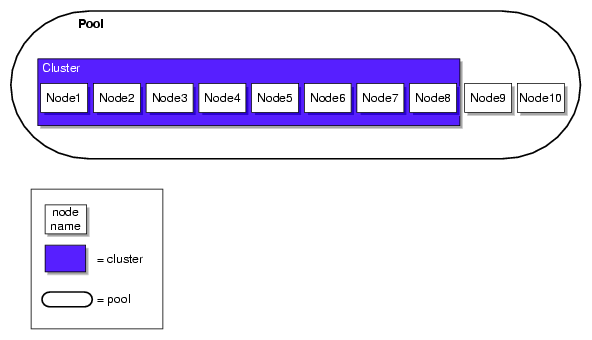
Figure 1-1 shows the concepts of pool and cluster. Node9 and Node10 have been defined as nodes in the CXFS pool, but they have not been added to the cluster definition.
The cluster database (CDB) contains configuration and logging information. A node is defined in the cluster database as one of the following types:
Server-capable administration node, which is installed with the cluster_admin software product and contains the full set of cluster administration daemons (fs2d, crsd, cad, and cmond) and the CXFS server-capable administration node control daemon ( clconfd). Only nodes running Linux with SGI Foundation Software can be server-capable administration nodes. This node type is capable of coordinating cluster activity and metadata. Multiple synchronized copies of the database are maintained across the server-capable administration nodes in the pool by the cluster administration daemons.
Note: For any given configuration change, the CXFS cluster administration daemons must apply the associated changes to the cluster database and distribute the changes to each server-capable administration node before another change can take place. For more details, see:
Client-only node, which is installed with the cxfs_client software product and that has a minimal implementation of CXFS that runs the CXFS client control daemon (cxfs_client ). The client-only nodes in the pool do not maintain a local synchronized copy of the full cluster database. Instead, one of the daemons running on a server-capable administration node provides relevant database information to the client-only nodes. If the set of server-capable administration nodes changes, another node may become responsible for updating the client-only nodes. This node can run any supported operating system.
This node can safely mount CXFS filesystems but it cannot become a CXFS metadata server or perform cluster administration. Client-only nodes retrieve the information necessary for their tasks by communicating with a server-capable administration node. This node does not contain a copy of the cluster database.
For more details, see:
CXFS 5 Client-Only Guide for SGI InfiniteStorage
For each CXFS filesystem, one server-capable administration node is responsible for updating that filesystem's metadata. This node is referred to as the metadata server.
Multiple server-capable administration nodes can be defined as potential metadata servers for a given CXFS filesystem, but only one node per filesystem is chosen to function as the active metadata server, based on various factors. There can be multiple active metadata servers in the cluster, one per CXFS filesystem.
All other nodes that mount a CXFS filesystem function as CXFS clients. A server-capable administration node can function at any point in time as either an active metadata server or a CXFS client, depending upon how it is configured and whether it is chosen to function as the active metadata server.
| Note: Do not confuse CXFS client and metadata server with the traditional data-path client/server model used by network filesystems. Only the metadata information passes through the metadata server via the private Ethernet network; the data is passed directly to and from storage on the CXFS client via the Fibre Channel connection. |
The metadata server must perform cluster-coordination functions such as the following:
All CXFS requests for metadata are routed over a TCP/IP network and through the metadata server, and all changes to metadata are sent to the metadata server. The metadata server uses the advanced XFS journal features to log the metadata changes. Because the size of the metadata is typically small, the bandwidth of a fast Ethernet local area network (LAN) is generally sufficient for the metadata traffic.
The operations to the CXFS metadata server are typically infrequent compared with the data operations directly to the LUNs. For example, opening a file causes a request for the file information from the metadata server. After the file is open, a process can usually read and write the file many times without additional metadata requests. When the file size or other metadata attributes for the file change, this triggers a metadata operation.
The following rules apply:
If another potential metadata server exists, recovery will take place. For more information, see “Recovery”.
If the last potential metadata server for a filesystem goes down while there are active CXFS clients, all of the clients will be forced out of the filesystem.
If you are exporting the CXFS filesystem to be used with other NFS clients, the filesystem must be exported from the active metadata server for best performance (which might require manually relocating the metadata server). For more information on NFS exporting of CXFS filesystems, see “CXFS Mount Scripts” in Chapter 12.
There should be an odd number of server-capable administration nodes with CXFS services running for quorum calculation purposes. If you have a cluster that consists of only two server-capable administration nodes, you should use reset lines and you should not use a tiebreaker. If the cluster has more than one server-capable administration node and at least one client-only node, SGI recommends that you define a stable client-only node as the CXFS tiebreaker. See “CXFS Tiebreaker” and “Use an Odd Number of Server-Capable Administration Nodes” in Chapter 2.
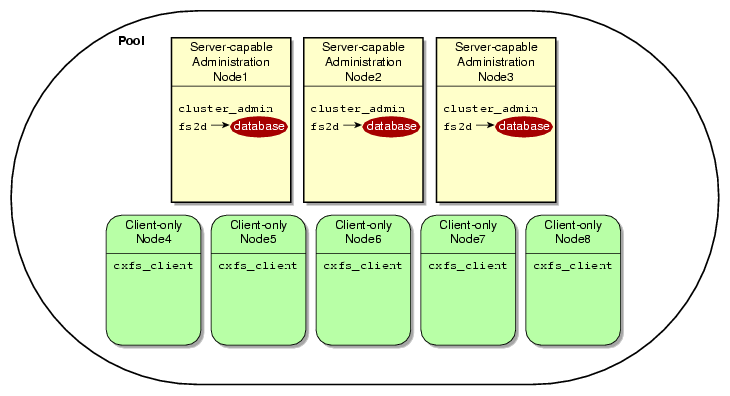
Figure 1-2 shows nodes in a pool that are installed with the cluster_admin software product and others that are installed with the cxfs_client software product. Only those nodes with the cluster_admin software product have the fs2d daemon and therefore a copy of the cluster database. (For more information, see Table 1-2 and Table 1-3.)
A standby node is a server-capable administration node that is configured as a potential metadata server for a given filesystem.
Ideally, all server-capable administration nodes will run the same version of the operating system. However, SGI supports a policy for CXFS that permits a rolling upgrade; see “CXFS Release Versions and Rolling Upgrades” in Chapter 12.
The following figures show a few configuration possibilities. The potential metadata servers are required to be server-capable administration nodes; the other nodes should be client-only nodes.
Figure 1-3 shows a very simple configuration with a single metadata server and no potential (standby) metadata servers; recovery and relocation do not apply to this cluster. The database exists only on the server-capable administration node. The client-only nodes could be running any supported operating system.

Figure 1-4 shows a configuration with two server-capable administration nodes, both of which are potential metadata servers for filesystems /a and /b:
Node1 is the active metadata server for /a
Node2 is the active metadata server for /b
Neither Node1 nor Node2 runs applications because they are both potential metadata servers. For simplicity, the figure shows one client-only node, but there could be many. One client-only node should be the tiebreaker so that the configuration remains stable if one of the server-capable administration nodes is disabled.

Figure 1-5 shows three server-capable administration nodes as active metadata servers. Node1 is the active metadata server for both filesystems /a and /b. If Node1 failed, Node2 would take over as the active metadata server according to the list of potential metadata servers for filesystems /a and /b.

The nodes in a cluster must act together to provide a service. To act in a coordinated fashion, each node must know about all the other nodes currently active and providing the service. The set of nodes that are currently working together to provide a service is called a membership:
Cluster database membership is the group of server-capable administration nodes that are accessible to each other. (Client-only nodes are not eligible for cluster database membership.) The nodes that are part of the cluster database membership work together to coordinate configuration changes to the cluster database. One node is chosen to be the quorum master, which is the node that propagates the cluster database to the other server-capable administration nodes in the pool. (See “Determine the Quorum Master” in Chapter 15.)
CXFS kernel membership is the group of CXFS nodes in the cluster that can actively share filesystems, as determined by the CXFS kernel, which manages membership and CXFS kernel heartbeating. The CXFS kernel membership may be a subset of the nodes defined in a cluster. All nodes in the cluster are eligible for CXFS kernel membership.
CXFS kernel heartbeat messages are exchanged via a private network so that each node can verify each membership:
Every second, each server-capable administration node sends a single multicast packet monitored by all of the other server-capable administration and client-only nodes
Every second, each client-only node sends a single multicast packet monitored by all of the server-capable administration nodes
A heartbeat timeout occurs when a node does not receive a heartbeat packet from another node within a predetermined period of time. Timeouts can happen in either direction, although they most frequently are seen when the server-capable administration node fails to receive a multicast heartbeat packet from a client-only node.
A private network is one that is dedicated to cluster communication and is accessible by administrators but not by users.
| Note: A virtual local area network (VLAN) is not supported for a private network. |
CXFS uses the private network for the following:
CXFS kernel heartbeat
Cluster database heartbeat
CXFS filesystem metadata traffic
Cluster database replication
Communication between the cluster database master and the clients
Communication between the cxfs_admin configuration command and the cluster database master
Even small variations in heartbeat timing can cause problems. If there are delays in receiving heartbeat messages, the cluster software may determine that a node is not responding and therefore revoke its CXFS kernel membership; this causes it to either be reset or disconnected, depending upon the configuration.
Rebooting network equipment can cause the nodes in a cluster to lose communication and may result in the loss of CXFS kernel membership and/or cluster database membership; the cluster will move into a degraded state or shut down if communication among nodes is lost. Using a private network limits the traffic on the network and therefore will help avoid unnecessary resets or disconnects. Also, a network with restricted access is safer than one with user access because the messaging protocol does not prevent snooping (illicit viewing) or spoofing (in which one machine on the network masquerades as another).
Therefore, because the performance and security characteristics of a public network could cause problems in the cluster and because CXFS kernel heartbeat and cluster database heartbeat are very timing-dependent, a private network is required. The private network should be used for metadata traffic only. (Although the primary network must be private, the backup network may be public.)
| Note: When NFS or Samba serving from a CXFS cluster, the network used for remote fileserving cannot be a backup private network for CXFS. Using the fileserving network as a backup private network for CXFS private network may result in heartbeat timeouts, which will cause a severe drop in CXFS and fileserving performance. |
The private network must be connected to all nodes, and all nodes must be configured to use the same subnet for that network.
For more information, see:
A failed node must be isolated from the shared filesystems so that it cannot corrupt data. CXFS uses the following methods in various combinations to isolate failed nodes:
System reset, which performs a system reset via a system controller. Reset should always be used for server-capable administration nodes.
I/O fencing, which disables a node's Fibre Channel ports so that it cannot access I/O devices and therefore cannot corrupt data in the shared CXFS filesystem. When fencing is applied, the rest of the cluster can begin immediate recovery.
System shutdown for client-only nodes that use static CXFS kernel heartbeat monitoring.
Cluster tiebreaker on a stable client-only node.
For more information, see “Protect Data Integrity on All Nodes” in Chapter 2,
The CXFS tiebreaker node is used in the process of computing the CXFS kernel membership for the cluster when exactly half the server-capable administration nodes in the cluster are up and can communicate with each other.
The tiebreaker is required for all clusters with more than one server-capable administration node and at least one client-only node. You should choose a reliable client-only node as the tiebreaker; there is no default. For a cluster that consists of only four or more server-capable administration nodes, you should choose one of them as the tiebreaker; this is the only situation in which you should choose a server-capable administration node as a tiebreaker.
The tiebreaker is required in addition to I/O fencing or system reset; see “Data Integrity Protection”.
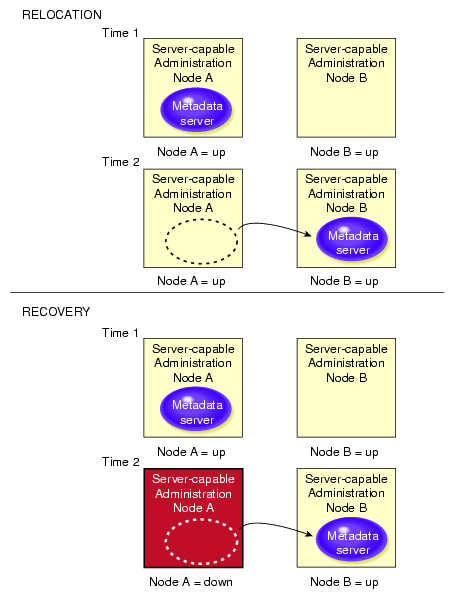
Relocation is the process by which the metadata server moves from one node to another due to an administrative action; other services on the first node are not interrupted.
| Note: Relocation is disabled by default. |
CXFS kernel membership is not affected by relocation. However, users may experience a degradation in filesystem performance while the metadata server is relocating.
An example of a relocation trigger is when the system administrator uses the GUI or cxfs_admin to relocate the metadata server.
To use relocation, you must enable relocation on the active metadata server. See “CXFS Relocation Capability” in Chapter 12.
See also “Use Relocation and Recovery Properly” in Chapter 2.
Recovery is the process by which the metadata server moves from one node to another due to an interruption in services on the first node. If the node acting as the metadata server for a filesystem dies, another node in the list of potential metadata servers will be chosen as the new metadata server. This assumes that at least two potential metadata servers are listed when you define a filesystem.
The metadata server that is chosen must be a filesystem client; other filesystem clients will experience a delay during the recovery process. Each filesystem will take time to recover, depending upon the number of active inodes; the total delay is the sum of time required to recover each filesystem. Depending on how active the filesystems are at the time of recovery, the total delay could take up to several minutes per filesystem.
If a CXFS client fails, the metadata server will clean up after the client. Other CXFS clients may experience a delay during this process. A delay depends on what tokens, if any, that the deceased client holds. If the client has no tokens, then there will be no delay; if the client is holding a token that must be revoked in order to allow another client to proceed, then the other client will be held up until recovery returns the failed nodes tokens (for example, in the case where the client has the write token and another client wants to read). The actual length of the delay depends upon the following:
The total number of exported inodes on the metadata server
CXFS kernel membership situation
Whether any metadata servers have died
Where the metadata servers are in the recovery-order relative to recovering this filesystem
The CXFS client that failed is not allowed to rejoin the CXFS kernel membership until all metadata servers have finished cleaning up after the client.
The following are examples of recovery triggers:
A metadata server panics
A metadata server locks up, causing CXFS kernel heartbeat timeouts on metadata clients
A metadata server loses connection to all of the CXFS networks
Figure 1-6 describes the difference between relocation and recovery for a metadata server. (Remember that there is one active metadata server per CXFS filesystem. There can be multiple active metadata servers within a cluster, one for each CXFS filesystem.)
See also “Use Relocation and Recovery Properly” in Chapter 2.
To start CXFS services enables a node, which changes a flag in the cluster database by performing an administrative task using the CXFS GUI or cxfs_admin.
To stop CXFS services disables a node, which changes a flag in the cluster database, by performing an administrative task using the GUI or cxfs_admin:
To shutdown CXFS services withdraws a node from the CXFS kernel membership, either due to the fact that the node has failed somehow. The node remains enabled in the cluster database.
Starting, stopping, or shutting down CXFS services does not affect the daemons involved. For information about the daemons that control CXFS services, see “CXFS Control Daemons”.
CXFS is released as part of the SGI InfiniteStorage Software Platform (ISSP). ISSP combines SGI storage software products (such as CXFS, DMF, NFS, Samba, XFS, XVM, and Appliance Manager) into a single distribution that is tested for interoperability.
This section discusses the following:
CXFS supports the use of hierarchical storage management (HSM) products through the data management application programming interface (DMAPI), also know as X/Open Data Storage Management Specification (XSDM). An example of an HSM product is the Data Migration Facility (DMF). DMF is the only HSM product supported with CXFS.
If DMF is managing a CXFS filesystem, DMF will ensure that the filesystem's CXFS metadata server is the DMF server and will use metadata server relocation if necessary to achieve that configuration. CXFS client-only nodes may be DMF parallel data mover nodes or DMF clients. For more information, see:
DMF Administrator's Guide for SGI InfiniteStorage
Linux-HA Heartbeat from the Linux-HA project provides high-availability services for CXFS clusters. The CXFS plug-in reports on whether the metadata server for a filesystem on a given node is running, not running, or has an error. Heartbeat then moves services accordingly, based upon constraints that the customer sets. For more information about the CXFS plug-in, see SGI InfiniteStorage High Availability Using Linux-HA Heartbeat. For more information about Heartbeat, see:
CXFS supports XVM labels on LUNs with GUID partition table (GPT) labels as well LUNs with SGI disk volume header (DVH) labels. A CXFS cluster can contain LUNs that have GPT labels and LUNs that have DVH labels. You can create these labels on server-capable administration nodes and Linux client-only nodes.
| Note: CXFS supports a GPT-labeled LUN greater than 2 TB in size. However, being able to label a LUN does not mean that the system is able to recognize and use it. The operating systems in the cluster will determine whether you can actually use a LUN of a given size. If a LUN is set up as greater than 2-TB in size but if the operating system of a node in a cluster cannot support a greater-than-2-TB LUN, then this node will not be able to share or even access data on this LUN. |
For information about creating GPT labels, see the XVM Volume Manager Administrator's Guide.
CXFS supports guaranteed-rate I/O (GRIO) version 2 clients on all platforms, with a GRIO server on a server-capable administration node. GRIO is disabled by default on the server-capable administration nodes and on Linux client-only nodes.
| Note: GRIO application reservations are functional only for Windows 32-bit and IRIX nodes; they are not functional on any other nodes (AIX, Mac OS X, Solaris, Windows 64-bit, or Linux, including Linux server-capable administration nodes). |
As the superuser, you can run the following commands from any node in the cluster:
Run the above tools with the -h (help) option for a full description of all available options.
The paths to the GRIO commands differ by platform. See Appendix C, “Path Summary” and the appendix in the CXFS 5 Client-Only Guide for SGI InfiniteStorage. For details about GRIO, see the Guaranteed-Rate I/O Version 2 for Linux Guide. For other platform-specific limitations and considerations, see the CXFS 5 Client-Only Guide for SGI InfiniteStorage.
This section describes the CXFS differences for the following:
CXFS enables the use of commercial backup packages such as Veritas NetBackup and Legato NetWorker for backups that are free from the local area network (LAN), which allows the backup server to consolidate the backup work onto a backup server while the data passes through a storage area network (SAN), rather than through a lower-speed LAN.
For example, a backup package can run on a host on the SAN designated as a backup server. This server can use attached tape drives and channel connections to the SAN storages. It runs the backup application, which views the filesystems through CXFS and transfers the data directly from the LUNs, through the backup server, to the tape drives.
This allows the backup bandwidth to scale to match the storage size, even for very large filesystems. You can increase the number of LUN channels, the size of the backup server, and the number of tape channels to meet the backup-bandwidth requirements.
| Note: Do not run backups on a client node because it causes heavy use of non-swappable kernel memory on the metadata server. During a backup, every inode on the filesystem is visited, and if done from a client, it imposes a huge load on the metadata server. The metadata server may experience typical out-of-memory symptoms, and in the worst case can even become unresponsive or crash. |
You can put an NFS server on top of CXFS so that computer systems that are not part of the cluster can share the filesystems. You should run the NFS server on the CXFS active metadata server for optimal performance.
XFS quotas are supported. However, the quota mount options must be the same on all mounts of the filesystem.
You can administer user and group quotas from any IRIX or Linux node in the cluster.
With a Linux metadata server, the only supported use of project quotas is as directory quotas: for this purpose, the /etc/projects configuration file specifies which directory tree falls under which project, while the /etc/projid configuration file maps numeric project IDs to names.
You can view or modify project quotas only on the active CXFS metadata server, not on a standby metadata server or on client-only nodes.
For more information about setting quotas, see XFS for Linux Administration and IRIX Admin: Disks and Filesystems.
A CXFS filesystem may be shared via Samba from a CXFS node to other types of machines that are not running CXFS software, such as a Windows machine. The Samba server should run on the active metadata server for optimal performance. There can be one Samba server per CXFS filesystem. You must not serve the same CXFS filesystem from multiple nodes in a cluster.
The architecture of Samba assumes that each share is exported by a single server. Because all Samba client accesses to files and directories in that share are directed through a single Samba server, the Samba server is able to maintain private metadata state to implement the required concurrent access controls (in particular, share modes, write caching, and oplock states). This metadata is not necessarily promulgated to the filesystem and there is no protocol for multiple Samba servers exporting the same share to communicate this information between them.
Running multiple Samba servers on one or more CXFS clients exporting a single share that maps to a common underlying filesystem has the following risks:
File data corruption from writer-writer concurrency
Application failure due to inconsistent file data from writer-reader concurrency
These problems do not occur when a single Samba server is deployed, because that server maintains a consistent view of the metadata used to control concurrent access across all Samba clients.
 | Caution: SGI recommends that you do not use multiple Samba servers. |
CXFS uses the XVM volume manager. XVM can combine many LUNs into high transaction rate, high bandwidth, and highly reliable filesystems. CXFS uses XVM to provide the following:
| Note: The xvm command must be run on a server-capable
administration node. If you try to run an XVM command before starting
the CXFS daemons, you will get a warning message and be put into XVM's
local domain.
When you are in XVM's local domain, you could define your filesystems, but then when you later start up CXFS you will not see the filesystems. When you start up CXFS, XVM will switch to cluster domain and the filesystems will not be recognized because you defined them in local domain; to use them in the cluster domain, you would have to use the give command. Therefore, it is better to define the volumes directly in the cluster domain. |
For more information, see the XVM Volume Manager Administrator's Guide.
CXFS supports XVM failover V2 on all platforms. XVM failover V2 allows XVM to use multiple paths to LUNs in order to provide fault tolerance and static load balancing. Paths to LUNs are representations of links from the client HBA ports to the fabric and from the fabric to the RAID controller; they do not represent the path through the fabric itself.
SGI requires SGIAVT mode for XVM failover V2 because failover V2 is unable to issue the device-specific commands necessary to change LUN ownership when the RAID is in SGIRDAC mode. See “Changing SGIRDAC Mode to SGIAVT Mode for SGI RAID” in Appendix H.
In general, you want to evenly distribute the I/O to LUNs across all available host bus adapters and RAID controllers and attempt to avoid blocking in the SAN fabric. The ideal case, from a performance standpoint, is to use as many paths as connection endpoints between two nodes in the fabric as possible with as few blocking paths as possible in the intervening SAN fabric.
For more information, see “XVM Failover V2” in Chapter 12.
A CXFS cluster is supported with as many as 64 nodes, of which as many as 16 can be server-capable administration nodes.
CXFS requires the following hardware and software for server-capable administration nodes, as specified in the release notes:
All server-capable administration nodes within the cluster must have similar capabilities. You must use all Altix ia64 systems or all Altix XE x86_64 systems. See also “Provide Enough Memory” in Chapter 2.
An odd number of server-capable administration nodes or a tiebreaker with an even number of potential metadata servers. (SGI recommends that you always configure a stable client-only node as a tiebreaker, even for a cluster with an odd number of nodes.)
Server-capable administration nodes that are dedicated to CXFS and filesystems work. See “Use Server-Capable Administration Nodes that are Dedicated to CXFS Work” in Chapter 2.
Server-capable administration nodes running Linux with the SGI Foundation Software listed in the release notes on all SGI Altix ia64 systems or all SGI Altix XE x86_64 systems. (For client-only nodes, see the release notes and CXFS 5 Client-Only Guide for SGI InfiniteStorage.)
At least one host bus adapter (HBA) as listed in the release notes.
A supported SAN hardware configuration. For details about supported hardware, see the Entitlement Sheet that accompanies the release materials. (Using unsupported hardware constitutes a breach of the CXFS license.)
Use a network switch of at least 100baseT. (A network hub is not supported.)
A private 100baseT or Gigabit Ethernet TCP/IP network connected to each node.
System reset capability and/or supported Fibre Channel switches. For supported switches, see the release notes. (Either system reset or I/O fencing is required for all nodes.)
Note: If you use I/O fencing and ipfilterd on a node, the ipfilterd configuration must allow communication between the node and the telnet port on the switch. RAID hardware as specified in the release notes.
Adequate compute power for CXFS nodes, particularly server-capable administration nodes, which must deal with the required communication and I/O overhead. There should be at least 2 GB of RAM on the system. To avoid problems during metadata server recovery/relocation, all potential metadata servers should have as much memory as the active metadata server. See “Provide Enough Memory” in Chapter 2.
Licenses for CXFS and XVM. See the general release notes Chapter 5, “CXFS License Keys”.
The following software products are installed on a server-capable administration node:
Application binaries, documentation, and support tools:
cluster_admin
cluster_control
cluster_services
cxfs_admin
cxfs-doc
cxfs_cluster
cxfs_util
cxfs-xvm-cmds
Enhanced XFS:
sgi-enhancedxfs-kmp-KERNELTYPE
GRIOv2 software:
grio2-cmds
grio2-server
GUI tools:
sgi-sysadm_base-client
sgi-sysadm_base-lib
sgi-sysadm_base-server
sgi-sysadm_cluster_base-client
sgi-sysadm_cluster_base-server
sgi-sysadm_cxfs-client
sgi-sysadm_cxfs-server
sgi-sysadm_cxfs-web
sgi-sysadm_xvm-client
sgi-sysadm_xvm-server
sgi-sysadm_xvm-web
Kernel module:
sgi-cxfs-server-kmp-KERNELTYPE
For information about client-only nodes, see CXFS 5 Client-Only Guide for SGI InfiniteStorage.
This section discusses the following:
See also “CXFS and Cluster Administration Initialization Commands” in Chapter 12.
You can perform CXFS configuration tasks using the GUI or cxfs_admin , shown in Table 1-1. These tools update the cluster database, which persistently stores metadata and cluster configuration information. After the associated changes are applied to all online database copies in the pool, the view area in the GUI will be updated. You can use the GUI or the cxfs_admin command to view the state of the database. (The database is a collection of files, which you cannot access directly.)
Table 1-1. Configuration Commands
Command | Software Product | Description |
|---|---|---|
cxfs_admin | Configures and administers the cluster database. | |
sgi-sysadm_cxfs-client | Invokes the CXFS GUI, which provides access to the tasks that help you set up and administer your CXFS filesystems and provides icons representing status and structure. | |
sgi-sysadm_xvm-client | Invokes the XVM GUI, which provides access to the tasks that help you set up and administer your logical volumes and provides icons representing status and structure. You access the XVM GUI as part of the CXFS GUI. |
The rest of this section discusses:
The cxfsmgr command invokes the CXFS Manager graphical user interface (GUI). The GUI lets you set up and administer CXFS filesystems and XVM logical volumes. It also provides icons representing status and structure. The GUI provides the following features:
You can click any blue text to get more information about that concept or input field. Online help is also provided with the Help button.
The cluster state is shown visually for instant recognition of status and problems.
The state is updated dynamically for continuous system monitoring.
All inputs are checked for correct syntax before attempting to change the cluster configuration information. In every task, the cluster configuration will not update until you click OK.
Tasks take you step-by-step through configuration and management operations, making actual changes to the cluster configuration as you complete a task.
The graphical tools can be run securely and remotely on any computer that has a web browser enabled to use Java, including Windows and Linux computers and laptops.
Figure 1-7 shows an example GUI screen. For more information, see Chapter 10, “CXFS GUI”.
| Note: The GUI must be connected to a server-capable administration node, but it can be launched elsewhere; see “Starting the GUI” in Chapter 10. |

cxfs_admin lets you set up and administer CXFS filesystems and XVM logical volumes using command-line mode. It shows both the static and dynamic cluster states. This command is available on nodes that have the appropriate access and network connections. The cxfs_admin command provides the following features:
Waits for a command to be completed before continuing and provides a list of possible choices (by using the <TAB> key).
Validates all input before a command is completed.
Provides a step-by-step mode with auto-prompting and scripting capabilities.
Provides better state information than the GUI, or cxfs_info.
Provides certain functions that are not available with the GUI.
Provides a convenient method for performing basic configuration tasks or isolated single tasks in a production environment.
Provides the ability to run scripts to automate some cluster administration tasks. You can use the config command in cxfs_admin to output the current configuration to a file and later recreate the configuration by using a command line option.
For more information, see Chapter 11, “cxfs_admin Command”.
Table 1-3 lists the set of daemons that provide cluster infrastructure on a server-capable administration node.
Table 1-2. Cluster Administration Daemons
Daemon | Software Product | Description |
|---|---|---|
cad | cluster_admin | |
cmond | cluster_admin | Monitors the other cluster administration and CXFS control daemons on the local node and restarts them on failure. |
crsd | cluster_control | |
fs2d | cluster_admin | Manages the cluster database (CDB). Keeps each copy in synchronization on all server-capable administration nodes in the pool and exports configuration to client-only nodes. |
You can start these daemons manually or automatically upon reboot by using the chkconfig command. For more information, see:
Table 1-3 lists the daemons that control CXFS nodes.
Table 1-3. CXFS Control Daemons
Daemon | Software Product | Description |
|---|---|---|
clconfd | cxfs_cluster | Controls server-capable administration nodes. Does the following:
|
cxfs_client | cxfs_client | Controls client-only nodes. Manages the local kernel's CXFS kernel membership services accordingly. |
You can start these daemons manually or automatically upon reboot by using the chkconfig command. For more information, see:
Table 1-4 summarizes the other CXFS commands of most use on a server-capable administration node. For information about client-only nodes, see CXFS 5 Client-Only Guide for SGI InfiniteStorage.
Table 1-4. Other Administrative Commands
Command | Software Product | Description |
|---|---|---|
cluster_admin | Accesses the back-end cluster database. | |
cluster_admin | Backs up the cluster database. | |
cluster_admin | Restores the cluster database. | |
cluster_admin | Configures the cluster database. | |
cluster_admin | Accesses the cluster database by means of commands that correspond to functions in the libcdb library. | |
cxfs_cluster | Provides static and dynamic information about the cluster. | |
cxfs_cluster | Provides CXFS kernel heartbeat statistics for cluster. | |
cluster_control | Configures the action taken by the surviving nodes when a CXFS node loses membership. Normally, you will use the GUI or cxfs_admin to perform these actions. | |
cxfs_util | ||
cxfs_util | Gathers configuration information in a CXFS cluster for diagnostic purposes. | |
cxfs_util | Reports the status of license keys. | |
cxfs_cluster | Shuts down CXFS in the kernel and CXFS daemons. | |
cluster_services | Obtains I/O fencing configuration and status information. | |
cxfs_cluster | Administer the CXFS I/O fencing configuration stored in the cluster database. Normally, you will perform this task using the GUI or cxfs_admin. | |
sgi-sysadm_base-server | Allows clients to perform remote system administration for the GUI server. |