This chapter discusses the following:
If you are unable to use the SGI InfiniteStorage Gateway Management Center, verify that you have all of the software requirements in place. See “Management Center Requirements” in Chapter 2.
If you are unable to access an application such as DMF Manager, you might have to exit the existing Firefox process. For details, see:
This section discusses the following:
If a library is listed under the Unconfigurable header, it means that it does not meet the requirements for SGI InfiniteStorage Gateway configuration with DMF. For example, there may be an insufficient number of volumes. See “Secondary-Storage Requirements for DMF Simplified Configuration ” in Chapter 1.
If a COPAN MAID shelf is already formatted, it cannot be configured for DMF. You must unformat the shelf and return it to factory state, see “Returning a Shelf to Factory State”.
 | Caution: Unformatting a shelf will destroy any existing data. |
If an expected user filesystem does not appear in the Configure DMF System page, ensure the filesystem is mounted with the dmi option according to the output of the mount(1) command.
For example, the following output shows that the dmfusr1 filesystem is ready for DMF use (mounted with the dmi option) but the dmfusr2 filesystem is not (mounted, but without the dmi option):
mis# mount | grep dmfusr /dev/lxvm/user0 on /dmfusr1 type xfs (rw,noatime,dmi,mtpt=/dmfusr1) /dev/lxvm/user1 on /dmfusr2 type xfs (rw,noatime,mtpt=/dmfusr2) |
This section discusses the following:
DMF Manager denotes areas with problems by adding a yellow or red icon next to the component that is experiencing problems, depending upon severity. For example, Figure 7-1 shows that although DMF is still running, there are warnings that may require action (red icon). To investigate, hover the mouse over the shield icon to display pop-up help that describes the warning.
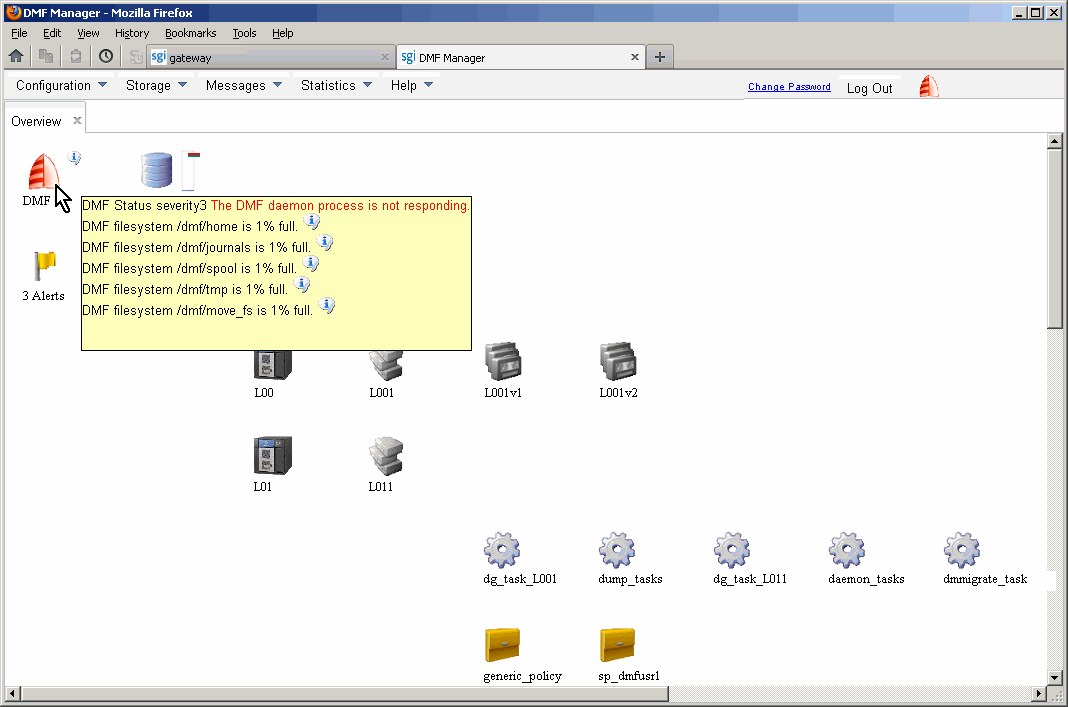
For details, click the Alerts icon flag and select Show Alerts... or choose the following from the DMF Manager menu bar:
Messages -> Alerts
Either action will open the Alerts page, which displays the unacknowledged messages (similar to the Alerts page in the Management Center), but also provides more information about a particular alert if you select it and choose Help on this alert, as shown in Figure 5-5. For more information, see “Acknowledging DMF Alerts” in Chapter 5.
You can also use the following page to view daily activity reports (those containing critical log errors show red warning symbols):
Messages -> Reports
If the Overview page indicates that there are problems, consult the DMF 6 Administrator Guide for SGI InfiniteStorage or call SGI Support.
To restore DMF-managed filesystems and databases, see the information in the SGI InfiniteStorage Gateway release notes available from the following selection in the Management Center:
Help -> Documentation -> SGI InfiniteStorage Gateway Release Notes
For additional help, contact SGI Support.
This section discusses the following:
Powering on a COPAN MAID system requires a specific sequence of steps. You must call SGI Support for assistance.
| Caution: Unformatting a shelf will destroy any existing data. |
To return a COPAN MAID shelf to unformatted factory state, use the SGI ov_copan unformat command. For more information, see the ov_copan(8) man page. If you did not use the ov_copan command to originally format the shelf, see the SGI COPAN 400 User Guide.
You can reset the BMC if necessary by using the BMC Configuration page available from the following:
Management -> System -> BMC
If the other topics in this chapter do not solve the problem, contact your local SGI Customer Support Center:
You can also contact your authorized service provider.
If you are in North America, you can call the Technical Assistance Center at: 1 (800) 800 4SGI
If you are outside North America, see the following website for the appropriate Customer Service phone number:
http://www.sgi.com/support/supportcenters.html
If you notice problems with DMF, contact your representative and request an upload directory on shell.sgi.com. Then collect DMF information, as described in “Gathering DMF Data” in Chapter 4. This will run scripts to gather the relevant system and DMF information that will help SGI Support analyze the problem. To gather information about the system, use the Gather Support Data link from the same page. Also see the section about gathering support data in SGI Management Center for InfiniteStorage Administrator Guide.