This introduction discusses the organization of the CHALLENGE™ and Onyx™ Rack and Deskside Illustrated Parts List, defines SGI® marketing and assembly numbers, defines terms used in this guide, and briefly illustrates SGI product history.
This book illustrates Silicon Graphics CHALLENGE and Onyx rack and deskside system components and their positions relative to each other. Components include all major assemblies, with some sub-assemblies shown for detail and to assist in component installation and replacement.
 | Note: These diagrams are for identification purposes, and include components not routinely available for ordering. Follow normal parts ordering procedures to determine component availability. |
Chapter 1 and Chapter 2 contain marketing codes, part diagrams, and part numbers for rack and deskside systems, respectively.
Chapter 3 lists part numbers and illustrates chassis parts common to both rack and deskside systems. Chapter 4 provides part numbers and illustrations for board assemblies for both rack and deskside systems. Chapter 5 describes the media devices (hard drives, tape drives, and CD-ROM drives) available for CHALLENGE and Onyx systems. Chapter 6 illustrates the contents of selected option kits for CHALLENGE and Onyx systems.
Appendix A is a table of common hardware components used in CHALLENGE and Onyx systems.
The Index contains the part numbers and marketing codes mentioned throughout the parts list.
| Note: A number of components are compatible across products. In many cases these common components are shown in separate chapters to minimize duplication across sets of parts diagrams. |
You can approach a parts search in a number of ways:
If you know a component's physical location and appearance, and you need its description or part number, locate it in the illustrations and match its ID number in the corresponding table.
If you know an assembly number and the type of system in which it is used (rack or deskside), and you wish to see the position of the component within the chassis, or wish to see what the component looks like, reverse the above method: Find the description or number in the table, look up its ID number, and then locate that ID in the corresponding illustration.
If you know only the part number, look up that number in the index, then go to the page number(s) referenced and locate the part number. This will give you a description. You can then proceed as above.
SGI uses several types of numbers to identify complete systems, assemblies, and components: marketing codes, assembly numbers, and manufacturing numbers.
Marketing codes identify products that are available for sale through normal business channels. The marketing codes shown here are in the format that started with the CHALLENGE and Onyx products.
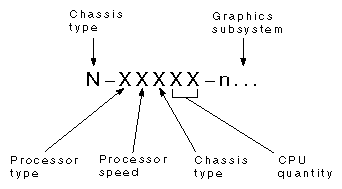
Marketing codes provide clues to the type of product they describe. For example, the marketing code R-45802-VTX indicates a rack system using R4000® processors running at 150 MHz, with a total of 2 processors, and using a VTX™ graphics subsystem. See Figure I-1.
Since SGI systems change configuration easily, the marketing code for a particular system must change to properly reflect the current system configuration.
Assembly numbers identify collections of parts that compose a logical assembly, such as a power supply complete with cabling, fans, circuitry, and housing. SGI builds many assemblies at the factory, and contracts some assemblies through other companies.
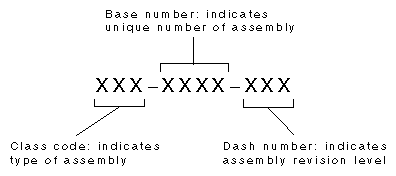
The assembly number format is XXX-XXXX-XXX. The first three digits are the class code, which are logical groupings for the manufacturing process; see Table I-1 for a partial listing of class codes. The middle four digits are a base number that uniquely identifies an assembly. The final three digits are the dash number, which indicates the revision level of an assembly; lower dash numbers indicate earlier revisions. See Figure I-2 for an example.
| Note: The tables accompanying the part diagrams show class and base codes, and (in most cases) use a generic dash code (-xxx). Certain configurations require specific assembly revisions. Check with your support representative to match assembly revisions with a specific system configuration. |
Assembly numbers are the most relevant to field service, since SGI Logistics typically stocks replacement parts at this level and calls them field-replaceable units (FRU). Only a limited number of assemblies are available as FRUs. Since FRU and assembly numbers use the same format, contact the field service office to identify field-replaceable assemblies. Table I-1 gives a partial list of SGI custom class codes.
Manufacturing numbers (also called "off-the-shelf class codes") define components and assemblies that serve as a single unit within SGI. Examples include screws, cover plates, and cables with sealed connectors. Components include bulk parts as well as pre-built units from other manufacturers and fulfillment houses.
The manufacturing number format is seven numbers in one string, such as 9500801. SGI employees sometimes refer to manufacturing numbers as "nine million numbers" or "seven million numbers." New components receive the next available manufacturing number. Low manufacturing numbers can indicate old and potentially obsolete components. Table I-2 gives a partial list of SGI manufacturing numbers.
Table 1. Partial Listing of SGI Custom Class Codes
Class | Description |
|---|---|
000- | Workstation |
007- | Manual (hard copy) |
008- | Manual (on-line) |
013- | Assembly drawing, spare assembly |
015- | Harness assembly |
018- | Cable assembly |
024- | Label (custom) |
030- | PCA, tested (printed circuit assembly) |
034- | PCB FAB (printed circuit board - i.e., the bare board) |
040- | Sheet metal |
041- | SGI customized commercial product |
050- | Plastic |
060- | Power module |
070- | PAL/PROM assembly |
090- | Shipping, packaging |
098- | Custom IC |
099- | Gate array |
108- | SSE manual (hard copy) |
109- | SSE manual (on-line) |
300- | PCA (printed circuit assembly), untested |
802- | Hardware release notes |
807- | Manuals, release notes, filesystem |
808- | Software image |
810- | Software image, Iris Vision |
811- | Disk assembly |
812- | CD assembly |
Table 2. Partial Listing of SGI Off-the-Shelf Class Codes
Class | Description |
|---|---|
600xxxx | Header, jumper, strain relief |
701xxxx | Fuse, protective device |
702xxxx | Heatsink, thermal film |
704xxxx | Receptacle |
706xxxx | Fan guard |
709xxxx | Shrink tubing, Teflon tubing |
710xxxx | Faston terminal |
712xxxx | Ring or fork terminal |
713xxxx | Terminal |
714xxxx | Crimp terminal contact pins |
715xxxx | Cable tie |
716xxxx | Cable (no connectors) |
717xxxx | Cable clamp |
721xxxx | Bushing |
722xxxx | Cord clip, other clip |
725xxxx | Fastener |
726xxxx | Pop rivet |
727xxxx | Screw, bolt |
728xxxx | Washer |
728xxxx | Nut |
730xxxx | Wire |
741xxxx | Grommet, eyelet, ferrule |
742xxxx | Bonding agent |
743xxxx | Standoff, spacer |
744xxxx | Label (off-the-shelf) |
745xxxx | Plug, AC - Power, Ground, Housing |
751xxxx | Screw lock, jacket socket |
752xxxx | Foam, foam tape, tape adhesive |
753xxxx | Pull tab |
757xxxx | Shipping, packaging items |
758xxxx | Gasket, EMI shielding |
9xxxxxx | Electronic components |
This guide uses shorthand designations to refer to particular groups of products. See Table I-3 for a list of these terms and the products to which they refer.
Term | Group of Products |
|---|---|
Everest | POWER CHALLENGE, CHALLENGE, POWER Onyx and Onyx product families (both rack and deskside) |
Rack Systems | POWER CHALLENGE XL, CHALLENGE XL, POWER Onyx XL, and Onyx XL |
Deskside Systems | POWER CHALLENGE L, CHALLENGE L, POWER Onyx L, and Onyx L |
Server Systems | POWER CHALLENGE XL, CHALLENGE XL, POWER CHALLENGE L, and CHALLENGE L |
Graphics Systems | POWER Onyx XL, Onyx XL, POWER Onyx L, and Onyx L |
The part-number tables in this book contain descriptions taken directly from the SGI product database, with changes made only where necessary to avoid confusion. These database descriptions have been left completely in capital letters. Where explanation would be helpful it is provided in square brackets and is in lower case letters.
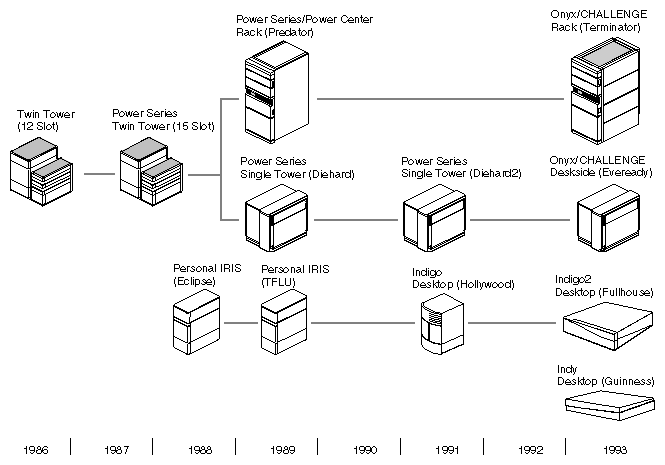
Figure I-3 shows the SGI product history from 1986. The figure identifies the products by their official names and includes their SGI internal project names in parentheses.