OpenGL Volumizer includes a new application programming interface (API) for large-data volume rendering. This API allows volume rendering of datasets that exceed main memory and texture memory and addresses bottlenecks associated with pixel-fill performance using a multiresolution rendering scheme.
This chapter contains the following topics:
Chapter 4, “Texture Mapping Render Action” introduces the render action Texture Mapping Render Action (TMRenderAction). TMRenderAction uses 3D texture mapping hardware to volume render a shape node. TMRenderAction manages the data resident in texture or graphics memory. In the context of volume rendering and 3D texture mapping, when the size of volume data is larger than what the local resources can handle, volume visualization also becomes a data management problem. This chapter shows how OpenGL Volumizer can efficiently manage resources to maintain interactive frame rates.
In the context of 3D texture-based rendering, large data implies that the size of the volume data exceeds one or more of the following:
Rendering efficiency of the graphics hardware, such as the fill rate limitation of the graphics subsystem
Amount of texture or graphics memory of the graphics subsystem
Amount of main memory of the computer system
System data bandwidth, especially between the various peripherals and the graphics pipe
Current graphics subsystems provide unified graphics memory or dedicated texture memory in addition to necessary framebuffer and ancillary-buffer support. With graphics hardware providing ever larger texture- or graphics-memory configurations, it is possible to render sizable volumes at frame rates approaching near real-time performance (10/15 fps). However, even if the volume data fits in graphics memory, the pixel fill rate of the graphics hardware can limit an application's rendering performance. Moreover, if the size of the data exceeds graphics-memory resources, the data to be visualized will partly reside on slower and larger storage peripherals, such as system memory, and disks. It is the task of the visualization application to manage the data among memory devices within the time constraint in addition to taking into account concerns over pixel fill-rate limitations.
Applications can improve volume rendering performance when rendering large data by addressing bandwidth bottlenecks—for instance, during data transfer. One approach is to divide the whole volumetric data into smaller components called bricks. Using bricks provides an application more control over frame rates by moving these data bricks to the local texture memory from the various storage devices. This level of control gives applications the capability to visualize huge data located in memory or on high-performance disks by paging them into texture memory using intelligent schemes. Thus, bricking allows applications to page in to an application space as needed smaller units of a large volume that would not otherwise fit into main or graphics memory.
In addition to the usefulness of bricks in the implementation of texture-paging mechanisms, view-frustum culling, and load balancing on multipipe systems, this representation is useful in circumventing the inefficiencies due to the padding of textures to the next higher power-of-two dimensions, as required by OpenGL. Brick size plays an important role in the overall efficiency. Short data transfers may require frequent interrupts in the data flow and can consequently affect performances. On the other hand, long data transfers optimize the overall bandwidth but are not interruptible. The choice of brick size depends upon the hardware architecture; therefore, applications should select values taking system parameters into consideration.
Bricking alone addresses data representation for efficient data transfer. Data visualization techniques used in 3D texture-based rendering applications, such as volume roaming and multiresolution volume rendering can affect application performance as well. These rendering methods use bricking as a base for exchanging data from main memory to texture memory or from disks to main memory.
Volume roaming is a technique that allows the user to explore large volumetric data using a volumetric probe, through which users interactively move inside a rendered volume. The probe allows users to navigate the dataset using a viewing window and helps them concentrate on a specific section of the whole dataset. The key components of the technique are texture bricking, intelligent texture and main memory management, and asynchronous disk paging of volume data. The application maintains a hierarchy of windows, which contain smaller subsets of the total volume data and are updated during user motion. Each window is subdivided into multiple shapes, one for each brick. As the window moves, the bricks are updated with new texture data. The application is responsible for controlling all of the window management and data transfer between the various peripherals. TMRenderAction efficiently pages in the new data into texture memory from main memory. Roaming allows an application to overcome fill rate, texture memory, and main memory constraints. The technique renders only a subvolume of data at a time and cannot guarantee constant frame rates during fast user motion.
To achieve interactive rendering for a volume dataset of a given size, applications can control the sampling of the data that they render. Making a tradeoff between performance and image quality, multiresolution volume rendering allows applications to interactively render large volume data by rendering bricks that vary in volume levels-of-detail (LOD). Lower resolutions help improve performance since it limits the texture memory as well as the fill rate consumption of the application. To improve rendering performance while maintaining acceptable image quality, applications can do the following:
Couple texture management with LOD switching to ensure near-constant frame rates.
Take advantage of the sorted order of bricks to determine the LOD to be rendered.
Use clipping geometries to optimize the use of texture memory available on the graphics subsystem.
Progressively render higher-resolution volumes during minimal stages of user interaction or for bricks closer to the user.
Using LODs requires the volume data to be reformatted at different resolutions by filtering and decimation to produce a more compressed representation. Because this compression is usually lossy, the rendering process trades off interactivity against rendering performance and image quality against visualization accuracy.
The key components of multiresolution volume rendering include texture bricking, intelligent texture memory management, and proper computation of the various LODs. Applications can improve the performance by rendering low-resolution data during user interaction and then successively improving the image quality during an absence of user interaction. In this case, a shape is used to represent each node in the octree. The TMRenderAction manages the texture data and multiple lookup tables used to compensate for the different opacities at the LODs. Low resolutions help improve rendering performance by limiting texture memory and fill-rate consumption of the application. A limitation of this technique is that all of the volume data along with the various LODs need to be present in main memory, thereby constraining the size of the dataset that can be rendered using this method.
OpenGL Volumizer provides a large-data API: an interface to a hierarchy of 3D clip textures and their associated renderer. 3D clip textures allow applications to visualize arbitrarily large volumetric data by merging the advantages of volume roaming and multiresolution techniques.
While multiresolution volume rendering and volume roaming are attractive techniques for rendering volumetric data, they are restricted when dealing with extremely large datasets. 3D clip textures allow applications to visualize arbitrarily large volumetric data by combining the advantages of bricking, volume roaming, and multiresolution techniques.
Figure 6-1 illustrates the concept of 2D clip textures. 2D clip textures have been used successfully to provide interactive navigation of very large terrain data. Clip textures are mipmap versions of the original texture data, except that each mipmap level maintains a roaming window (physical memory window in Figure 6-1) to limit the amount of texture data resident in main memory. These clipped mipmap levels are called clip levels. The highest level of resolution in the hierarchy corresponds to the original texture data. The remaining levels are computed by filtering and decimating the preceding clip level.
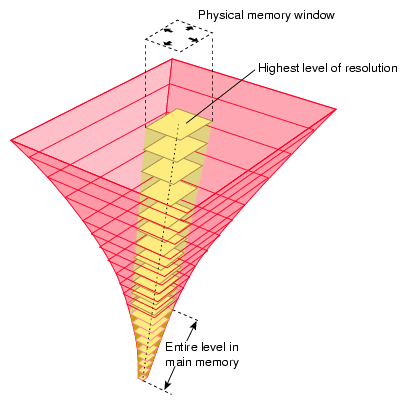
The center of the physical memory window is usually the viewer's center of interest. As the viewer moves, the center of interest is updated and the texture data that is not in the window anymore is replaced by new data from disk. This data is paged into slots vacated by data being paged out of the window. This mapping ensures constant memory usage during user interaction. As shown in Figure 6-1, lower resolutions of texture data fit completely in main memory. During periods of fast user motion, these low-resolution textures are rendered while high-resolution data is being paged in. As higher-resolution texture data is available, it is rendered to improve the image quality of the visualization. This mechanism provides the capability to interactively visualize huge amounts of texture data resident in main memory or on high-performance disks.
Special-purpose SGI graphics hardware, such as InfiniteReality systems, provides built-in support for 2D clip textures. OpenGL Volumizer implements a software emulation of 3D clip textures. A 3D clip texture is an extension of a 2D clip texture scheme combining volume roaming with multiresolution volume rendering. In this case, the data transfer process is supported by representing the whole clip texture hierarchy as a collection of smaller 3D bricks at each level of resolution. This volume data representation combines the benefits of bricked volume files, asynchronous disk paging, multiresolution and volume roaming methods to overcome memory and pixel-fill constraints.
Like their 2D counterparts, 3D clip textures maintain a window of textures, which fits in main memory of the system at each level of the hierarchy. A clip texture loader replaces all texture data not contained in the window with new texture data from disk. To maintain the highest data transfer rate, OpenGL Volumizer represents the clip texture hierarchy as a collection of smaller 3D bricks at each level of resolution.
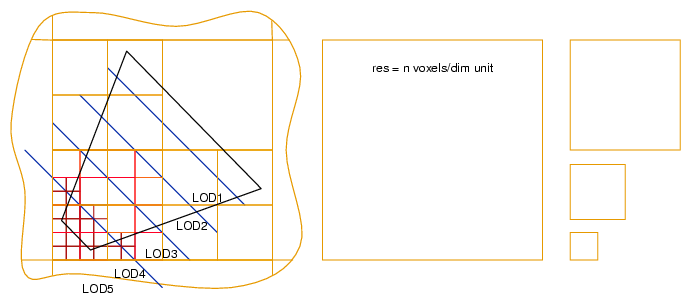
Figure 6-2 shows different resolutions for the same volume data. Each brick in the figure has the same data dimensions but they have different geometry ROIs. For example, if the brick has dimensions of 128 x 128 x 128 (2MB for 1 byte/texel), approximately 4 terabytes of volume data require 256 x 256 x 256 blocks at the highest resolution. By subsampling the data to lower resolutions using a kernel of size 2 x 2 x 2 or 4 x 4 x 4 texels, the data can be reduced by a factor of 8 and 64, respectively.
The core of the large-data API for OpenGL Volumizer is in the abstraction of a 3D clip texture and its associated renderer. The implementation of the clip texturing is exposed as a new class, vzParameterClipTexture, and an associated render action, vzClipRenderAction. Figure 6-3 and Figure 6-4 show the similarities between shape node components for the core OpenGL Volumizer API and the 3D clip texture API.
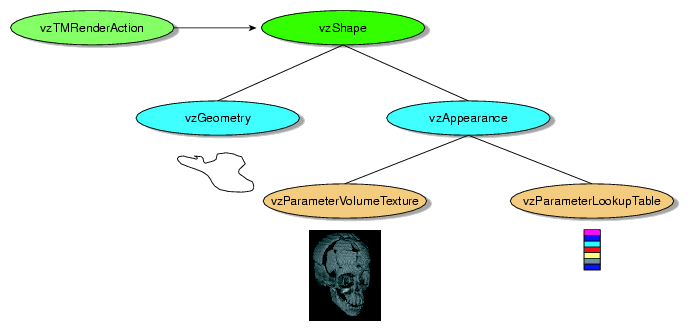
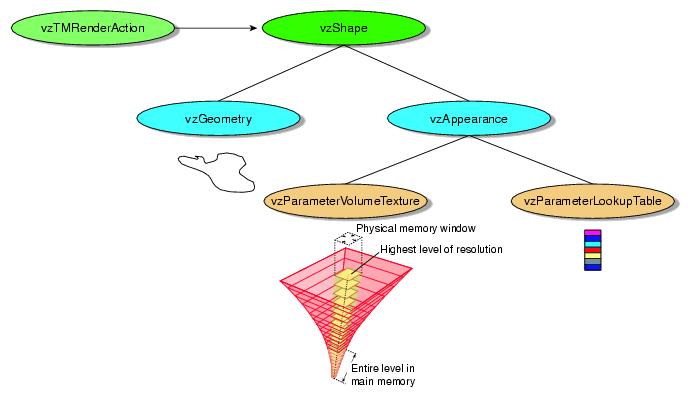
The class vzParameterClipTexture is a new parameter class that provides an abstraction for a 3D clip texture hierarchy. The class maintains a set of clip levels and manages the amount of physical memory necessary to store the texture data. In addition, the class handles texture bricking and paging based on application-specific parameters. For efficiency, texture bricks are of constant size.
Applications control the following parameters to initialize a clip texture hierarchy:
| Parameter | General Function | |
| Brick dimensions | Optimizes the data transfer on the underlying hardware architecture, and it is constant for all bricks. | |
| Physical memory size | Limits the amount of physical memory used to load texture data. | |
| Data loader callback | Allows a clip texture to load the texture data from the disk. |
Depending on the preceding parameters, the clip texture class creates a number of clip levels. Each clip level is assigned a maximum physical memory window, the size of which is computed from the total physical memory allowed for the clip texture. When the application starts, multiple loader threads are created, which invoke data-load callbacks to load texture bricks from disk. These callbacks are invoked in a sorted order using a cost function proportional to the distance of the brick from the center of the physical memory window. When a callback returns, the appropriate flag in the brick is updated to reflect the presence of the brick in main memory. As illustrated in Figure 6-5, this memory management and window management mechanism is implemented using a 4D toroidal mapping technique. OpenGL Volumizer maintains a separate toroidal map for each clip level.
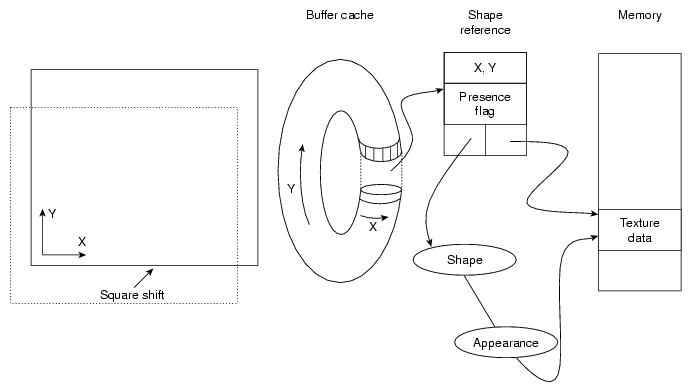
Applications control the following parameters on a per-frame basis:
| Parameter | General Function | |
| Center of interest | Updates the center of the physical memory windows of the clip levels. | |
| Roaming window size | Updates the size of the physical memory windows. |
When the physical memory window is updated, all of the bricks that are not in the window anymore are marked to be dirty and, hence, need to be reloaded by the loader threads.
The following list defines the parameters for this class:
The remaining parameters, shown in the following list, have default values computed internally. Applications can override the default values using the corresponding set methods. All these methods affect the way the clip texture is set up, applications should be modified immediately after the construction of the clip texture and before it is managed and drawn for the first time.
Most of the set methods also have corresponding get methods. The man pages for OpenGL Volumizer describe the complete set of methods.
To load the volume data from disk, the clip texture class uses a data-load callback. OpenGL Volumizer provides sample callbacks with the demo code. The following is the format for the callback:
static void loadData(int offset[3], int level, int dimensions[3], void *data, void *userData); |
The callback that an application uses to load in volume data passes through the position offset and level. The dimensions of the data to be loaded are in the argument dimensions. The resulting data will be set in argument data. For example, the following sample code uses IFL loaders to load in the volume data.
void loadDataCB(int offset[3], int level, int dimensions[3], void *data, void *userData) {
IFLLoader *loader=((ClipLoaders **)userData)->getLoaderForLevel(level);
loader–>loadBrick(data, offset, dimensions);}
|
The class vzClipRenderAction implements a render action for 3D clip textures. This render action implements intelligent, texture-paging techniques to render a clip texture hierarchy in a view-dependent fashion. It renders bricks that are closer to the viewpoint at a higher resolution compared to those farther away. It also performs view-frustum and geometry culling to discard bricks that are not visible in the current frame. This render action supports both looking at the visible frustum as well as roaming the dataset using multiple levels of detail. The renderer encapsulates a vzTMRenderAction and implements view-dependent rendering of clip textures. Depending on the geometry bounding box, the renderer is capable of rendering the whole volume or a subcubical roaming window in the data. Like vzTMRenderAction, it provides methods to manage and unmanage a vzShape and the methods beginDraw() and endDraw(). Unlike the draw method of vzTMRenderAction, the vzClipRenderAction draw method uses the current center of interest and clip window of the clip texture. The renderer culls out the texture bricks that do not lie in the visible frustum of the current window. In addition, the render action provides a debug utility that draws the wireframe for the bounding boxes of the texture bricks being rendered in the current frame.
The LOD used to decide whether a given brick is rendered or not is computed by projecting the brick's bounding box to screen space and then comparing it with a user-supplied threshold value. A brick that is closer to the viewpoint (that is, in front of other bricks at the same LOD in the visibility sorted order) gets higher priority in the selection process. The render action selects a brick for rendering if the following conditions are true:
The brick intersects the viewing frustum and intersects the shape's geometry.
Its associated texture data is in main memory.
Its projection-to-screen space meets the LOD threshold criteria.
The associated texture fits in texture memory.
The renderer allows applications to roam the clip texture by modifying the volumetric geometry for the shape. This geometry provides the region of interest in the volume data and can be moved around to navigate the dataset interactively. In order to maintain near-constant frame rates during user motion, the render action performs predictive texture downloads to distribute the overhead of the data transfer over multiple frames. The predictive texture download is a function of the direction of motion of the probe and a differential of the current and predicted positions. The texture download will proceed over a sequence of multiple frames. In the roaming mode, only textures at the same level of resolution are rendered. To find such textures, the renderer traverses the clip level hierarchy to find the collection of bricks with the highest resolution possible and which satisfy the preceding criteria. Roaming mode is more efficient when using a smaller geometry as a probe, because the render action can provide finer control over the frame rate.
The vzClipRenderAction provides methods to control texture memory resources and trades off such resources against rendering time. For example, applications can control the amount of texture memory that the render action uses to store texture data by using the setTextureMemorySize() method. Applications can set an upper bound on the total size of textures that the renderer can download in a given frame using setMaxDownloadSize(). This constraint in conjunction with the LOD threshold helps improve the interactivity of the render action by reducing the time spent in downloading textures. In addition, the setMaxDrawSize() method allows applications to set an upper bound on the total size of textures that the renderer can draw in a given frame.
To get an approximate measure of texture-download time in a previous frame, use the getDownloadTime() method. It is only applicable if the total texture being rendered in the frame does not exceed the size of texture memory. The getDrawTime() method allows an application to elicit the time taken in microseconds for the actual draw of the shapes, including the time for the polygonization and the polygon rendering. Applications can control the ability to roam using the setRoam() method, which enables or disables the roaming mode by setting the argument roaming to true or false, respectively. If roaming is enabled, only texture bricks at the same level of resolution are drawn. In the “normal” multiresolution rendering mode, textures closer to the viewpoint are drawn at a higher resolution than textures farther from the viewpoint.
A visualization pipeline for large-data applications needs to address constraints imposed by large data and limited resources. Because of the amount of data involved, OpenGL Volumizer uses a two-step approach: offline data preparation followed by a visualization method that supports 3D clip textures. The first step in the data visualization is volume data preprocessing, which is done before the visualization process begins by an offline application. OpenGL Volumizer provides the ClipGen3d application (installed in the directory bin/clipGen3d under the sample distribution), which performs this pre-processing. See the README file in the directory for details for the various options, some of which will be discussed in the following sections.
The vzParameterClipTexture class represents the clip texture hierarchy as a set of clipped mipmap levels of the original texture data. The clip renderer roams through each of the clip levels individually to provide interactive visualization. These mipmap levels are stored on the disk so that they can be paged in by the clip texture through a data-load callback and then rendered by the clip render action. Hence, before creating the clip texture, the original texture data needs to be preprocessed to compute these mipmap levels. At run time, the clip texture invokes a previously provided data-load callback to load texture bricks from disk. It is essential to understand the clip texture mechanism to be able to create your own clip texture levels.
The preprocessing step involves filtering and decimation of the input texture data to compute the clip levels, which are compressed representations of the data. In this process, the filtering step is applied to retain valuable features in the dataset that might be lost during decimation. Figure 6-6 illustrates the preprocessing.

The preceding process is repeated for each clip level that needs to be computed.
In this discussion, we assume that the level 0 corresponds to the original (highest) resolution texture data. Currently, vzParameterClipTexture assumes a decimation factor of 2 x 2 x 2. Hence, each of the clip levels has data dimensions that are half in size of the next higher resolution level. Let X, Y, and Z denote the texture dimensions of the original texture. Figure 6-7 illustrates the data decimation.
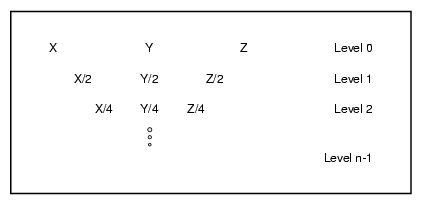
Chapter 4, “Texture Mapping Render Action” describes the bricking of textures and the need to have a one-voxel overlap among adjacent bricks. The clip texture class handles the bricking of texture data internally, but the application has to ensure that it has taken the one-voxel overlap into consideration to compute the appropriate number of clip levels for the hierarchy.
To compute the correct number of clip levels, given the data dimension of the input data and the texture brick dimensions used for bricking the data, you must determine the following:
For example, using a brick size of 1283 on a dataset with dimensions of 10243 results in the following:
Bricks = ceil ( 1024 / (128 – 1) ) = 9 Clip Levels = ceil ( log2(9) ) + 1 = 5 |
The lowest resolution level in the hierarchy contains only one texture brick. Hence, using a brick size of 128 x 128 x 128 would generate five clip levels with the following data dimensions:
1024 x 1024 x 1024 512 x 512 x 512 256 x 256 x 256 128 x 128 x 128 64 x 64 x 64 |
Taking advantage of the fact that clip textures always load in bricks of constant sizes, the application can optimize the disk-to-memory transfer rate by computing the clip level files appropriately. The clip files can be stored using a scheme in which the data for the appropriate bricks is stored contiguously to account for a one-voxel overlap among adjacent bricks. This technique is used by the RoamLoader example loaders provided in VZROOT/src/lib/loaders.
The following pseudocode reorganizes an ordinary data file into such a bricked file:
for texture bricks index = 0 to numBricks - 1 {
    offset = index * (brickSize - 1)
    loadBrickDataFromFile(offset, brickSize, brickDataBuffer)
    writeBrickDataToFile(index, brickDataBuffer)
}
|
The writeBrickDataToFile() function writes the brick data to a file using contiguous bricks. Hence, while loading this file, the loader needs to perform only one seek-and-read per brick to load the data.
The clip generator reads the volume data at a given clip level, computes the appropriate input and output parameters, filters, and then decimates the data to generate the following clip level in the hierarchy. To compute clip level n, a clip-generating application may choose to use clip level n–1 as the input texture. The exception to this rule is that an application should only brick and potentially filter clip level 0, but it should not be decimated, unless required by the application.
Users must be aware of available computational and memory resources and of application-specific requirements, such as specific filters, when implementing the filtering and decimation portions of a clip-generating utility in light of the data sizes involved when designing for the large-data API.
In general, you have two choices for implementing a 3D filtering routine. For example, you may choose to implement spatial filtering using convolution in three dimensions. The second choice is to use a frequency-filtering method, which requires that the volume data, as well as the filter, be Fourier-transformed into frequency space, multiplied, and inverse-transformed to spatial coordinates. The desired method depends on the following:
Number of available CPUs
Characteristics of the filtering method to be implemented
Availability of high-performing mathematical libraries for optimal, multithreaded or parallelizable computation
Amount of memory resources available
The README file in that directory provides instructions on how to generate your clip levels. This utility generates a ClipData.ct file and a series of clip level files based on the size of the original datasets and the user-specified brick dimensions. The ClipData.ct file indicates the location of the source texture, its format, brick dimensions, the clip level formats, and the names of the clip level files. The text format of the ClipData.ct configuration file is the following:
Brick dimensions - dim |
x dimy dimz
Original volume - <file format> <outFileName>0 Clip volumes - <file format> <outFileName>1 <outFileName>2 ..... <outFileName>n – 1 |
Each clip level file contains a filtered and decimated copy of the texture. In ClipGen3d, the filter implementation is through basic 3D convolution, assuming non-separable, odd-sized kernels. For voxels not covered by the filter support, such as edges, the convolution copies the corresponding voxels within the original dataset. Decimation takes a step in each of X, Y, and Z and subsamples the already filtered volume by the corresponding factor.
The file format for filters for this first release of ClipGen3d is a text file where the first three entries denote the dimensions of the filter kernel in three dimensions, followed by the filter taps or coefficients, as shown in the following:
dim |
x dimy dimz
k |
0 ... (kx*ky*kz - 1)
The dimi values are the dimensions of the filter kernel along the respective directions. The ki values are the corresponding filter components or taps. The utility ClipGen3d does not assume that filters are normalized; so, it will normalize it if necessary upon reading the coefficients.
A clip texture visualization architecture can be structured into the following separate threads that run at different rates, each depending on the resources available to the thread:
An application thread that manages user interaction, including the center-of-interest region and the roaming window
A clip texture loader that manages the physical memory window
A clip texture renderer that manages and renders the texture memory window (a subset of the physical-memory window) and supports geometry and view frustum culling
Depending on the user interaction, the volume data is loaded from the storage device into memory in a predictive way. The view dependency affects the functions of the loader and the renderer in that it affects visibility windows, data loading, culling, and rendering.
The clip texture loader uses a visibility window, a cache cuboid from the clip texture class, and a second cache cuboid from the clip rendering class, representing the contents of main memory and texture memory. The clip texture loader uses that information to manage volume data in main memory. As needed by the application and based on the user's view, the loader asynchronously loads additional data from disk when the main memory cuboid moves. The computation of the visibility windows is based on the movement the user gives from mouse and button events.
The clip texture uses texture bricks of constant size for efficiency, as explained in Chapter 4, “Texture Mapping Render Action”. The data-load callback provided to the clip texture is invoked to load bricks of this size only. Different bricks are loaded by modifying the offset and clip level parameters in the loader callback. The application should be able to properly load boundary bricks by appropriately padding the bricks to the requested brick dimensions.
For example, in the preceding example, in order to load a boundary brick along the X dimension, the clip texture might invoke the following:
int off[3] = {1016, 0, 0};
int level = 0;
int dims[3] = {128, 128, 128};
void *data = malloc(texelSize * 128 * 128 * 128);
(*loadDataCB)(off, level, dims, data, userData);
|
In this case, the brick to be loaded exceeds the data dimensions of clip level 0. The callback loadDataCB should be able to handle this case properly by loading the correct dataset into a temporary buffer of brick dimensions (8, 128, 128) and then copying it appropriately to the given brick data buffer.
Before rendering a particular brick, the renderer checks for its availability in main memory. As illustrated in Figure 6-8, the culler extracts boxes from the data representation according to the field of view, the position of the user, and the culler's direction inside the texture memory cuboid. This functionality also selects the level of detail needed from back to front of the volume. The optimizer selects the resolution level according to the presence of volume data in buffer memory and maintains bricks in texture memory. In addition, it produces a list of bricks to reside in texture memory as bricks to be rendered.
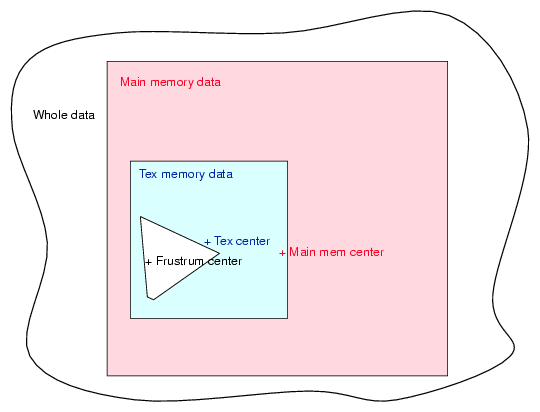
As soon as the culler retrieves cuboids for rendering a new frame, the loader starts reading additional volume data blocks on disks. The renderer thread polls for the presence of data and determines whether to render the shape inside the cull space. Once all the shapes in the culling frustum have their data loaded in main memory and then in texture memory, they are rendered.
Mapping the preceding description to the clip texture API, a basic clip texture viewing application must do the following: