This chapter describes how you use OpenGL Volumizer to build an application. The chapter consists of the following sections:
There are two key notions in OpenGL Volumizer:
The following subsections introduce these two concepts. Chapter 3, “The OpenGL Volumizer API” describes these concepts in greater detail.
The shape node encapsulates a volume in a manner that allows you to separate its geometry from its appearance. The volume's geometry defines its spatial attributes and a region of interest while the volume's appearance defines its visual attributes. The appearance itself consists of a list of parameters that are specific to the particular rendering technique being applied to the shape. Figure 2-1 illustrates this concept.

The shape node contains all information required to render itself. Hence, it can be treated as the leaf node of a scene graph. You can create a more complex scene graph by inserting these shape nodes to represent the volumetric components of the scene, as shown in Figure 2-2.
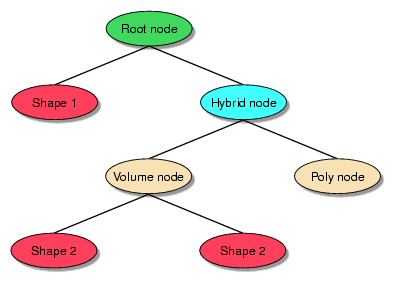
Figure 2-2 shows an example of a scene graph that has polygonal data mixed with volumetric shapes. Such a scene graph can sit on top of the OpenGL Volumizer API in conjunction with other scene graph APIs like OpenGL Performer or Open Inventor.
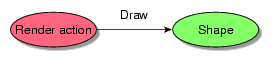
A render action primarily implements a visualization algorithm that accepts a shape node and renders it. Hence, in OpenGL Volumizer, there is a clear distinction between the descriptive components of the scene (the shape nodes) and the procedural components (the render actions). Your control of render actions allows you flexibility in employing known visualization algorithms. Figure 2-3 illustrates rendering actions.
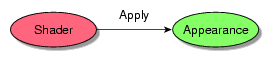
Closely related to render actions are shaders, which are used to apply specific rendering techniques to generate a desired visual effect. Shaders deal with the specific OpenGL state settings that need to be applied during the rendering process. The shaders are attached to the shape's appearance and expect a list of parameters for rendering the shape. Figure 2-4 illustrates the function of shaders.
Example 2-1 shows a simple volume rendering application that uses the OpenGL Utility Toolkit ( GLUT) to manage the user interface. This application demonstrates how to create a shape node and how to render it. The source for this application can be found in the directory VZROOT/src/apps/simple/pguide/.
Example 2-1. Sample Volume Rendering Application
// C / C++
#include <stdlib.h>
#include <iostream.h>

// OpenGL / GLUT
#include <GL/gl.h>
#include <GL/glut.h>

// IFL
#include <loaders/IFLLoader.h>

// Volumizer2
#include <Volumizer2/Version.h>
#include <Volumizer2/Shape.h>
#include <Volumizer2/Block.h>
#include <Volumizer2/Appearance.h>
#include <Volumizer2/ParameterVolumeTexture.h>
#include <Volumizer2/TMRenderAction.h>
#include <Volumizer2/TMSimpleShader.h>

// Global variables
vzShape *shape = NULL;
vzTMRenderAction *renderAction = NULL;
GLint viewport[4];
int lastPosition[2] = {0, 0};
float angles[2] = {0, 0}, lastAngles[2] = {0, 0};

//////////////////////// Volumizer //////////////////////////////

//  Load the volume data and initialize the shape node.
void loadVolumeData(char *fileName)
{
    // Print the volumizer version string
    cerr<<vzGetVersionString()<<endl;

    // Create a data loader
    IFLLoader *loader = IFLLoader::open(fileName);
    if (loader == NULL) {
        cerr<<“Error: couldn't open file “<<fileName<<endl;
        exit(0);
    }


    // Load the volume data
    vzParameterVolumeTexture *volume = loader->loadVolume();
    if (volume == NULL) {
        cerr<<“Error: couldn't read volume data”<<endl;
        delete loader;
        exit(0);
    }

    // Initialize appearance
    vzShader *shader = new vzTMSimpleShader();
    vzAppearance *appearance = new vzAppearance(shader);
    shader->unref();
    appearance->setParameter(“volume”, volume);
    volume->unref();

    // Initialize geometry
    vzGeometry *geometry = new vzBlock();

    // Initialize shape node
    shape = new vzShape(geometry, appearance);
    geometry->unref();
    appearance->unref();

    // Initialize the render action
    renderAction = new vzTMRenderAction(1);
    renderAction->manage(shape);
    }

// Draw the volume data
void renderVolumeData()
{
    // Begin drawing
    renderAction->beginDraw(VZ_RESTORE_GL_STATE_BIT);
    renderAction->draw(shape);
    renderAction->endDraw();
}

// Clean up the shape node and the render action
void cleanup()
{
    // Delete the render action and unref() the shape node
    renderAction->unmanage(shape);
    delete renderAction;
    shape->unref();
}

/////////////////////// GLUT callback functions///////////////////

// glutDisplayFunc() callback function
void display()
{
    glClear(GL_COLOR_BUFFER_BIT);
    glDisable(GL_DEPTH_TEST);

    // Viewport
    glViewport(viewport[0], viewport[1], viewport[2], viewport[3]);

    // Projection matrix
    glMatrixMode(GL_PROJECTION);
    glLoadIdentity();
    glOrtho(-1, 1, -1, 1, -1, 1);

    // Modelview matrix
    glMatrixMode(GL_MODELVIEW);
    glLoadIdentity();
    glRotated( 90 + angles[1], 1, 0, 0);
    glRotated(180 + angles[0], 0, 0, 1);
    glScalef(1.5, 1.5, 1.5);
    glTranslatef(- 0.5, - 0.5, - 0.5);

    // Enable back-to-front alpha blending
    glEnable(GL_BLEND);
    glBlendFunc(GL_SRC_ALPHA, GL_ONE_MINUS_SRC_ALPHA);

    // Render the volume data
    renderVolumeData();
    glutSwapBuffers();
}

// glutKeyboardFunc() callback function
void keyboard(unsigned char key, int x, int y)
{
    switch (key) {
        case 27:
            cleanup();
            exit(0);
    }
}

// glutReshapeFunc() callback function
void reshape(int width, int height)
{

    // Update viewport
    viewport[0] = 0;     viewport[1] = 0;
    viewport[2] = width; viewport[3] = height;
    glutPostRedisplay();
}

// glutMouseFunc() callback function
void mouse(int button, int state, int x, int y)
{
    if (state == GLUT_DOWN) {
        lastPosition[0] = x;
        lastPosition[1] = y;
        lastAngles[0] = angles[0];
        lastAngles[1] = angles[1];
    }
}

// glutMotionFunc() callback function
void motion(int x, int y)
{
    angles[0] = lastAngles[0] + (lastPosition[0] - x) / 4.0;
    angles[1] = lastAngles[1] + (y - lastPosition[1]) / 4.0;
    glutPostRedisplay();
}

// main
void main(int argc, char *argv[])
{
    if(argc < 2) {
        cerr<<“Usage: “<<argv[0]<<“ <filename>”<<endl;
        exit(0);
    }
    glutInit(&argc, argv);
    loadVolumeData(argv[1]);

    // Initialize window
    glutInitDisplayMode(GLUT_RGB | GLUT_DOUBLE);
    glutCreateWindow(“Simple Volume Viewer”);

    // Initialize callbacks
    glutDisplayFunc(display);
    glutReshapeFunc(reshape);
    glutKeyboardFunc(keyboard);
    glutMouseFunc(mouse);
    glutMotionFunc(motion);
    glutMainLoop();
}
|
The following subsections describe the sample application:
The following software must be installed on your system:
Note that the application links against libvzLoaders.so (vzLoaders.dll on Windows), which is generated by compiling the source given in VZROOT/src/lib/loaders.
To compile the application, enter the following commands:
(On Linux)
% g++ -o glut.o glut.cxx -c -I/usr/share/Volumizer2/src/lib % g++ -o viewer glut.o -L/usr/share/Volumizer2/lib/linux32 -lvz -lvzLoaders -lglut -lGLU -lGL -lXmu -lX11 |
Note that the preceding commands assumes 32-bit Linux. On 64-bit Linux systems, change the library path to linux64.
(On Windows)
C:\> cl.exe /c glut.cxx /I ..\..\..\..\include /I ..\..\..\lib /D VISUALCXX C:\> link.exe /out: viewer glut.obj /libpath: ..\..\..\..\lib vzLoaders.lib vz.lib opengl32.lib glut32.lib |
Note that you need to run the VCVARS32.BAT batch file provided by Microsoft Visual Studio before compiling the sample code. Alternatively, you can create your own project in Microsoft Visual Studio to compile the application. Also, note that you need to have libtiff for Windows installed on your system in order to run this application.
To run the application, enter the following commands:
(On Linux)
% viewer /usr/share/Volumizer2/data/medical/Phantom/ CT.Head.Bone.char.tif |
(On Windows)
C:\> viewer.exe ..\..\..\..\data\medical\Phantom\CT.Head.Bone.char.tif |
The program can be divided into the two main components:
The following subsections describe program initialization and the OpenGL Volumizer component of the program:
The OpenGL Volumizer include files are located in the directory /usr/include/Volumizer2 for Linux and %VZROOT%\include for Windows.
This program also uses the IFL data loaders, which are installed in the directory VZROOT/src/loaders.
The method loadVolumeData() loads in a volumetric data set from the disk and then creates the vzShape node. The following are the key actions required to create the shape node.
Create a loader for the volume data.
The following line from the function loadVolumeData() creates an IFL loader.
IFLLoader *loader = IFLLoader::open(fileName);
Upon success, open() returns the data loader; otherwise, a NULL pointer is returned. The value fileName should point to a valid file in the IFL TIFF format.
Load the volume data.
The following line uses the loader just created to load in the volume data:
vzParameterVolumeTexture *volume = loader->loadVolume();
The loadVolume() method returns a vzParameterVolumeTexture value. The vzParameterVolumeTexture value corresponds to the only shader parameter attached to the shape's appearance in this example. One could attach multiple shader parameters to an appearance. See “Shader Parameters” in Chapter 3 for details.
Create a shader for the appearance.
The following line creates a shader:
vzShader *shader = new vzTMSimpleShader();
The shader determines the particular rendering technique to be applied to the shape while rendering it. The vzTMSimpleShader shader performs simple volume rendering using 3D texture mapping. See Chapter 4, “Texture Mapping Render Action” for details.
Create the shape's appearance.
The following line creates the shape's appearance:
vzAppearance *appearance = new vzAppearance(shader);
The appearance for the shape determines how the shape looks when rendered. It accepts a vzShader value as an argument to its constructor.
Add the volume texture as a parameter to the appearance.
The following line adds the parameter:
appearance->setParameter(“volume”, volume);
The shader vzTMSimpleShader needs a parameter named volume, which should be of the type vzParameterVolumeTexture. The appearance adds the parameter to its list of parameters.
Decrement the reference counts of the shader and the volume texture.
On initialization, the reference count of any OpenGL Volumizer object is set to 1. The previous two calls cause the appearance to increase the reference counts of the shader and the volume texture. The following unref() calls decrease the reference counts by one. This ensures that shader and volume will be deleted when appearance is deleted.
shader->unref(); // shader ref count = 1
volume->unref(); // volume ref count = 1
Initialize the geometry.
The following line creates a simple cuboidal geometry:
vzGeometry *geometry = new vzBlock();
The vzBlock object represents a simple axis-aligned cube. By default, the extents of the cube are set to (0, 0, 0) and (1, 1, 1).
Initialize the shape node.
The following line creates the shape node shape with the given geometry and appearance:
shape = new vzShape(geometry, appearance);
Again, the reference counts of geometry and appearance are increased by one.
Decrement the reference counts of the geometry and appearance.
The following lines ensure that geometry and appearance will be deleted when shape is deleted.
geometry->unref();// geometry ref count = 1
appearance->unref(); // appearance ref count = 1
Figure 2-5 depicts the resulting shape node.
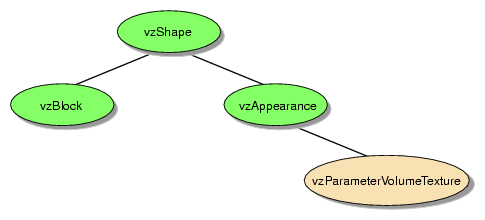
The render action used in this example is Texture Mapping Render Action (TMRenderAction). It renders the given geometry by slicing it using sampling planes and then compositing them in a back-to-front order with alpha blending.
The next two steps create the render action and manage the shape.
Create a vzTMRenderAction.
renderAction = new vzTMRenderAction(1);
The integral argument specifies the number of threads the render action is allowed to create.
Manage the vzShape.
renderAction->manage(shape); // shape ref count = 2
The render action adds the given shape to its list of managed shapes. In this case, it ensures that the volume textures in the shape are made resident in the texture memory of the graphics subsystem. The render action also maintains a reference count for the shape inside the manage() method.
The method renderVolumeData() draws the created shape node using the vzTMRenderAction.
The following lines render the shape node:
renderAction->beginDraw(VZ_RESTORE_GL_STATE_BIT); renderAction->draw(shape); renderAction->endDraw(); |
The beginDraw() method tells the render action that the application is done creating and managing the shape nodes for this frame and now it needs to render the shapes. The actual rendering is done inside the draw() calls for the individual shapes to be rendered. The endDraw() method marks the end of the rendering phase.
The method cleanup() deletes the shape node and the render action. The reference counting ensures that all the other components of the shape node are also deleted when the shape node is deleted.
The following lines delete the render action and the shape node:
renderAction->unmanage(shape); // shape ref count = 1 delete renderAction; shape->unref(); // shape ref count = 0. Deletes itself |
For the details about the shape node and related classes, refer to Chapter 3, “The OpenGL Volumizer API”. Chapter 4, “Texture Mapping Render Action” describes in detail TMRenderAction and related shaders.