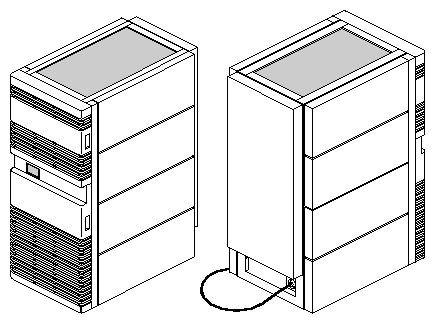
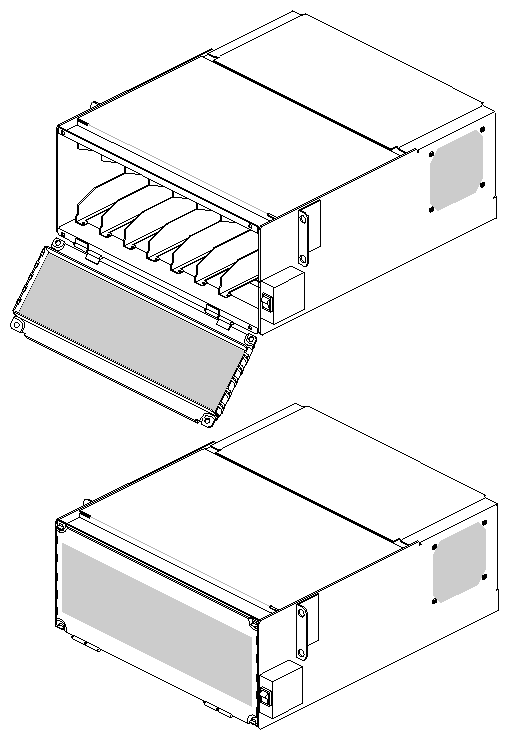
This manual provides instructions for installing and operating the CHALLENGE™ Vault peripherals rack (see Figure 1-1) and the SCSIBox 2 (see Figure 1-2). The SCSIBox 2 (Model No. CMN AS02) houses SCSI drives for use with the Vault rack. This information is written for Silicon Graphics® system support engineers (SSEs) and third-party field support groups responsible for product installation and testing.
 | Note: This document covers the 12-drive box Vault (CMN A012B). The 12-drive box Vault (see Figure 1-3) supports front and rear drive box installation. The 7-drive box Vault holds only drive boxes in the front of the chassis and does not have any supporting railing in the back of the chassis. Both versions also have the same product name. The newer 12-drive box model replaces the older 7-drive box Vault, which is no longer being manufactured by Silicon Graphics. |
 | Caution: You cannot upgrade an existing 7-drive box Vault to a 12-drive box Vault by installing additional rails in the rear. |
This manual is divided into seven chapters as follows:
Chapter 1, "General Information," introduces the CHALLENGE Vault rack and the SCSIBox 2.
Chapter 2, "Components," provides parts lists for the upgrades.
Chapter 3, "Specifications," discusses preinstallation requirements and lists pertinent product specifications.
Chapter 4, "Chassis Tour," describes the controls, connectors, indicators, and available product configurations.
Chapter 5, "Installation," discusses how to install the SCSI drive box and the Vault rack.
Chapter 6, "Verifying Installation," describes how to test the installation.
Chapter 7, "Software Guidelines," provides guidelines to reconfigure the system software if needed to operate the rack and drive box.
Be sure to read the following information before you begin installation.
 | Warning: Installation of these upgrades requires specific training and technical knowledge. These instructions have been provided for use by Silicon Graphics system support engineers (SSEs) or other Silicon Graphics-trained personnel only. This equipment utilizes electrical power internally that is hazardous if the equipment is improperly disassembled. |
| Caution: This equipment is extremely sensitive and susceptible to damage caused by electrostatic discharge (ESD). ESD is an electrical discharge (spark) caused by the buildup of electrostatic potential on clothing and other materials. |
You must use proper ESD preventive measures and observe these precautions:
Connect a ground strap to your wrist when connecting/disconnecting peripherals.
Be sure that you and all of the electrical equipment that you handle during this installation are at ground potential to avoid damage from ESD.
Keep the boards or drives in the antistatic bags provided. Remove a board or drive from its antistatic bag only when you are properly grounded to the chassis ground with a ground strap.
There are 14 fuses installed on the backplane. For continued protection against risk of fire, replace only with the same type and rating of fuse: Cooper Industries, Bussman Div., P/N MCR-5, rated at 125V, 5A.
The Vault rack can house a number of different drives, including SCSI hard disks, helical scan 8-mm tape, and RAID (redundant array of inexpensive disks). The Vault (see Figure 1-3) can also hold up 12 drive boxes and up to 96 half-height or 48 full-height drives.
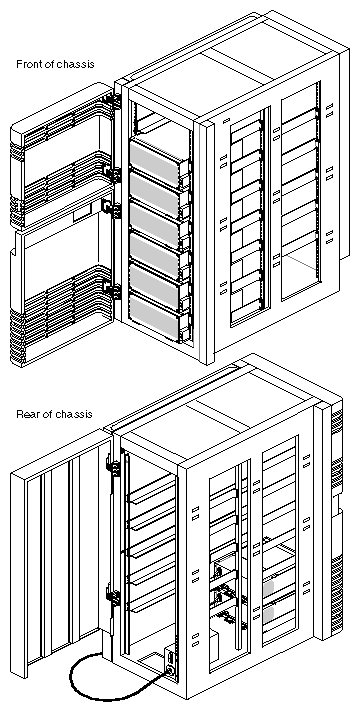
| Note: The 12-drive box Vault supports SCSIBox 2s in the front and rear of the chassis. |
The Vault SCSIBox 2 (see Figure 1-2) provides enhancement to previous Silicon Graphics SCSI boxes and features the following improvements:
supports up to 8 half-height or 4 full-height SCSI drives
comes in single-ended or differential SCSI configurations
provides front-loading drive capability
| Note: The Vault SCSIBox 2 is different from the SCSIBox 2 that installs into the OnyxTM and CHALLENGE rackmount chassis. For a list of differences between these two drive boxes, see Chapter 4, "Chassis Tour." |
The Vault rack operates with only the Onyx and CHALLENGE rackmount and deskside systems, and the Vault SCSIBox 2 works only in the Vault rack.
| Caution: You cannot use a Vault SCSIBox 2 in an Onyx or CHALLENGE rackmount chassis; nor can you use an Onyx or CHALLENGE SCSIBox 2 in a Vault rack. |
| Note: To support this upgrade, you need to install IRIX 5.0 or later. |