This chapter provides a top-level overview of the array hardware and software and also describes the array features and available configurations.
 | Note: The POWER CHALLENGEarray requires IRIX 6.1 or later. The POWER CHALLENGEarray 10000 and the CHALLENGE DataArray require IRIX 6.2 or later. In addition the Array 2.0 software release requires IRIX 6.2 or later. |
Unless otherwise stated, the term array refers to the POWER CHALLENGEarray, the POWER CHALLENGEarray 10000, or the CHALLENGE DataArray.
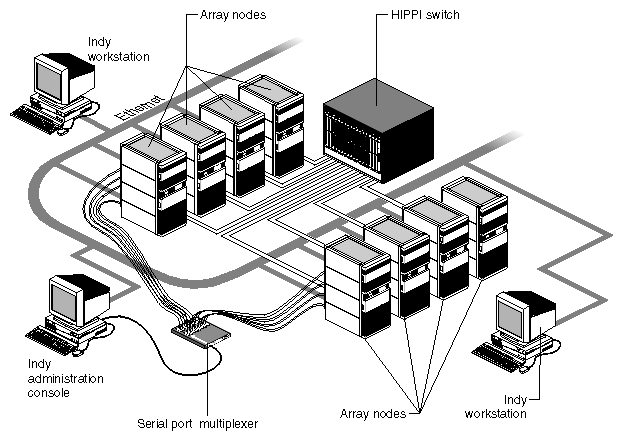
The POWER CHALLENGEarray or CHALLENGE DataArray (see Figure 1-1) is a flexible, scalable platform for extreme-performance interactive supercomputing. It:
provides a highly scalable supercomputing configuration accommodating from 2 CPU boards (in the minimum two -node setup) to 72 CPU boards (using eight POWER CHALLENGE XLs, for example)
provides up to four 100 MB/sec HIPPI interconnects between systems (see Note below). The HIPPI driver appears as a single virtual HIPPI to applications, providing applications with a fault-tolerant and higher bandwidth internode communications path.
supports up to 128 GB main memory
provides 4 GB per second disk transfer capacity
serves as a network of powerful symmetric multiprocessing (SMP) computer servers or workstations for general-purpose mission critical applications in production and research environments
uses high-bandwidth performance HIPPI networking for facilitating efficient and rapid movement of large amounts of data between different nodes in the array.
provides single-point system administration
has enhanced communications and process management software, sophisticated development and administration tools, and power 3D graphic
The POWER CHALLENGEarray differs from the CHALLENGE DataArray primarily in the types of systems (or nodes) that are used. The POWER CHALLENGEarray uses POWER CHALLENGE™ systems (with IRIX 6.1 or later) or POWER CHALLENGE 10000 systems (with IRIX 6.2 OR later). The CHALLENGE DataArray uses the CHALLENGE® (R4400®) or CHALLENGE 10000 system with IRIX 6.2 or later software.
The array is fundamentally a collection of POWER CHALLENGE or POWER Onyx servers, bound together via a high-performance network and layered software.
Chapter 4 details the installation process of the array. As the array is installed, it evolves through various stages of functionality; each stage can be independently tested. The stages include:
single isolated server with hardware tested (base node)
single server operating on local area network (LAN node)
single server operating on HIPPI network (HIPPI node)
fully operational array (array node)
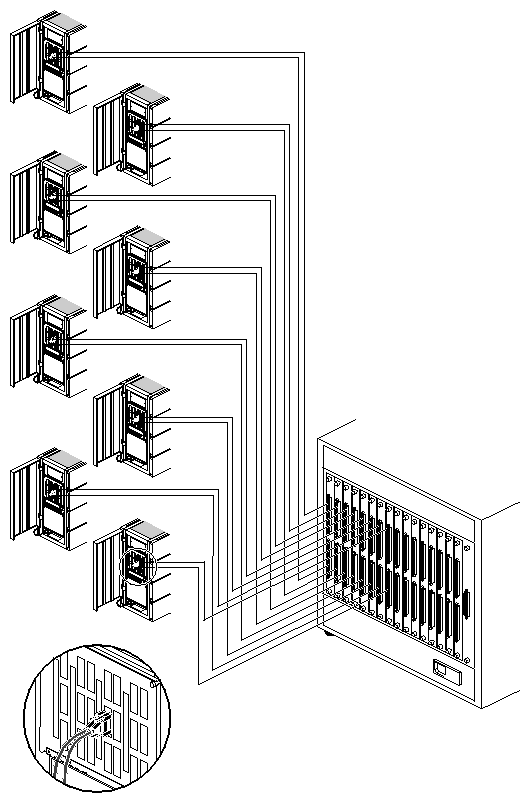
The array (see Figure 1-1) consists of two to eight systems, each called an array node. The array nodes are interconnected by a high-performance parallel HIPPI network and a conventional local area network, for data sharing between array nodes. An Indy® workstation equipped with IRISconsole software and multiplexer provides for centralized control and administration of the array nodes.
The following systems are supported in an array configuration:
CHALLENGE DM, L or XL (with R4400 or R10000™ CPUs)
POWER CHALLENGE L or XL (with R8000® or R10000 CPUs)
Onyx Deskside or Rackmount systems (with R4400 or R10000 CPUs)
POWER Onyx Deskside or Rackmount systems (with R8000 or R10000 CPUs)
The array contains the following hardware:
two to eight CHALLENGE/POWER CHALLENGE or Onyx/POWER Onyx SMP servers (individually known as array nodes).
Note: A POWER CHALLENGE system can be optionally equipped with Extreme™ Graphics visualization consoles or RealityEngine2™ graphics heads. one to four bidirectional HIPPI network interfaces per array node.
one Multi-Port HIPPI switch (optional for dual-node arrays).
one IRISconsole as an administration console, consisting of a 24-bit Indy workstation running IRIX 5.3, XFS™, an ST-1600 or ST-1616 serial port multiplexer, and cabling.
The array software binds the computation and communication hardware into a powerful supercomputing platform. The array software consists of base and optional packages.
Base array software includes but is not limited to the following:
IRIX 6.1 or later symmetric multiprocessing operating system
XFS high-performance, extreme-capacity, journaled filesystem
NFS® (Network File system) version 3
HIPPI high-performance networking software
Array services array management software
IRISconsole centralized server administration software
MPI (message-passing interface) communication software
PVM (parallel virtual machine) communication software
array diagnostics
array gifts
For a complete description of the available array software packages, see the Getting Started With the Array (p/n 007-3058-xxx).
A principal use of an array system is to run jobs that are large enough to span two or more servers. To help accomplish this task, the array uses Array Services software to monitor and manipulate jobs (programs) running across several nodes of the array. Message passing libraries such as the message passing interface (MPI) and parallel virtual machine (PVM) allow the nodes to interact and send messages to one another.
The array implements these three major parallel processing methods for maximized performance:
Multiple CPUs (IP19, 1P21, or IP25) so that appropriate tasks can be automatically time-sliced among available processors.
Threaded execution in which applications can be parallelized into alternating sections of serial and parallel tasks. When the application comes to a parallel segment, it splits into a number of threads that execute various portions of the parallel segment at the same time. At the end of the parallel segment is a barrier at which the threads are collected together until all are finished executing, at which time the execution of the next serial segment begins.
Message-passing facilities such as PVM and MPI, which use inter-node communication to implement parallelism within the application. PVM and MPI are both industry-standard libraries for sending "messages" (which are chunks of data with a message "type" added) between nodes. The idea is to start a group of programs on different systems, and have them interact by sending "messages" to one another.
The array services software has the primary task of administering and managing the array and also performs several other duties:
It knows the current array configuration and can provide that information to other commands and programs in the array.
It can determine which processes belong to a particular array session and provide that information to other commands and programs.
It can display the load, process, and indicate the users on all the nodes of an array.
It can forward commands to all of the systems in an array.
| Note: The Array 2.0 software requires IRIX 6.2 or later. |
The IRISconsole consists of an Indy and the Serial Port Multiplexer. It provides a central array system administration station with a graphical user interface (GUI). The IRISconsole allows the system administrator to set up and administer array nodes. Once the nodes are connected to the Serial Port Multiplexer and Indy, you can use the IRISconsole GUI to:
Set up, add, or delete the systems in a site.
View real-time graphs of hardware operating statistics, such as voltage, operating temperature, and blower RPM, of a system in a site.
Set a threshold for operating statistics so that an alarm is activated when the threshold is reached.
Take control of a system by obtaining exclusive access to its console.
Reset individual nodes of the array.
The IRISconsole Administrator's Guide (P/N 007-2872-xxx) explains how to set up and administer sites.
This section describes the available configurations of the array and minimum system requirements.
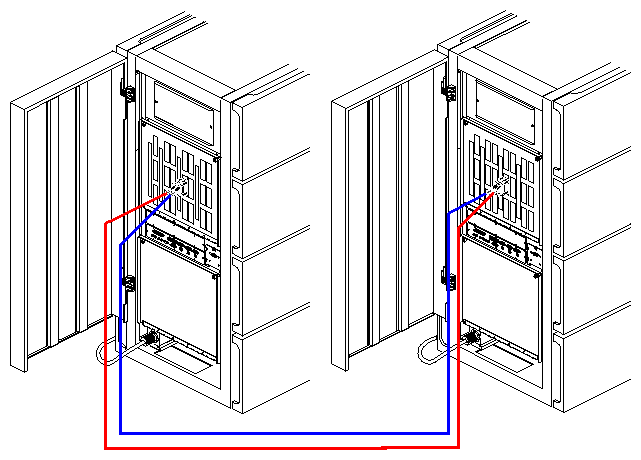
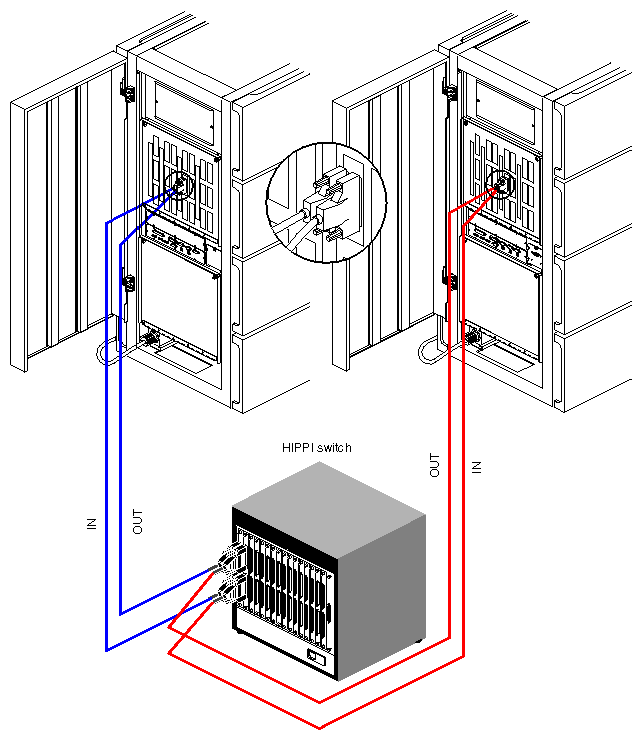
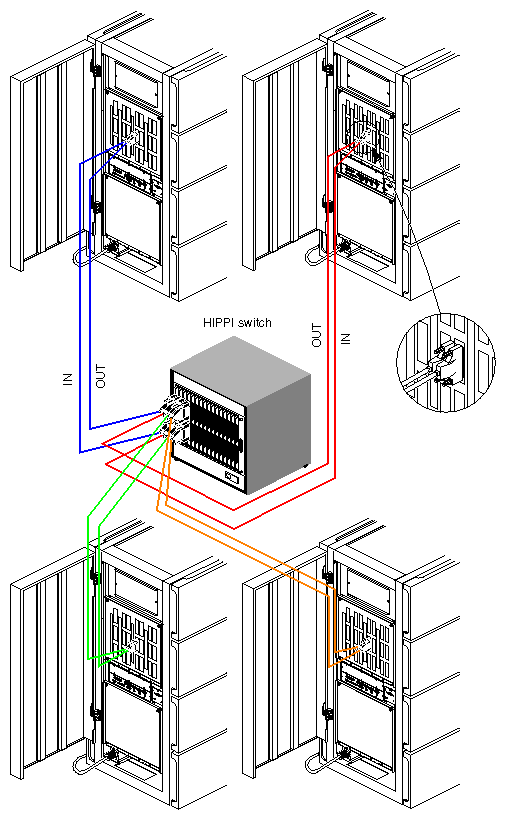
The array comes in the following standard configurations:
a two-node system without a HIPPI router switch (see Figure 1-2)
a two-node system with a HIPPI router switch (see Figure 1-3)
a four-node system with a HIPPI router switch (see Figure 1-4)
an eight-node system with a HIPPI router switch (see Figure 1-5)
| Note: The rack systems have twice as many HIPPI connections as shown in the following figures. |
Prepackaged rackmount array node systems ship from Silicon Graphics with the following hardware configuration:
Four CPU boards)
2 GB of main memory using eight-way interleaving
4 GB system disk
One additional 4 GB drive
Two HIPPI boards
Two IO4 boards
Prepackaged deskside array nodes ship with the following hardware configuration:
four processors (on two IP21 boards)
512 MB of main memory using two-way interleaving
4 GB system disk
One additional 4 GB drive
One HIPPI board
It is possible to convert existing systems in the field into an array, as long as the systems meet the recommended hardware configuration guidelines. For example, the array should consist of two, four, or eight array nodes. In addition, it is recommended that all the nodes in the array be of the same system type.
| Note: The array requires IRIX 6.1 or later software for proper operation. |
It is recommended that the nodes in an array be balanced, that is each node should have roughly the same amount of memory, the same number of processors, and the same amount of disk space.