The raid5 commands are summarized in Table A-1.
Parameter | Use |
|---|---|
bind | Bind (group) physical disks into a RAID-5 unit |
chglun | Change parameters for a currently bound group |
clearlog | Destroy the contents of the RAID storage controller's error log |
clearstats | Reset statistics logging on the RAID storage processor, setting all log counters to 0 |
firmware | Update the firmware on the CHALLENGE RAID storage processor |
getagent | Get names and descriptions of devices controlled by the storage-control processor |
getcache | Get information about the storage system caching environment |
getcontrol | Get information about the processor's configuration |
getcrus | Display status information on all system components, such as the fan module, battery backup unit, and so on |
getdisk | Display status information on one disk module or all disk modules in the system |
getlog | Display the storage processor log, in which errors are stored, or display the head and tail of the log |
getlun | Display information about a disk group |
setcache | Change information about the RAID controller's caching environment |
unbind | Deconfigure physical disks from their current logical configuration, destroying all data on the logical unit (group) |
 | Note: For complete details of raid5 commands, see the CHALLENGE RAID-5 Installation and Maintenance Instructions (document number 007-0128-001) or the CHALLENGE RAID-5 Owner's Guide (document number 007-2532-001. |
This appendix gives details on raid5 commands that are important for OPS operation and which are referenced in this guide:
raid5 bind
raid5 getagent
raid5 firmware
The syntax of /usr/raid5/raid5 bind is as follows:
/usr/raid/raid5 [-vp] [-d device] bind raid-type lun-number disk-names [optional-args] |
In this syntax, variables mean the following.
| -v | Enables verbose return. Use this flag to print detailed error message information. | |||
| -p | Parses the raid5 command without calling the API. If the string does not parse correctly, an error message is printed to stderr; otherwise there is no output. | |||
| -d device | Target RAID device, as returned by raid5 getagent. The environment variable RaidAgentDevice is the default value for the device when none is specified with the -d flag. If RaidAgentDevice is not set and no -d switch is present, an error is generated.
| |||
| raid-type | r5: Raid level 5 | |||
| lun-number | Logical unit number to assign the unit (0-3). | |||
| disk-names | Indicates which physical disks to bind, in the format bd, where b is the physical bus name (a through e) and d is the device number on the bus (0 through 3). For example, a0 represents the device 0 on bus A, and e2 represents device 2 on bus E. |
The optional arguments are as follows.
| -r rebuild-time | Maximum time in hours to rebuild a replacement disk. Default is 4 hours; legal values are any number greater than or equal to 0. A rebuild time of 2 hours rebuilds the disk more quickly, but degrades response time slightly. A rebuild time of 0 hours rebuilds as quickly as possible but degrades performance significantly. If the customer requires fast response time and wants to minimize degradation to normal I/O activity, enter a longer period of time, such as 24 hours. The customer can change the rebuild time later without damaging the information stored on the physical disk unit. | |
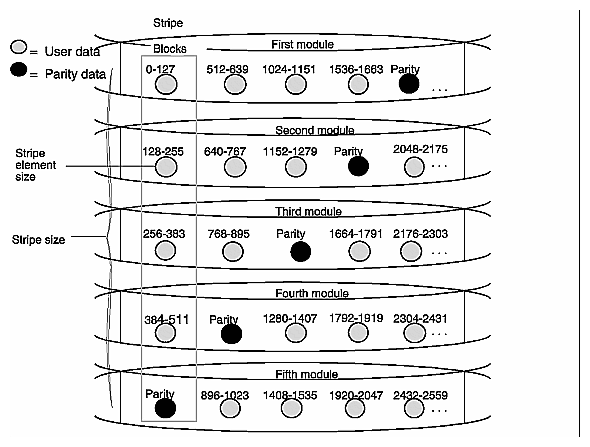
| -s stripe-size | Number of blocks (sectors) per physical disk in a RAID-5 stripe. Each sector is 0.5 KB. Default is 128 sectors (65,536 bytes); legal values are any number greater than 0, in even multiples of 16. The smaller the stripe element size, the more efficient the distribution of data read or written. However, if the stripe size is too small for a single host I/O operation, the ORACLE database application must access two stripes, thus causing the hardware to read and/or write from two disk modules instead of one. Generally, it is best to use the smallest stripe element size that will rarely force access to another stripe. With RAID–5 technology, the hardware writes parity information to each disk module in the array. For highest data availability for a RAID–5 group, the disk modules making up the group should be on different SCSI internal buses (A, B, C, and so on). Figure A-1 illustrates user and parity data with the default stripe element size of 128 sectors (65,536 bytes) in a five-module RAID–5 group. The stripe size comprises all stripe elements. Notice that the disk block addresses in the stripe proceed sequentially from the first module to the second, third, and fourth, then back to the first, and so on. | |
| -c cache-flags |
The default is none. confer with the customer as to whether the site wants caching enabled. The customer can also specify caching in a separate operation. For complete information on caching, see Chapter 7 of the CHALLENGE RAID-5 Owner's Guide. | |
| -z stripe-count | Number of stripes in a LUN. For example, in binding a RAID-5 group with a stripe count of 2, partition the LUN into 2 stripes, thus preventing access to the remainder of the available space. This option is useful for short bind operations. Legal values are any number greater than or equal to 0. The default is 0, which binds the maximum number of stripes available. |
The raid5 command with the bind parameter has no output.
| Note: For information on setting up caching and on dual processor, load balancing, and device names, see Chapter 4, "Installing the CHALLENGE RAID Software and Configuring Disks," in the CHALLENGE RAID-5 Installation and Maintenance Guide. |
Use the getagent parameter with raid5 to display information on devices controlled by the API:
raid5 getagent |
Following is a sample output for one device; normally, the output would give information on all devices.
Name: Disk Array Desc: RAID5 Disk Array Node: sc4d2l0 Signature:0xf3b51700 Peer Signature: 0x657e0a00 Revision: 7.12.4 SCSI ID: 1 Prom Rev: 0x0076100 SP Memory: 64 Serial No: 94-7240-808 |
Table A-2 summarizes entries in the raid5 getagent output.
Table A-2. Output of raid5 getagent
Entry | Meaning |
|---|---|
Name | ASCII string found in the agent configuration file which assigns a name to the node being accessed (see node description below) |
Desc | ASCII string found in the agent configuration file which describes the node being accessed (see node description below) |
Node | The /dev/scsi entry which the agent uses as a path to the actual SCSI device; this value must be entered by the user for every CLI command (except getagent) |
Signature | Unique 32 bit identifier for the storage processor (SP) being accessed through Node |
Peer Signature | Unique 32 bit identifier for the other SP in the chassis; 0 if no additional SP is present |
Revision | Revision of firmware currently running on the storage control processor |
Prom Rev | PROM revision currently present on the storage control processor |
SP Memory | Amount of DDRAM present on the storage control processor |
Serial No | 12 digit ASCII string that uniquely identifies this subsystem |
To update the firmware on the CHALLENGE RAID storage-control processor, type as root
raid5 -d device firmware /usr/raid5/flare7.67.0.prom.7.99.bin |
| Note: You must use this command every time you replace a parity disk. |
In this string, filename is the full pathname of the new firmware image. This image contains microcode that runs on the storage-control processor and possibly also a microcode image destined for the storage-control processor PROM, which runs the power-on diagnostics.
This command has no output.