This chapter describes how the IRIS ATM light-emitting diodes (LEDs) behave, and provides suggestions for troubleshooting.
The IRIS ATM board has 7 LEDs. These are illustrated in Figure 3-1 and their behavior is described in Table 3-1.
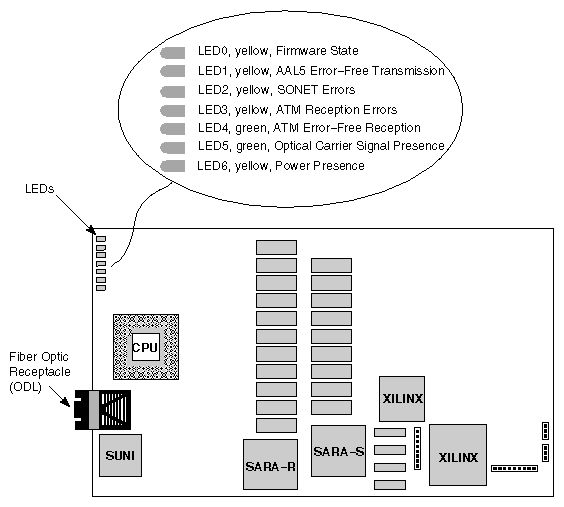
Table 3-1. IRIS ATM LED Behavior
LED | Color | Controlled By | Description |
|---|---|---|---|
LED 0 | yellow | firmware | Firmware State: |
LED 1 | yellow | firmware | AAL5 Packet Transmission: |
LED 2 | yellow | firmware | SONET Errors: |
LED 3 | yellow | firmware | ATM Packet Reception with Errors: |
LED 4 | green | firmware | ATM Error-free Packet Reception: |
LED 5 | green | hardware | Optic Signal: |
LED 6 | yellow | hardware | Power Indicator: |
See Section 3.2, "Indications of Normal Operation" and Section 3.3, "Troubleshooting with LEDs" for in-context descriptions of these LEDs.
The behaviors described in this section indicate normal operation of the IRIS ATM board. The LEDs use the following signalling sequences to communicate their status information:
 |
 |
The board's firmware and CPU are functioning properly.
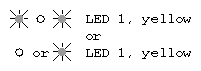 |
When blinking, the board is successfully transmitting packets. It is normal for this LED to be off when no local application is sending data through this ATM subsystem. If an application is sending data to this subsystem and this LED is not blinking, there is a problem, in which case see Section 3.3, "Troubleshooting with LEDs."
 |
No errors are being detected.
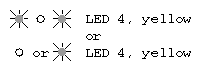 |
When blinking, the board is successfully receiving ATM packets. It is normal for this LED to be off whenever there is no incoming data currently on the fiber optic connection. If a remote system is transmitting to the host, and this LED does not blink, there is a problem, in which case see Section 3.3, "Troubleshooting with LEDs."
 |
The carrier signal from the remote system is being seen by the board's fiber optic receiver (ODL).
 |
The board has power.
This section describes procedures for troubleshooting the IRIS ATM board.
A fiber optic loopback cable is required for some of the procedures. The loopback cable consists of the items listed below and is illustrated in Figure 3-2:
two fiber optic lines of any length
at one end, the two lines are terminated with an SC connector
at the other end, the lines are terminated with two ST® connectors (female)
a male-male (ST-to-ST) adapter to loop the optic signal from one line to the other
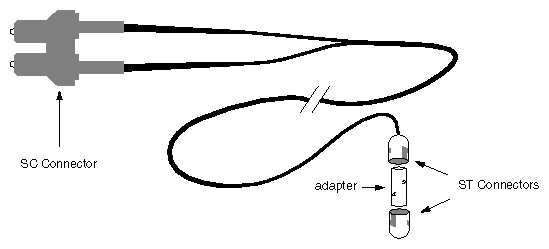
 | Note: Instead of the loopback cable described above, you can use one that attaches to the IO panel with a MIC connector. A loopback cable that attaches to the IO panel plate can be either a low-loss connector (commonly called FDDI station tester) or an assembly like the one in Figure 3-2 except that a male MIC is used instead of the SC connector. |
If you experience problems with the IRIS ATM board, check the LEDs, in the order described below, to identify the reason and resolve the problem. Each LED section assumes that the LEDs described before are functioning normally. The LEDs use the following signalling sequences to communicate their status information:
|
 |
The IRIS ATM board is not powered on. This can be caused by either no power to the IRIS ATM board or a malfunction of the board.
Do the following steps to remedy this problem. After each step, check to see if the problem has been resolved before performing the next step.
Verify that the system has power and is turned on.
Verify that the IO4 board to which the IRIS ATM board is attached, has power. If the IO4 board has power, follow the instructions in Chapter 2 to reinstall the IRIS ATM board, taking extra precautions to seat it firmly into the IO4 board. If the IO4 board does not have power, turn off the system power, verify that the power module for the IO4 board's slot is installed properly, then reinstall the IO4 board, making sure to seat it firmly into its slot.
If the IO4 board has power, and you have already reinstalled the IRIS ATM board without solving the problem, the IRIS ATM board might be dysfunctional. Contact the Silicon Graphics Technical Assistance Center.

The optic carrier signal is not detected on the incoming fiber. This can be caused by any of the following: (1) a faulty cable or connection between the IRIS ATM board's ODL and the remote transmitter, (2) a failure in the remote system, or (3) a dysfunctional IRIS ATM board.
Do the following steps to remedy this problem. After each step, check to see if the problem has been resolved before performing the next step.
Verify the IRIS ATM board by attaching a loopback cable directly to the ODL on the board, while the board is powered on. If LED 5 turns on, continue with the steps below to locate where the signal is being obstructed. If LED 5 does not turn on, the IRIS ATM board may be dysfunctional. Contact the Silicon Graphics Technical Assistance Center.
Verify that the remote ATM hardware is turned on and is functional. If possible, either do a loopback test or connect the remote system to a different system that is known to be functional in order to verify the presence of its carrier signal. When this verification is completed, reconnect the remote system to the IRIS ATM hardware.
Verify that all the connectors between the remote ATM hardware and the IRIS ATM board's fiber optic receptacle (ODL) are connected properly. Each connector should click or snap into position. Disconnect and reconnect each connection, making sure that keyed components are properly matched. Be sure to check the IRIS ATM's internal cable assembly connections as well as the cable running between the external IO panel plate and the remote system.
One by one, exchange each cable segment between the two ATM systems with cables that are known to be functional.
If the problem persists, the IRIS ATM board might be dysfunctional. Contact the Silicon Graphics Technical Assistance Center.
 |
The firmware or the CPU on the IRIS ATM board is not functioning. Either the driver has not initialized the board or the board is dysfunctional.
Do the following steps to remedy this problem. After each step, check to see if the problem has been resolved before performing the next step.
Using the command line shown below, verify that the operating system includes the IRIS ATM driver. If there are entries for atm (for example, ifatm_mtusize), the operating system has been built to include IRIS ATM. The board may be dysfunctional. Contact Silicon Graphics Technical Assistance Center. If there are no entries for the IRIS ATM driver, continue to the next step.
% grep atm /usr/var/sysgen/master.c
Use the versions command to verify that the IRIS ATM software has been installed. If the IRIS ATM software is not installed, follow the instructions in the IRIS ATM Release Notes to install it. If the software is installed, continue to the next step.
% versions atm
Use the autoconfig command to build a new operating system (IRIX kernel) that includes the IRIS ATM driver. Then, reboot the system to start using the new operating system.
# /etc/autoconfig
...
# Automatically reconfigure the operating system (yes/no)?  yes
...
# /etc/reboot
If the problem persists, the IRIS ATM board may be dysfunctional. Contact the Silicon Graphics Technical Assistance Center.
 |
The board is not transmitting. This may be caused by a faulty configuration of the protocol stack, a programming problem in the upper-layer application, or a dysfunctional IRIS ATM board.
Do the following steps to remedy this problem. After each step, check to see if the problem has been resolved before performing the next step.
Do this test with either of these configurations:
Attached the station to an adjacent ATM switch, and configure the switch to route the incoming PVC from the port (using VPI=0 and VCI=201) back to itself.
Attach a loopback cable to the IRIS ATM board, and use atmconfig -iunit# -o 0 to configure the board to recover the clock from its own transmit clock signal.
Use hinv to obtain the correct unit number for the problematic ATM subsystem:
% /sbin/hinv
...
ATM OC-3c unit #: slot#, adapter#, ...
ATM OC-3c unit #: slot#, adapter#, ...
Invoke atmtest (as superuser) to transmit over the problematic ATM subsystem:
# /usr/etc/atmtest -i unit# -Xrw
where unit# is the digit for the board's unit number.
For example:
# /usr/etc/atmtest -i 1 -Xrw
If the LED does not start blinking, continue to the next step. If the LED starts blinking, the IRIS ATM board and the IRIS ATM API for PVCs is functional. The problem is a software or configuration problem. Transmissions from other upper-layer applications are not successfully obtaining the services of the subsystem,. Verify the protocol stack configuration for IP-based applications or verify the programmatic interface calls within the code for applications using the character device interface.
Reboot the system to synchronize the system and the board:
# /etc/reboot
Invoke atmtest again. If the problem persists, the board may be dysfunctional. Contact the Silicon Graphics Technical Assistance Center.

The board is detecting SONET level errors on incoming data. This indicates corruption or absence of the optical signal, and may be caused by any of the following:
disconnected or loose connection at the ATM I/O panel plate
disconnected or loose connection between the internal cable assembly and the IRIS ATM board
disconnected or loose connection at the transmitting node (for example, the switch)
faulty fiber optic cable or internal cable assembly
a dysfunctional ODL on the IRIS ATM board
To remedy this problem, check each of the above connections and cables. Replace any suspect cables with known working ones. If the problem persists, the board may be dysfunctional. Contact the Silicon Graphics Technical Assistance Center.
 |
The board is not receiving error-free ATM packets. This may be caused by a problem in the remote transmitting system or a dysfunctional IRIS ATM board.
Do the following steps to remedy this problem:
Do this test with either of these configurations:
Attached the station to an adjacent ATM switch, and configure the switch to route the incoming PVC from the port (with VPI=0 and VCI=201) back to itself.
Attach a loopback cable to the IRIS ATM board, and use atmconfig -i unit# -o 0 to configure the board to recover the clock from its own transmit clock signal.
Use hinv to obtain the correct unit number for the problematic ATM subsystem:
% /sbin/hinv
...
ATM OC-3c unit #: slot#, adapter#
ATM OC-3c unit #: slot#, adapter#
Invoke atmtest (as superuser) to transmit and receive over the problematic ATM subsystem:
# /usr/etc/atmtest -i unit# -Xrw
where unit# is the digit indicating the unit number
For example, the command line below exercises board unit 1:
# /usr/etc/atmtest -i 1  -Xrw
atmtest: /dev/atm1:
vpi/vci = 0 201 xmit-rate: 137.14 Mbps Best Eff
- 1000/10000 frames transmitted, total 0 lost
- 2000/10000 frames transmitted, total 0 lost
- 3000/10000 frames transmitted, total 0 lost
- 4000/10000 frames transmitted, total 0 lost
- 5000/10000 frames transmitted, total 0 lost
- 6000/10000 frames transmitted, total 0 lost
- 7000/10000 frames transmitted, total 0 lost
- 8000/10000 frames transmitted, total 0 lost
- 9000/10000 frames transmitted, total 0 lost
 ---- 10000 frames transmitted, 0 lost ---
If the LED blinks, the IRIS ATM board is functional; the problem is probably with the remote ATM hardware. If the LED does not blink, the IRIS ATM board may be dysfunctional; contact the Silicon Graphics Technical Assistance Center.

The board is detecting ATM level errors on its incoming data. This indicates a problem with the transmitting station or switch, and may be caused by any of the following:
the switch is incorrectly configured
data with the wrong address (VPI/VCI) is being transmitted to this station
the switch is creating malformed ATM packets
To remedy this problem, check the configuration and performance of the switch to which this system is connected.