This chapter discusses the following:
After you are familiar with the general requirements for creating a simple XVM volume on Linux, you should be able to use the examples in this chapter to determine how to configure more complex volumes.
Before configuring an XVM volume, you may need to assess the status of your disks and your system:
Before you can label a disk as an XVM disk, it must be formatted as a GPT disk:
For information on how the partitions must be configured on a GPT disk, see “Partition Layout with GPT Disk Format” in Chapter 2.
For information on formatting a disk for use in XVM under Linux, see “Preparing to Configure XVM Volumes in the Local Domain” in Chapter 2.

Note: If you attempt to use XVM to label a disk that is not a GPT disk, you will get an error message indicating that the disk volume header partition is invalid. Before beginning any of the procedures in this chapter, you may find it useful to execute the following command to view the names of the disks on the system that have not been assigned to XVM:
# xvm show unlabeled/*
You will not be able to label disks as XVM disks if they contain partitions currently in use as mounted filesystems. In a CXFS cluster, any XVM physical volumes (physvols) that will be shared must be physically connected to all nodes in the cluster.
Use the options of the show command to view your system configuration and status. For example, the following command displays the stripe unit for stripe0:
xvm:cluster> show -v stripe0
To configure XVM volumes, you must be logged in as root. However, you can display volume configuration information even if you do not have root privileges.
Note: As you configure a volume, remember that you can view help information for an xvm command by entering the help command with the -v[erbose] option. For example, you can view the full help screen that includes the options for the slice command by entering the following: xvm:cluster> help -v slice
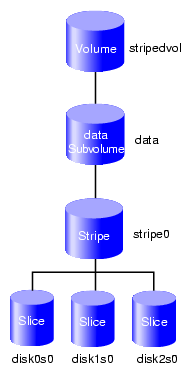
Procedure 7-1 shows an example of creating a simple volume that stripes data across three disks. In this example, the entire usable space of each disk is used for the slice. Figure 7-1 shows the volume that Procedure 7-1 creates.
Procedure 7-1. Creating a Volume with a Three-Way Stripe
Assign disks to XVM. You must perform this procedure only once for each disk that you will be using to create volumes.
For example, to assign three disks to XVM:
# xvm
xvm:cluster> label -name disk0 unlabeled/dev/pm/SGI-TP9700--lun0-600a0b8000269d1e0000c9b14d31a849
disk0
xvm:cluster> label -name disk1 unlabeled/dev/pm/SGI-TP9700--lun1-600a0b8000269d1e0000c9b14d31a849
disk1
xvm:cluster> label -name disk2 unlabeled/dev/pm/SGI-TP9700--lun2-600a0b8000269d1e0000c9b14d31a849
disk2
View all of the disks that have been assigned as XVM physvols to verify what you have labeled. For example:
xvm:cluster> show phys/*
phys/disk0                 35542780 online
phys/disk1                 35542780 online
phys/disk2                 35542780 online
Create a slice that consists of all of the usable blocks in each of the XVM physvols. For example:
xvm:cluster> slice -all disk*
</dev/cxvm/disk0s0>  slice/disk0s0
</dev/cxvm/disk1s0>  slice/disk1s0
</dev/cxvm/disk2s0>  slice/disk2s0
Create a stripe that consists of the slices and explicitly name the volume (stripedvol in this case):
xvm:cluster> stripe -volname stripedvol slice/disk0s0 slice/disk1s0 slice/disk2s0
</dev/cxvm/stripedvol> stripe/stripe0
In this example:
A data subvolume will automatically be generated.
/dev/cxvm/stripedvol is the name of the volume on which you can execute the mkfs command. The volume was named explicitly and will therefore persist across reboots
stripe/stripe0 is the name of the stripe object. The name of the stripe object is automatically generated and is therefore subject to change upon reboot.
View the resulting topology of the volume:
xvm:cluster> show -topology stripedvol
vol/stripedvol                    0 online
    subvol/stripedvol/data     106627968 online
        stripe/stripe0             106627968 online,tempname
            slice/disk0s0              35542780 online
            slice/disk1s0              35542780 online
            slice/disk2s0              35542780 online
Exit the xvm tool:
xvm:cluster> exit
Make the filesystem for the volume. For example:
# mkfs /dev/cxvm/stripedvol
meta-data=/dev/cxvm/stripedvol   isize=256    agcount=51, agsize=261344 blks
data     =                       bsize=4096   blocks=13328496, imaxpct=25
         =                       sunit=16     swidth=48 blks, unwritten=1
naming   =version 1              bsize=4096
log      =internal log           bsize=4096   blocks=1168
realtime =none                   extsz=65536  blocks=0, rtextents=0
For more information, see the mkfs(8) man page.
Mount the filesystem:
For a shared filesystem in a CXFS cluster, mount the filesystem with the CXFS GUI or the cxfs_admin command, as described in CXFS 7 Administrator Guide for SGI InfiniteStorage.
For a local filesystem, put the volume in the fstab file and use the mount command to mount the filesystem. For more information, see the fstab(5) and mount(8) man pages.
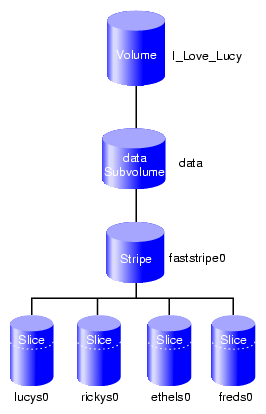
Procedure 7-2 shows an example of creating a stripe on the outer third of a disk. It also includes advice about naming volume elements. Figure 7-2 shows the volume this example creates.
Assign disks to XVM. For example, to assign four disks to XVM:
# xvm
xvm:cluster> label -name lucy unlabeled/dev/pm/SGI-TP9700--lun0-600a0b8000269d1e0000c9b14d31a849
lucy
xvm:cluster> label -name ricky unlabeled/dev/pm/SGI-TP9700--lun1-600a0b8000269d1e0000c9b14d31a849
ricky
xvm:cluster> label -name ethyl unlabeled/dev/pm/SGI-TP9700--lun2-600a0b8000269d1e0000c9b14d31a849
ethyl
xvm:cluster> label -name fred unlabeled/dev/pm/SGI-TP9700--lun3=600a0b8000269d1e0000c9b14d31a849
fred
Note: Four separate controllers are chosen for better stripe performance. Partition one-third of each disk for the stripe, using one of the following methods:
Allocate the entire disk, but only use the last third. For example, for disk lucy you could do the following (and use slice/lucys2 for the stripe):
xvm:cluster> slice -equal 3 lucy
</dev/cxvm/lucys0> slice/lucys0
</dev/cxvm/lucys1> slice/lucys1
</dev/cxvm/lucys2> slice/lucys2
Confine the block range explicitly to one-third of the disk. For example, you can do the following to allocate the last third of the other disks (ricky, ethyl, and fred):
xvm:cluster> slice -start 11852676 -length 5926340 ricky
</dev/cxvm/rickys0> slice/rickys0
xvm:cluster> slice -start 11852676 -length 5926340 ethyl
</dev/cxvm/ethyls0> slice/ethyls0
xvm:cluster> slice -start 11852676 -length 5926340 fred
</dev/cxvm/freds0> slice/freds0
Verify the allocation by using the show command. For example:
If using three equal stripes:
xvm:cluster>
show -v lucy
XVM physvol phys/lucy
=========================
...
---------------------------------------------------
0 5926338 slice/lucys0
5926338 5926338 slice/lucys1
11852676 5926340 slice/lucys2
Local stats for phys/lucy since being enabled or reset:
--------------------------------------------------------------------
stats collection is not enabled for this physvol
If allocating space explicitly:
xvm:cluster> show -v ricky
XVM physvol phys/ricky
=========================
...
---------------------------------------------------
0 11852676 (unused)
11852676 5926340 slice/rickys0
-------------------------------------------------------------------
Create the stripe. For example, to explicitly name the volume I_Love_Lucy and name the stripe faststripe0:
xvm:cluster> stripe -volname I_Love_Lucy -vename faststripe0 \
-unit 128 slice/lucys2 slice/rickys0 slice/ethys0 slice/freds0
</dev/cxvm/I_Love_Lucy> stripe/faststripe0
View the stripe. For example:
xvm:cluster> show -top stripe/fast*
stripe/faststripe0         23705088 online
     slice/lucys2                5926340 online
     slice/rickys0               5926340 online
     slice/ethyls0               5926340 online
     slice/freds0                5926340 online
Exit the xvm tool:
xvm:cluster> exit
Make the filesystem for the volume. For example:
# mkfs /dev/cxvm/I_Love_Lucy
meta-data=/dev/rxvm/I_Love_Lucy   isize=256    agcount=26, agsize=256416 blks
data     =                       bsize=4096   blocks=6666528, imaxpct=25
         =                       sunit=16     swidth=48 blks, unwritten=1
naming   =version 1              bsize=4096
log      =internal log           bsize=4096   blocks=1168
realtime =none                   extsz=65536  blocks=0, rtextents=0
Mount the filesystem:
For a shared filesystem in a CXFS cluster, mount the filesystem with the CXFS GUI or the cxfs_admin command, as described in CXFS 7 Administrator Guide for SGI InfiniteStorage.
For a local filesystem, put the volume in the fstab file and use the mount command to mount the filesystem. For more information, see the fstab(5) and mount(8) man pages.
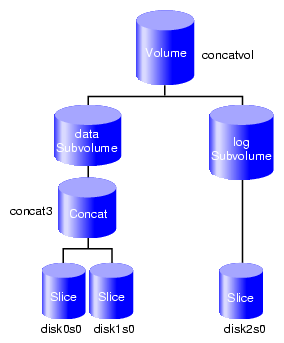
Procedure 7-3 describes an example of creating a volume that includes both a data subvolume and a log subvolume as well as a concat. In this example, the data subvolume consists of all the usable space of two disks and the log subvolume consists of all the usable space of a third disk. Figure 7-3 shows the volume this example creates.
Procedure 7-3. Volume with a log Subvolume and a Concat
Assign three disks to XVM:
# xvm
xvm:cluster> label -name disk0 unlabeled/dev/pm/SGI-TP9700--lun0-600a0b8000269d1e0000c9b14d31a849
disk0
xvm:cluster> label -name disk1 unlabeled/dev/pm/SGI-TP9700--lun1-600a0b8000269d1e0000c9b14d31a849
disk1
xvm:cluster> label -name disk2 unlabeled/dev/pm/SGI-TP9700--lun2-600a0b8000269d1e0000c9b14d31a849
disk2
Create a slice that consists of all of the usable blocks in each of the XVM physvols:
xvm:cluster> slice -all disk*
</dev/xvm/disk0s0>  slice/disk0s0
</dev/xvm/disk1s0>  slice/disk1s0
</dev/xvm/disk2s0>  slice/disk2s0
Combine two of the slices into a concat and name the associated new volume concatvol and view the topology results:
xvm:cluster> concat -volname concatvol slice/disk0s0 slice/disk1s0
</dev/cxvm/concatvol>  concat/concat3
xvm:cluster> show -topology vol/concatvol
vol/concatvol                     0 online
    subvol/concatvol/data      35554848 online
        concat/concat3             35554848 online,tempname
            slice/disk0s0              17777424 online
            slice/disk1s0              17777424 online
Note: The name of the concat is generated automatically by XVM and therefore may not be persistent across reboots. The name concat3 indicates that this is the fourth generated concat name created by XVM. Create the log subvolume consisting of the third slice and generate a temporary name for the volume:
xvm:cluster> subvol -tempname -type log slice/disk2s0
</dev/cxvm/vol7,log>  subvol/vol7/log
Note: You do not need to name this volume because you will attach the log subvolume to the existing concatvol volume in step 5. Attach the log subvolume to the existing concatvol volume and display the resulting topology of the volume:
xvm:cluster> attach subvol/vol7/log vol/concatvol
vol/concatvol
xvm:cluster> show -topology vol/concatvol
vol/concatvol                     0 online
    subvol/concatvol/data      35554848 online
        concat/concat3             35554848 online,tempname
            slice/disk0s0              17777424 online
            slice/disk1s0              17777424 online
    subvol/concatvol/log       17779016 online
        slice/disk2s0              17779016 online
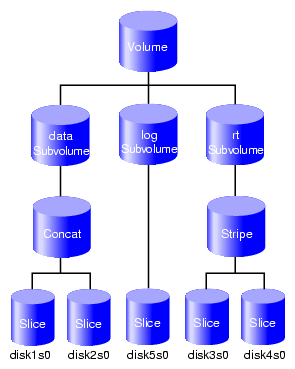
When you configure an XVM volume, you can create the volume's hierarchy from the bottom up or from the top down. The following example creates a volume that includes a data subvolume, a log subvolume, and an rt subvolume.
Figure 7-4 shows the volume this example creates.
Procedure 7-4. Create a Volume from the Bottom Up
Assign five disks to XVM:
# xvm
xvm:local> label -name disk1 unlabeled/dev/pm/SGI-TP9700--lun0-600a0b8000269d1e0000c9b14d31a849
disk1
xvm:local> label -name disk2 unlabeled/dev/pm/SGI-TP9700--lun1-600a0b8000269d1e0000c9b14d31a849
disk2
xvm:local> label -name disk3 unlabeled/dev/pm/SGI-TP9700--lun2-600a0b8000269d1e0000c9b14d31a849
disk3
xvm:local> label -name disk4 unlabeled/dev/pm/SGI-TP9700--lun3-600a0b8000269d1e0000c9b14d31a849
disk4
xvm:local> label -name disk5 unlabeled/dev/pm/SGI-TP9700--lun4-600a0b8000269d1e0000c9b14d31a849
disk5
Create a slice that consists of all of the usable blocks of each of the XVM physvols you have created:
xvm:local> slice -all disk*
</dev/lxvm/disk1s0>  slice/disk1s0
</dev/lxvm/disk2s0>  slice/disk2s0
</dev/lxvm/disk3s0>  slice/disk3s0
</dev/lxvm/disk4s0>  slice/disk4s0
</dev/lxvm/disk5s0>  slice/disk5s0
Create the concat that will constitute the data subvolume:
xvm:local> concat -tempname slice/disk1s0 slice/disk2s0
</dev/lxvm/vol0>  concat/concat0
Create the stripe that will constitute the rt subvolume:
xvm:local> stripe -tempname slice/disk3s0 slice/disk4s0
</dev/lxvm/vol1>  stripe/stripe1
Create the data subvolume:
xvm:local> subvolume -tempname -type data concat/concat0
</dev/lxvm/vol2>  subvol/vol2/data
Create the rt subvolume:
xvm:local> subvolume -tempname -type rt stripe/stripe1
</dev/lxvm/vol3,rt>  subvol/vol3/rt
Create the log subvolume:
xvm:local> subvolume -tempname -type log slice/disk5s0
</dev/lxvm/vol4,log>  subvol/vol4/log
Create a volume that contains the three subvolumes and display the resulting topology:
xvm:local> volume -volname myvol subvol/vol2/data \
subvol/vol4/log subvol/vol3/rt
vol/myvol
xvm:local> show -topology myvol
vol/myvol                         0 online
    subvol/myvol/data          35558032 online
        concat/concat0             35558032 online,tempname
            slice/disk1s0              17779016 online
            slice/disk2s0              17779016 online
    subvol/myvol/log               8192 online
        slice/disk5s0                  8192 online
    subvol/myvol/rt            35557888 online
        stripe/stripe1             35557888 online,tempname
            slice/disk3s0              17779016 online
            slice/disk4s0              17779016 online
The example in this section creates a volume similar to the one created in the example in “Creating a Volume with a log Subvolume and a Concat” (shown in Figure 7-3), but it creates an empty volume first before attaching the child volume elements for that volume.
Assign three disks to XVM:
# xvm
xvm:cluster> label -name disk0 unlabeled/dev/pm/SGI-TP9700--lun0-600a0b8000269d1e0000c9b14d31a849
disk0
xvm:cluster> label -name disk1 unlabeled/dev/pm/SGI-TP9700--lun1-600a0b8000269d1e0000c9b14d31a849
disk1
xvm:cluster> label -name disk2 unlabeled/dev/pm/SGI-TP9700--lun2-600a0b8000269d1e0000c9b14d31a849
disk2
Create a slice that consists of all of the usable blocks of each of the XVM physvols you have created:
xvm:cluster> slice -all disk*
</dev/cxvm/disk0s0>  slice/disk0s0
</dev/cxvm/disk1s0>  slice/disk1s0
</dev/cxvm/disk2s0>  slice/disk2s0
Create an empty volume named topdownvol and display the resulting topology:
xvm:cluster> volume -volname topdownvol
vol/topdownvol
xvm:cluster> show -topology vol/top*
vol/topdownvol                    0 offline
    (empty)                           * *
Create an empty concat and display the resulting topology:
xvm:cluster> concat -tempname
</dev/cxvm/vol8>  concat/concat5
xvm:cluster> show -topology vol/vol8
vol/vol8                          0 offline,tempname
    subvol/vol8/data                  0 offline,pieceoffline
        concat/concat5                    0 offline,tempname
            (empty)                           * *
Attach the generated data subvolume that contains the concat to topdownvol and display the resulting topology:
xvm:cluster> attach subvol/vol8/data vol/topdownvol
vol/topdownvol
xvm:cluster> show -topology vol/topdownvol
vol/topdownvol                    0 offline
    subvol/topdownvol/data            0 offline,pieceoffline
        concat/concat5                    0 offline,tempname
            (empty)                           * *
Attach two slices to fill the empty concat and display the resulting topology:
xvm:cluster> attach slice/disk0s0 slice/disk1s0 concat/concat5
</dev/cxvm/topdownvol>  concat/concat5
xvm:cluster> show -top vol/topdownvol
vol/topdownvol                    0 online
    subvol/topdownvol/data     35554848 online
        concat/concat5             35554848 online,tempname
            slice/disk0s0              17777424 online
            slice/disk1s0              17777424 online
Create a log subvolume:
xvm:cluster> subvol -tempname -type log
</dev/cxvm/vol9,log>  subvol/vol9/log
Attach the log subvolume to topdownvol and display the resulting topology:
xvm:cluster> attach subvol/vol9/log vol/topdownvol
vol/topdownvol
xvm:cluster> show -topology vol/topdownvol
vol/topdownvol                    0 offline
    subvol/topdownvol/data     35554848 online
        concat/concat5             35554848 online,tempname
            slice/disk0s0              17777424 online
            slice/disk1s0              17777424 online
    subvol/topdownvol/log             0 offline
        (empty)                           * *
Attach the third slice to the log subvolume and display the resulting topology:
xvm:cluster> attach slice/disk2s0 subvol/topdownvol/log
</dev/cxvm/topdownvol,log>  subvol/topdownvol/log
xvm:cluster> show -topology vol/topdownvol
vol/topdownvol                    0 online
    subvol/topdownvol/data     35554848 online
        concat/concat5             35554848 online,tempname
            slice/disk0s0              17777424 online
            slice/disk1s0              17777424 online
    subvol/topdownvol/log      17779016 online
        slice/disk2s0              17779016 online
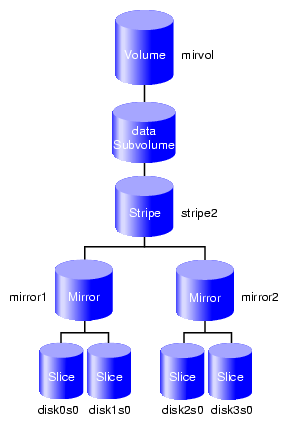
The following example creates a volume with striped mirrors. shown in Figure 7-5. In this example, the volume contains a stripe that consists of two mirrors, each mirroring a slice.
Assign four disks to XVM:
xvm:cluster> label -name disk0 unlabeled/dev/pm/SGI-TP9700--lun0-600a0b8000269d1e0000c9b14d31a849
disk0
xvm:cluster> label -name disk1 unlabeled/dev/pm/SGI-TP9700--lun1-600a0b8000269d1e0000c9b14d31a849
disk1
xvm:cluster> label -name disk2 unlabeled/dev/pm/SGI-TP9700--lun2-600a0b8000269d1e0000c9b14d31a849
disk2
xvm:cluster> label -name disk3 unlabeled/dev/pm/SGI-TP9700--lun3-600a0b8000269d1e0000c9b14d31a849
disk3
Create a slice using all of the usable blocks on each XVM physvol:
xvm:cluster> slice -all disk*
</dev/cxvm/disk0s0>  slice/disk0s0
</dev/cxvm/disk1s0>  slice/disk1s0
</dev/cxvm/disk2s0>  slice/disk2s0
</dev/cxvm/disk3s0>  slice/disk3s0
Create two mirrors, each consisting of two of the slices you have defined. Because you are creating new mirrors that will be written to before they are read, you can specify the -clean option. This indicates that the mirrors do not need to be synchronized on creation.
If you do not specify the -clean option, executing this command initiates a mirror revive, which synchronizes the data on the slices. A message indicating that a revive has begun would be written to the system log, and another message would be written to the system log when the revive completes.
You do not need to define a persistent name for the volume that will be generated.
xvm:cluster> mirror -tempname -clean slice/disk0s0 slice/disk1s0
</dev/cxvm/vol2>  mirror/mirror1
xvm:cluster> mirror -tempname -clean slice/disk2s0 slice/disk3s0
</dev/cxvm/vol3>  mirror/mirror2
Create a stripe that consists of the two mirrors you have defined, naming the volume that will be generated to contain the stripe. This command attaches the mirrors to the stripe.
xvm:cluster> stripe -volname mirvol mirror/mirror1 mirror/mirror2
</dev/cxvm/mirvol>  stripe/stripe2
Display the volume:
xvm:cluster> show -topology mirvol
vol/mirvol                   0 online
  subvol/mirvol/data    71085312 online
     stripe/stripe2        71085312 online,tempname
         mirror/mirror1        35542780 online,tempname
             slice/disk0s0         35542780 online
             slice/disk1s0         35542780 online
         mirror/mirror2        35542780 online,tempname
             slice/disk2s0          35542780 online
             slice/disk3s0          35542780 online
The following procedure reconfigures a filesystem while the filesystem is online by mirroring the data in a new configuration, then detaching the original configuration. It is not necessary to unmount the filesystem to perform this procedure.
| Note: Figure 7-6 shows the configuration of the original filesystem that has been built and mounted. |
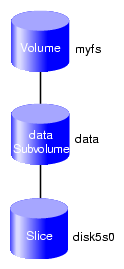
The original filesystem myfs is configured as follows:
xvm:cluster> show -topology myfs
vol/myfs                          0 online
    subvol/myfs/data             102400 online,open
slice/disk5s0 102400 online,open |
Procedure 7-6 reconfigures this filesystem into one that consists of a four-way stripe.
Procedure 7-6. Reconfigure an Online Volume with a Four-way Stripe by using a Mirror
Create the slices that will make up the four-way stripe. The stripe that you are creating should be the same size as the existing filesystem, so in this example each slice is one-quarter the size of the filesystem.
xvm:cluster> slice -length 25600 phys/disk[1234]
</dev/cxvm/disk1s0>  slice/disk1s0
</dev/cxvm/disk2s0>  slice/disk2s0
</dev/cxvm/disk3s0>  slice/disk3s0
</dev/cxvm/disk4s0>  slice/disk4s0
Create the stripe using a system-generated name and the default stripe unit (128 512-byte blocks) and then display the resulting topology of the stripe:
Note: This uses all of the blocks of each slice because the slices are multiples of the stripe unit in size. xvm:cluster> stripe -tempname slice/disk[1234]s0 </dev/cxvm/vol5> stripe/stripe5 xvm:cluster> show -topology stripe5 stripe/stripe5 102400 online,tempname slice/disk1s0 25600 online slice/disk2s0 25600 online slice/disk3s0 25600 online slice/disk4s0 25600 online
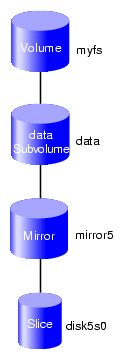
Insert a temporary mirror above the point that will be reconfigured (in this case, slice/disk5s0) and display the resulting topology of the volume:
xvm:cluster> insert mirror slice/disk5s0
</dev/cxvm/myfs>  mirror/mirror5
xvm:cluster> show -topology myfs
vol/myfs                          0 online
    subvol/myfs/data             102400 online,open
        mirror/mirror5               102400 online,tempname,open
            slice/disk5s0                102400 online,open
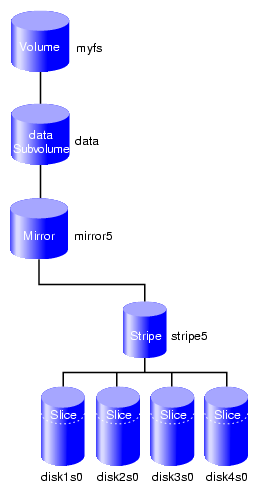
Figure 7-7 shows the configuration of the filesystem myfs after the insertion of the mirror.
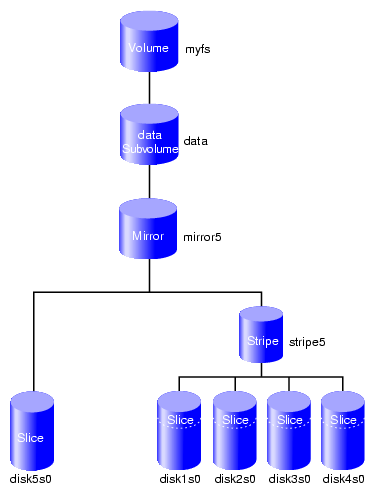
Attach the stripe to the mirror ( mirror5), which will initiate a revive that replicates the data of slice/disk5s0 on stripe5 and display the resulting topology of the volume:
xvm:cluster> attach stripe/stripe5 mirror/mirror5
</dev/cxvm/myfs>  mirror/mirror5
xvm:cluster> show -topology myfs
vol/myfs                          0 online
    subvol/myfs/data             102400 online,open
        mirror/mirror5               102400 online,tempname,reviving:26%
            slice/disk5s0                102400 online,open
            stripe/stripe5               102400 online,tempname,reviving
                slice/disk1s0                 25600 online,open
                slice/disk2s0                 25600 online,open
                slice/disk3s0                 25600 online,open
                slice/disk4s0                 25600 online,open
Figure 7-8 shows the configuration of the filesystem myfs after the stripe has been attached to the mirror.
Note: You can use the show command to display the status of the revive operation. The length of time required depends on the size of the mirror. After the mirror revive completes, detach slice/disk5s0 from the mirror:
xvm:cluster> detach slice/disk5s0
</dev/cxvm/disk5s0>  slice/disk5s0
Note: You must wait for the mirror revive to complete before you can detach the slice because you cannot detach the last valid piece of an open mirror. Until the revive completes, the slice is the only valid leg of the mirror. Figure 7-9 shows the configuration of the filesystem myfs after the original slice has been detached.
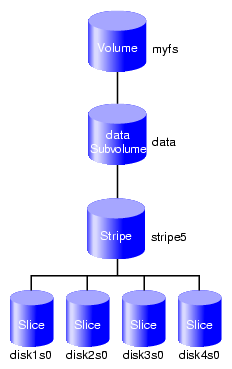
Remove the mirror layer from the tree and display the resulting topology of the volume (which is now a four-way stripe):
xvm:cluster> collapse mirror/mirror5
xvm:cluster> show -topology myfs
vol/myfs                          0 online
    subvol/myfs/data             102400 online,open
        stripe/stripe5               102400 online,tempname,open
            slice/disk1s0                 25600 online,open
            slice/disk2s0                 25600 online,open
            slice/disk3s0                 25600 online,open
            slice/disk4s0                 25600 online,open
Figure 7-10 shows the final configuration of the filesystem myfs.
| Note: In these procedures, the modifications to the volume are performed after you have made a filesystem on the volume and mounted the filesystem. |
The following sections describe example procedures for creating and modifying a volume:
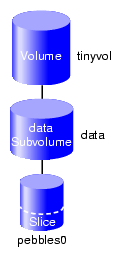
Procedure 7-7 creates a simple volume that contains a single slice. Figure 7-11 shows the simple volume this procedure creates.
Procedure 7-7. Creating a Volume with One Slice
Create a slice on the physvol pebble, naming the generated volume that contains the slice tinyvol:
xvm:cluster> slice -volname tinyvol -start 17601210 -length 177792 pebble
</dev/cxvm/tinyvol> slice/pebbles0
Exit the xvm CLI:
xvm:cluster> exit
Make the filesystem:
# mkfs /dev/cxvm/tinyvol meta-data=/dev/cxvm/tinyvol isize=256 agcount=5, agsize=4445 blks data = bsize=4096 blocks=22224, imaxpct=25 = sunit=0 swidth=0 blks, unwritten=1 naming =version 1 bsize=4096 log =internal log bsize=4096 blocks=1168 realtime =none extsz=65536 blocks=0, rtextents=0For a shared filesystem in a CXFS cluster, mount a filesystem with the CXFS GUI or the cxfs_admin command, as described in CXFS 7 Administrator Guide for SGI InfiniteStorage.
For a local filesystem, put the volume in the fstab file and use the mount command to mount the filesystem. For more information, see the fstab(5) and mount(8) man pages.
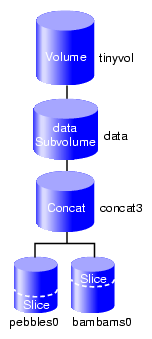
Procedure 7-8 grows the volume created in Procedure 7-7. Figure 7-12 shows the volume after the insertion of a concat to grow the volume.
Procedure 7-8. Growing the Volume
Display the topology of volume tinyvol:
xvm:cluster> show -topology tinyvol
vol/tinyvol                       0 online
    subvol/tinyvol/data          177792 online,open
        slice/pebbles0               177792 online,open
Change the volume tinyvol to include a concat container and display the resulting topology of the volume:
xvm:cluster> insert concat slice/pebbles0
</dev/cxvm/tinyvol> concat/concat3
xvm:cluster> show -topology tinyvol
vol/tinyvol                       0 online
    subvol/tinyvol/data          177792 online,open
        concat/concat3               177792 online,tempname,open
            slice/pebbles0               177792 online,open
Create a free slice on the physvol bambam:
xvm:cluster> slice -start 0 -length 177792 bambam
</dev/xvm/bambams0> slice/bambams0
Attach the slice to tinyvol. There are two different ways to specify the concat volume element to which you are attaching the slice:
Attach the slice by the relative location of the volume element:
xvm:cluster> attach slice/bambams0 tinyvol/data/0
</dev/cxvm/tinyvol> concat/concat3
Attach the slice by referring to the object name of the volume element:
xvm:cluster> attach slice/bambams0 concat3
For information on referring to object names and relative locations in XVM commands, see “Object Names in XVM” in Chapter 4.
Display the results of the attach command:
xvm:cluster> show -topology tinyvol
vol/tinyvol                       0 online
    subvol/tinyvol/data          355584 online,open
        concat/concat3               355584 online,tempname,open
            slice/pebbles0               177792 online,open
            slice/bambams0               177792 online,open
Exit the xvm CLI:
xvm:cluster> exit
Grow the filesystem, using the mount point where you mounted the filesystem in step 4 of Procedure 7-7 (in this example, the mount point is /clusterdisk):
# xfs_growfs /clusterdisk
meta-data=/clusterdisk     isize=256    agcount=5, agsize=4445 blks
data     =                 bsize=4096   blocks=22224, imaxpct=25
         =                 sunit=0      swidth=0 blks, unwritten=1
naming   =version 1        bsize=4096
log      =internal         bsize=4096   blocks=1168
realtime =none             extsz=65536  blocks=0, rtextents=0
data blocks changed from 22224 to 44448
Procedure 7-9 creates a mirror for the data in the filesystem. Figure 7-13 shows the volume after the insertion of the mirror.
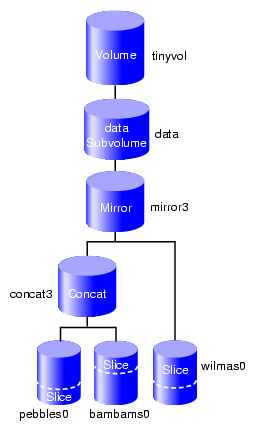
Procedure 7-9. Mirroring Data on the Volume
Change tinyvol to include a mirror container and display the resulting topology:
# xvm
xvm:cluster> insert mirror tinyvol/data/0
</dev/cxvm/tinyvol>  mirror/mirror3
xvm:cluster> show -topology tinyvol
vol/tinyvol                   0 online
    subvol/tinyvol/data      355584 online,open
        mirror/mirror3           355584 online,tempname,open
            concat/concat3           355584 online,tempname,open
                slice/pebbles0           177792 online,open
                slice/bambams0           177792 online,open
Find free space or make a new slice of the same size:
xvm:cluster> slice -start 0 -length 355584 wilma
</dev/cxvm/wilmas0>  slice/wilmas0
Attach the slice to the mirror and display the results:
xvm:cluster> attach slice/wilmas0 tinyvol/data/0
</dev/cxvm/tinyvol>  mirror/mirror3
xvm:cluster> show -top tinyvol
vol/tinyvol                 0 online
     subvol/tinyvol/data    355584 online,open
         mirror/mirror3         355584 online,tempname,open
             concat/concat3         355584 online,tempname,open
                 slice/pebbles0         177792 online,open
                 slice/bambams0         177792 online,open
             slice/wilmas0          355584 online,reviving:11%
Note: In this example, the revive that was initiated when the slices were attached to the mirror has not yet completed.
Figure 7-14 converts the previously created concat to a stripe that replaces the concat in the mirror. Figure 7-14 shows the resulting volume.
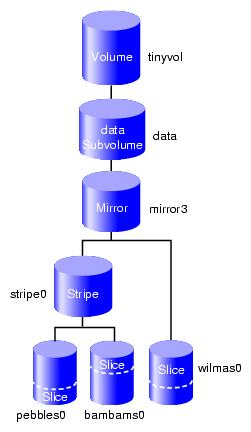
| Note: The new storage must be at least as large as the existing storage in order to attach as a mirror leg (and the same storage in a stripe will be slightly smaller than the concat because it automatically does alignment, where a concat uses all space). |
Procedure 7-10. Converting a Concat to a Stripe using Mirroring
Break the mirror:
xvm:cluster> detach -tempname mirror3/0
</dev/cxvm/vol6>  concat/concat3
Delete the concat object, detaching and keeping its slices:
xvm:cluster> delete -nonslice concat3
</dev/cxvm/pebbles0>  slice/pebbles0
</dev/cxvm/bambams0>  slice/bambams0
Create a stripe using the slices:
xvm:cluster> stripe -tempname -unit 128 slice/pebbles0 slice/bambams0
</dev/cxvm/vol7>  stripe/stripe0
Attach the stripe to the mirror and display the results:
xvm:cluster> attach stripe0 mirror3
xvm:cluster> show -topology tinyvol
vol/tinyvol                 0 online
   subvol/tinyvol/data    355584 online,open
       mirror/mirror3         355584 online,tempname,open
           stripe/stripe0         355584 online,tempname,reviving:5%
               slice/pebbles0         177792 online,open
               slice/bambams0         177792 online,open
           slice/wilmas0          355584 online,open
Note: In this example, the revive that was initiated when the stripes were attached to the mirror has not yet completed.
If you increase the storage size beneath a mirror, the mirror itself will not automatically increase in size. To make it reflect the current size, you can insert and collapse a new mirror. For example:
xvm:local> show -top vol/drives0
vol/drives0                       0 online,accessible
     subvol/drives0/data       111406464 online,accessible
         mirror/mirror0            111406464 online,tempname,incomplete,accessible
             (empty)                           * *
             stripe/stripe1            167109504 online,tempname,accessible
                 slice/drives2              55703232 online,accessible
                 slice/drives3              55703232 online,accessible
                 slice/drives4              55703232 online,accessible
xvm:local> insert mirror stripe1
</dev/lxvm/drives0>  mirror/mirror1
xvm:local> show -top vol/drives0
vol/drives0                       0 online,accessible
     subvol/drives0/data       111406464 online,accessible
         mirror/mirror0            111406464 online,tempname,incomplete,accessible
             (empty)                           * *
             mirror/mirror1            167109504 online,tempname,accessible
                 stripe/stripe1            167109504 online,tempname,accessible
                     slice/drives2              55703232 online,accessible
                     slice/drives3              55703232 online,accessible
                     slice/drives4              55703232 online,accessible
xvm:local> collapse mirror0
xvm:local> show -top vol/drives0
vol/drives0                       0 online,accessible
     subvol/drives0/data       167109504 online,accessible
         mirror/mirror1            167109504 online,tempname,accessible
             stripe/stripe1            167109504 online,tempname,accessible
                 slice/drives2              55703232 online,accessible
                 slice/drives3              55703232 online,accessible
slice/drives4 55703232 online,accessible |
Procedure 7-11 removes the mirror layer from the volume. Figure 7-15 shows the volume after the mirror has been removed.
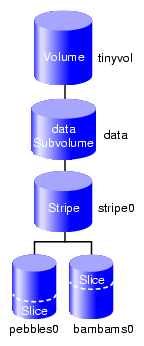
Procedure 7-11. Removing a Mirror
Detach the slice on which the data is mirrored:
xvm:cluster> detach -tempname slice/wilmas0
</dev/cxvm/wilmas0>  slice/wilmas0
Remove the mirror layer and display the results:
xvm:cluster> collapse mirror3
xvm:cluster> show -top tinyvol
vol/tinyvol                       0 online
    subvol/tinyvol/data          355584 online,open
        stripe/stripe0               355584 online,tempname,open
            slice/pebbles0               177792 online,open
            slice/bambams0               177792 online,open
Procedure 7-12 mirrors the individual slices that make up the stripe. Figure 7-16 shows the volume this example yields.
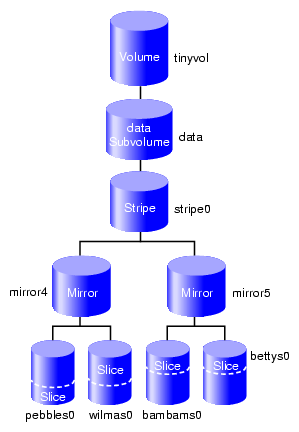
Procedure 7-12. Mirroring Individual Stripe Members
Place the slices within mirror containers and display the results (the following examples demonstrate alternative methods of specifying slices):
xvm:cluster> insert mirror tinyvol/data/0/0
</dev/cxvm/tinyvol>  mirror/mirror4
xvm:cluster> insert mirror slice/bambams0
</dev/cxvm/tinyvol>  mirror/mirror5
xvm:cluster> show -top tinyvol
vol/tinyvol                  0 online
     subvol/tinyvol/data      355584 online,open
         stripe/stripe0           355584 online,tempname,open
             mirror/mirror4          177792 online,tempname,open
                 slice/pebbles0          177792 online,open
             mirror/mirror5          177792 online,tempname,open
                 slice/bambams0          177792 online,open
Find some free space or reuse some unused slices:
xvm:cluster> slice -start 0 -length 177792 betty
</dev/cxvm/bettys0>  slice/bettys0
xvm:cluster> show slice/wilmas0
slice/wilmas0                355584 online,autoname
Attach the slices to the mirrors and display the resulting topology:
Note: wilmas0 is larger than pebbles0 but the mirror will continue to use the smallest size. xvm:cluster> attach slice/wilmas0 tinyvol/data/0/0 </dev/cxvm/tinyvol> mirror/mirror4 xvm:cluster> attach slice/bettys0 stripe0/1 </dev/cxvm/tinyvol> mirror/mirror4 xvm:cluster> show -topology tinyvol vol/tinyvol 0 online subvol/tinyvol/data 355584 online,open stripe/stripe1 355584 online,tempname,open mirror/mirror4 177792 online,tempname,open slice/pebbles0 177792 online,open slice/wilmas0 355584 online,open mirror/mirror5 177792 online,tempname,open slice/bambams0 177792 online,open slice/bettys0 177792 online,open
This section discusses the following:
SGI storage solutions (TP-9XXX and IS- XXX series) based on LSI RAID are designed to use Automatic Volume Transfer (AVT) failover. This means that as soon as you use one of the alternate controller's path, a failover of the LUN is initiated.
To prevent the LUN from alternating between controllers boot time (when the kernel discovers the disk labels), LSI has created an exclusion zone of 8192 blocks at the beginning and the end of each LUN assigned with a host type of SGIAVT.
It is important when planning your XVM volumes and GPT labels to use this exclusion zone to minimize path failover during boot time. Figure 7-17 shows the optimal way of creating XVM volumes and a GPT label on a LUN using LSI RAID:
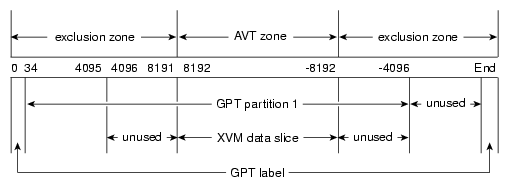
The xvm label command automatically lays out the LUN to meet these requirements. See “Do Not Create Slices Within the RAID Exclusion Zone” in Chapter 3.
| Note: GPT label itself reserves blocks 0- 34 for it own label and also 34 blocks at the end of the disk for a backup of the label. More information on the GPT label is available at: http://en.wikipedia.org/wiki/GUID_Partition_Table |
To make the GPT label, use the Linux parted(8) command. Create the label and then create one partition. This partition will contain the XVM label data followed by the user data. The partition must start on or before block 63 and end at DISK_SIZE-8192. XVM scans the first 64 blocks of the disk to see if there is an XVM label. If no label is found, XVM ignores the disk.
The following examples show how to create a GPT label using the parted command, followed by an example using the xvm label command.
To use the parted command to create a GPT label, perform the following:
# parted /dev/disk/by-path/pci-0000:08:03.1-fc-0x22000011c61dd850-lun-0 GNU Parted 2.3 Using /dev/sdca Welcome to GNU Parted! Type 'help' to view a list of commands. (parted) mklabel gpt Warning: The existing disk label on /dev/sdca will be destroyed and all data on this disk will be lost. Do you want to continue? Yes/No? y (parted) mkpart Partition name? []? File system type? [ext2]? xfs Start? 0 End? -1 Warning: You requested a partition from 0s to 585937499s. The closest location we can manage is 34s to 585937466s. Is this still acceptable to you? Yes/No? y Warning: The resulting partition is not properly aligned for best performance. Ignore/Cancel? i (parted) print Model: SGI ST336753FC (scsi) Disk /dev/sdca: 36.7GB Sector size (logical/physical): 512B/512B Partition Table: gpt Number Start End Size File system Name Flags 1 17.4kB 36.7GB 36.7GB (parted) quit Information: You may need to update /etc/fstab. |
| Note: You can ignore the warning about alignment from parted. You can align the data areas by using the XVM slice -align option. |
To write an XVM label on the GPT-labeled LUN, perform the following:
# xvm label -name test1 /dev/disk/by-path/pci-0000:08:03.1-fc-0x22000011c61dd850-lun-0 test1 Performing automatic probe for alternate paths. Performing automatic path switch to preferred path for phys/test1. # xvm show -v phys/test1 XVM physvol phys/test1 ========================= size: 71670988 blocks sectorsize: 512 bytes state: online,local,accessible uuid: ced104db-2e1c-4d6d-ada5-89c7b3d8ee59 system physvol: no path manager device: /dev/pm/SGI-TP9700--lun0-600a0b8000269d1e0000c9b14d31a849 on host petrel using paths: /dev/disk/by-path/pci-0000:08:03.0-fc-0x22000011c61dd850-lun-0 <sdao 66:128> affinity=none ws /dev/disk/by-path/pci-0000:08:03.0-fc-0x21000011c61dd850-lun-0 <sdaq 66:160> affinity=none /dev/disk/by-path/pci-0000:08:03.1-fc-0x22000011c61dd850-lun-0 <sdca 68:224> affinity=none /dev/disk/by-path/pci-0000:08:03.1-fc-0x21000011c61dd850-lun-0 <sdcb 68:240> affinity=none Disk has the following XVM label: Clusterid: 0 Host Name: petrel Disk Name: test1 Magic: 0x786c6162 (balx) Version 2 Uuid: ced104db-2e1c-4d6d-ada5-89c7b3d8ee59 last update: Tue Jun 26 16:10:21 2012 state: 0x91<online,local,accessible> flags: 0x0<idle> secbytes: 512 label area: 8157 blocks starting at disk block 35 (0 used) user area: 71670988 blocks starting at disk block 8192 Physvol Usage: Start Length Name --------------------------------------------------- 0 71670988 (unused) Local stats for phys/test1 since being enabled or reset: ------------------------------------------------------------------------------ stats collection is not enabled for this physvol |
You can make any number of slices, but the usual case is just one slice. In some cases, especially where striped volumes are used, good performance requires that the slice is aligned on certain boundaries of the underlying LUN. You can align the slice by using the -align option of the slice command
Create the slice and align it (assuming that the boundary of interest is every 768 KB, or 1536 sectors):
xvm:cluster> slice -align 1536 phys/test1
</dev/lxvm/test1s0>  slice/test1s0
Show the resulting physvol:
xvm:cluster> show -v phys/test1
XVM physvol phys/test1
=========================
size: 71670988 blocks  sectorsize: 512 bytes  state: online,local,accessible
uuid: cf38c332-42e4-4d5a-8f01-0f741790ac34
system physvol:  no
path manager device:  /dev/pm/SGI-TP9700--lun0-600a0b8000269d1e0000c9b14d31a849 on host petrel
using paths:
 /dev/disk/by-path/pci-0000:08:03.1-fc-0x21000011c61dd850-lun-0 <sdcb 68:240> affinity=none ws
 /dev/disk/by-path/pci-0000:08:03.1-fc-0x22000011c61dd850-lun-0 <sdca 68:224> affinity=none
 /dev/disk/by-path/pci-0000:08:03.0-fc-0x21000011c61dd850-lun-0 <sdaq 66:160> affinity=none
 /dev/disk/by-path/pci-0000:08:03.0-fc-0x22000011c61dd850-lun-0 <sdao 66:128> affinity=none
Disk has the following XVM label:
  Clusterid:  0
  Host Name:  petrel
  Disk Name:  test1
  Magic:  0x786c6162 (balx)     Version 2
  Uuid: cf38c332-42e4-4d5a-8f01-0f741790ac34
  last update:  Mon Jul  2 16:14:51 2012
  state: 0x91<online,local,accessible> flags: 0x0<idle>
  secbytes:  512
  label area:  8157 blocks starting at disk block 35 (10 used)
  user area:   71670988 blocks starting at disk block 8192

Physvol Usage:
Start        Length       Name
---------------------------------------------------
0            1024         (unused)
1024         71668224     slice/test1s0
71669248     1740         (unused)

Local stats for phys/test1 since being enabled or reset:
------------------------------------------------------------------------------
stats collection is not enabled for this physvol
To determine the size of an XVM volume, use the show command to display the size of the volume's children in 512-byte blocks and add the sizes:
xvm:cluster> show vol/volumename/* |
For example, the following shows that volume drives10 has one child (the data subvolume) and consists of a total of 55,703,232 blocks:
xvm:cluster> show vol/drives10/* subvol/drives10/data 55703232 online,open,accessible |
For example, the following shows that volume drives11 has two children (the data and log subvolumes) and consists of a total of 65,703,232 blocks:
xvm:cluster> show vol/drives11/* subvol/drives11/data 55703232 online,open,accessible subvol/drives11/log 10000000 online,open,accessible |