This chapter discusses the following:
This section discusses the following:
XVM path failover creates an infrastructure for the definition and management of multiple paths to a single disk device or logical unit (LUN). XVM path failover can be used on any supported underlying storage, such as RAID devices.
Figure 6-1 shows a simple case of a host computer connected through a fabric to a RAID that offers four LUNs.
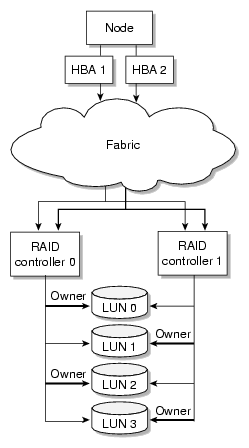
XVM selects a path for I/O from the host through the fabric to the RAID, using the least loaded HBA at the host end and a particular controller at the RAID end. You can improve I/O performance by configuring XVM to select the RAID controllers for each LUN so that the I/O load is distributed across them.
All LUNs are visible from each RAID controller, therefore each LUN can be accessed by each path. However, in this example controller 0 is preferred for LUN 0 and LUN 2 while controller 1 is preferred for LUN 1 and LUN 3. Unnecessary switching between RAID controllers to access a LUN can degrade performance considerably.
If the RAID supports the asymmetric logical unit access (ALUA) feature, XVM will automatically read the RAID's settings for preferred controller for each LUN. If ALUA is not supported, you should add a line with the keyword preferred to the /etc/failover2.conf file to configure the preferred controller.
 | Note: For ALUA RAID, you do not use the affinity or preferred keywords. Instead, set the controller preference in the RAID software. |
If XVM detects an I/O error, it will attempt path failover and select another path. XVM must know the controller used by each path so that it can choose a path through the same controller if possible.
If the RAID supports the ALUA feature, XVM will automatically read each path's controller connection from the RAID's configuration. If ALUA is not supported, you should add a line for each path in the /etc/failover2.conf file that has an affinity setting such as affinity=1, where an affinity value is arbitrarily associated with a controller.
The affinity setting in the /etc/failover2.conf file groups all of the device paths to a particular RAID controller that can be used in harmony without causing LUN ownership changes (which would result in poor disk performance).
For a RAID supporting the ALUA feature, configuration information provided in the /etc/failover2.conf file overrides the equivalent configuration read from the RAID.
| Note: The RAID ALUA feature no effect on HBA configuration. |
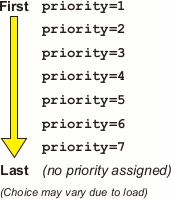
The paths to the selected RAID controller may go through several different HBAs. For a given I/O, the XVM path manager feature chooses a path through the most lightly loaded HBA. However, if the dynamic selection of HBAs for each path is not satisfactory, you may use the priority=1 setting for the line in the /etc/failover2.conf file. There can be one path marked priority=1 for each controller of a LUN. This path will be used first.
Other paths may be marked priority=2 through priority=7. Paths with lower priority numbers will normally be used before paths with higher priority numbers, although multiple paths (chosen in order from priority=2 to priority=7) will be used to handle traffic overflow if required. Paths that have no explicit priority number will normally be used last. Figure 6-2 describes this.
The SGI UV system consists of a number of compute and central-memory nodes interconnected by a NUMAlink ® network. Each node could have an HBA that originates paths to the RAID. The data for a particular I/O is on some node and XVM selects an HBA that is close to the data (according to the NUMAlink) in order to minimize use of NUMAlink bandwidth. On an SGI UV system, the selection of an I/O path is made by considering both the proximity of the data buffer to the HBA and the current I/O load on the HBA. You can optionally use the priority tag to provide an additional bias toward a particular path.
This section discusses the following:
The TP9100 and RM610/660 RAID units do not have any host type failover configuration. Each LUN should be accessed via the same RAID controller for each node in the cluster because of performance reasons. These RAIDs behave and have the same characteristics as the SGIAVT mode discussed below.
TP9100 1 GB and 2 GB SGIAVT mode requires that the array is set to multitid.
The TP9300, TP9500, and TP9700 RAID SGIAVT mode has the concept of LUN ownership by a single RAID controller. However, LUN ownership change will take place if any I/O for a given LUN is received by the RAID controller that is not the current owner. The change of ownership is automatic based on where I/O for a LUN is received and is not done by a specific request from a host failover driver. The concern with this mode of operation is that when a node in the cluster changes I/O to a different RAID controller than that used by the rest of the cluster, it can result in severe performance degradation for the LUN because of the overhead involved in constantly changing ownership of the LUN.
XVM failover requires that you configure TP9300, TP9500, TP9700, and S330 RAID units with SGIAVT host type and the 06.12.18. xx code or later be installed.
TP9700 use of SGIAVT requires that 06.15.17 xx. code or later be installed.
This section discusses the following steps to configure the /etc/failover2.conf file:
Use the XVM show unlabeled command in both the local and (if using CXFS) cluster domains to see the disks available to XVM. For example, the following shows that there are 5 unlabeled LUNs:
# xvm show unlabeled unlabeled/dev/pm/SGI-TP9700--lun0-600a0b8000269d1e0000c9b14d31a849 * * unlabeled/dev/pm/SGI-TP9700--lun1-600a0b8000269d1e0000c9b14d31a849 * * unlabeled/dev/pm/SGI-TP9700--lun2-600a0b8000269d1e0000c9b14d31a849 * * unlabeled/dev/pm/SGI-TP9700--lun3-600a0b8000269d1e0000c9b14d31a849 * * unlabeled/dev/pm/SGI-TP9700--lun4-600a0b8000269d1e0000c9b14d31a849 * * |
To see more information about a specific LUN, use the show command to display verbose information:
# xvm show -v /dev/pm/pathname |
For example:
# xvm show -v /dev/pm/SGI-TP9700--lun0-600a0b8000269d1e0000c9b14d31a849 Unlabeled disk unlabeled/dev/pm/SGI-TP9700--lun0-600a0b8000269d1e0000c9b14d31a849 ================================ using paths: /dev/disk/by-path/pci-0000:08:03.0-fc-0x21000011c61dd97e-lun-0 <sdbm68:0> affinity=none ws /dev/disk/by-path/pci-0000:08:03.1-fc-0x21000011c61dd97e-lun-0 <sdq65:0> affinity=none ws /dev/disk/by-path/pci-0000:08:03.0-fc-0x22000011c61dd97e-lun-0 <sdbf67:144> affinity=none ws /dev/disk/by-path/pci-0000:08:03.1-fc-0x22000011c61dd97e-lun-0 <sdp8:240> affinity=none ws |
The above output shows that there are four paths to the LUN and, because affinity=none, that the affinities have not been configured. An ALUA LUN is configured automatically, therefore this output indicates that this is a non-ALUA LUN and therefore you should configure the path failover in the /etc/failover2.conf file.
The four lines showing paths can be used as lines of the /etc/failover2.conf file, with configuration for each path added to its line. For example:
/dev/disk/by-path/pci-0000:08:03.0-fc-0x21000011c61dd97e-lun-0 <sdbm68:0> affinity=1 /dev/disk/by-path/pci-0000:08:03.1-fc-0x21000011c61dd97e-lun-0 <sdq65:0> affinity=1 /dev/disk/by-path/pci-0000:08:03.0-fc-0x22000011c61dd97e-lun-0 <sdbf67:144> affinity=2 preferred /dev/disk/by-path/pci-0000:08:03.1-fc-0x22000011c61dd97e-lun-0 <sdp8:240> affinity=2 |
In another example, suppose that the following LUN is not already represented in the /etc/failover2.conf file and it produces the following show output:
# xvm show -v /dev/pm/SGI-TP9700--lun1-600a0b8000269d1e0000c9b14d31a849 Unlabeled disk unlabeled/dev/pm/SGI-TP9700--lun1-600a0b8000269d1e0000c9b14d31a849 ================================ using paths: /dev/disk/by-path/pci-0000:08:03.1-fc-0x20360080e524a0d2-lun-1 <sdcu70:32> <ALUA opt> affinity=0 ws /dev/disk/by-path/pci-0000:08:03.1-fc-0x20460080e524a0d2-lun-1 <sdcq69:224> <ALUA opt> affinity=0 ws /dev/disk/by-path/pci-0000:08:03.1-fc-0x20370080e524a0d2-lun-1 <sdcm69:160> <ALUA nonopt pref> affinity=1 /dev/disk/by-path/pci-0000:08:03.1-fc-0x20470080e524a0d2-lun-1 <sdci69:96> <ALUA nonopt pref> affinity=1 /dev/disk/by-path/pci-0000:08:03.0-fc-0x20470080e524a0d2-lun-1 <sdam66:96> <ALUA nonopt pref> affinity=1 /dev/disk/by-path/pci-0000:08:03.0-fc-0x20370080e524a0d2-lun-1 <sdaq66:160> <ALUA nonopt pref> affinity=1 /dev/disk/by-path/pci-0000:08:03.0-fc-0x20360080e524a0d2-lun-1 <sday67:32> <ALUA opt> affinity=0 ws /dev/disk/by-path/pci-0000:08:03.0-fc-0x20460080e524a0d2-lun-1 <sdau66:224> <ALUA opt> affinity=0 ws |
The above output indicates that the paths with affinity=0 are the working set (ws), which is set of paths that are currently used for I/O. Activity is only shown for the current working set. A working set starts out as all of the paths of the preferred affinity, but paths can be removed if they get errors, and the whole working set can be changed to the paths of another controller by a failover to another affinity.
In this case, the path reported for the LUN contains the ALUA tag, which indicates that the RAID has the ALUA feature set. The affinity= values are integers based on the RAID's target port group number.
The following tags provide additional information about the ALUA LUN:
| Tag | State |
| nonopt | This path is not optimized. That is, it runs through the RAID controller that provides slower performance. |
| opt | This path is optimized. That is, it runs through the RAID controller that currently gives it the best performance. |
| pref | This affinity is configured as preferred in the RAID. |
For ALUA RAIDs, XVM will use these configurations to select preferred paths if there are no lines for this LUN in the /etc/failover2.conf file. If you require changes, you should make them via the RAID software (recommended) or else override them in the /etc/failover2.conf file.
For non-ALUA RAIDs that have no /etc/failover2.conf file entries, an arbitrary path is chosen by path manager for I/O.
The path report lines from the following xvm command are usable as a preliminary /etc/failover2.conf file:
# xvm show -v unlabeled |
The persistent pathname is used by xvm to associate the other attributes on the line with the path. Other parts of the show output should be removed, for instance by using the following command line:
# xvm show -v unlabeled | grep -e affinity > /etc/failover2.conf |
In this preliminary file, non-ALUA LUNs will have a affinity=none setting. (ALUA LUNs will automatically have an affinity= integer setting that is based on the RAID configuration, therefore it is not necessary to include them in the /etc/failover2.conf file.
| Note: Normally, if changes for an ALUA LUN are required, you should make them via the RAID. However, you can override the settings via the /etc/failover2.conf by including the path and including the affinity=integer and preferred keywords, just as for non-ALUA LUNs. (If the nonopt , opt, and pref keywords are present in the /etc/failover2.conf, they are ignored). See: |
This section discusses the following:
| Note: You can also use the mk_failover2(8) command to create the failover2.conf file for CXFS clients. See CXFS 7 Client-Only Guide for SGI InfiniteStorage. |
The following rules apply to the /etc/failover2.conf file for non-ALUA LUNs:
The order of the paths listed in the /etc/failover2.conf file is not significant.
The valid range of affinity values is affinity=0 (lowest and default) through affinity=15 (highest). The path used starts with the affinity of the currently used path and increases from there. Paths with the same affinity number are all tried before XVM failover moves to the next highest affinity number. For example, if the currently used path is affinity=2, all affinity=2 paths are tried, then all affinity=3, then all affinity=4, and so on; after affinity=15, failover wraps back to affinity=0 and starts over.
By default, every path has a default of affinity=0.
A path that fails will be removed from the working set, leaving the rest of the working set to continue handling the I/O. If there are no more paths in the working set, then failover to the next affinity will occur.
Strings within < > characters in the file are considered comments and will be ignored.
If a path is not actually present, none of the attributes assigned to it in the /etc/failover2.conf file will take effect. If a path is not available, XVM cannot determine the LUN to which an /etc/failover2.conf entry is referring.
Note: If a preferred path ceases to be available, you must edit the /etc/failover2.conf file so that path selection takes place correctly for the remaining paths. You can then inject the changes to into the kernel by using the following command: xvm:cluster> foconfig -init
The affinity values for a particular RAID controller should be identical on every node in the CXFS cluster.
Note: A given affinity group must all go to the same RAID controller.
Usually, you want to configure all paths to the same controller with the same affinity value and thus only two affinity values are used. To make it easier to understand and maintain the /etc/failover2.conf file, it is best to follow a consistent strategy for setting path affinity. Consider the following:
Because the default is affinity=0, it would be sufficient to include entries only for those paths that are a non-zero affinity. It would also be sufficient to include a preferred entry for the preferred path only. However, SGI recommends including definitions for all paths.
You may find it useful to specify values starting with affinity=1 and specify a nonzero value for all paths. This makes it easy to detect those paths that have not yet been configured because they are assigned the default of affinity=0. For example, if you added a new HBA but forgot to add its paths to the /etc/failover2.conf file, all of its paths would have an affinity=0, which could result in LUN ownership changes if some paths point to controller A and others point to controller B. Using this convention would not avoid this problem, but would make it easier to notice. If you use this convention, you must do so for the entire cluster.

Following is a simple strategy that works well for most sites:
Set to affinity=1 for all paths to a LUN that go through controller A
Set to affinity=2 for all paths to a LUN that go through controller B
| Note:
For SGI InfiniteStorage platforms, the WWN of a path to controller A always uses an even number in the fourth digit of the hexadecimal name. For example:
The WWN of a path to controller B always uses an odd number in the fourth digit of the hexadecimal name. For example:
|
For a non-ALUA RAID, add the preferred key to one path for each LUN. To determine which path to identify as preferred , consult the TPSSM GUI or the RAID Array profile.
For an ALUA RAID, the ALUA feature provides the affinities and a preferred affinity.
You can set HBA usage for a LUN by adding the priority= n setting to some or all of the /etc/failover2.conf lines for that LUN. The value of the priority ranges from 1 (highest priority) to 7; lines without a priority=n setting are given the lowest priority, the same as priority=0 .
If several paths with the same affinity have the same priority, then one of them will be selected arbitrarily if these are the highest priority paths available in the affinity.
Because the affinity and preferred settings are provided automatically by an ALUA LUN, the only need for an /etc/failover2.conf file is to bias the selection of an HBA by providing priority values; in this case, you could add the high-priority paths to the file.
Do the following:
Display the paths of an unlabeled ALUA LUN:
petrel:~ # xvm show -v /dev/pm/60080e500024a0d20000046f5006d2c2
Unlabeled disk unlabeled/dev/pm/60080e500024a0d20000046f5006d2c2
================================
using paths:
/dev/disk/by-path/pci-0000:08:03.1-fc-0x20360080e524a0d2-lun-2 <sdcv 70:48> <ALUA opt pref> affinity=0 ws
/dev/disk/by-path/pci-0000:08:03.1-fc-0x20370080e524a0d2-lun-2 <sdcn 69:176> <ALUA nonopt> affinity=1
/dev/disk/by-path/pci-0000:08:03.1-fc-0x20460080e524a0d2-lun-2 <sdcr 69:240> <ALUA opt pref> affinity=0 ws
/dev/disk/by-path/pci-0000:08:03.1-fc-0x20470080e524a0d2-lun-2 <sdcj 69:112> <ALUA nonopt> affinity=1
/dev/disk/by-path/pci-0000:08:03.0-fc-0x20470080e524a0d2-lun-2 <sdan 66:112> <ALUA nonopt> affinity=1
/dev/disk/by-path/pci-0000:08:03.0-fc-0x20370080e524a0d2-lun-2 <sdar 66:176> <ALUA nonopt> affinity=1
/dev/disk/by-path/pci-0000:08:03.0-fc-0x20360080e524a0d2-lun-2 <sdaz 67:48> <ALUA opt pref> affinity=0 ws
/dev/disk/by-path/pci-0000:08:03.0-fc-0x20460080e524a0d2-lun-2 <sdav 66:240> <ALUA opt pref> affinity=0 ws
Choose a path of each affinity that uses the same HBA and add just those paths to the /etc/failover2.conf file, giving each a high priority value:
/dev/disk/by-path/pci-0000:08:03.1-fc-0x20370080e524a0d2-lun-2  priority=1
/dev/disk/by-path/pci-0000:08:03.1-fc-0x20460080e524a0d2-lun-2  priority=1
Label and show the LUN to see the priority selection take effect (line breaks shown for readability):
petrel:~ # xvm label -name clalua2 /dev/pm/60080e500024a0d20000046f5006d2c2
clalua2
Performing automatic probe for alternate paths.
Performing automatic path switch to preferred path for phys/clalua2.

petrel:~ # xvm show -v clalua2
XVM physvol phys/clalua2
=========================
size: 1142784000 blocks  sectorsize: 512 bytes  state: online,local,accessible
uuid: 0f605448-d84b-4029-962c-00e45970bfc2
system physvol:  no
path manager device:  /dev/pm/60080e500024a0d20000046f5006d2c2 on host petrel
using paths:
/dev/disk/by-path/pci-0000:08:03.1-fc-0x20360080e524a0d2-lun-2 <sdcv 70:48> <ALUA opt pref> affinity=0 ws
/dev/disk/by-path/pci-0000:08:03.1-fc-0x20370080e524a0d2-lun-2 <sdcn 69:176> <ALUA nonopt> affinity=1
    priority=1
/dev/disk/by-path/pci-0000:08:03.1-fc-0x20460080e524a0d2-lun-2 <sdcr 69:240> <ALUA opt pref> affinity=0 ws
    priority=1
/dev/disk/by-path/pci-0000:08:03.1-fc-0x20470080e524a0d2-lun-2 <sdcj 69:112> <ALUA nonopt> affinity=1
/dev/disk/by-path/pci-0000:08:03.0-fc-0x20470080e524a0d2-lun-2 <sdan 66:112> <ALUA nonopt> affinity=1
/dev/disk/by-path/pci-0000:08:03.0-fc-0x20370080e524a0d2-lun-2 <sdar 66:176> <ALUA nonopt> affinity=1
/dev/disk/by-path/pci-0000:08:03.0-fc-0x20360080e524a0d2-lun-2 <sdaz 67:48> <ALUA opt pref> affinity=0 ws
/dev/disk/by-path/pci-0000:08:03.0-fc-0x20460080e524a0d2-lun-2 <sdav 66:240> <ALUA opt pref> affinity=0 ws
Suppose the following:
There is one PCI card with HBA two ports (highlighting the name differences in bold):
pci-0000:04:00.0
pci-0000:04:00.1
               ^
There are two RAID controllers (controller A and controller B), each with two ports. Each controller port has a unique world wide number (WWN) that is part of the persistent pathname, as follows (highlighting the name differences in bold):
Controller A ports:
0x202400a0b8119204
0x204400a0b8119204
    ^^
Controller B ports:
0x201500a0b8119204
0x203500a0b8119204
    ^^
Note: These details may vary depending on the RAID vendor. Controller B is the preferred controller for LUN 1.
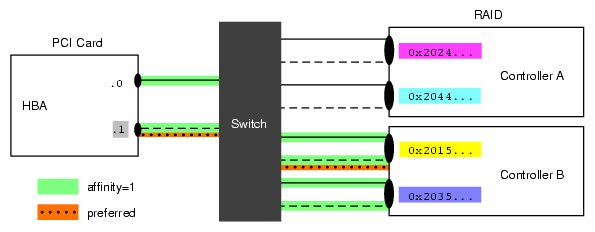
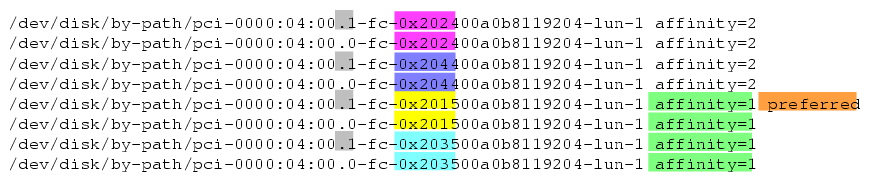
In this situation, the LUN has eight paths (via two PCI cards, two RAID controllers, and two ports on the controllers). You want to group the paths so that all paths to controller B will be tried before any of the paths to controller A. To do this, use the following settings in the /etc/failover2.conf file:
Two affinity groups for lun1 :
affinity=1 (highlighted in green) for the paths that go to controller B ( 0x2015... and 0x20 35...)
affinity=2 for the paths that go to controller A (0x2024... and 0x2044...)
A preferred path that goes to one of the ports in controller B (highlighted in orange)
Figure 6-3 depicts the paths, highlighting the four affinity=1 paths in green and the one preferred path in orange. Figure 6-4 shows the corresponding portion of the /etc/failover2.conf file.
Given the above, failover will exhaust all paths to lun1 from controller B (with affinity=1 and the preferred path) before moving paths that use controller A (with affinity=2).
Assign the disks to XVM by using the label command. Paths to the same LUN are detected automatically by the path-manager feature. If you run the label command and exit the xvm CLI, the XVM autoprobe feature can probe for additional paths (see “Controlling Automatic Probing with the label and set Commands” in Chapter 5). In a CXFS environment, the CXFS reprobe script is run automatically in order to discover new alternate paths.
The contents of the /etc/failover2.conf file is pushed to the kernel upon reboot or when you execute the following command:
xvm:cluster> foconfig -init |
| Note: To force a change of affinity immediately, use the foswitch command as described in “Setting All LUNs to the Preferred Path”. |
You should examine the messages produced by the foconfig command to find potential errors in the /etc/failover2.conf file. For more messages, use the -verbose option.
The XVM foconfig command allows you to override the default /etc/failover2.conf filename with the -f option. The following command pushes to the kernel the contents of the file myfailover2.conf in the current working directory:
xvm:cluster> foconfig -f myfailover2.conf |
You can switch the path used to access an XVM physvol by using the XVM foswitch command. This enables you to set up a new working set on a running system, without rebooting. This section discusses the following:
To set all physvols to their preferred path, enter the following:
xvm:local> foswitch -preferred phys |
The following command switches to the preferred path for phys/lun33 for all nodes in the cluster:
xvm:cluster> foswitch -cluster -preferred phys/lun33 |
The following command requests that a path that has been removed from a working set because of I/O errors be added back to the working set so that it can be retried (if it is already in the working set, there is no change):
xvm:cluster> foswitch -dev 8:32 phys/lun22 |
The following command switches physvol phys/lun33 to the affinity=2 group if the working set does not have affinity=2:
xvm:local> foswitch -setaffinity 2 phys/lun33 |
| Note: If the working set already had affinity=2, no switch is made. |
The following command switches physvol phys/lun33 to a path of affinity=2 for all nodes in the cluster if the working set does not have affinity=2:
xvm:cluster> foswitch -cluster -setaffinity 2 phys/lun33 |
| Note: In the cluster domain, you should include the -cluster option so that the affinity setting is consistent for all nodes in the cluster. |