This chapter discusses the following:
The XVM volume manager combines underlying physical disk storage into a single logical unit, known as a logical volume (abbreviated to volume). Volumes behave like standard disk partitions and you can use them as arguments anywhere that you can specify a partition.
A volume allows a filesystem or raw device to consist of multiple physical disks. Using volumes can also increase disk I/O performance because a volume can be distributed (or striped) across multiple disks. Volumes can also be used to mirror data on different disks.
XVM provides the following features:
The xvm(8) command-line interface and the XVM Manager graphical user interface (GUI) provides access to the tasks that help you set up and administer your volumes. The GUI provides icons representing status and structure. You can access the GUI via the xvmgr(1) command or via the web.
XVM supports a cluster environment in association with the CXFS clustered filesystem product, providing an image of the XVM devices across all nodes in a cluster and allowing for administration of XVM devices from any node in the cluster. Disks within a cluster can be assigned dynamically to the entire cluster (the cluster domain) or to individual nodes within the cluster (the local domain ).
 | Note: If the appropriate services are not started, XVM cannot be set to the cluster domain. See “CXFS Service Requirements for Cluster Domain” in Chapter 2. |
See:
CXFS 7 Administrator Guide for SGI InfiniteStorage
CXFS 7 Client-Only Guide for SGI InfiniteStorage
The elements that make up a volume can be layered in any configuration. For example, you can mirror disks at any level of the volume configuration.
The layout of a disk is independent of the underlying device driver. XVM determines how the disk is sliced. Because of this, XVM can divide a disk into an arbitrary number of slices.
XVM supports thousands of volumes on a single disk and allows for the expansion of the label file as needed. There are no restrictions on volume width, which is the number of volume elements that make up the widest layer of the XVM topology tree for a volume.
XVM lets you specify the read policy for a mirror, allowing you to read from the mirror in a sequential or round-robin fashion, depending on the needs of your configuration. You can also specify whether a particular mirror leg is to be preferred for reading.
XVM also lets you specify that a mirror does not need to be synchronized at creation or that a particular mirror (such as a mirror of a scratch filesystem) will never need to be synchronized.
XVM tracks statistics at every level of the topology tree and provides type-specific statistics. Statistics are tracked per host and interfaces are provided to Performance Co-Pilot™ to present a global state.
A disk containing XVM volumes can be added to a running system and the system will be able to read the XVM configuration information without rebooting. This feature allows you to move disks between systems and to configure a new system from existing disks that contain XVM volumes.
The XVM administration commands provide the ability to insert and remove components from existing disk configurations, allowing you to grow and modify a disk configuration on a running system with open volumes.
Persistent configuration and attribute information for a volume is distributed among all disks that are part of the volume. The information is stored in a label file on a disk, removing any dependence on the filesystem. Whole sets of disks can be moved within and between systems.
Volumes support aggregate storage through concatenation and striping. Volumes also support redundant storage through mirroring.
A volume can support multiple mutually exclusive address spaces in the form of subvolumes. Each subvolume within a volume has a different usage defined by the application accessing the data. XVM supports multiple subvolume types. See “Subvolume” in Chapter 2.
When a host performs an I/O operation and it fails due to connection problems, XVM will automatically try all paths that the host has to the disk by switching (failing over) from an inaccessible path to the alternate paths in turn until a usable path is found, or until all paths are found to fail.
XVM supports both asymmetric logical unit access (ALUA) RAID, which simplifies the setup of automatic path failover, and non-ALUA RAID.
XVM volumes are composed of a hierarchy of logical storage objects, each of which is known as a volume element (referred to as a ve in some commands):
Volumes are composed of subvolumes
Subvolumes are composed of stripes, mirrors, concats (for concatenated volume elements), and slices, combined in whatever hierarchy suits your system needs
Stripes, mirrors, and concats are ultimately made up of slices
Slices define an area of physical storage
The concat, stripe, and mirror volume elements can be arranged and stacked arbitrarily. There is a limit of ten levels from the volume through the slice, inclusive. The hierarchy of elements that compose a volume is known as the topology tree.
Figure 1-1 shows an example of a simple XVM volume. In this example, there is one data subvolume that consists of a single two-way stripe.

Figure 1-2 shows an XVM volume with two subvolumes (data and log) and a mirrored stripe in the data subvolume.
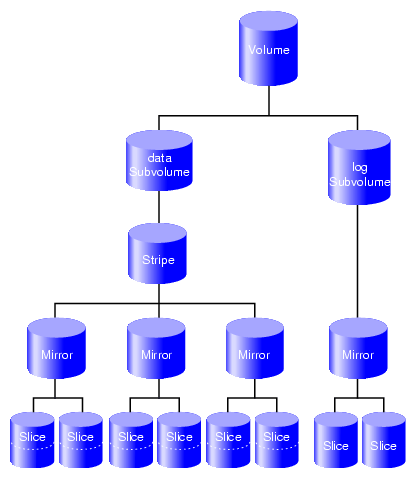
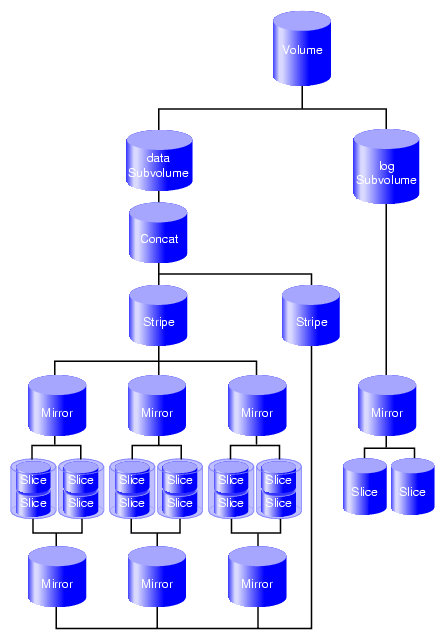
Figure 1-3 shows the example illustrated in Figure 1-2 after the insertion of a concat. In Figure 1-3, additional slices were created on the unused disk space on the disks that made up the data subvolume. These slices were used to create a parallel mirrored stripe, which was combined with the existing mirrored stripe to make a concat.Two slices are on each physical disk in the data subvolume.
For more details, see “Composition of XVM Volumes” in Chapter 2.
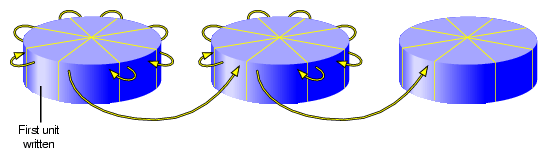
A volume can include slices from several physical disk drives. If the volume is not striped, data is written to the first volume element until that element is full. Figure 1-4 shows the order in which data is written to a concat consisting of three slices. In this figure, each wedge represents a unit of data that is written to disk. To some degree, the data is written in parallel to the various slices.
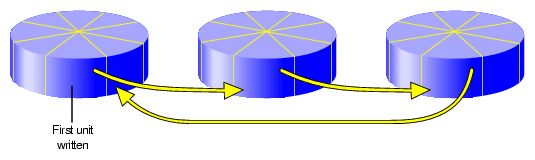
If the volume is striped, an amount of data called the stripe unit is written to each underlying volume element in a round-robin fashion. Figure 1-5 shows the order in which data is written to a striped volume element with a three-way stripe. Each wedge represents a stripe unit of data. One stripe unit of data is written to each stripe component, with some degree of parallelism.
As an example of configuring stripes to improve performance, consider a situation where your typical I/O activity is 2 MB in size and you have four disks. If you simply concatenate the disks into one volume, the I/O will all go to one disk until it is full, as shown in Figure 1-6.
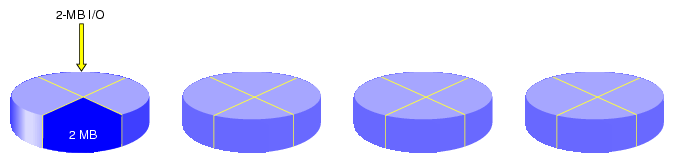
However, if you stripe the four disks using a stripe unit of 512 KB, then a 2-MB I/O activity will use all four disks in parallel, each working with 512 KB of data, as shown in Figure 1-7.

For more information, see “Use an Appropriate Stripe Unit Size and Alignment” in Chapter 3.
For each I/O operation, XVM selects the I/O path that is the least heavily loaded at the moment and is connected to the proper RAID controller. Additional tuning may be done in the /etc/failover2.conf file:
For ALUA RAID, the preferred RAID controller for each LUN is set in the RAID itself, and XVM reads that setting.
For non-ALUA RAID, you must define the preferred RAID controller as well as the grouping of paths to each specific controller (to prevent unnecessary switching between RAID controllers, which can degrade performance considerably) by using the preferred and affinity keywords.
In either case, the likelyhood of an I/O operation using a particular path may be adjusted by using the priority keyword.
For details, see Chapter 6, “XVM Path Failover”.
XVM is released in the SGI InfiniteStorage Software Platform (ISSP) media kit and includes the following packages for SUSE® Linux Enterprise Server (SLES®) Red Hat® Enterprise Linux (RHEL):
Kernel module:
kmod-xvm (RHEL) sgi-xvm-default (SLES) Commands:
sgi-pm-commands sgi-xvm-commands XVM Manager GUI:
sgi-sysadm_xvm-client sgi-sysadm_xvm-server sgi-sysadm_xvm-web
For installation information, see the ISSP release note.
The path-manager feature on Linux nodes provides a mechanism to add features to improve I/O performance without restricting those features to XVM volumes. The path-manager feature applies to all supported SLES servers/clients and RHEL 5 or later clients.
The path-manager feature includes the following:
Automatic selection of an I/O path on an SGI UV™ system to minimize the nonuniform memory access (NUMA) interconnect traffic
Path failover functionality
The /etc/xvm/xvm_persistent_name_scan.sh script selects paths for management by the path-manager feature. The script returns the persistent names of all paths to LUNs that could possibly use an xvm label. See the xvm_persistent_name_scan(8) man page.
If required to support new hardware, you can create a customized version of the script and place it in the following location:
/etc/xvm/custom_persistent_name_scan.sh
If the above customized script exists, XVM will execute it rather than /etc/xvm/xvm_persistent_name_scan.sh.
The /etc/xvm/pm_bypass_single_path.sh script connects a path directly to XVM, bypassing management by the path-manager feature. This is appropriate for paths that are connected directly to a PCI bus on the processor, such as for SSDs. If necessary, the root user can modify this script to support new hardware. See the pm_bypass_single_path(8) man page.
| Note: Default use of the path-manager feature does not require any additional actions on the part of a system administrator. |