Chapter 2, “The MPK Programming Model”, describes a simple MPK program. This chapter describes how MPK supports the implementation of culling.
The typical single-pipe application executes culling either in a separate thread or does the culling on-the-fly while the database is rendered. In addition, multipipe applications may execute culling on different levels within a compound tree. This makes possible a number of culling configurations for a given rendering setup.
This chapter has the following two sections:
“Configuring” explains how the different culling schemes can be specified using the config file format or the MPK API.
“Data Handling” describes how to unlock the full flexibility of MPK's culling infrastructure.
Each compound in MPK has an operation mode which defines if it should execute draw, cull, or cull and draw operations. If unspecified, this mode is inherited from the parent or is cull-draw (cull and draw) for the topmost compound.
In order to update the 2D decomposition shown in Figure 4-1, MPK will invoke first the update cull callback and then the update draw callback on the channels “buffer” and “destination”.
 | Note: If culling should be disabled, the operation mode of the top-level compound simply has to be set to draw, which will be inherited by all children. |

Because the same channel executes the cull and draw operation, the execution of the tasks is serialized. A cull compound can be used to parallel the cull and draw operation. Note that channels used only for culling typically reside on a window having no drawable; that is, the window attribute hint drawable is set to none. Using parallelized culling for both source channels, Figure 4-2 shows the decomposition from Figure 4-1.

Children of a cull compound decompose the cull and draw task. In the given example, channel “cull1” executes the culling for channel “buffer”, which executes only the draw operation. The ASYNC flag can be used on cull compounds to execute the culling asynchronously from the drawing. This introduces one additional frame of latency, because the cull regions process frame N while the draw regions render frame N–1.
If the system has enough resources, it may be desirable to first cull the data for the destination view and then redefine culling on each source channel. This can be done using a cull compound to decompose the destination compound. Figure 4-3 shows the tree for the 2D configuration.
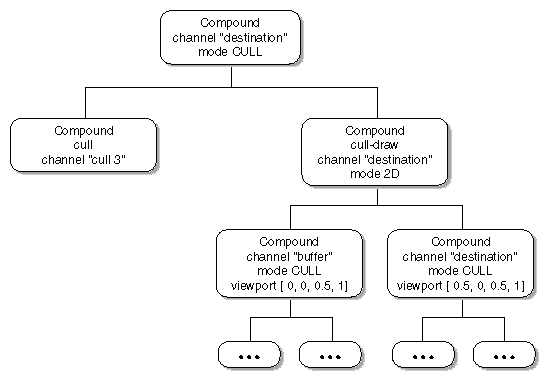
When this configuration is updated, channel “cull3” first culls the whole database, and the result is culled again by channels “cull1” and “cull2” for the appropriate sub-frustum.
The culling for a single channel can be decomposed across multiple cull threads by specifying multiple cull regions using different channels, as shown in Figure 4-4.
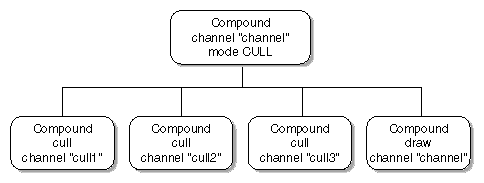
When the data handling API (described in the next section ) is used, MPK distributes the data appropriately across the cull regions. Otherwise, it is the application's responsibility to do the correct data passing.
The cull compound can also be used to decompose the drawing across multiple draw regions. The recomposition uses the same algorithm as for database decomposition.
MPK provides functions to facilitate data passing between the individual cull and draw operations. You describe the frame from the application thread. To do so, decompose mpkConfigFrame() into mpkConfigFrameBegin() and mpkConfigFrameEnd(). Between the latter two calls, describe the scene using mpkConfigFrameData(), as outlined in Example 4-1.
Example 4-1. Describing the Data Used for a Frame
while( !exit )
{
    // update database
    ...
    mpkConfigFrameBegin( config, framedata );

    // send database
    mpkConfigFrameData( config, data1 );
    ...
    mpkConfigFrameData( config, dataN );

    mpkConfigFrameEnd( config )
}
|
MPK distributes this data to the topmost cull or draw processes in the configuration. You can retrieve the data using mpkChannelNextData() and mpkChannelCheckData(). Cull callbacks can pass the visible data to further cull or draw callbacks using mpkChannelPassData(), as outlined in Example 4-2.
Example 4-2. A Simple Cull Callback
void cullChannel( MPKChannel *channel, void *data )
{
    // get frustum to cull against
    float frustum[6], xfm[16];

    mpkChannelGetFrustum( channel, frustum, xfm );

    // apply application-specific view
    ...

    // cull all data
    MPKFrameData *data;
    while( (data = mpkChannelNextData( channel )) != NULL )
    {
        // test object[s] described in data against frustum
        ...

        if( isVisible )
            mpkChannelPassData( channel, data );
    }
}
|
For culling implementations using a hierarchical approach, the function mpkChannelPutData() is provided to enable better parallelization between multiple cull threads. The function mpkChannelPutData() puts data back to the input queue used by all cull regions of the same cull compound. A typical use is outlined in the pseudo code in Example 4-3 , where the top-level bounding box is passed using mpkConfigFrameData(). Without using mpkChannelPutData(), the whole database would be processed by only one cull thread.
Example 4-3. Hierarchical Culling Using mpkChannelPutData()
void cullChannel( MPKChannel *channel, void *data )
{
    // get frustum to cull against
    float frustum[6], xfm[16];

    mpkChannelGetFrustum( channel, frustum, xfm );

    // apply application-specific view
    ...

    // cull all data
    MPKFrameData *data;
    while( (data = mpkChannelNextData( channel )) != NULL )
    {
        // test object[s] described in data against frustum
        ...

        switch( visibility )
        {
            case FULLY_VISIBLE:
                mpkChannelPassData( channel, data );
                break;

            case PARTIALLY_VISIBLE:
                foreach child of data
                    mpkChannelPutData( channel, child );
                break;
        }
    }
}
|
Finally, you must modify the update draw callback to draw the data which is passed, not the full database. In order to do so, again use mpkChannelCheckData() and mpkChannelNextData(). Example 4-4 shows pseudo code for such a callback.
Example 4-4. An Update Draw Callback Using the Cull Queues
void updateChannel( MPKChannel *channel, void *data )
{
    // apply frustum, transformation, OpenGL state
    ...

    MPKFrameData *data;
    while( (data = mpkChannelNextData( channel )) != NULL )
    {
        // draw object[s] described in data
        ...
    }
}
|
In order to deallocate the data passed to MPK using mpkConfigFrameData() or mpkChannelPassData(), use the MPKConfig's reference-data or dereference-data callback, set by mpkConfigSetFrameDataRefCB() or mpkConfigSetFrameDataUnrefCB().
MPK provides the following three global attributes to tune the performance of the queues used to connect the various callbacks:
Set these attributes before calling mpkConfigInit(). For the frame data and cull data queues, MPK uses caches to minimize locking between multiple consumers and producers. These caches impose a certain granularity for processing items.