This chapter describes the program structure and execution model of an OpenGL Mulitipipe SDK (MPK) program and compares this model with that of a conventional OpenGL program. It includes a walkthrough of a simple MPK application. This chapter has the following sections:
In large part, MPK follows the OpenGL naming conventions for its programming constructs. The primary MPK constructs are its data structures. Most of these data structures correspond to the graphics elements you will manage:
Configuration (usually abbreviated to “Config” in names)
Pipe
Window
Channel
Compound (a decomposition mode)
This section describes how the data structures are named as well as the naming conventions for related functions and data constants.
MPK uses a composite form for its data structure names: the MPK prefix plus the data structure type. MPK has the following user-accessible data structures:
MPKConfig
MPKPipe
MPKWindow
MPKChannel
MPKCompound
MPKEvent
MPKFrame
MPKGlobal (used to specify global default attributes)
MPKImage
Generally, MPK function names have three parts:
mpk prefix
Data structure type
Action
The following are examples:
mpkWindowDelete() mpkChannelApplyBuffer() mpkCompoundGetRange() |
There are special function names associated with MPKGlobal data structures. The section “MPKGlobal Attributes” in Appendix A describes the naming of these functions.
Like MPK data structure names and function names, MPK attribute names are composite names with an MPK prefix, but unlike the data structure and function names, attribute names use the underscore character (_) to separate the parts and the attribute names use all capital letters.
MPK attribute names have three or more parts, the first two of which are the following:
MPK prefix
Attribute type
CATTR Specifies a channel attribute.
PATTR Specifies a pipe attribute.
WATTR Specifies a window attribute.
DEFAULT Used only in the case of the stereo-related attribute MPK_DEFAULT_EYE_OFFSET.
The remaining parts contain additional attribute descriptors. The following are examples of attribute names:
MPK_CATTR_FAR MPK_PATTR_STEREO_WIDTH MPK_WATTR_HINTS_RGBA |
MPK encapsulates the graphics resources and rendering options in data structures. This section describes the hierarchy and function of these data structures as well as the special data structures MPKEvent, MPKFrame, MPKGlobal, and MPKImage and the interface MPKArena. The following subsections comprise this section:
MPK uses a hierarchical tree to describe the configuration. The top-level data structure, the MPKConfig data structure, holds children of type MPKPipe. The MPKPipe data structure holds children of type MPKWindow, which hold children of type MPKChannel. As such, you can take advantage of the attendant inheritance. For instance, you can specify the screen dimensions at the MPKPipe level and they will be inherited by the child windows and child channels. This inheritance is made possible because MPK uses no absolute pixel dimensions but fractional viewport descriptions for its window and channels.
Figure 2-1 illustrates one possible configuration using two pipes, two windows, and four channels to render four different views. Example 2-1 illustrates the skeleton of the corresponding configuration file, which can be read using mpkConfigLoad().

Example 2-1. MPK Data Structures in a Configuration File
config {
    pipe {
        window {
            viewport [ parameters1 ]
            channel {
                viewport [ parameters2 ]
                  .
                  .
                  .
            }
            channel {
                viewport [ parameters3 ]
                  .
                  .
                  .
             }
        }
    }
    pipe {
        window {
            viewport [ parameters4 ]
            channel {
                viewport [ parameters5 ]
                  .
                  .
                  .
            }
            channel {
                viewport [ parameters6 ]
                  .
                  .
                  .
             }
        }
    }
}
|
Reading this configuration file, MPK determines the following:
What physical pipes it must allocate
What parallel tasks it must create
How to synchronize the rendering tasks
The final rendering framebuffer area
The following sections describe the function of each data structure.
The MPKConfig data structure primarily describes the rendering resources of an MPK application as a hierarchy of the following:
Hardware rendering pipelines (MPKPipes)
GLX software rendering threads (MPKWindows)
OpenGL framebuffer rendering areas (MPKChannels)
It may also describe MPKCompounds, various parallelization schemes of the rendering across channels in order to scale performances.
You can read the MPKConfig data structure from an ASCII file using mpkConfigLoad() and launch the MPKConfig using mpkConfigInit(). Rendering threads are then spawned and the MPKConfig initialization callbacks are invoked. These should in turn specify the rendering callbacks that will be triggered by mpkConfigFrame().
The MPKPipe data structure describes the rendering resources within an MPKConfig that are assigned to a given hardware rendering pipe. The pipe itself is characterized by the name of its corresponding X11 display as well as the expected mono and stereo mechanisms (full-screen, quad-buffer, and so on) to be applied by its rendering threads (MPKWindows).
You can specify the display sizes corresponding to the various stereo modes using MPKGlobal attributes; otherwise, MPK uses the values returned by DisplayWidth(3X11) and DisplayHeight(3X11). “MPK Attribute Names” in Appendix A describes the MPKGlobal attributes.
An MPKWindow data structure corresponds to a single GLX unit. A GLX unit is a single X window, pixel buffer (pbuffer), or X pixmap with its associated OpenGL visual and context. Essential in the MPK programming model is that each MPKWindow spawns its own rendering thread. MPK also supports nonthreaded windows, which are updated sequentially from the application thread.
An MPKChannel data structure is essentially a view onto a scene and corresponds to a single viewport inside its parent MPKWindow. See the man page glViewport(3G) for information on viewports. In addition to the viewport description, an MPKChannel also contains the modeling coordinates for the projection rectangle in the real world.
To achieve greater application performance, the MPKCompound data structure is used to describe a decomposition scheme as well as the recomposition by distributing the rendering workload across several graphics pipes.
It is essentially a container for children of type MPKCompound, each associated with an existing MPKChannel data structure. The rendering of the topmost MPKChannel in the hierarchy will be parallelized among the child channels by one or more of the following decomposition schemes:
Chapter 3, “Using Compounds” describes in detail the decomposition schemes.
The MPKEvent data structure encapsulates an X11 event. It provides convenience functions to decode the data in the corresponding XEvent. Note that the MPKEvent is freed automatically by MPK. Hence, the pointer to an MPKEvent should not be stored within the application.
The MPKGlobal data structure specifies MPK default attribute values. It handles general default values—such as the execution mode, shared arena attributes, and the timer signal—as well as default attributes for the MPKPipe, MPKWindow, and MPKChannel data structures. These entities retrieve their default values during creation.
“MPK Attribute Names” in Appendix A describes the MPKGlobal attributes.
The MPKFrame and MPKImage data structures provide access to the transported color, depth, and stencil values during compound assembly. The section “Advanced Compositing” in Chapter 5 explains this API.
MPK provides a simple memory allocation interface that enables applications to allocate data regardless of their current execution mode. Any data that is shared between the rendering threads and the application thread should be allocated using mpkMalloc() or mpkRealloc().
Internally, MPK may use a shared arena (see the usinit(3P) man page) to allocate memory. The default parameters of this arena can be changed using the MPKGlobal interface.
The typical OpenGL application, as shown in Figure 2-2, is a single-threaded application with a main rendering loop. Within that loop it updates the scene database, draws a new frame, and processes user input. This application is constrained to single-window output, as it is unable to scale the rendering across multiple pipes. In theory, it is still possible to update several windows sequentially. However, this leads to no scalability since the application is single-threaded with each update adding time to the total frame time.

The evolution of an existing OpenGL application to a multithreaded, multipipe implementation requires application changes that are independent of the framework being used. The following steps describe the actions to be taken for this conversion:
Isolate scene graph manipulation and drawing.
This first step isolates the application's rendering operation from its data-manipulation operation. Then, multiple rendering operations can execute concurrently on the application data in a manner that the rendering and data-manipulation operations do not modify each other's variables. As a result, the rendering operation accesses the application data in a read-only mode and is limited to feeding the graphics pipeline. This separation requires a re-evaluation of the application's data structures for the channel-specific component. Therefore, you must consider the existing culling mechanisms. Although such mechanisms comprise an interface layer between channels and their associated views, they are typically specific to the application data or scene graph API. MPK ensures that its programming model does not infringe on any possible culling implementation.
Centralize events and data processing.
Data access can be controlled by protecting thread-sensitive data (using a mutex or l ocks) , by engineering an entire application around a central data server (APP), or by integrating both of these methods. Although event processing is just one aspect of this issue, it impacts the entire design process.
Introducing a thread-safe implementation, this approach reflects OpenGL's “natural” application framework.

Once you complete the first two conversion steps, it is just a small step to use MPK as an application framework. You only need to transpose the drawing-related functions into their MPK counterparts. Figure 2-3 illustrates the MPK execution model.
The restructured application is now capable of parallel execution to scale its performance, as described in the section “Run-Time Scalability” in Chapter 1. MPK takes care of all the necessary synchronization.
This section describes the components of a very simple MPK program in the following subsections:
All the code fragments used in the various subsections to explain the parts of an MPK program are put together in the last subsection “Example Code” to compose an executable example.
Example 2-2 shows the typical initialization sequence for a simple MPK program. Each of the MPK calls are described after the example.
Example 2-2. A Simple MPK Initialization Sequence
MPKConfig *config;

mpkGlobalSetExecutionMode( MPK_EXECUTION_PTHREAD );

mpkInit();

// shared must be allocated after mpkInit().
shared = mpkMalloc( sizeof( Shared ));
initSharedData( shared );

if (argc < 2)
    config = mpkConfigLoad(“../configs/1-window”);
else
    config = mpkConfigLoad(argv[1]);

if ( config == NULL )
{
    fprintf(stderr, “Can't load config file.\n”);
    exit (0);
}

mpkConfigOutput( config, 0 );

shared->stereo = ( mpkConfigGetMode(config) == MPK_STEREO ? 1 : 0 );

mpkConfigSetWindowInitCB(config,initWindow);
mpkConfigSetWindowExitCB(config,NULL);
mpkConfigSetChannelInitCB(config,initChannel);
mpkConfigSetDataFreeCB( config, freeFrameData );

mpkConfigInit( config, 0 );
|
The function mpkGlobalSetExecutionMode() selects the threading model used by this application. MPK supports pthread, sproc, or fork execution modes. Since the execution mode has to be known before initialization, it is set before mpkInit(). The default execution mode is pthread.
Calling mpkInit() initializes internal MPK data structures and the shared arena if necessary. This call has to be the first MPK call in an application, except for the following:
The shared arena is used to allocate shared memory in fork execution mode as well as to create synchronization primitives in fork and sproc execution mode.
The next step for the application is to initialize its shared global data. Note that global data should always be located in a block of memory allocated by mpkMalloc() or mpkCalloc() to ensure the data is accessible by all threads. See “Data Handling” in Chapter 5 for more details.
After MPK and the application is initialized, an MPKConfig data structure is created. In this case, mpkConfigLoad() is used to read an ASCII configuration file into an MPKConfig structure. This could be done by other means—for example, by constructing an MPKConfig structure programmatically or by writing an alternate parser. See Chapter 5, “Advanced MPK Programming” for a description of the alternative approaches. The function mpkConfigOutput() can be used to print the given MPKConfig in a format compatible with mpkConfigLoad().
The stereo mode, as specified in the configuration file, is obtained using mpkConfigGetMode(). This value is later needed during the main loop and in the event callbacks.
Some MPKConfig callbacks have to be set in order to run this configuration properly. These are the window initialization and channel initialization callbacks as well as the data deallocation callback. The initialization callbacks are explained in the following paragraphs. The purpose of the free-data callback is explained in the section “The Main Loop” later in this chapter.
Finally, the configuration is initialized by calling mpkConfigInit(). For each data structure in the configuration hierarchy, the MPKConfig initialization callback is invoked.
From the application thread perspective, the initialization of the threaded windows consists of simply launching the window thread. The first thing that is invoked from the newly created window rendering thread is the MPKConfig's window initialization callback and the initialization callbacks for all channels of this window.
Nonthreaded windows are initialized from the application thread sequentially. All threaded window and channel initialization callbacks are called from their respective window threads. Therefore, the window initialization and channel initialization happen in parallel. Any critical data access in the window or channel initialization callbacks has to be protected using mutual exclusion.
The default window initialization callback is mpkWindowCreate(). Most applications overwrite the default callback in order to do per-window initialization. Example 2-3 shows a simple window initialization callback.
Example 2-3. Simple Window Initialization Callbacks
void initWindow( MPKWindow *w )
{
    // MPKWindow initialization

    mpkWindowSetDrawCB(w,MPK_WINDOW_DRAWCB_INIT_X,initWindowX);
    mpkWindowSetDrawCB(w,MPK_WINDOW_DRAWCB_INIT_GL,initWindowGL);
    mpkWindowSetDrawCB(w,MPK_WINDOW_DRAWCB_EXIT_X,exitWindowX);
    mpkWindowSetDrawCB(w,MPK_WINDOW_DRAWCB_EXIT_GL,exitWindowGL);

    mpkWindowSetEventCB(w,MPK_WINDOW_EVENTCB_MOUSE,windowMouse);
    mpkWindowSetEventCB(w,MPK_WINDOW_EVENTCB_BUTTON,windowMouse);
    mpkWindowSetEventCB(w,MPK_WINDOW_EVENTCB_EXIT,windowExit);
    mpkWindowSetEventCB(w,MPK_WINDOW_EVENTCB_KEYBOARD,windowKeyboard);
}

void initWindowX( MPKWindow *w )
{
    // X11 initialization
    mpkWindowCreate( w );
}

void initWindowGL( MPKWindow *w )
{
    // create ctx
    mpkWindowCreateContext( w );
    mpkWindowMakeCurrent( w );

    // GL initialization
    mpkWindowApplyViewport( w );

    glDepthFunc( GL_LEQUAL );
    glEnable( GL_DEPTH_TEST );

    glEnable( GL_LIGHTING );
    glEnable( GL_LIGHT0 );
    glLightfv( GL_LIGHT0, GL_POSITION, lightpos );

    glColorMaterial( GL_FRONT_AND_BACK, GL_DIFFUSE );
    glEnable( GL_COLOR_MATERIAL );

    glClearDepth( 1. );
    glClearColor( 0., 0., 0., 1. );

    // clear both buffers
    glClear( GL_COLOR_BUFFER_BIT | GL_DEPTH_BUFFER_BIT );
    mpkWindowSwapBuffers(w);
    glClear( GL_COLOR_BUFFER_BIT | GL_DEPTH_BUFFER_BIT );
}
|
For window initialization, there are three stages:
During the MPKWindow initialization, all necessary event callbacks are set. The event callbacks are described in the later section “Event Processing”. The X initialization creates the window. The function mpkWindowCreate() performs the following operations:
mpkWindowOpenDisplay( window ); GLXFBConfig *fbconfig = mpkWindowChooseFBConfig( window, &n ); mpkWindowSetFBConfig( window, fbconfig[0] ); mpkWindowCreateDrawable( window ); mpkWindowMapDrawable( window ); |
The initGL() function creates an OpenGL context and initializes OpenGL.At the end of the OpenGL initialization callback, both draw buffers are cleared in order to avoid visual artifacts during the initial frames. The function mpkWindowSwapBuffers() should always be used instead of glXSwapBuffers().
The channel initialization code, as shown in Example 2-4, is quite simple: it just sets this channel's clear and update draw callbacks. The purpose of these callbacks is explained in the later section “The Rendering Callbacks”.
Example 2-4. A Sample Channel Initialization Callback
void initChannel( MPKChannel *c )
{
    mpkChannelSetDrawCB( c, MPK_CHANNEL_DRAWCB_CLEAR, clearChannel );
    mpkChannelSetDrawCB( c, MPK_CHANNEL_DRAWCB_UPDATE, updateChannel );
}
|
The main rendering loop, as shown in Example 2-5, performs two basic operations: it updates the application's database based on user input and draws a new frame in an endless loop.
Example 2-5. The Main Rendering Loop
while (!shared->exit )
{
    // update DB
    incrementRotation(  shared->rotation,
                        shared->xangle,
                        shared->yangle );

    shared->translation[0] += shared->dx;
    shared->translation[1] += shared->dy;
    shared->translation[2] += shared->dz;

    shared->dx = 0.;
    shared->dy = 0.;
    shared->dz = 0.;


    // new frame
    mpkConfigChangeMode( config, shared->stereo );
    framedata = newFrameData( shared );
    mpkConfigFrame( config, framedata );
}
|
The function mpkConfigChangeMode() changes the configuration stereo mode to the passed mode. If the new mode is the same as the old, then the change is ignored. Switching the stereo mode involves exiting and restarting the configuration if any of the windows that will use quad-buffered stereo does not have a stereo-capable visual. For that reason, if a configuration file uses quad-buffered stereo, the MPKGlobal attribute MPK_WATTR_HINTS_STEREO should be set to 1 in the global section of the configuration file.
Finally, a new frame is drawn by calling mpkConfigFrame(). MPK provides a transport mechanism for frame data to render latency-correct frames. For certain decompositions, as discussed in Chapter 3, “Using Compounds”, a channel draws an older frame than the current one. For that reason, frame-specific data—for example, the current translation of the scene—has to be managed through the MPK frame data mechanism. MPK keeps track of older frame data and always passes the appropriate frame data to the rendering callbacks. In order to free old frame data, MPK calls the free-data callback for the MPKConfig structure. The MPK internal data structures are latency-aware. For example, a channel's viewport in a rendering callback will be computed according to the current latency.
Example 2-6 uses the functions newFrameData() and freeFrameData() to manage the application's frame data. A simple linked list is used to recycle old frame data structures, in order to avoid subsequent mpkMalloc() and mpkFree() calls for each frame. To generate a new frame data structure, newFrameData() gets a structure allocated using mpkMalloc() and fills in frame-dependent data from the application's database. In this example, this is the translation and rotation of the scene. The free-data callback inserts the old structure into a linked list to recycle it for new use by newFrameData().
Example 2-6. The Frame Data-Handling Functions
FrameData *newFrameData( Shared *shared )
{
    FrameData *framedata;
    if ( frameDataBuffer == NULL )
    {
        framedata = (FrameData *) mpkMalloc( sizeof(FrameData) );
    }
    else
    {
        framedata = frameDataBuffer;
        frameDataBuffer = framedata->next;
    }

    framedata->next = NULL;

    memcpy( framedata->translation, shared->translation,
     3*sizeof(float) );
    memcpy( framedata->rotation, shared->rotation, 16*sizeof(float) );

    return framedata;
}

void freeFrameData( MPKConfig *cfg, void *data )
{
    FrameData *framedata = (FrameData *)data;
    framedata->next = frameDataBuffer;
    frameDataBuffer = framedata;
}
|
This section explains what actually happens during a mpkConfigFrame() call: what callbacks are invoked, their invocation order, and how the rendering threads are synchronized. Figure 2-4, not taking compounds into account, shows a simplified diagram of the execution.
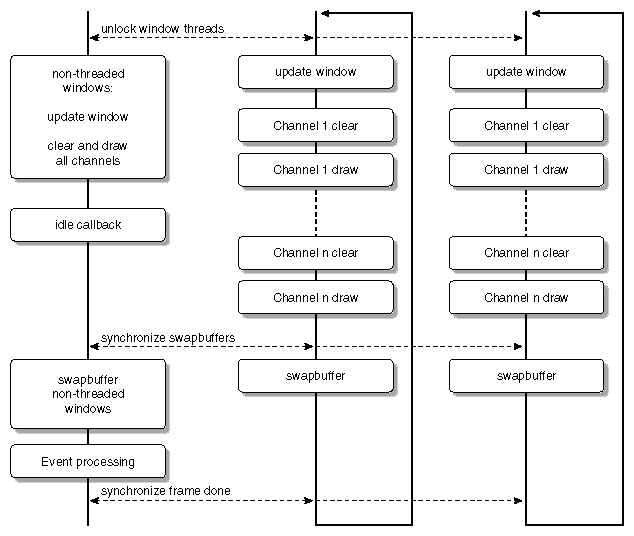
First, the function mpkConfigFrame() unlocks the rendering threads. This action invokes the update-window draw callback and then calls the update callbacks for each channel.
Usually, the application thread is idle while the window threads are drawing. Some applications may perform an intermittent task during this time—for example, to pipeline their culling— but the application must avoid modifying the data currently being used by the rendering processes. The MPKConfig idle callback serves this purpose.
The abstraction of the rendering from the main application enables an MPK application to transparently use stereo rendering. When running in stereo mode, MPK calls the update callbacks twice for each channel: once for the left eye and once for the right eye.
The update-window draw callback is called once at the beginning of each frame. Typically, this is the place to update the OpenGL context, for example, by creating new texture objects. This callback is not used in the example code in this section.
MPK, in contrast to other multipipe programming models, separates the update of a channel into two callbacks, clear and draw. The separation is necessary to do the recomposition during compound processing, as explained in Chapter 3, “Using Compounds”.
A simple clear callback is shown in Example 2-7.
Example 2-7. A Channel Clear Callback
 void clearChannel( MPKChannel *c, void *data )
    {
        mpkChannelApplyBuffer( c );
        mpkChannelApplyViewport( c );

        glClear( GL_COLOR_BUFFER_BIT | GL_DEPTH_BUFFER_BIT );
    }
|
The purpose of the clear callback is to set up the current channel and clear its OpenGL framebuffer as needed. The function mpkChannelApplyBuffer() sets the correct OpenGL read and draw buffers (see the glReadBuffer(3G) and glDrawBuffer(3G) man pages) according to the current stereo mode and eye pass.
The function mpkChannelApplyViewport() applies the current OpenGL viewport and scissor area (see the glViewport(3G) and glScissor(3G) man pages). The channel's pixel viewport is computed from the parent window's pixel viewport (that is, its width and height) and the channel's fractional viewport using the following formula:
#define IRND(a) ((int)((a)+.5)) // compute first pixel position of the channel channel.pvp[0] = IRND(channel.vp[0] * window.pvp[2]); channel.pvp[1] = IRND(channel.vp[1] * window.pvp[3]); // compute last pixel position of the channel channel.pvp[2] = IRND((channel.vp[0]+channel.vp[2]) * window.pvp[2]); channel.pvp[3] = IRND((channel.vp[1]+channel.vp[3]) * window.pvp[3]); // compute channel's dimension channel.pvp[2] -= channel.pvp[0]; channel.pvp[3] -= channel.pvp[1]; |
This method honors positions over dimensions in order to ensure adjacency whenever possible—for example, in a 1280x1024 window:
vp(1): [0. 0. 0.3333 1. ] pvp(1): [0 0 427 1024] vp(2): [0.3333 0. 0.3333 1. ] pvp(2): [427 0 426 1024] |
Note that in full-screen stereo mode (type rect) during the left eye pass, the value of the MPKGlobal variable MPK_PATTR_STEREO_OFFSET will be added to channel.pvp[1].
Example 2-8 shows a simple update-channel draw callback. The purpose of the draw callback is to render a new frame based on the current frustum and frame data for this channel.
Example 2-8. A Channel Draw Callback
void updateChannel( MPKChannel *c, void *data )
{
    FrameData *framedata = (FrameData *)data;

    glMatrixMode( GL_PROJECTION );
    glLoadIdentity();
    mpkChannelApplyFrustum( c );

    glMatrixMode( GL_MODELVIEW );
    glLoadIdentity();
    mpkChannelApplyTransformation( c );

    glTranslatef(  framedata->translation[0],
                   framedata->translation[1],
                   framedata->translation[2] );

    glMultMatrixf( framedata->rotation );

    drawcube();
}
|
Since MPK manages the frustum, the draw callback should always use MPK functions to set up the frustum. The function mpkChannelApplyFrustum() applies an OpenGL frustum matrix for the passed MPKChannel with respect to the current eye pass, eye position, and the channel's physical layout specification. For orthographic views, MPK provides the call mpkChannelApplyOrtho() as an alternative to mpkChannelApplyFrustum(). MPK uses the mode MPK_ORTHO_STILL or MPK_ORTHO_TRACKED to apply an OpenGL orthographic matrix. If the orthographic mode is MPK_ORTHO_STILL, then mpkChannelApplyOrtho() simply uses the half-width and half-height dimensions of the channel layout to produce the distances used in glOrtho(). Otherwise, if orthographic mode is MPK_ORTHO_TRACKED, then mpkChannelApplyOrtho() uses the current view direction (for example, from mpkConfigSetHeadOrientation()) to produce consistent viewing across all channels in the configuration. Figure 2-5 illustrates an example of MPK_ORTHO_STILL (left side) and MPK_ORTHO_TRACKED (right side). The argument zoom specifies two-dimensional scaling on the X and Y screen coordinates.
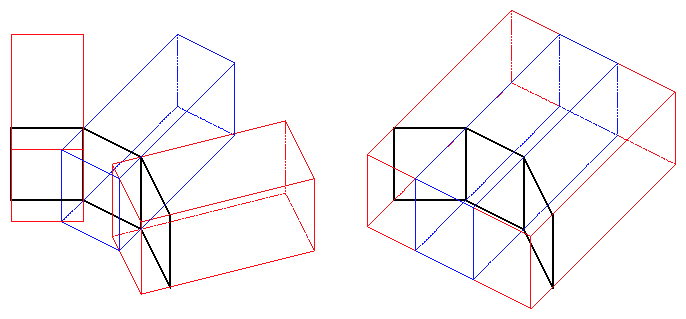
To position and orient the frustum specified by mpkChannelApplyFrustum() or mpkChannelApplyOrtho(), the function mpkChannelApplyTransformation() applies the necessary modeling transformation.
Once the frustum is set up correctly, the scene is positioned according to the rotation and translation of the current frame data. The function drawcube() draws the database, a colored cube.
MPK provides a flexible solution to process events. The event gathering and processing is centralized in the application thread.
In order to receive events, each window has an input display, which is created during mpkWindowOpenDisplay(). MPK uses XSelectInput() to request events on a given window. The functions mpkConfigSelectInput(), mpkPipeSelectInput(), and mpkWindowSelectInput() can be used to change the event mask for all windows in the given hierarchy.
The event processing is done at the end of the frame by calling an event processing callback. By default, this callback is set to mpkConfigHandleEvents(). The callback polls for XEvents on all input displays and encapsulates the XEvents in MPKEvents. This MPKEvent is then processed by the any-event callback of the matching window. The default any-event callback, mpkWindowProcessEvent(), calls the other window event callbacks based on the event type. The pseudo code for the default event processing in mpkConfigHandleEvents() is shown in Example 2-9.
Example 2-9. Pseudo Code for mpkConfigHandleEvents()
foreach input display connection
  while XEvent pending
    receive XEvent
    find matching MPKWindow
    encapsulate XEvent in MPKEvent
    update MPKEventXData
    call window any-event callback
      | default:
      | mpkWindowProcessEvent
      |   call exit, expose, configure, mouse, button or keyboard
      |   event callback based on event type
  end while
end for
|
This architecture enables MPK to provide support for the various event processing scenarios:
Event-driven applications
An application that is event-driven redraws only when user input or other events require a redraw. Usually, these applications set the configuration's event callback to NULL and process the events themselves by using mpkConfigNextEvent() and mpkConfigCheckEvent(). This enables the application to issue a new mpkConfigFrame() call whenever necessary. The example flip.eventDriven shows such an application.
Applications that are not event-driven
For some applications it is necessary to continously draw new frames, for example, to display animations. MPK's default event processing does not block for new events; thus, it returns as soon as all pending events are processed. This leads naturally to the desired behavior.
No MPK event processing
Some applications already have their own event processing model. By setting the window's input display to NULL during window initialization and setting the configuration's event callback to NULL, MPK event processing is disabled.
As cited in an earlier section, the MPKEvent data structure encapsulates an X11 event. It provides convenience functions to decode the data in the corresponding XEvent. Note that the MPKEvent is freed automatically by MPK. Hence, the pointer to an MPKEvent should not be stored within the application.
The event callbacks of the example program in this section, as shown in Example 2-10, provide some mouse interaction as well as the possibility to switch the stereo mode by pressing s.
Example 2-10. Window Event Callbacks for Mouse, Keyboard, and Exit
void windowMouse( MPKWindow *w, MPKEvent *event )
{
    MPKEventXData *data = (MPKEventXData *) mpkEventGetData( event );

    if ( data->button.left )
    {
        if ( data->button.middle )
        {
            shared->dz += (float) data->mouse.dy/200.;
        }
        else
        {
            shared->dx += (float) data->mouse.dx/500.;
            shared->dy -= (float) data->mouse.dy/500.;
        }
    }
    else if ( data->button.middle )
    {
        shared->xangle = (float) data->mouse.dy*.5;
        shared->yangle  = (float) data->mouse.dx*.5;
    }
}

void windowExit( MPKWindow *w, MPKEvent *event )
{
    shared->exit = GL_TRUE;
}

void windowKeyboard( MPKWindow *w, MPKEvent *event )
{
    MPKEventXData *data = (MPKEventXData *)mpkEventGetData( event );

    if ( data->keyboard.state != MPK_PRESS )
        return;

    switch( data->keyboard.key )
    {
        case XK_S:
        case XK_s:
            shared->stereo = !shared->stereo;
            break;
    }
}
|
Eventually, application processing leaves the main loop. In the sample program in this section, the exit-window callback, which is called whenever Esc is pressed, sets the exit flag to true. This causes the main loop shown in Example 2-5 in section “The Main Loop” to terminate.
Example 2-11 shows a simple exit sequence.
Example 2-11. A Simple Exit Sequence
//---------- restore MONO

mpkConfigSetWindowInitCB(config,NULL);
mpkConfigSetChannelInitCB(config,NULL);
mpkConfigChangeMode( config, MPK_MONO );

//---------- exit & delete config

mpkConfigExit( config );
mpkConfigDelete( config );

exitSharedData( shared );
mpkFree( shared );

mpkExit();
|
The first part of Example 2-11 restores the mono mode upon exiting. This may not be desired for other applications, but in this case it is provided for convenience. The initialization callbacks are set to NULL to avoid unnecessary window creation in case the configuration is restarted.
The second part contains the actual cleanup. It exits the configuration; this action will cause the exit callbacks, shown in Example 2-12, to be called in the reverse order of the initialization callbacks.
In Example 2-11, nothing has to be done in order to exit the MPKWindow. Therefore, the MPKConfig's exit-window callback is set to NULL. The X exit callback calls mpkWindowDestroy(), which performs the following operations:
mpkWindowDestroyDrawable( window ); mpkWindowDestroyFBConfig( window ); mpkWindowCloseDisplay( window ); |
The OpenGL exit callback destroys the OpenGL context.
Example 2-12. The Exit Callbacks
//---------------------------------------------------------------------
// exitWindowX
//---------------------------------------------------------------------
void exitWindowX( MPKWindow *w )
{
    mpkWindowDestroy( w );
}

//---------------------------------------------------------------------
// exitWindowGL
//---------------------------------------------------------------------
void exitWindowGL( MPKWindow *w )
{
    // destroy ctx
    mpkWindowMakeCurrentNone( w );
    mpkWindowDestroyContext( w );
}
|
After mpkConfigExit() is called, all window threads are terminated. The MPKConfig data structure and all of its children are freed by calling mpkConfigDelete(). Next, before the final mpkExit(), the shared data is deinitialized and freed using mpkFree(), the mpkMalloc() counterpart.
The source code in Example 2-13 is the full example for the simple MPK application described part by part in the preceding subsections.
Example 2-13. A Simple MPK Application
/* compile using `cc -o example example.c -lm -lmpk -lGL -lpthread' */

#include <mpk/mpk.h>

#include <X11/keysym.h>
#include <math.h>
#include <stdio.h>

#ifndef M_PI
#define M_PI 3.1415926535
#endif

#define DEG2RAD(a)  ((a)*M_PI/180.)

typedef struct
{
    int    stereo;
    int    exit;

    float   xangle, yangle,
            dx, dy, dz,
            translation[3],
            rotation[16];

} Shared;

typedef struct _FrameData
{
    float   translation[3],
            rotation[16];

    struct _FrameData *next;

} FrameData;

Shared    *shared;
FrameData *frameDataBuffer = NULL;
FrameData *newFrameData( Shared *shared );
void       freeFrameData( MPKConfig *, void * );

void    initSharedData( Shared *shared );
void    exitSharedData( Shared *shared );

void    initWindow( MPKWindow * );
void    initWindowX( MPKWindow * );
void    initWindowGL( MPKWindow * );
void    exitWindowX( MPKWindow * );
void    exitWindowGL( MPKWindow * );

void    initChannel( MPKChannel *c );
void    clearChannel( MPKChannel *, void * );
void    updateChannel( MPKChannel *, void * );

void    windowMouse( MPKWindow *, MPKEvent * );
void    windowExit( MPKWindow *, MPKEvent * );
void    windowKeyboard( MPKWindow *, MPKEvent * );

void    incrementRotation( float *, float, float );
void    drawcube();

static float lightpos[] = { 0., 0., 1., 0. };

//---------------------------------------------------------------------
//  main
//---------------------------------------------------------------------
main( int argc, char *argv[] )
{
    MPKConfig *config;
    FrameData *framedata;

    mpkGlobalSetExecutionMode( MPK_EXECUTION_PTHREAD );

    mpkInit();

    // shared must be allocated after mpkInit().
    shared = mpkMalloc( sizeof( Shared ));
    initSharedData( shared );

    if (argc < 2)
        config = mpkConfigLoad(“../configs/1-window”);
    else
        config = mpkConfigLoad(argv[1]);

    if ( config == NULL )
    {
        fprintf(stderr, “Can't load config file.\n”);
        exit (0);
    }

    mpkConfigOutput( config, 0 );

    shared->stereo = ( mpkConfigGetMode(config)==MPK_STEREO ? 1 : 0 );

    mpkConfigSetWindowInitCB(config,initWindow);
    mpkConfigSetWindowExitCB(config,NULL);
    mpkConfigSetChannelInitCB(config,initChannel);
    mpkConfigSetDataFreeCB( config, freeFrameData );

    mpkConfigInit( config, 0 );

    while (!shared->exit )
    {
        // update DB
        incrementRotation(  shared->rotation,
            shared->xangle,
            shared->yangle );

        shared->translation[0] += shared->dx;
        shared->translation[1] += shared->dy;
        shared->translation[2] += shared->dz;

        shared->dx = 0.;
        shared->dy = 0.;
        shared->dz = 0.;

        // new frame
        mpkConfigChangeMode( config, shared->stereo );
        framedata = newFrameData( shared );
        mpkConfigFrame( config, framedata );
    }

    //---------- restore MONO

    mpkConfigSetWindowInitCB(config,NULL);
    mpkConfigSetChannelInitCB(config,NULL);
    mpkConfigChangeMode( config, MPK_MONO );

    //---------- exit & delete config

    mpkConfigExit( config );
    mpkConfigDelete( config );

    exitSharedData( shared );
    mpkFree( shared );

    mpkExit();
}

//---------------------------------------------------------------------
//  initSharedData
//---------------------------------------------------------------------
void initSharedData( Shared *shared )
{
    int i, j;

    shared->exit = 0;
    shared->stereo = MPK_MONO;
    shared->yangle = 0.;
    shared->xangle = 0.;

    for (i=0; i<4; i++)
        for (j=0; j<4; j++)
            shared->rotation[4*i+j] = (i==j) ? 1. : 0.;

    shared->dx = 0.;
    shared->dy = 0.;
    shared->dz = 0.;
    shared->translation[0] = 0.;
    shared->translation[1] = 0.;
    shared->translation[2] = -2.;
}

//---------------------------------------------------------------------
//  exitSharedData
//---------------------------------------------------------------------
void exitSharedData( Shared *shared )
{
    while ( frameDataBuffer != NULL )
    {
        FrameData *framedata = frameDataBuffer;

        frameDataBuffer = framedata->next;

        mpkFree( framedata );
    }
}

//---------------------------------------------------------------------
//  initWindow
//---------------------------------------------------------------------
void initWindow( MPKWindow *w )
{
    mpkWindowSetDrawCB( w, MPK_WINDOW_DRAWCB_INIT_X, initWindowX );
    mpkWindowSetDrawCB( w, MPK_WINDOW_DRAWCB_INIT_GL, initWindowGL );
    mpkWindowSetDrawCB( w, MPK_WINDOW_DRAWCB_EXIT_X, exitWindowX );
    mpkWindowSetDrawCB( w, MPK_WINDOW_DRAWCB_EXIT_GL, exitWindowGL );

    mpkWindowSetEventCB(w,MPK_WINDOW_EVENTCB_MOUSE,windowMouse);
    mpkWindowSetEventCB(w,MPK_WINDOW_EVENTCB_BUTTON,windowMouse);
    mpkWindowSetEventCB(w,MPK_WINDOW_EVENTCB_EXIT,windowExit);
    mpkWindowSetEventCB(w,MPK_WINDOW_EVENTCB_KEYBOARD,windowKeyboard);
}

//---------------------------------------------------------------------
// initWindowX
//---------------------------------------------------------------------
void initWindowX( MPKWindow *w )
{
    mpkWindowCreate( w );
}

//---------------------------------------------------------------------
// initWindowGL
//---------------------------------------------------------------------
void initWindowGL( MPKWindow *w )
{
    // create ctx
    mpkWindowCreateContext( w );
    mpkWindowMakeCurrent( w );

    // GL initialization
    mpkWindowApplyViewport( w );

    glEnable( GL_DEPTH_TEST );
    glDepthFunc (GL_LESS);

    glEnable( GL_LIGHTING );
    glEnable( GL_LIGHT0 );
    glLightfv( GL_LIGHT0, GL_POSITION, lightpos );

    glColorMaterial( GL_FRONT_AND_BACK, GL_DIFFUSE );
    glEnable( GL_COLOR_MATERIAL );

    glClearDepth( 1. );
    glClearColor( 0., 0., 0., 1. );

    // clear both buffers
    glClear( GL_COLOR_BUFFER_BIT | GL_DEPTH_BUFFER_BIT );
    mpkWindowSwapBuffers(w);
    glClear( GL_COLOR_BUFFER_BIT | GL_DEPTH_BUFFER_BIT );
}

//---------------------------------------------------------------------
// exitWindowX
//---------------------------------------------------------------------
void exitWindowX( MPKWindow *w )
{
    mpkWindowDestroy( w );
}

//---------------------------------------------------------------------
// exitWindowGL
//---------------------------------------------------------------------
void exitWindowGL( MPKWindow *w )
{
    // destroy ctx
    mpkWindowMakeCurrentNone( w );
    mpkWindowDestroyContext( w );
}

//---------------------------------------------------------------------
//  initChannel
//---------------------------------------------------------------------
void initChannel( MPKChannel *c )
{
    mpkChannelSetDrawCB( c, MPK_CHANNEL_DRAWCB_CLEAR, clearChannel );
    mpkChannelSetDrawCB( c, MPK_CHANNEL_DRAWCB_UPDATE, updateChannel );
}

//---------------------------------------------------------------------
//  newFrameData
//---------------------------------------------------------------------
FrameData *newFrameData( Shared *shared )
{
    FrameData *framedata;
    if ( frameDataBuffer == NULL )
    {
        framedata = (FrameData *) mpkMalloc( sizeof(FrameData) );
    }
    else
    {
        framedata = frameDataBuffer;
        frameDataBuffer = framedata->next;
    }

    framedata->next = NULL;

    memcpy( framedata->translation,
            shared->translation, 3*sizeof(float) );
    memcpy( framedata->rotation, shared->rotation, 16*sizeof(float) );

    return framedata;
}

//---------------------------------------------------------------------
//  freeFrameData
//---------------------------------------------------------------------
void freeFrameData( MPKConfig *cfg, void *data )
{
    FrameData *framedata = (FrameData *)data;

    framedata->next = frameDataBuffer;
    frameDataBuffer = framedata;
}

//---------------------------------------------------------------------
//  clearChannel
//---------------------------------------------------------------------
void clearChannel( MPKChannel *c, void *data )
{
    mpkChannelApplyBuffer( c );
    mpkChannelApplyViewport( c );

    glClear( GL_COLOR_BUFFER_BIT | GL_DEPTH_BUFFER_BIT );
}

//---------------------------------------------------------------------
//  updateChannel
//---------------------------------------------------------------------
void updateChannel( MPKChannel *c, void *data )
{
    FrameData *framedata = (FrameData *)data;

    glMatrixMode( GL_PROJECTION );
    glLoadIdentity();

    mpkChannelApplyFrustum( c );

    glMatrixMode( GL_MODELVIEW );
    glLoadIdentity();
    mpkChannelApplyTransformation( c );

    glTranslatef(  framedata->translation[0],
        framedata->translation[1],
        framedata->translation[2] );

    glMultMatrixf( framedata->rotation );

    drawcube();
}

//---------------------------------------------------------------------
//  windowMouse
//---------------------------------------------------------------------
void windowMouse( MPKWindow *w, MPKEvent *event )
{
    MPKEventXData *data = (MPKEventXData *) mpkEventGetData( event );

    if ( data->button.left )
    {
        if ( data->button.middle )
        {
            shared->dz += (float) data->mouse.dy/200.;
        }
        else
        {
            shared->dx += (float) data->mouse.dx/500.;
            shared->dy -= (float) data->mouse.dy/500.;
        }
    }
    else if ( data->button.middle )
    {
        shared->xangle = (float) data->mouse.dy*.5;
        shared->yangle  = (float) data->mouse.dx*.5;
    }
}

//---------------------------------------------------------------------
//  windowExit
//---------------------------------------------------------------------
void windowExit( MPKWindow *w, MPKEvent *event )
{
    shared->exit = GL_TRUE;
}

//---------------------------------------------------------------------
//  windowKeyboard
//---------------------------------------------------------------------
void windowKeyboard( MPKWindow *w, MPKEvent *event )
{
    MPKEventXData *data = (MPKEventXData *)mpkEventGetData( event );

    if ( data->keyboard.state != MPK_PRESS )
        return;

    switch( data->keyboard.key )
    {
        case XK_S:
        case XK_s:
            shared->stereo = !shared->stereo;
            break;
    }
}

//---------------------------------------------------------------------
//  incrementRotation
//---------------------------------------------------------------------
static void xformColumn(    float *m, int i, int j, int k,
                            float cosX, float sinX,
                            float cosY, float sinY )
{
    float aux = sinX*m[j] + cosX*m[k];
    float x = sinY*aux + cosY*m[i];
    float y = cosX*m[j] - sinX*m[k];
    float z = cosY*aux - sinY*m[i];
    m[i] = x;
    m[j] = y;
    m[k] = z;
}

void incrementRotation( float *matrix, float xangle, float yangle )
{
    float cosX, sinX, cosY, sinY;

    cosX = cos( DEG2RAD(xangle) );
    sinX = sin( DEG2RAD(xangle) );
    cosY = cos( DEG2RAD(yangle) );
    sinY = sin( DEG2RAD(yangle) );
    xformColumn( matrix, 0, 1, 2, cosX, sinX, cosY, sinY );
    xformColumn( matrix, 4, 5, 6, cosX, sinX, cosY, sinY );
    xformColumn( matrix, 8, 9, 10, cosX, sinX, cosY, sinY );
}

//---------------------------------------------------------------------
//  drawcube
//---------------------------------------------------------------------
#define CUBE_SIZE   .25
void drawcube()
{
    glColor3f( 0., 0., 1. );
    glNormal3f( 0., 0., -1. );
    glBegin( GL_TRIANGLE_STRIP );
    glVertex3f(-CUBE_SIZE,-CUBE_SIZE,-CUBE_SIZE);
    glVertex3f(-CUBE_SIZE, CUBE_SIZE,-CUBE_SIZE);
    glVertex3f( CUBE_SIZE,-CUBE_SIZE,-CUBE_SIZE);
    glVertex3f( CUBE_SIZE, CUBE_SIZE,-CUBE_SIZE);
    glEnd();

    glColor3f( 0., 1., 0. );
    glNormal3f( 0., -1., 0. );
    glBegin( GL_TRIANGLE_STRIP );
    glVertex3f(-CUBE_SIZE,-CUBE_SIZE,-CUBE_SIZE);
    glVertex3f(-CUBE_SIZE,-CUBE_SIZE, CUBE_SIZE);
    glVertex3f( CUBE_SIZE,-CUBE_SIZE,-CUBE_SIZE);
    glVertex3f( CUBE_SIZE,-CUBE_SIZE, CUBE_SIZE);
    glEnd();

    glColor3f( 1., 1., 1. );
    glNormal3f( -1., 0., 0. );
    glBegin( GL_TRIANGLE_STRIP );
    glVertex3f(-CUBE_SIZE,-CUBE_SIZE,-CUBE_SIZE);
    glVertex3f(-CUBE_SIZE, CUBE_SIZE,-CUBE_SIZE);
    glVertex3f(-CUBE_SIZE,-CUBE_SIZE, CUBE_SIZE);
    glVertex3f(-CUBE_SIZE, CUBE_SIZE, CUBE_SIZE);
    glEnd();

    glColor3f( 1., 0., 0. );
    glNormal3f( 0., 1., 0. );
    glBegin( GL_TRIANGLE_STRIP );
    glVertex3f(-CUBE_SIZE, CUBE_SIZE,-CUBE_SIZE);
    glVertex3f(-CUBE_SIZE, CUBE_SIZE, CUBE_SIZE);
    glVertex3f( CUBE_SIZE, CUBE_SIZE,-CUBE_SIZE);
    glVertex3f( CUBE_SIZE, CUBE_SIZE, CUBE_SIZE);
    glEnd();

    glColor3f( 1., 0., 1. );
    glNormal3f( 1., 0., 0. );
    glBegin( GL_TRIANGLE_STRIP );
    glVertex3f( CUBE_SIZE,-CUBE_SIZE,-CUBE_SIZE);
    glVertex3f( CUBE_SIZE,-CUBE_SIZE, CUBE_SIZE);
    glVertex3f( CUBE_SIZE, CUBE_SIZE,-CUBE_SIZE);
    glVertex3f( CUBE_SIZE, CUBE_SIZE, CUBE_SIZE);
    glEnd();

    glColor3f( 1., 1., 0. );
    glNormal3f( 0., 0., 1. );
    glBegin( GL_TRIANGLE_STRIP );
    glVertex3f(-CUBE_SIZE,-CUBE_SIZE, CUBE_SIZE);
    glVertex3f( CUBE_SIZE,-CUBE_SIZE, CUBE_SIZE);
    glVertex3f(-CUBE_SIZE, CUBE_SIZE, CUBE_SIZE);
    glVertex3f( CUBE_SIZE, CUBE_SIZE, CUBE_SIZE);
    glEnd();
}
|