This overview of OpenGL Multipipe SDK (MPK) consists of the following sections:
Throughout this document, we shall use the term Reality Center facility to convey the following meaning: an SGI computer environment with extended visualization capabilities. Note that this definition not only applies to the traditional three-pipe theater (historically set up for flight simulation) but covers as well all kinds of immersive environments (such as a Cave, TANORAMA POWERWALL, or TAN HOLOBENCH facility) and also extends to encompass graphics clusters. Figure 1-1 illustrates an SGI Reality Center facility.
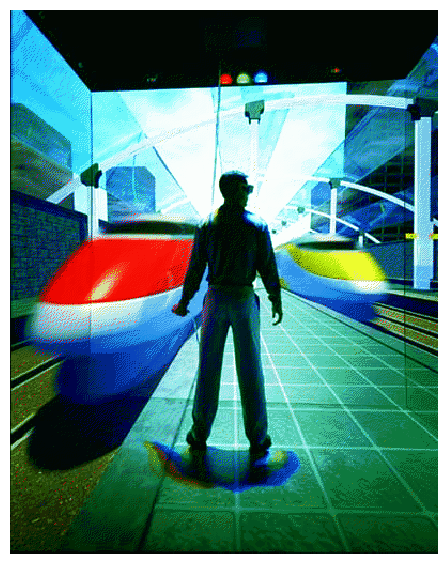
As more and more graphics applications come into the virtual reality arena as a piece of immersive solutions, application developers face new requirements. Not only do developers need to take into account high frame rates and low latencies needed for temporal realism, but also better image quality for visual realism. OpenGL applications must improve their performances and must be able to run in increasingly complex environments that include various input peripherals and projection systems. For applications initially designed to run on a visual workstation in non-real time and with keyboard-mouse input, new releases now need to be time-accurate and should be able to integrate a moving frustum tied to head-tracking peripherals and several rendering engines (graphics pipes) that provide multiple and wider fields of view. Because these types of evolving environments have numerous parameters, the applications must be sufficiently flexible and robust to accommodate their demands.
MPK is an application programming interface (API) designed to help software developers meet the demands of these new immersive environments. This product enables the application to take advantage of the scalability provided by additional pipes and other scalable graphics hardware, as well as to support immersive environments. MPK provides the following specific features:
Run-time configurability
Run-time scalability
Integrated support for scalable graphics hardware
Integrated support for stereo and immersive environments
MPK allows developers to create applications that run on multiple platforms ranging from simple visual workstations to large and complex visualization environments, often based on several pipes for parallel rendering purposes. It implements a design that largely isolates the application from the graphics resources and the physical environment. Providing run-time configurability, an application written in the MPK programming model can run on a simple desktop platform or, without any modification or recompilation, in highly complex visualization environments like an SGI Reality Center facility.
Graphics-intensive applications often require several pipes in order to achieve a desired performance. Each pipe contributes to a part of the final rendering. This introduces the need for a decomposition paradigm and the issue of how the rendering performance scales with the number of pipes. Rendering in parallel requires the developer to manage several graphic contexts and then to create tasks or threads, each managing their own graphic context and sharing the scene to be rendered. MPK allows a multipipe applications developer to avoid dealing with such parallel programming paradigms and offers compound algorithms based on several decomposition types.
Scalable graphics hardware such as the SGI Scalable Graphics Compositor and the SGI Video Digital Multiplexer (DPLEX) can perform some of the compositing functions that MPK now provides in software. MPK supports such hardware as well as conventional graphics hardware.
Along with its scalability features, MPK has integrated the ability to exploit the stereo features of your application-display environment without recompilation. Having the related display characteristics of your environment described in a configuration file, you can specify at run time whether to run in stereo or mono.
In addition, MPK provides the application with the ability to support truly immersive environments by using a simple programming interface: the application only needs to provide real-world information about the position and orientation of the viewer. MPK then transparently adapts its left- and right-eye frustum computations to the actual user's location.
The ease of configuring your application to accomodate different hardware resources (graphics pipes and head-tracking devices) and different display areas makes MPK ideal for use in immersive environments.
Application programming interface
Designed for the applications programmer to adapt OpenGL graphics applications to fit the MPK programming model in order to support multipipe environments.Configuration file interface
Designed for Reality Center administrators to configure MPK graphics applications to run in their environments. This ASCII file interface allows you to specify how the framebuffer resources (pipes, windows, and channels) are mapped onto the physical projection areas (walls) and the parallel decomposition schemes (compounds) to be used by your applications.
MPK is available on IRIX through C language function calls. It is designed as a thin layer on top of the operating system, X11, OpenGL, and GLX.
As an application will have to run in different configurations, MPK externalizes the configuration management by implementing an ASCII file that is separate from the other application code. The scene management and data workflow is separate from scene rendering (management of the graphics resources). Figure 1-2 illustrates the structure of an application based on MPK.

Example 1-1 shows a one-pipe, one-window configuration file that can be used in conjunction with a MPK-structured program—for instance, volview, a scalable volume-viewer application packaged as part of the OpenGL Volumizer 2 product.
Example 1-1. Sample Configuration File
global {
    MPK_WATTR_PLANES_ALPHA  1
    MPK_DEFAULT_EYE_OFFSET 0.01
}
config {
    name    “Volview: 1-pipe”
    mode    mono

    mono    “/usr/gfx/setmon -n 1280x1024_76”
    stereo  “/usr/gfx/setmon -n str_top”
    pipe {
        window {
            viewport        [ 0, 0, 1.0, 1.0 ]
            channel {
                name                    “center”
                viewport                [ 0., 0., 1., 1. ]
                wall {
                    bottom_left     [ -.5, -.5, -1 ]
                    bottom_right    [  .5, -.5, -1 ]
                    top_left        [ -.5,  .5, -1 ]
                }
            }
        }
    }
}
|