SGI DataSync is an API enables data sharing across a cluster. It aims at imitating a shared memory system such as SGI Onyx on a cluster of computers with no physical shared memory.
SGI DataSync implements a client-server model for control operations and a symmetric, shared-memory model for data exchanges. This document describes the SGI DataSync API in the following sections:
This section describes a typical cluster and names its components. A cluster consists of multiple PCs. Each one of these PCs is a cluster node. Figure 2-1 shows a cluster consisting of four nodes. Commonly, one of these nodes has the host name master-channel, and the others have the names channel0, channel1, and so on.

The node with the host name master-channel has a special designation: it is the master of the SGI ImageSync network. The SGI ImageSync network enables frame synchronization of all video outputs of cluster nodes.
SGI DataSync provides the API for sharing data and synchronizing processes on each one of the cluster nodes. Typically, SGI DataSync uses the node with the host name master-channel for running its daemon. All cluster nodes may run processes (multiple processes per node) sharing data using SGI DataSync.
When a collection of processes on cluster nodes has to share some data, it has to connect to an SGI DataSync session. SGI DataSync provides a server process that manages sessions. Processes can create or join sessions on the server. Once connected to a session, processes can share data with other processes in the same session.
When connecting to a server session, a process receives access to the following synchronization primitives:
Shared memory blocks
Messages
Cluster events (for example, nodes added or dropped from a session)
Barriers
Semaphores
Locks
In order to share data, cluster nodes have to create a correspondence between memory buffers on each node. In order to create this correspondence, SGI DataSync lets an application attach each memory buffer to a unique identifier. Two nodes attaching memory blocks to the same unique identifier are sharing the contents of their memory blocks.
SGI DataSync identifies blocks of data and other synchronization primitives among cluster nodes using unique identifiers called dsDataId objects. Each node on the cluster can allocate multiple dsDataId objects and these are unique across the entire cluster. When two nodes on a cluster operate on the same dsDataId identifier, they access the same object.
A dsDataId object can have one of the following types:
| DS_MEMORY | A memory block identifier | |
| DS_BARRIER | A barrier identifier | |
| DS_SEMA | A semaphore identifier | |
| DS_LOCK | A lock identifier |
A dsDataId object of type DS_MEMORY does not allocate any memory. Attaching a block of previously allocated memory to a dsDataId object of type DS_MEMORY makes this memory block shared.
dsDataId objects of types DS_BARRIER, DS_SEMA, and DS_LOCK do not need additional attachment to local constructs. For example, an application can join a barrier by naming a dsDataId object of type DS_BARRIER.
For each type of dsDataId object, SGI DataSync provides a different API set. For example, on dsDataId objects of type DS_MEMORY, SGI DataSync provides interfaces for the following actions:
Allocate/free memory for a dsDataId object.
Map/unmap (attach/detach) a block of physical memory to a dsDataId object.
Mark a dsDataId memory block as dirty.
Synchronize contents of all dirty memory blocks.
This section describes the order of events in a basic SGI DataSync session (dsSession). This high-level description includes the required operations without exposing API details, which are described in the following subsection.
The following steps describe the initialization of a session.
Start the server process on one cluster node.
Repeat the following steps for each process needing to share data:
Initialize SGI DataSync.
Acquire a handle to the SGI DataSync server.
Try to create a dsSession on the server. If you succeed, this process is the first process in the dsSession. If you fail, a dsSession already exists and the process has to log in to the existing dsSession.
Add a new user (dsUser) to the dsSession. A dsUser is a connection to a dsSession. All dsSession-related operations use the dsUser pointer.
If this process is the first process in a dsSession, do the following:
Allocate unique identifiers for shared data blocks.
Allocate a special identifier for a dsSession information block.
Allocate local memory for each identifier.
Attach each identifier to its newly allocated memory.
Store the unique identifiers in the dsSession information block.
Realize the dsSession.
For each process other than the first one in a dsSession, do the following:
Query the dsSession for its information identifier (a dsDataId indentifier).
Allocate memory for the dsSession information.
Attach newly allocated memory to the dsSession information identifier.
Retrieve the unique identifiers that the first process stored in the dsSession information block.
Allocate memory for each unique identifier.
Attach the newly allocated memory to the new identifier.
Figure 2-2 demonstrates the process of allocating new dsDataId objects and distributing them to all cluster nodes. Node A is the first node to join a session. It allocates three dsDataId objects (D1, D2, and D3) and three memory blocks (A1, A2 and A3). Node A then maps A1 to D1, A2 to D2, and A3 to D3. In order to inform node B of the newly allocated dsDataId objects, Node A stores D2 and D3 in memory block A1 and designates dsDataId D1 as the session information block.
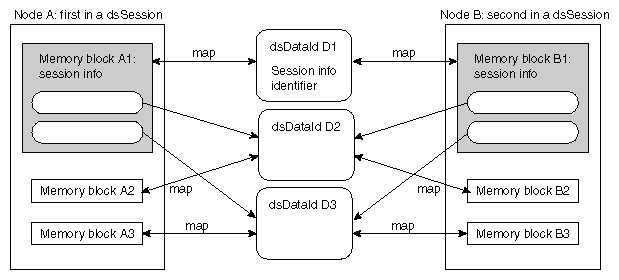
Node B would like to share blocks A2 and A3 with node A. Node B starts by allocating three memory blocks B1, B2, and B3. In order to make B2 and A2 shared, node B has to get dsDataId D2. It queries the dsSession for the dsDataId of its information block (D1), maps memory block B1 to it, and reads D2 and D3 out of its local B1.
In effect, the dsSession info block serves as a globally known name that all dsSession users can access.
This section shows pseudo-code for implementing the example in Figure 2-2 using the SGI DataSync API.
dsInit(initParams);
server = dsOpen( openParams );
buffer1 = malloc ( ... );
buffer2 = malloc ( ... );
buffer2 = malloc ( ... );
session = server->addSession( “SessionName” );
if (session) // Success - I'm the first user of this session.
{
	user = session->addUser(“First”);
	// Create three dsDataId's
	D1 = user -> alloc( DS_MEMORY, DS_PRESERVED );
	D2 = user -> alloc( DS_MEMORY, DS_UNPRESERVED );
	D3 = user -> alloc( DS_MEMORY, DS_UNPRESERVED );

	// Store dsDataId's in dsSession information block
	buffer1 -> d2 = D2;
	buffer1 -> d3 = D3;

	// Attach dsDataId's to physical memory.
	user -> mapMemory(D1, 0, buffer1, ... );
	user -> mapMemory(D2, 0, buffer2, ... );
	user -> mapMemory(D3, 0, buffer3, ... );

	// Notify SGI DataSync that the contents of buffer1 should be sent to
	// all other cluster nodes that mapped memory to D1.
	user -> markMemory(D1, ...);
	user -> syncMemory();

	// Designate the dsDataId D1 as the session information
	// identifier.
	session -> putInfo(D1);

	// Finish session startup.
	session -> realize();
{
else
{
	session = server -> login(“SessionName”);
	user = addUser(“Second”);

	// Obtain dsDataId of session information block.
	D1 = session -> getInfo();

	// Attach memory to the session information dsDataId. Request an
	// immediate copy of the most up-to-date data in that buffer.
	user -> mapMemory(D1, buffer1, ..., DS_RDONLY | DS_COPY);

	// Get the dsDataId's for D2 and D3 from the session information
	// block.
	D2 = buffer1 -> d2;
	D3 = buffer1 -> d3;

	user -> mapMemory(D2, buffer2, ...);
	user -> mapMemory(D3, buffer3, ...);


}
|
At the end of the above code sequence, each one of the processes on the dsSession has three local memory buffers and SGI DataSync is responsible for keeping their contents identical upon user request.
SGI DataSync optimizes its processing based on the amount of network traffic that it produces. It does not propagate memory block changes unless specifically requested to do so by the application. On the other hand, an application does not have to request SGI DataSync to update its local memory blocks with information from other nodes. These updates happen transparently using a separate updating thread.
Assume Buffer is a local memory block mapped to dsDataId D. A frame of a producer process would therefore contain the following stages:
Compute new data in Buffer.
Mark D dirty.
Call the syncMemory() function to propagate the contents of Buffer across the cluster.
A consumer of the shared data in Buffer would simply use its contents—that is, never calling any API to update it. Updates happen transparently without application intervention.
 | Note: Transparent updates can cause program errors and race conditions. The application should always assume that any shared buffer may be changing while being read. Shared buffers are just as sensitive to race conditions as true shared memory buffers in a multiprocessing environment. |
The simple session in the preceding section does not synchronize the writers and readers of a shared memory block. Most applications require some level of synchronization among cluster processes. The following sections demonstrate how to use the SGI DataSync synchronization primitives.
Many SGI DataSync API calls generate a notification event either for the dsUser calling the API or for all other connected dsUsers. Each dsUser can read a queue of incoming events in order to find out about these API calls. Event types break into the following groups:
dsSession/dsUser activity
A session was added or removed on the SGI DataSync server.
A dsUser joined or left a dsSession.
These events are important when a process needs to change its behavior based on the size or existence of dsSessions.
dsDataId activity
A memory block mapped to some dsDataId has been updated with new contents, or a dsDataId has been freed.
Messages
A message from another user has arrived.
An application may declare what type of events it wants to receive by calling dsUser::handleEvent(). All other events will be rejected upon arrival and will not fill up the event queue.
An application can poll for events using dsUser::checkEvent() and read the next event by calling dsUser::nextEvent().
SGI DataSync provides a message passing mechanism among nodes connected to a dsSession. A dsUser can send a memory block as a message to either a single other dsUser or to all dsUsers on a dsSession.
Upon arrival of a message, the receiving dsUser receives a dsEvent of type dsMessageEvent.
This section demonstrates the use of barriers in the following setup: multiple cluster nodes read a shared memory block that one cluster node writes. The writer changes the contents of the buffer at regular frame intervals. The readers are to process new contents as it arrives.
In the following event-sequence example, process A is the writer and process B is one of the readers of a shared memory block D.
At initialization time, the first process in the dsSession allocates a dsBarrier and store its dsDataId in the session information block.
All other processes can retrieve the barrier dsDataId from the session information block.
For each frame, writer process A does the following:
Changes the contents of the shared memory block D.
Calls dsUser::markMemory() on D.
Calls dsUser::syncMemory().
Enters the barrier.
For each frame, reader process B does the following:
Enters the barrier.
Reads and uses the contents of data block D.
The preceding sequence assumes that B's usage of the contents of D is always shorter than A's frame duration. In other words, at the time B finishes reading the block D, A has not yet started modifying it again. If this assumption is too strong, the application could use another barrier in order to avoid writing on D before B finishes its reading.
| Note: Using a dsBarrier requires specifying the number of nodes expected to join the barrier. Since nodes can join or leave a dsSession at any time, the application may run into race conditions and hang on a barrier expecting too many participants. |
Applications often have to know about all dsUsers connected to their session.They often wish to acquire a list of all other dsUsers on a cluster and compute their relative position on that list. The following code sample demonstrates how to compute this information:
// get the directory of all dsUsers in session
dsDirectory *dir = (dsDirectory *) session -> directory();

// Lock directory while we look through it.
dir -> lock();

// Loop through dsUsers until we find our user name.
for (i = 0 ; i < dir -> size() ; i ++)
	if (strcmp (myUserName, dir -> entry(i)) == 0)
	{
		myUserID = i;
		break;
	}

// Unlock directory so we can receive session updates from daemon.
dir -> unlock();
|
When exiting a session, all processes other than the first process in a session should log out of the session. The first process in the session must remove the session after all other processes have logged out.
| Note: Removing a dsSession (by calling the dsServer::removeSession() function) before all dsUsers have logged out of it may cause the application to crash. When removing a dsSession, all dsSession and dsUser interfaces are disabled on the removed dsSession. This means that any call other than dsServer::logout() and dsSession::removeUser() will produce an error. To expedite the exit sequence of your program, you can replace the sleep(1) call with user->nextEvent(dsRemoveUserEvent). |
The following code sample demonstrates how the first process in a dsSession waits for all dsUsers to log out before it removes the dsSession:
// Figure out initial number of users in session.
dsDirectory *dir = (dsDirectory *)(session -> directory());
numUsers = dir -> size();

// Wait for all users to logout from the session.
while (numUsers > 1)
{
	dsDirectory *dir = (dsDirectory *)(session -> directory());
	numUsers = dir -> size();
	sleep (1);
}
// Remove dsSession from the master.
server -> removeSession (session_name);
// Exit SGI DataSync.
dsExit();
|
| Note: Exiting an application without removing the dsSession leaves this session open on the SGI DataSync daemon. If you run the application again without restarting the server, there is no way to tell which process is the first in the session. |