This chapter describes the SGI Media Server, which provides real-time, frame-accurate recording and playback of broadcast-quality digital media data. The SGI Media Server manages video as data, distributing the files over the existing LAN/WAN infrastructure—whether 100 Base-TX, Gigabit Ethernet, or enhanced video networks—within a facility or between facilities.
The following topics are discussed in this chapter:
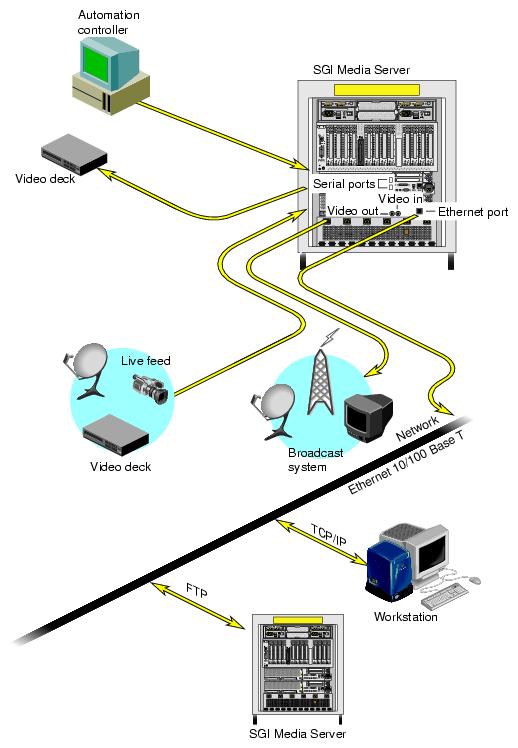
Digital media data is brought into the SGI Media Server by recording it from a live feed or a videotape deck or copying it from a file. The data can then be played out to a broadcast system, a video port, or a video tape recorder (VTR).
The SGI Media Server can be controlled using a Multiport Video Computer Protocol (MVCP) application or through the use of a broadcast system automation controller, which can control video servers using serial control protocols—such as the Video Disk Communications Protocol (VDCP) or an edit controller that can control a VTR using the Sony RS-422 VTR protocol.
For non-production, developmental activities, you can use the SGI Media Server control graphical user interface (GUI).The GUI consists of screens that are used to record and play digital data, determine status information, and manage digital media data stored on the SGI Media Server.
This functionality is shown in Figure 1-1.

The SGI Media Server software provides scalability and maximum flexibility. The software includes the following:
SGI Video Server Technology (VST), the core software of the SGI Media Server. VST provides real-time, frame-accurate recording and playback of broadcast-quality digital media.
Control interface modules, which provide device-dependent code. For example, there is a control interface module that contains the code that is specific to VDCP controllers.
Media device interface modules, which contain format-dependent code that provides access to the ports over which media is played and recorded.
Format interface modules, which provide handlers for accessing specific digital media storage formats. For example, there are format interface modules for MPEG-2, DVCPRO 25, DVCPRO 50, DVCAM, and DV (16-bit/48 Khz only) compression.
Figure 1-2 shows the primary software components in VST. The remainder of this section describes the software components shown in Figure 1-2.
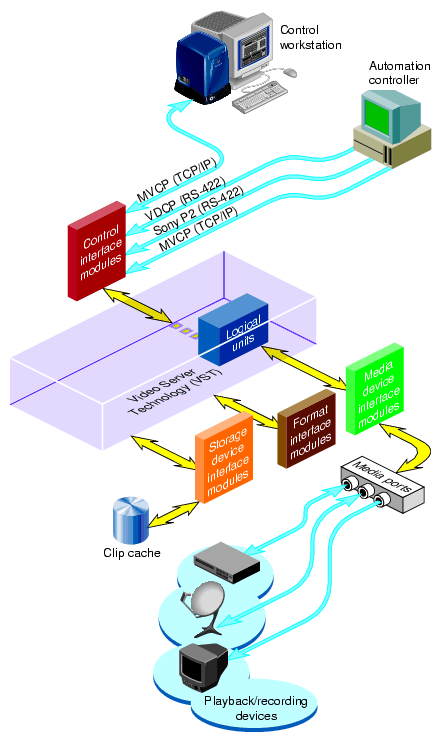
Digital media data that the SGI Media Server processes for playout and recording is stored in one or more clip caches. Each audio/video segment that is stored in a clip cache is called a clip.
Clips can be added to the cache by doing the following:
Using the SGI Media Server to record the clip
Generating the clips elsewhere and adding them to the cache by data transfer
The VST core software provides the basic functionality for playback and recording of media. It uses the IRIX operating system as well as portions of the SGI Digital Media Libraries.
The core software provides the following basic functionality:
Clip cache management
Maintains persistent information about the media that is either stored in the clip cache or is in the process of being transferred into or out of it.Controller management
Links one or more external control protocol modules (for example, VDCP) to the internal processing logic.Configuration management
Automatically configures the VST software according to the hardware capabilities of the system on which it runs.
VST provides a core library that supports external interface modules that contain the code specific to a given external entity. When the SGI Media Server is started, the VST software loads and initializes all external interface modules it locates so that the modules can be used.
Control interface modules allow various automation controllers and digital media applications to control the use of the SGI Media Server. These modules translate to and from external control protocols.
The following control interface modules are provided:
The Video Disk Communications Protocol ( VDCP). This control protocol provides control of VST over RS-422. The VDCP interface module supports back-to-back play and record (subject to restrictions imposed by the video I/O port capabilities).
The Sony RS-422 VTR (also called, 9-pin or P2) protocol. VST supports this protocol through a full-featured VTR deck-emulation mode that includes frame-accurate insert editing and a variable-speed shuttle.
Multiport Video Computer Protocol ( MVCP) defined by SGI. This control protocol provides full-featured control of VST through TCP/IP. This control interface module supports archive management, multiple-unit control, and event monitoring and provides access to advanced features of SGI devices.
Storage device interface modules provide access to the storage systems on which the clip cache resides. Currently, there is a storage device interface module for the IRIX XFS filesystem.
Media device interface modules provide access to the ports over which the media is played and recorded (that is, the media ports). Each type of I/O port typically has its own media device interface module.
VST has media device interface modules for the following:
PCI-VIDAUD-MSB-B is the DVCPRO 25, DVCPRO 50, DVCAM, and MPEG-2 multiformat video and audio codec for PCI backplanes.
PCI-VIDAUD-MSB-C is the DVCPRO 25, DVCAM, DV (16-bit/48 Khz only), and MPEG-2 multiformat video and audio codec for PCI backplanes.
PCI-VIDAUD-MSB-IMX is the DVCPRO 25, DVCPRO 50, DVCAM, IMX, and MPEG-2 multiformat video and audio codec for PCI backplanes.
PCI-VIDAUD-MSB-IMX-C is the DVCPRO 25, DVCPRO 50, DVCAM, DV (16- bit/48 Khz only) , D10/IMX, and MPEG-2 multiformat video and audio codec for PCI backplanes.
Diaquest (limited support): direct Sony RS-422 control of videotape decks.
The MPEG-2, DVCPRO 25, DVCPRO 50, DVCAM, and DV (16-bit/48 Khz only) compression algorithms can be used to provide a compressed video stream, which can be stored in a file. This file format is useful for transporting video across data networks. In addition to traditional TCP/IP data networks, this data can also be transmitted across coaxial video networks as data to and from VTRs, nonlinear editors, and servers. The following section explains how to display this compressed data stream during transfer.
The SGI Media Server uses Serial Digital Interface ( SDI) protocols for primary video I/O operations, which are SMPTE-259M compliant. Additionally, the server employs composite analog video for Genlock input and output monitoring. The SGI Media Server is configurable for either MPEG-2, DVCPRO 25, DVCPRO 50, DVCAM, or DV (16-bit/48 Khz only) compression types. For MPEG-2, you can select I-Frame, long GOP, and optionally IMX/constant-byte GOP (CBG).
The supported file formats include the following:
| File Format | Standard | |
| DIF DVCAM | ||
| DIF DVCPRO 25 | SMPTE-314M | |
| DIF DVCPRO 50 | ||
| GXF MPEG-2 I-frame—playout only | ||
| MXF D10/IMX | ||
| MXF OP-1a DVCPRO 25/50 | ||
| MXF OP-1a (MPEG-2) | SMPTE-378M | |
| SGI MPEG-2 |
See “Supported SMPTE Standards” for a list of supported standards.
Table 1-1 summarizes the support for the various file formats and compression types.
Table 1-1. Support for File Formats and Compression Types
File Format | Video Compression | Native Record | Playout1 |
|---|---|---|---|
Native SGI | MPEG-2 long GOP2 MPEG2 I-frame3 IMX30/40/503 | Yes | Yes |
MXF | IMX30/40/503
DVCPRO 25 | Yes | Yes |
DIF | DVCPRO 25 DV | Yes | Yes |
SMPTE 360M | MPEG2 I-frame3 | No5 | Yes |
Playout of files either natively recorded or received from another device through FTP.
For information on limitations of long GOP support, see the VST release notes.
IMX is Sony's constant-byte GOP recording format based on D10 and generates a format compatible with IMX VTR decks. Only one of the compression schemes IMX and I-frame VBR is supported at the same time on IMX-record-enabled boards. For playout, both IMX and I-frame VBR are supported simultaneously.
The PCI-VIDAUD-MSB-C card does not support DIF DVCPRO 50 and MXF DVCPRO 50 recording or playback. The PCI-VIDAUD-IMX-C card is now required for these file formats. Please note that the PCI-VIDAUD-MSB-B and PCI-VIDAUD-IMX cards still support DIF DVCPRO 50 and MXF DVCPRO 50 recording and playback with VST 2.2.1.
An SGI offline utility converts SGI native MPEG-2 files (including long GOP) into SMPTE 360M format files for transferring to other devices in this file format.
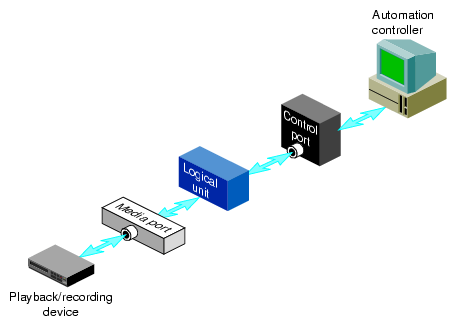
Logical units enable media ports to play and record clips. Each SGI Media Server unit can be thought of as a logical VTR transport that is capable of loading, cueing, playing, and recording clips using a specific media port.
Logical units are created automatically by VST when the SGI Media Server control GUI or an automation controller is used. When MVCP is used, a command requests that a unit be added or that a unit created by another control connection be used.
There is normally a one-to-one relationship between a control connection to the SGI Media Server and a VST logical unit and between a logical unit and a media port. This is shown in Figure 1-3.
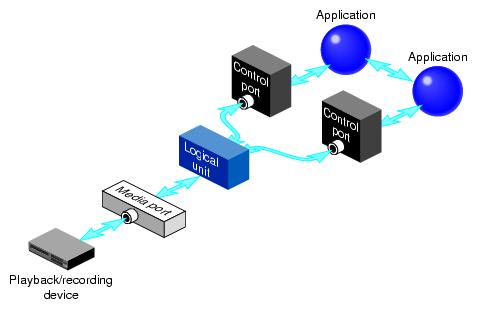
A single unit can also be controlled by multiple control ports. For example, two tightly integrated applications might control a single unit, where each application would have its own control port. This is shown in Figure 1-4.

A media port can be controlled by multiple logical units. For example, an application with one control connection and two units could be cueing one clip while playing out another, enabling back-to-back playout of clips when allowed by the media format. This example is shown in Figure 1-5.
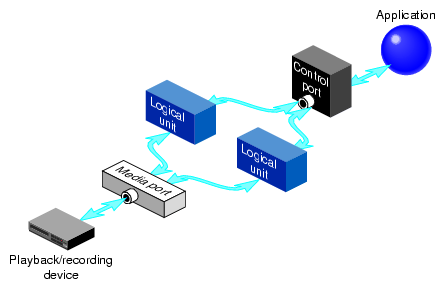
If a media port supports multiple logical units, the sharing is subject to the device-sharing characteristics of that port.
This book describes the SGI Media Server Models 325, 345, 365, and 385. Their hardware configuration consists of the components shown in Table 1-2.
Table 1-2. Hardware Components of the SGI Media Server
 | Note: In many respects, the audio/video cards listed in Table 1-2 are functionally equivalent. Section “Internal Devices” describe their differences. Subsequent references to PCI-VIDAUD-MSB-B cards in this manual also apply to all of the cards unless otherwise noted. |
A typical hardware configuration is shown in Figure 1-6.
The Origin 350 server provides massive processing, storage, and throughput capabilities to satisfy large production requirements. They are built from a scalable node architecture, enabling small configurations that can be incrementally upgraded to the larger configurations. Each Origin server can be configured as a single module or as multiple modules with a single system image.
The following list provides an overview of the SGI Media Server models:
Table 1-3 compares the various models.
Table 1-3. Comparison of SGI Media Server Models
Features | Model 325 | Model 345 | Model 365 | Model 385 |
|---|---|---|---|---|
Digital video cards | 1 or 2 | 1 to 4 | 1 to 6 | 1 to 8 |
Processors | 2 | 4 | 4 | 4 |
Memory size | 2 GB | 4 GB | 4 GB | 4 GB |
Number of PCI slots 1 | 4 | 8 | 12 | 16 |
JBOD storage device (2 GB TP900) | 1 maximum | 1 maximum | 1 maximum | 1 maximum |
Fibre Channel storage device (TP9100) | 1 maximum | 1 maximum | 1 maximum | 1 maximum |
1. The base compute module has four internal PCI slots; however, one PCI slot of the base compute module is required for the IO9 base I/O card. Therefore, the number of available slots in the base compute module is reduced by one.
The SGI Media Server disk storage holds the XFS real-time filesystems that contain the video content stored in the clip cache. The descriptive information about clips—for example, clip names, duration, edit points, and so on—are stored on non-real-time filesystems.
The storage system supports the use of scalable storage to enable the total disk space to range from only a few gigabytes to hundreds of terabytes or more. The type of disk storage that is used depends upon several factors, including the number and size of stored clips, the use of RAID, and the required availability (uptime) of the system.
Two different types of disk storage are available:
JBOD storage, sometimes called RAID-0, in which several disk drives are striped into XLV logical volumes. This type of disk storage does not provide redundancy, but it does provide higher bandwidth than XFS on a single disk drive.
RAID storage, which provides high-availability, redundant digital storage.
The SGI Media Server supports the use of the following external devices:
For more information about installing these devices for use with the SGI Media Server, see Chapter 7, “Configuring and Using External Devices”.
For a complete list of external devices that interface with the SGI Media Server, see the release notes.
The SGI Media Server supports the use of the following internal devices:
Audio/Video I/O:
PCI-VIDAUD-MSB-B cards, which support the MPEG-2, DVCPRO 25, DVCPRO 50, DVCAM, and DV (16-bit/48 Khz audio only) video codecs and embedded, AES/EBU, and analog audio.
PCI-VIDAUD-MSB-C cards, which support the MPEG-2, DVCPRO 25, DVCAM, and DV (16-bit/48 Khz audio only) video codecs and embedded, AES/EBU, and analog audio.
PCI-VIDAUD-MSB-IMX and PCI-VIDAUD-MSB-IMX-C cards, which support the MPEG-2, MPEG-2 D10/IMX,, DVCPRO 25, DVCPRO 50, DVCAM, and DV (16- bit/48 Khz audio only) video codecs and embedded, AES/EBU, and analog audio.
Note: The PCI-VIDAUD-MSB-C and PCI-VIDAUD-MSB-IMX-C cards are supported only on VST 2.2 or later.
The SGI Media Server provides integrated support for the following SMPTE standards. The SGI Media Server is designed to interact with signal formats and media file formats that follow the SMPTE standards and constraints.
Table 1-4. SMPTE Standards Supported by the SGI Media Server