The SGI Graphics Cluster includes basic software tools for administering the system. This chapter explains how to use them for system startup and other tasks, and includes a list of system administration references. The chapter consists of these sections:
“System Administration References”

Note: For information on using SGI ImageSync, SGI DataSync, or SGI Clusterfly, consult the manuals for those products; see the documentation CD included with the SGI Graphics Cluster.
Read these instructions carefully.
Follow all warnings and instructions marked on the product and noted in this and other documentation included with the product.
Unplug this product from the wall outlet before cleaning. Do not use liquid cleaners or aerosol cleaners. Use a damp cloth for cleaning.
Do not use this product near water.
Do not place this product or components of this product on an unstable cart, stand, or table. The product may fall, causing serious damage to the product.
Slots and openings in the bottom of the cabinet and the back or front of the components are provided for ventilation, reliable operation, and protection from overheating. These openings must not be blocked or covered. This product should never be placed near or over a radiator or heat register, or in a built-in installation unless proper ventilation is provided.
This product should be operated from the type of power indicated on the marking label. If you are not sure of the type of power available, consult your dealer or local power company.
Do not allow anything to rest on the power cord. Do not locate this product where persons will walk on the cord.
Do not use extension cords with the SGI Graphics Cluster.
Never push objects of any kind into this product through cabinet slots as the objects may touch dangerous voltage points or short out parts that could result in a fire or electric shock. Never spill liquid of any kind on the product.
Do not attempt to service this product yourself except as noted in this guide. Opening or removing covers of node and switch internal components may expose you to dangerous voltage points or other risks. Refer all servicing to qualified service personnel.
Unplug this product from the wall outlet and refer servicing to qualified service personnel under the following conditions:
When the power cord or plug is damaged or frayed.
If liquid has been spilled into the product.
If the product has been exposed to rain or water.
If the product does not operate normally when the operating instructions are followed. Adjust only those controls that are covered by the operating instructions, because improper adjustment of other controls may result in damage and will often require extensive work by a qualified technician to restore the product to normal condition.
If the product has been dropped or the cabinet has been damaged.
If the product exhibits a distinct change in performance, indicating a need for service.
Replace the lithium battery on the motherboard only with the same type or an equivalent type recommended by the manufacturer. Discard used batteries according to the manufacturer's instructions. There is a danger of explosion if the battery is incorrectly replaced.

Warning: Danger of explosion if battery is incorrectly replaced. Replace only with the same or equivalent type recommended by the manufacturer. Discard used batteries according to the manufacturer's instructions. Use only the proper type of power supply cord set (provided with the system) for this unit.
Table 3-1 summarizes the settings for each Linux node as set up at the factory.
Table 3-1. Factory Settings (Linux)
Setting | Value |
|---|---|
User | gcadmin |
User ID | 501 |
Groups: |
|
Home directory | /home/gcadmin |
Shell | /bin/bash |
Password | sgisgi |
Channel names are as follows:
master-channel
channel0
channel1
channel2
channel3
channel4
channel5
channel6
On the master node of an SGI Graphics Cluster Series 12 running Linux, the following applies:
If an optional network interface PCI card (NIC) is present, it is eth0 and the onboard NIC is eth1.
If an optional gigabit Ethernet card is present, it is the last NIC: eth1 if no network interface PCI card is present, or eth2 if a network interface PCI card is present.
If no gigabit Ethernet card is present in the SGI Graphics Cluster, addresses are as shown in Table 3-2.
Table 3-2. IP Addresses, No GigaBit Ethernet Card Present
Node Name | Address |
|---|---|
master-channel | 127.0.0.1 (eth0); 10.0.2.1 (eth1) |
channel0 | 10.0.2.10 (eth0) |
channel1 | 10.0.2.11 (eth0) |
channel2 | 10.0.2.12 (eth0) |
channel3 | 10.0.2.13 (eth0) |
channel4 | 10.0.2.14 (eth0) |
channel5 | 10.0.2.15 (eth0) |
channel6 | 10.0.2.16 (eth0) |
If a gigabit Ethernet card is present in the SGI Graphics Cluster, addresses are as shown in Table 3-3.
Table 3-3. IP Addresses, GigaBit Ethernet Card Present
Node Name | Address | Gigabit Ethernet Node Name | Gigabit Ethernet Address |
|---|---|---|---|
master-channel | 127.0.0.1 (eth0); 10.0.2.1 (eth1) | g0-master-channel | 192.168.1.1 (eth2) |
channel0 | 10.0.2.10 (eth0) | g0-channel0 | 192.168.1.10 (eth1) |
channel1 | 10.0.2.11 (eth0) | g0-channel1 | 192.168.1.11 (eth1) |
channel2 | 10.0.2.12 (eth0) | g0-channel2 | 192.168.1.12 (eth1) |
channel3 | 10.0.2.13 (eth0) | g0-channel3 | 192.168.1.13 (eth1) |
channel4 | 10.0.2.14 (eth0) | g0-channel4 | 192.168.1.14 (eth1) |
channel5 | 10.0.2.15 (eth0) | g0-channel5 | 192.168.1.15 (eth1) |
channel6 | 10.0.2.16 (eth0) | g0-channel6 | 192.168.1.16 (eth1) |
SGI ImageSync reads the Windows NT registry for a list of the channel IP addresses, as follows:
For Linux, these addresses are in /etc/channel_list. These node names and IP addresses are reflected in /etc/hosts.
For Windows NT, these addresses are in HKLM\System\CurrentControlSet\Services\ImageSync\Parameters:
ImageSync.
This section explains how to start the system, in these subsections:
To start the SGI Graphics Cluster system, follow these steps:
Check that all external cabling is firmly seated.
Power on the monitor cabled to the master node; power on the peripherals as desired.
Open the rack rear door and check that the following cabling is firmly seated:
System switch Ethernet cabling and switch power cable
Optional switch Ethernet cabling and switch power cable
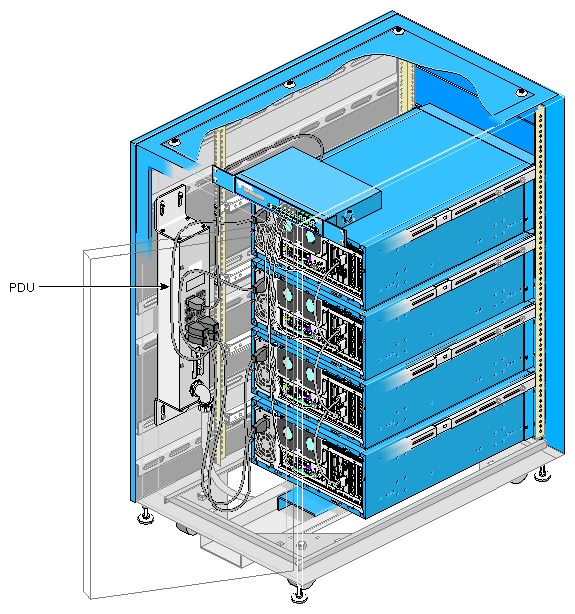
SGI ImageSync daisy-chain cabling: from the master node OUT port to channel0 IN port; from channel0 OUT port to channel1 IN port; from channel1 OUT port to channel2 IN port, and so on (see Figure 3-1)
Turn on rack power using the breaker switch on the power distribution unit (PDU); see Figure 3-1.
At the back of the rack, check that the switch link LEDs illuminate.
If an LED does not illuminate, it might indicate that the node to which this Ethernet cable is connected is not receiving power, because it is powered off or because its power cable is not plugged in or defective.
Power on each node in the system, starting with the master node at the bottom of the rack, as follows:
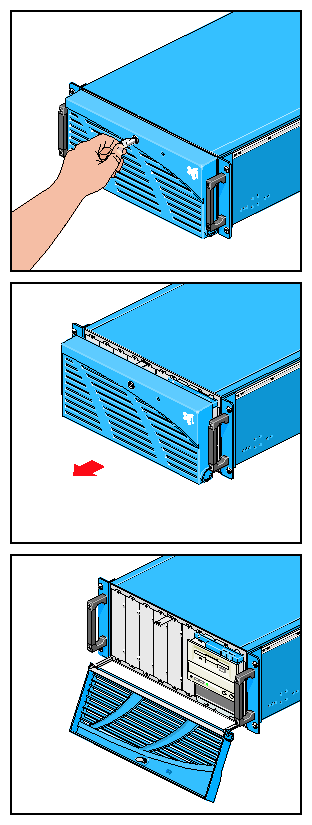
Unlock the node bezel using the key provided. The keys (two for each node) are shipped attached to the rack door; the keys are identical.
Pull the bezel out and away from the node, and swing the bezel down, as shown in Figure 3-2.
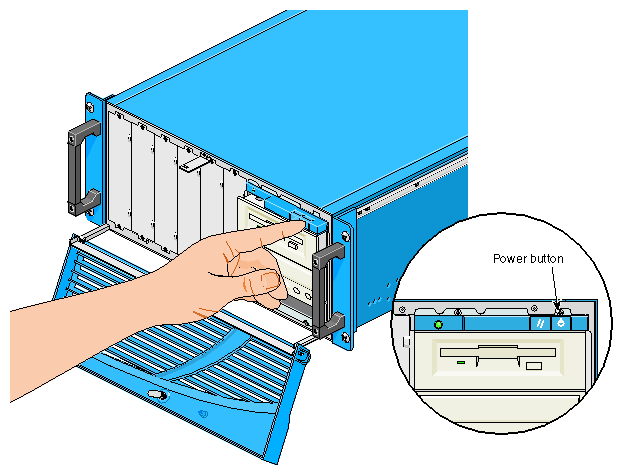
Power on the node by pressing the button at the far right above the floppy disk drive; see Figure 3-3.
SGI has set up a cluster administration account, gcadmin, for your use. The password is sgisgi. Each channel is set to autologin to the gcadmin account, and displays a desktop when the system is fully booted.
SGI provides the command-line tool pconsole, which enables the administrator to execute Linux commands on all channels in unison. Documentation for pconsole is in /usr/share/doc/pconsole.
To start a pconsole session, open a terminal window. At the prompt, type the following:
pconsole.sh channel0 channel1 |
Note that the channel names end with the letter l and a numeral, in these cases, 0 (zero) and 1 (one).
SGI preloads the following tools that you may find useful:
pcp: Performance Co-Pilot
rsync: remote file transfer tool
autologin: allows automatic login upon boot
wu-ftpd: FTP daemon
ntp: network time protocol
Documentation for these tools and others on the system disk are on the system disk in /usr/share/doc. The license for SGI Performer is included in a packet.
For further Linux configuration information, see Linux in a Nutshell, Ellen Siever, Stephen Spainhour, Jessica P. Hekman, and Stephen Figgins, third edition, O'Reilly & Associates, 2000, ISBN 0-596-00025-1.
You must install Windows NT to meet the acceptance requirements of Microsoft EULA. All drivers, and Service Pack 6a are installed during this procedure. The Windows NT license is included with the operating system packet.
SGI suggests following accepted Windows NT administration procedures for setting up networking and domain controllers. Subnetworks that meet RFC specifications are available at 10.0.2.xxx and 192.168.1.xxx.
For further Windows NT configuration information, see the reference works listed in this chapter.
Useful system administration references for Linux are as follows:
Essential System Administration, AEleen Frisch, second edition, O'Reilly& Associates, 1995; ISBN 1-56592-127-,; http://www.oreilly.com/catalog/esa2/
Linux in a Nutshell, Ellen Siever, Stephen Spainhour, Jessica P. Hekman, and Stephen Figgins, third edition, O'Reilly & Associates, 2000, ISBN 0-596-00025-1, http://www.oreilly.com/catalog/linuxnut3/
Linux Network Administrator's Guide, Olaf Kirch and Terry Dawson, second edition, O'Reilly & Associates, 2000; ISBN 1-56592-400-2, http://www.oreilly.com/catalog/linag2/
Useful system administration reference works for Windows NT are as follows:
Windows NT in a Nutshell, Eric Pearce, O'Reilly & Associates, 1997; ISBN 1-56592-251-4, http://www.oreilly.com/catalog/winnut/
Essential Windows NT System Administration, AEleen Frisch, O'Reilly & Associates, 1998; ISBN 1-56592-274-3, http://www.oreilly.com/catalog/esawinnt/
DNS on Windows NT, Paul Albitz, Matt Larson, and Cricket Liu, O'Reilly & Associates, 1998, ISBN 1-56592-511-4, http://www.oreilly.com/catalog/dnswinnt/