This chapter provides information on mounting the SGI 1100 server in an SGI 19-inch rack.
Though the SGI 1100 server is not a very heavy system, installing one in a rack can be awkward, and it is therefore best to have assistance from a second person while performing the installation.
 | Note: When installing an SGI 1100 server in certain slots in an SGI 19-inch rack, it may be necessary to remove one of the PDUs (power distribution units) in order to reach some of the slide bracket mounting screws. |
Remove the server from the packaging container and check that all accessories are included. Inspect the packaging container for evidence of mishandling during transit. If the packaging container is damaged, photograph it for reference. After removing the contents, keep the damaged container and the packing materials.
Inspect the server and accessories for damage. If the contents appear damaged, file a damage claim with the carrier immediately.
Table 2-1 specifies the space requirements for the SGI 1100 server system when installed in an SGI rack.
Table 2-1. SGI 1100 Server Space Requirements
Height | 1u (1.75 in., 4.45 cm) |
Width | 19.0 in. (48.25 cm) |
Depth | 21.2 in. (53.85 cm) |
Weight | 24.2 lbs. (11 kg), maximum configuration |
Required front clearance | 25” (63.5 cm) minimum (for chassis servicing) |
Required rear clearance | 20” (50.8 cm) minimum (for rack door clearance) |
Required side clearance | None |
The four vertical rails of the SGI rack contain mounting holes arranged in the manner shown in Figure 2-1.

The system occupies 1U in the rack. Count the U positions and hole numbers from the bottom up.
The distance from the center of any hole to the center of the third hole above it is equivalent to 1U.
When installing components, you must start your measurement from the center of the two holes with closer spacing. Otherwise, the screw holes on the component may not match with those on the rack.
The hardware detailed in Table 2-2 is used in the mounting of the SGI 1100 server in an SGI 19-inch rack:
Table 2-2. Rack Mounting Hardware
Figure | Hardware type | Qty | Usage |
|---|---|---|---|
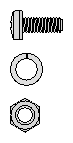 |
M4 x L8 screw
M4 lock-washer
M4 nut |
12
12
12 |
Secures the slides to their mounting brackets.
Secures the slides to their mounting brackets.
Secures the slides to their mounting brackets. |
 |
M6 x L10 screw |
8 |
Secures the slide mounting brackets to the rack rails. |
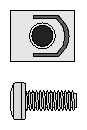 |
10-32 U-nut 10-32 x 0.5” screw |
2 2 |
Provides a threaded hole for fastening Fastens the SGI 1100 server front panel to the U-nut.
|
 |
M4 x L5 screw |
8 |
Secures the component rails to the system. |
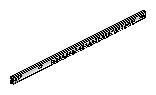 |
Slide |
2 |
Allows SGI 1100 server chassis to slide out of rack for access. (The left and right slides are identical.) |
 |
Mounting
bracket |
4 |
Mounts slide to rack vertical rails. (All four brackets [right front, right rear, left front, left rear] are identical.) |
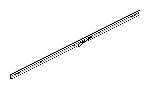 |
Chassis rail |
2 |
Attaches to SGI 1100 server chassis. (The left and right rails are identical.) |
| Note: The rack-mounting kit may also include additional hardware, such as step washers for use with certain brands of racks. This additional hardware is not used when mounting the SGI 1100 server in an SGI rack. |
Follow these steps to assemble the slides:
Remove the chassis rail from one of the slides (see Table 2-2 for illustrations of the two components). In order to remove the rail, you will need to push a release latch, as shown in Figure 2-11.
Push the slide back to its collapsed position.
Identify the front of the slide. The arrow in Figure 2-2 points toward the front.
Insert one of the M4xL8 screws (see Table 2-2) through the round hole at the front of slide, then through the round hole in one of the brackets (as shown in Figure 2-3). It will be necessary to extend the slide very slightly in order to reach the front hole.
Place one of the M4 lock washers and one of the M4 nuts (see Table 2-2) on the screw, and tighten normally.
Retract the slide again, then insert two more M4xL8 screws through the two elongated holes in the slide, then through the two slots in the bracket (as shown in Figure 2-3).
Place an M4 lock washer and an M4 nut on each of the two screws, and tighten normally.
Extend the slide about half way.
Insert three M4xL8 screws through the three elongated holes in the rear portion of the slide, then through the rear two slots in the bracket (see Figure 2-4). Do not place any of the screws through the rear round hole in the bracket.
Place an M4 lock washer and an M4 nut on each of the three screws, but leave them slightly loose (they will get tightened later).
Repeat steps 1 through 10 for the second slide, using the remaining two brackets.


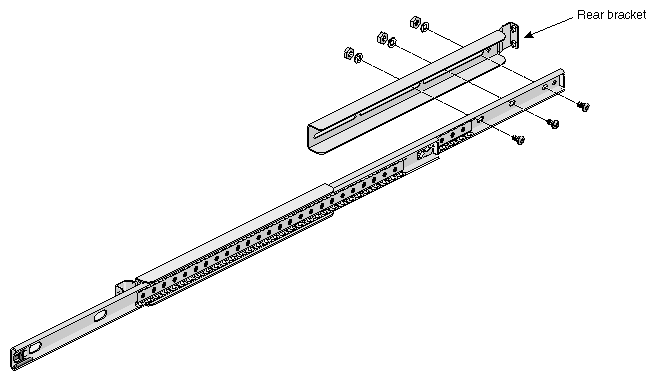
Follow these steps to mount the two slides into the SGI rack:
Take one of the assembled slides, and place the front bracket against the lower two holes of the chosen U on the left front rack rail.
Using two M6xL10 screws (see Table 2-2), fasten the bracket to the rack rail (see Figure 2-5).
Place the rear bracket against the lower two holes of the corresponding U on the left rear rack rail.
Using two M6xL10 screws, fasten the bracket to the rack rail (see Figure 2-6).
Note: Some locations in the SGI rack may require removal of a power distribution unit (PDU) in order to access the rear bracket screws. Once both the front and the rear brackets are mounted to the rack rails, tighten the three rear slide-to-bracket screws and nuts that you left slightly loose when you mounted the rear bracket to the slide.
Repeat steps 1 through 5, this time mounting the second slide on the right rail.

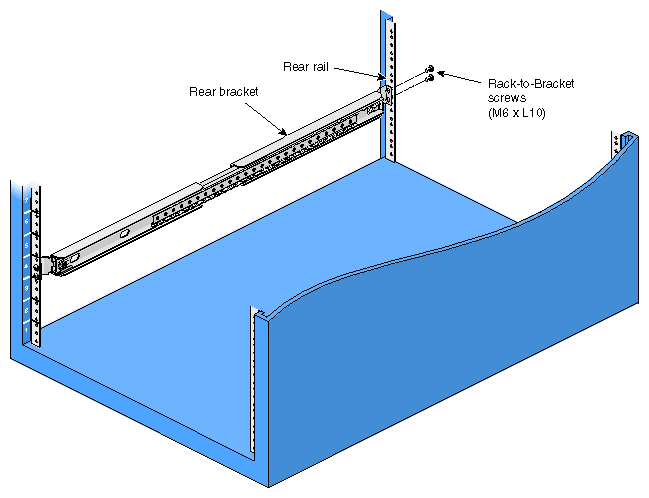
Caged U-nuts (see Table 2-2) are used to secure systems and other components to the vertical rails in the rack.
Snap the two caged U-nuts into place by sliding one caged U-nut over each of the two remaining holes in the selected U on the front rails (one on the right front rail, one on the left front rail). See Figure 2-7 for details.
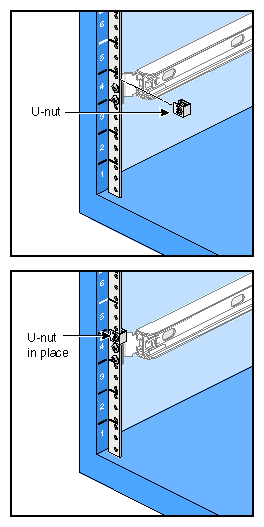
Follow these steps to prepare the SGI 1100 server for rack mounting:
Using four M4xL5 screws (see Table 2-2), attach one of the chassis rails to the right side of the SGI 1100 server chassis. Ensure that the rail is installed in the correct direction (see Figure 2-8 for details).
Repeat step 1, this time mounting the second rail to the left side of the SGI 1100 server chassis.

Follow these steps to install the SGI 1100 server in the rack:
Fully extend both the left and the right slides from the rack (see Figure 2-9 for details). They will click and lock into place when fully extended.
Slide the SGI 1100 server chassis fully onto the extended slides (see Figure 2-10 for details). Both slides will click and lock into place when the chassis is fully inserted.
Release the slide latches on both sides of the chassis and slide the chassis into the rack (see Figure 2-11 for details). The slides will be fairly stiff the first time the chassis slides into the rack, which is due to the bearing cages not being centered in the slides. After the chassis has traveled once over its full range, the motion will be much easier.

Caution: Once the chassis is pushed to about the halfway point, the inner slide latches will resist further motion, then will disengage rather suddenly. Be prepared for this. Using the two 10-32 x 0.5” screws (see Table 2-2), fasten the SGI 1100 server chassis to the U-nuts in the rack (as shown in Figure 2-1).


When installed in an SGI rack, the SGI 1100 server will plug into a power distribution unit ( PDU) included with the rack. Each PDU has ten IEC320-C13 10A power receptacles. Depending on configuration, the rack may be supplied with as many as four of these PDUs, for a total of up to forty IEC320-C13 10A power receptacles.