This chapter describes the cables required for SGI GSN products.
For the single-board SGI GSN copper-medium product, only one cable is required. See “GSN (HIPPI-6400) Cables”.
For the two-board SGI GSN copper-medium product, two cables are required. See “GSN (HIPPI-6400) Cables” and “XTOWN Cable”.
This section describes site cabling for SGI GSN products.
The GSN cable required for SGI GSN products is a multi-conductor, copper-medium cable of up to 40 meters with 100-position connectors. The cable and its connectors must meet all the copper cable requirements specified in the HIPPI-6400-PH ISO/ANSI international standard (that is, Information Technology - High-performance Parallel Interface - 6400 Mbit/s Physical Layer [HIPPI-6400-PH], ISO/IEC 11518-10, Rev. 2.4), including those items provided in Table 2-1. In case of a discrepancy between Table 2-1 and the standard, the standard prevails.
One copper GSN (HIPPI-6400-PH) cable is required for each SGI GSN product to connect it to the site's GSN fabric. This cable is not included with the SGI GSN product, but can be purchased from SGI, as summarized in Table 2-2.
To view the ANSI standard for HIPPI-6400–PH, use the following Web site: http://www.hippi.org/cDOCS.html .
Table 2-1. Electrical Specification for GSN Copper-medium Site Cables [a]
Parameter | Units | Maximum | Typical | Minimum | Comments |
|---|---|---|---|---|---|
Z0 | Ω (ohms) | 165 | 150 | 135 | Differential impedance (tolerance ± 10%) |
VXTALK | mV * ns | 200 | n.a. | n.a. | Reverse crosstalk voltage |
Vo | mVp-p |
| n.a. | 200 | Single-ended peak-to-peak output voltage |
TJITTER | ps | 500 | n.a. | n.a. | Deterministic peak-to-peak jitter |
Channel | ns | 7 | n.a. | n.a. | Channel-to-channel skew |
Imbalance skew | ps | 250 | n.a. | n.a. | Imbalance skew within a signal pair |
[a] Voltage measurements are single-ended rather than differential. | |||||
You can purchase GSN site cabling from your SGI sales representative using the following marketing codes:
Table 2-2. Site Cables Available From SGI to GSN Products
Code | Length | Description |
|---|---|---|
XT-GSN-C-CABLE-5M | 5 meters | GSN (HIPPI-6400-PH) copper cable (non-equalized) terminated with angled (at 40-degrees), keyed, 100–pin HIPPI-6400-PH connectors |
XT-GSN-C-CABLE-10 | 10 meters | GSN (HIPPI-6400-PH) copper cable (non-equalized) |
XT-GSN-C-CABLE-25M | 25 meters | GSN (HIPPI-6400-PH) copper cable (equalized) terminated with angled (at 40-degrees), keyed, 100–pin HIPPI-6400-PH connectors |
XT-GSN-C-CABLE-40M | 40 meters | GSN (HIPPI-6400-PH) copper cable (equalized) terminated with angled (at 40-degrees), keyed, 100–pin HIPPI-6400-PH connectors |
XT-GSN-C-LOOP | n.a. | GSN (HIPPI-6400-PH) loopback 100–pin connector - Figure 3-1 illustrates this item. |
For connectors with different angles or cables of different lengths, contact BERG Electronics at telephone number 800-237-2374 or via the Internet at http://www.berg.com .
This section describes the proper procedures for connecting GSN (HIPPI-6400) cables or a loopback device to the SGI GSN panel plate receptacle.
To prevent ESD buildup, install the cable's plastic conductive (antistatic) inserts into the cable's connectors whenever a cable is unattached.
To release builtup energy before attaching a cable, install the cable's plastic conductive (antistatic) inserts into the cable's connectors, then discharge the cable's backshell to an exposed metal part of the chassis on the destination system.
To attach a GSN cable or loopback device to the panel plate of the main SGI GSN board, follow these instructions:
If the system is powered on, disable the GSN network interface that is associated with the port to which you will attach a cable:
% ifconfig gsn# down
Locate the site's GSN (HIPPI-6400) copper cable for this SGI GSN connection, or the loopback device, as appropriate.
Optional: Put labels on the panel plate and cable.
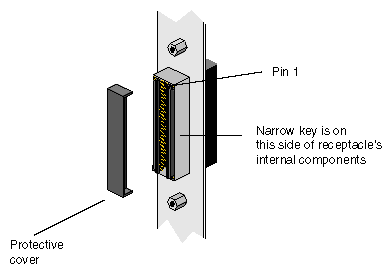
Remove the protective cover from the SGI GSN board's GSN (HIPPI–6400–PH) receptacle, as illustrated in Figure 2-1.
Figure 2-1. GSN Receptacle of Main SGI GSN Board When Installed in XIO Slot 3, 4, 7, 8, 11, or 12 of Origin 2000 or SGI 2100 System, or in XIO Slot 3 of Onyx2 Deskside System
Discharge the cable's backshell to an exposed metal part of the chassis.
Remove the protective caps or antistatic inserts from the cable's connectors or from loopback device.
Orient the connector to the panel plate receptacle.
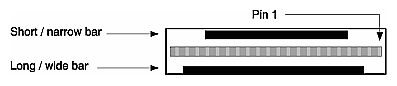
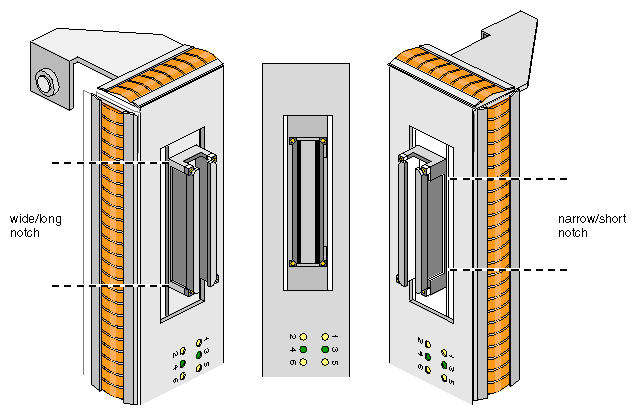
The cable or loopback device's connector and the receptacle on the panel plate are keyed to ensure proper insertion. The key consists of two parallel bars of metal inside the connector (one long piece and one short piece, as illustrated in Figure 2-2) that fit into two notches inside the receptacle (illustrated in Figure 2-3).
Look inside the cable connector and identify the short/narrow bar.
Align the short/narrow bar of the connector to the short/narrow notch inside the receptacle.
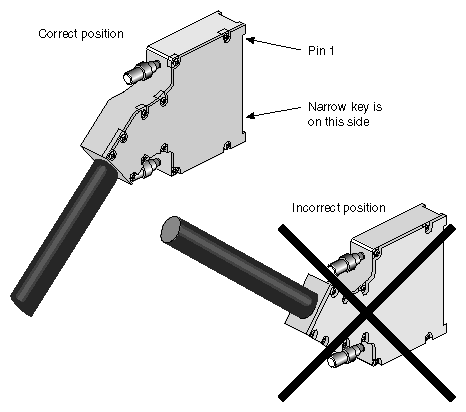
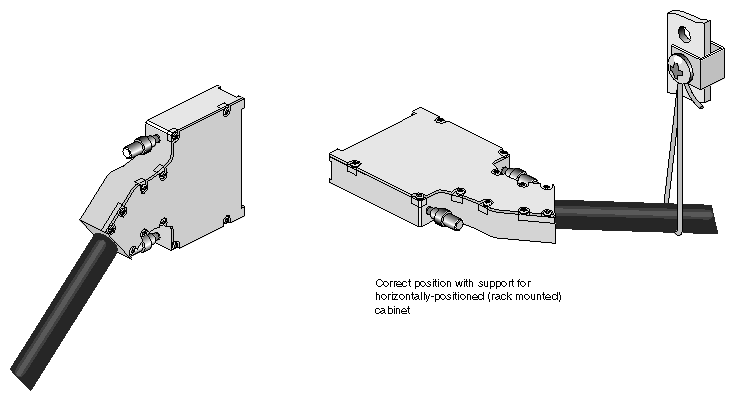
Some GSN cable connectors are designed with an angle to relieve strain. This style of connector must face downward (as illustrated in Figure 2-4) or sideways (as illustrated in Figure 2-5). If proper alignment of the key results in the cable facing upward, you need to locate a GSN cable with a different angle built into its connector.
Attach the cable or loopback device to the panel plate's GSN port.
It is easier to attach the connector to the receptacle if you start the insertion at one end (the 2 parts positioned at a slight angle to each other), rather than head-on (the 2 parts parallel to each other).
Push the 2 parts together until they are seated.
Finger tighten both thumb-screws. Engaging these screws completes the chassis ground circuit for the GSN link.

Note: Failure to engage these screws can compromise the product's electromagnetic integrity. 
Caution: Overtightening, which may occur if you use a screwdriver, can break these screws. For a GSN cable, make sure that the other end of the cable is attached to a switch or GSN endpoint.
If the system is powered on, enable the GSN network interface:
% ifconfig gsn# up
The XTOWN (also known as XIO) cable is a 58-inch, 100–position, copper-medium cable made by SGI (part number 018-0564-00x, marketing code XTOWN Cable Assembly). This cable provides the datapath between the main SGI GSN board and the additional SGI GSN board, using the XTOWN port on each board. This cable is shipped with the two-board SGI GSN product (XT-GSN-C-2XIO); it is not needed for the single-board SGI GSN product.