This chapter describes some basic hardware verification and troubleshooting for SGI GSN products. See the online document IRIX GSN Administrator's Guide for more complete procedures.
This section describes LED patterns on the main SGI GSN board that indicate problems. The section also provides suggestions of actions you can take to remedy the problem.
If any of the LEDs on the additional (XTOWN) SGI GSN board are ON, contact the SGI North American Technical Assistance Center at 1-800-800-4SGI or the local sales office.
Table 3-1 describes LED patterns that indicate a problem with the main SGI GSN board or the GSN connection. The table also provides suggestions for resolving the problem.
Table 3-1. Troubleshooting With SGI GSN Panel Plate LEDs
LED | Pattern | Description |
|---|---|---|
1 | OFF | When LEDs 1 and 2 are stuck in this pattern, the problem can be any of the |
2 | OFF | following: |
|
| • Power to the module is not on. |
|
| • Board is not UP (for example, board is not seated firmly into its slot). |
|
| • Unconnected, loose, damaged, or defective connectors at either end of the cable. |
|
| • Damaged or defective GSN cable. |
|
| • Dysfunctional GSN (HIPPI–6400-PH) hardware/node at either end of the cable. |
|
| Troubleshooting suggestions: |
|
| - Invoke gsncntl startup for the GSN board. |
|
| - Check the cable connections at each end of the cable. Make sure the thumb screws are tightened and the connectors are correctly and tightly seated. |
|
| - Verify functionality of each endpoint (that is, each system connected to the cable). To do this step for the local system, follow the procedure in “Verification With a Loopback Device” . |
|
| - Replace the cable with one that is known to be functional. |
|
|
|
|
|
|
|
|
|
|
|
|
|
|
|
|
|
|
|
|
|
|
|
|
1 (yellow) | ON | When LEDs 1 and 2 are stuck in this pattern, the problem can be any of the |
2 | OFF | following: |
|
| • Loose, damaged, or defective cable. |
|
| • Dysfunctional HIPPI–6400-PH hardware at either end of the cable: signal skew compensation is not working. |
|
| Troubleshooting suggestions: |
|
| - Check the cable connections at each end of the cable. Make sure the thumb screws are tightened. |
|
| - Reset the local SGI GSN subsystem as described in the online IRIX GSN Administrator's Guide. |
|
| - Reset the GSN subsystem at the other end of the cable by following the reset procedure supplied by its manufacturer. |
|
| - Replace the cable with one that is known to be functional. |
|
| - Verify the local SGI GSN endpoint functionality by following the procedure in “Verification With a Loopback Device” . |
|
| - Verify the GSN functionality at the other end of the cable by following the
verification procedure supplied by its manufacturer. |
|
|
|
|
|
|
|
|
|
|
|
|
|
|
|
|
|
|
|
|
|
|
|
|
|
|
|
1 (green) | ON | When LEDs 1 and 2 are stuck in this pattern, the problem can be any of the |
2 | OFF | following: |
|
| • Dysfunctional HIPPI–6400-PH hardware at either end of the cable: initialize/reset handshake is not working. |
|
| • Damaged or defective cable. |
|
| Troubleshooting suggestions: |
|
| - Verify the local SGI GSN endpoint functionality by following the procedure in “Verification With a Loopback Device” . |
|
| - Verify the GSN functionality at the other endpoint by following the verification procedure supplied by its manufacturer. |
|
| - Reset the local SGI GSN subsystem as described in the online IRIX GSN Administrator's Guide. |
|
| - Reset the GSN subsystem at the other end of the cable by following the reset procedure supplied by its manufacturer. |
|
| - Replace the cable with one that is known to be functional. |
|
|
|
|
|
|
|
|
|
|
|
|
|
|
|
|
|
|
|
|
|
|
|
|
|
|
|
|
|
|
1 (green) | ON | When LEDs 1 and 2 are stuck in either of these patterns, the problem can be |
2 (yellow) | ON | any of the following: |
or |
|
|
1 (green) | ON |
|
2 (green) | blinking | • Loose cable connection at either end. |
|
| • Dysfunctional HIPPI–6400-PH hardware at either end of the cable: for example., the link is shut down, the Destination at the other end of the cable is not sending credits, the local Source is not receiving credits, or the checksums are failing due to loose cable connectors, dysfunctional cable, or hardware. |
|
| Troubleshooting suggestions: |
|
| - Verify that cable connections at each endpoint are seated correctly and tightly. |
|
| - Exchange the cable with a known good cable. |
|
| - Verify each endpoint of this link by following the procedure in “Verification With a Loopback Device” . |
|
| - Reset the local SGI GSN subsystem as described in the online IRIX GSN Administrator's Guide. |
|
| - Reset the GSN subsystem at the other end of the cable by following the
reset procedure supplied by its manufacturer. |
|
|
|
|
|
|
|
|
|
|
|
|
|
|
|
|
|
|
|
|
|
|
|
|
3 | does not | When LED 3 does not blink and LEDs 1 and 2 are both green, the problem |
Receive | blink | can be any of the following: |
|
| • Link is quiescent because no data is passing through the link; the remote Source is not transmitting. |
|
| • Remote Source is dysfunctional. |
|
| • Loose or dysfunctional cable or cable connections. |
|
| Troubleshooting suggestions: |
|
| - Verify that the cable connections at each endpoint are seated correctly and tightly. |
|
| - Verify that the remote Source is actually transmitting data. |
|
| - Verify the local endpoint reception functionality by following the procedure in “Verification With a Loopback Device” . |
4 | does not | When LED 4 does not blink and LEDs 1 and 2 are both green, the problem |
Send | blink | can be any of the following: |
|
| • Link is quiescent simply because no data is passing through the link; local Source is not transmitting. |
|
| • Local Source is dysfunctional. |
|
| • Upper-layer protocol stack (software) is configured improperly so that no data is being passed to the GSN hardware. |
|
| • Loose or dysfunctional cable or cable connections. |
|
| Troubleshooting suggestions: |
|
| - Verify that the cable connections at each endpoint are seated correctly and tightly. |
|
| - Verify the local endpoint transmission functionality by following the procedure in “Verification With a Loopback Device” . |
5 (yellow) Lost In | blink | Whenever LED 5 blinks and LEDs 1-4 display normal operational patterns, any of the following may be the problem: |
|
| • Data is being corrupted before the local Destination accepts it. |
|
| • The local HIPPI–6400–PH Destination hardware is dysfunctional (for example, incorrectly generating or managing RSEQ values). |
|
| • The remote HIPPI–6400–PH Source hardware (at the other end of the cable) is dysfunctional (for example, incorrectly collapsing multiple RSEQ values before transmitting). |
|
| Troubleshooting suggestions: |
|
| - If this error occurs extremely rarely (for example, once in a day), ignore it as long as there are no accompanying upper-layer (software) errors. No data is lost because the remote Source retransmits. |
|
| - Verify that the cable connections at each endpoint are seated correctly and tightly. |
|
| - Replace the cable with a known good one. |
|
| - Identify which endpoint is dysfunctional and follow the manufacturer's instructions to fix it. For example, for an SGI GSN endpoint, follow the procedure in “Verification With a Loopback Device” . |
|
| - If the dysfunctional endpoint is an SGI GSN board, replace that board.
Otherwise, follow the manufacturer's instructions. |
|
|
|
|
|
|
|
|
|
|
|
|
|
|
|
|
|
|
|
|
|
6 (yellow) Lost Out | blink | Whenever LED 6 blinks and LEDs 1-4 display normal operational patterns, any of the following may be the problem: |
|
| • Data is being corrupted before the remote Destination accepts it. |
|
| • The local round-trip timeout value for this link is too short. |
|
| • The remote HIPPI–6400–PH hardware (at the other end of the cable) is experiencing problems that cause delays that exceed the timeouts. |
|
| • A parity error occurred that resulted in the remote HIPPI–6400–PH Destination discarding the micropacket. |
|
| • The remote HIPPI–6400–PH Destination is dysfunctional (for example, not generating ACKs or incorrectly discarding micropackets). |
|
| • The remote HIPPI–6400–PH Source is dysfunctional (for example, not transmitting the ACKs it receives from its own Destination logic). |
|
| • The local HIPPI–6400–PH Source hardware is dysfunctional (for example, transmitting incorrectly formatted micropackets that cause the other endpoint to discard the micropackets). |
|
| Troubleshooting suggestions: |
|
| - If this error occurs extremely rarely (for example, once in a day), ignore it as long as there are no accompanying upper-layer (software) errors. No data is lost because the Source retransmits. |
|
| - Verify that the cable connections at each endpoint are seated correctly and tightly. |
|
| - Replace the cable with a known good one. |
|
| - Identify which endpoint is dysfunctional and follow the manufacturer's instructions to fix it. For example, for an SGI GSN endpoint, follow the procedure in “Verification With a Loopback Device” . |
When the procedure described in this section succeeds, the path between the local IRIX operating system and the SGI GSN hardware is functional and the entire SGI GSN board is functional, including the external GSN (HIPPI–6400-PH) connectors. This test does not verify the functionality of the upper-layers of the protocol stack (for example, TCP or ST).
Disable the GSN network interface that needs to be verified:
% ifconfig gns# down
At the SGI GSN port, remove the external GSN cable and install a loopback device (illustrated in Figure 3-1).
Enable the network interface:
% ifconfig gns# up
Transmit and receive data through the loopback device using these commands:
% su
Password: your_password
# /usr/etc/gsntest gsn#
GSN PING hop 0: Received ping cmd/response from element in 122.40 us
GSN PING hop 1: Received ping cmd/response from element in 96.80 us
GSN PING hop 2: Received ping cmd/response from element in 1672 us
where Figure 3-2 illustrates the element (hop) that is responding to each PING message.
If this test fails, use Table 3-2 to proceed.
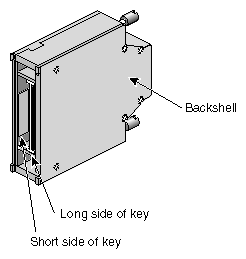

Table 3-2. How to Proceed When gsntest Fails
Error Message | Procedure |
|---|---|
Admin packet read/write error | Use ifconfig gsn# down; ifconfig gsn# up to reset the GSN subsystem. Then repeat the test. If the test still fails, contact the SGI North American Technical Assistance Center at 1-800-800-4SGI or the local sales office . |
Command not found | Use versions gsn to verify that the IRIX GSN software is installed. If it is not, install it. If IRIX GSN is installed, use ls /usr/etc to verify that gsntest is located correctly. If it is not, reinstall the IRIX GSN software. |
ERROR: ioctl call failed | Use ifconfig gsn# down; ifconfig gsn# up to reset the GSN subsystem. Then repeat the test. If the test still fails, contact the SGI North American Technical Assistance Center at 1-800-800-4SGI or the local sales office . |
Error opening device_name for dev access: error | The specified GSN device did not respond to the open() request due to the reason indicated by the error. Use hinv to verify that the GSN hardware is known to the operating system. Use ls /dev/gsn* to verify that a device file exists for the hardware. Use gsncntl status device to verify that the link state is LNK_RDY and gsncntl status element to verify that hop 0 (the local SuMAC) is responding. If any of these verifications fails, invoke ifconfig gsn# down; ifconfig gsn# up. Then repeat the test. If the test still fails, contact the SGI North American Technical Assistance Center at 1-800-800-4SGI or the local sales office . |
Error writing to SuMAC | Use ifconfig gsn# down; ifconfig gsn# up to reset the GSN subsystem. Then repeat the test. If the test still fails, contact the SGI North American Technical Assistance Center at 1-800-800-4SGI or the local sales office . |
PING error on hop # | Use ifconfig gsn# down; ifconfig gsn# up to reset the GSN subsystem. Then repeat the test. If the test still fails, contact the SGI North American Technical Assistance Center at 1-800-800-4SGI or the local sales office . |
Unable to receive GSN PING response | Use ifconfig gsn# down; ifconfig gsn# up to reset the GSN subsystem. Then repeat the test. If the test still fails, contact the SGI North American Technical Assistance Center at 1-800-800-4SGI or the local sales office . |
Unexpected command response | Use ifconfig gsn# down; ifconfig gsn# up to reset the GSN subsystem. Then repeat the test. If the test still fails, contact the SGI North American Technical Assistance Center at 1-800-800-4SGI or the local sales office . |
If this test succeeds, the SGI GSN subsystem (including the board) is functional. If the link between this GSN port and another GSN port has been problematic, install the loopback device on the other GSN port, then run verification tests on that system. If the verification test succeeds, replace the HIPPI–6400 cabling that connects these two ports.
 | Note: You must use ifconfig to disable then re-enable the GSN network interface when you remove the loopback device and (re)connect a GSN cable. |
If the problem recurs, replace the cable with a known good cable.
If replacing the cable does not solve the problem, contact the SGI North American Technical Assistance Center at 1-800-800-4SGI or the local sales office.
Note: Additional verification procedures are provided in the online IRIX GSN Administrator's Guide.