The REACT/Pro Frame Scheduler makes it easy to structure a real-time program as a family of independent, cooperating processes, running on multiple CPUs, scheduled in sequence at the frame rate of the application. For an overview of the Frame Scheduler, see “REACT/Pro Frame Scheduler”.
This chapter contains details on the operation and use of the Frame Scheduler, under these main headings:
“Frame Scheduler Concepts” details the operation and methods of the Frame Scheduler.
“Selecting a Time Base” covers the important choice of which source of interrupts should define a frame interval.
“Using the Scheduling Disciplines” explains the options for scheduling activities of different kinds.
“Preparing the System” reviews the system administration steps needed to prepare the CPUs that the Frame Scheduler will use.
“Implementing a Single Frame Scheduler” outlines the structure of an application that uses one CPU.
“Implementing Synchronized Schedulers” outlines the structure of an application that needs the power of multiple CPUs.
“Handling Frame Scheduler Exceptions” describes how overrun and underrun exceptions are dealt with.
“Using Signals Under the Frame Scheduler” discusses the issue of signal latency and the signals the Frame Scheduler generates.
“Using Timers with the Frame Scheduler” covers the use of itimers with the Frame Scheduler.
“The Frame Scheduler Device Driver Interface” documents the way that a kernel-level device driver can generate time-base interrupts for a Frame Scheduler.
One Frame Scheduler dispatches selected processes at a real-time rate on one CPU. You can also create multiple, synchronized Frame Schedulers so as to dispatch concurrent processes on multiple CPUs.
A Frame Scheduler takes over the scheduling and dispatching of processes on one CPU. It isolates the CPU (see “Isolating a CPU From TLB Interrupts”), and completely supersedes the operation of the normal IRIX scheduler on that CPU. Only processes enqueued to the Frame Scheduler can use the CPU. IRIX dispatching priorities are not relevant on that CPU.
The execution of normal processes, daemons, and pending timeouts are all migrated to other CPUs—typically to CPU 0, which cannot be owned by a Frame Scheduler. All interrupt handling is usually directed away from a Frame Scheduler CPU as well (see “Preparing the System”).
Instead of scheduling processes according to priorities with an attempt at fairness, the Frame Scheduler dispatches them according to a strict, cyclic rotation governed by a repetitive time base. The time base determines the fundamental frame rate. (See “Selecting a Time Base”.)
The interrupts from the time base define minor frames. You tell the Frame Scheduler a fixed number of minor frames that should be considered a major frame, which defines the application's true frame rate.
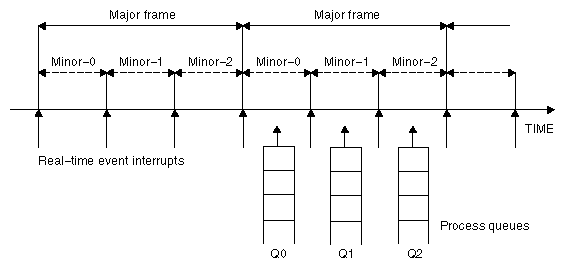
As shown in Figure 7-1, the Frame Scheduler maintains a queue of processes for each minor frame within a major frame. You enqueue the activity processes of your program in a specific order within specific minor frames. You can:
Enqueue multiple processes in one minor frame. All must complete their work within the minor frame interval.
Enqueue the same process to run in more than one minor frame. Say that process double is to run twice as often as process solo. You could enqueue double to Q0 and Q2 in Figure 7-1, and enqueue solo to Q1.
Enqueue a process that takes more than a minor frame to complete its work. If process sloth could need more than one minor interval, you could enqueue it to Q0, Q1 and Q2 in Figure 7-1, such that it would be able to continue working in all three minor frames until it completed.
Enqueue a background process that is allowed to run only when all others have completed, to use up any remaining time within a minor frame.
All these options are controlled by scheduling disciplines you specify for each process as you enqueue it (see “Using the Scheduling Disciplines”).
The processes that a Frame Scheduler dispatches are typically child processes of the process that creates the Frame Scheduler, but that is not a requirement. Any process can be enqueued, even one that starts execution as a separate command.
The process that creates a Frame Scheduler is called the frs-master process. It is privileged in two respects:
It can receive signals when errors are detected by the Frame Scheduler (see “Using Signals Under the Frame Scheduler”).
It cannot itself be enqueued to the Frame Scheduler. It continues to be dispatched by IRIX. It executes on some other CPU than the one the Frame Scheduler uses.
The details of the Frame Scheduler API can be found in the frs(3) reference page. However, it is summarized in Table 7-1 on “The Frame Scheduler API” for convenient reference.
The following special types are declared in frs.h:
typedef frs_fsched_info_t | A structure containing information about one scheduler, including the CPU number it owns. Used when creating a Frame Scheduler. |
typedef frs_t | A structure containing an frs_fsched_info_t and the process ID of the frs-master of the master Frame Scheduler. Used to create or specify any Frame Scheduler. |
typedef frs_queue_info_t | A structure containing information about one activity process, the CPU it uses, its queue number, and its scheduling discipline. Used when enqueuing a process. |
typedef frs_recv_info_t | A structure containing error recovery options. |
Each Frame Scheduler function is available in two ways: as a system call to schedctl(), or as one or more library calls to functions in the frs library, /usr/lib/libfrs.so. The system call is accessible from FORTRAN and Ada programs. The library calls are convenient for C and C++ use.
Table 7-1. Frame Scheduler Operations
Operation | Application Interface Options |
|---|---|
Create a Frame Scheduler | int schedctl(MPTS_FRS_CREATE, frs_fsched_info_t* frs_fsched_info
); |
Enqueue an activity process to a Frame Scheduler | int schedctl(MPTS_FRS_ENQUEUE, frs_queue_info_t* frs_queue_info
); |
Join a Frame Scheduler (activity is ready to start) | int schedctl(MPTS_FRS_JOIN, int cpu
); |
Start scheduling (all activities enqueued) | int schedctl(MPTS_FRS_START, int cpu
); |
Yield control after completing activity | int schedctl(MPTS_FRS_YIELD) |
Pause scheduling at end of minor frame | int schedctl(MPTS_FRS_STOP, int cpu
); |
Resume scheduling at next time-base interrupt | int schedctl(MPTS_FRS_RESUME, int cpu
); |
Destroy a Frame Scheduler | int schedctl(MPTS_FRS_DESTROY, int cpu
); |
Interrogate a process queue | int schedctl(MPTS_FRS_GETQUEUELEN, frs_queue_info_t* frs_queue_info
); |
Remove a process from a queue | int schedctl(MPTS_FRS_PREMOVE, frs_queue_info_t* frs_queue_info
); |
Reinsert a process in a queue (possibly changing discipline) | int schedctl(MPTS_FRS_PINSERT, frs_queue_info_t* frs_queue_info, int base_pid
); |
Set/retrieve error-recovery options | int schectl(MPTS_FRS_SETATTR, frs_attr_info_t*); |
An activity process that is enqueued to a Frame Scheduler has the basic structure shown in Example 7-1.
/* Initialize data structures etc. */
frs_join(scheduler-handle)
do
{
   /* Perform the activity. */
   frs_yield();
} while(1);
_exit();
|
When the process is ready to start real-time execution, it calls frs_join(). This call blocks until all enqueued processes are ready and scheduling has begun (see “Starting the Schedulers”). When frs_join() returns, the process is running in its first minor-frame execution.
The process then performs whatever activity it is supposed to complete in each minor frame. When it completes that work, it calls frs_yield(). This gives up control of the CPU until the next minor frame in which the process is enqueued.
Each activity process executes without interruption. As long as it yields before the end of the frame, it can do its assigned work without interruption of any kind. The Frame Scheduler preempts it at the end of the minor frame.
 | Tip: This means that activity processes can often operate on global data without using locks or semaphores. If the process that modifies global data is enqueued in a different minor frame from the processes that read the global data, there can be no access conflicts between them. |
Conflicts are still possible between two processes that are queued to the same minor frame in different, synchronized Frame Schedulers. However, such processes are guaranteed to be running concurrently. This means they can use spin-locks (see “Locks”) with high efficiency.
| Tip: A possible variation on the pattern for processes with a very short minor frame interval is the following: Immediately after calling frs_join(), spend the first minor frame touching a set of important data structures in order to “warm up” the cache—as sketched in Example 7-2. The idea is to avoid an overrun exception in the first frame due to cache misses (see “Reducing Cache Misses”). |
/* Initialize data structures etc. */
frs_join(scheduler-handle); /* Much time could pass here. */
/* Here touch important data structures, doing no work */
do
{
   frs_yield();
   /* Perform the activity. */
} while(1);
_exit();
|
Processes in a minor frame queue are dispatched in queue order. Initially, queue order is the order in which processes were named in frs_enqueue() calls. (The queues can be reordered dynamically; see frs_premove() and frs_pinsert() in Table 7-1.)
The Frame Scheduler keeps two status flags per queued process, named frs_run and frs_yield. If a process is ready to run when its turn comes, it is dispatched and its frs_run flag is set to indicate that this process has run at least once within this minor frame.
When a process yields, its frs_yield flag is set to indicate that the process has already run and released the processor. It will not be activated again within this minor frame.
If a process is not ready (usually because it is blocked waiting for I/O, a semaphore, or a lock), it is skipped. Upon reaching the end of the queue, the scheduler goes back to the beginning, in a round-robin fashion, searching for processes that have not yielded and may have become ready to run. If no ready processes are found, the Frame Scheduler goes into idle mode until a process becomes available or until an interrupt marks the end of the frame.
When a time base interrupt occurs to indicate the end of the minor frame, the Frame Scheduler checks the flags for each process. If the frs_run flag has not been set, that process never ran and therefore is a candidate for an underrun exception. If the frs_run flag is set but the frs_yield flag is not, the process is a candidate for an overrun exception. Whether these exceptions are declared depends on the scheduling discipline assigned to the process.
Scheduling disciplines are explained under “Using the Scheduling Disciplines”).
At the end of a minor frame, the Frame Scheduler resets all frs_run flags. It also resets all frs_yield flags except for those of processes that use the Continuable discipline in that minor frame. For those processes, the residual frs_yield flags keeps the processes that have yielded from being dispatched in the next minor frame. All frs_yield flags are reset at the end of a major frame.
Underrun and overrun exceptions are typically communicated via IRIX signals. These signals are sent to all processes in the FRS queues (see “Using Signals Under the Frame Scheduler”).
It is up to you to make sure that all the processes equeued to any minor frame can actually complete their work in one minor-frame interval. If there is too much work for the available CPU cycles, overrun errors will occur.
Estimation is simplified by the fact that only the enqueued processes can execute in a CPU controlled by the Frame Scheduler. You need to estimate the maximum time each process can consume between one call to frs_yield() and the next.
Frame Scheduler processes do compete for CPU cycles with I/O interrupt service in the same CPU. If you direct I/O interrupts away from the CPU (see “Isolating a CPU From Sprayed Interrupts” and “Assigning Interrupts to CPUs”), then the only competition for CPU cycles is the overhead of the Frame Scheduler itself, and it has been carefully optimized for least overhead.
Alternatively, you may assign specific I/O interrupts to a CPU used by the Frame Scheduler. In that case, you must estimate the time that interrupt service will consume (see “Maximum Response Time Guarantee”), and schedule fewer processes to compensate.
When the activities of one frame cannot be completed by one CPU, you need to recruit additional CPUs and execute activities concurrently. However, it is important that each of the CPUs have the same time base, so that each starts and ends frames at the same time.
You can create one master Frame Scheduler, which owns the time base and one CPU, and as many synchronized Frame Schedulers as you need, each managing an additional CPU. The synchronized schedulers take their time base from the master, so that all start minor frames at the same instant.
Each Frame Scheduler has its own queues of processes. A given process can be enqueued to only one CPU. (However, you could create multiple instances of the same process and enqueue each to a different CPU.) Normally, all synchronized Frame Schedulers use the same number of minor frames per major frame, although this is not a requirement.
A process can have the frs-master relationship to only one Frame Scheduler. In order to create multiple, synchronized Frame Schedulers, you must create a process to be the frs-master of each one. Typically these will be lightweight processes created with sproc().
A Frame Scheduler cannot start dispatching activities until
the frs-master has enqueued all the activity processes to their minor frames
all the enqueued processes have done their own initial setup and are ready to run their real-time loop
When multiple Frame Schedulers are used, none can start until all are ready.
The frs-master tells its Frame Scheduler that it has enqueued all activities by calling frs_start(). Each activity process tells its Frame Scheduler that it is ready to begin real-time processing by calling frs_join().
A Frame Scheduler is ready when it has received an frs_start() call and an appropriate number of frs_join() calls. The Frame Scheduler is prepared to have these calls come in any order; that is, a process is allowed to join before or after it has been enqueued.
Each synchronized Frame Scheduler tells the master Frame Scheduler when it is ready. When all the synchronized schedulers are ready, the master Frame Scheduler gives the downbeat, and the first minor frame begins.
Any Frame Scheduler can be made to pause and restart. Any process (typically but not necessarily the frs-master) can call frs_stop(), specifying a particular Frame Scheduler. That scheduler continues dispatching processes from the current minor frame until all have yielded. Then it goes into an idle loop until a call to frs_resume() tells it to start. It resumes on the next time-base interrupt, with the next minor frame in succession.
Since a Frame Scheduler does not stop until the end of a minor frame, you can stop and restart a group of synchronized schedulers by calling frs_stop() for each one before the end of a minor frame. You can cause them all to resume at the same time by calling frs_resume() for each one between one time-base interrupt and the next.
Your program specifies an interrupt source to be the time base when it creates the master (or only) Frame Scheduler. The master Frame Scheduler initializes the necessary hardware resources and redirects the interrupt to the appropriate CPU and handler.
The Frame Scheduler time base is fundamental because it determines the duration of a minor frame, and hence the frame rate of the program. This section explains the different time bases available.
When you use multiple, synchronized Frame Schedulers, the master Frame Scheduler creates an interrupt group, a hardware mechanism that distributes the time-base interrupt to each synchronized CPU. This ensures that minor-frame boundaries are synchronized across all the Frame Schedulers. (For details of the interrupt group mechanism, you can read “Group Interrupts on Challenge and Onyx Systems,” a technical paper distributed with the REACT/Pro product.)
Each processor chip contains a free-running timer that is used by IRIX for normal process scheduling. This R4000 timer is not synchronized between processors, so it cannot be used to drive multiple synchronized schedulers. The R4000 timer can be used as a time base when only one CPU is used and there is a reason to not use the high-precision timer described in the next topic.
To use the R4000 timer, specify FRS_INTRSOURCE_R4KTIMER as the interrupt source, and the minor frame interval in microseconds, to frs_create().
The high-resolution timer and clock is a timer that is synchronous across all processors, and is ideal to drive synchronous schedulers. On Challenge and Onyx systems this timer is based on the high resolution counter discussed under “Hardware Cycle Counter”.
To use this timer, specify FRS_INTRSOURCE_CCTIMER, and the minor frame interval in microseconds, to frs_create().
The IRIX kernel uses this timer for managing timer events. When your program creates the master Frame Scheduler, the Frame Scheduler migrates all timeout events to CPU 0, leaving the timer on the scheduled CPU free.
An interrupt group is not required to coordinate multiple Frame Schedulers when this time base is used. The high-resolution timers in all CPUs are synchronized automatically.
An interrupt is generated for every vertical retrace by the graphics subsystem (see “Understanding the Vertical Sync Interrupt”). The frame rate will be either 50 Hz or 60 Hz, depending on the installed hardware. This interrupt is especially appropriate for a visual simulator, since it defines a frame rate that matches the graphics subsystem frame rate.
To use the vertical sync interrupt, specify FRS_INTRSOURCE_VSYNC to frs_create(). An error is returned if this system lacks a graphics subsystem.
When multiple synchronized schedulers are used, the master Frame Scheduler allocates an interrupt group to distribute the vertical sync interrupt.
An external interrupt is generated via a signal applied to the external interrupt sockets on a Challenge or Onyx system (see “External Interrupts”). To use external interrupts as a time base, specify FRS_INTRSOURCE_EXTINTR to frs_create().
When multiple synchronized schedulers are used, the master Frame Scheduler receives the interrupt, and allocates an interrupt group that is used to make the interrupt simultaneously available to the synchronized schedulers.
 | Note: External output signals can be generated by software using ioctl() to the external interrupt driver. An imaginative designer might think of connecting the external output jacks to the external interrupt input jacks, thus creating software-controlled external interrupts as an FRS time base. This would work in principle. However, if the interrupts are generated by a user process that makes any other system calls, there is a possibility of system deadlock. |
A user-written, kernel-level device driver can supply the time-base interrupt (see “The Frame Scheduler Device Driver Interface”). The Frame Scheduler allocates an interrupt group. The device driver must direct interrupts to it.
To use a device driver as a time base, specify FRS_INTRSOURCE_DRIVER and the device driver's identifying number, to frs_create().
A programmed, software-generated interrupt can be used as the time base. Any user process can send this interrupt to the master Frame Scheduler by calling frs_userintr().
| Note: Software interrupts are primarily intended for application debugging. It is not feasible for a user process to generate interrupts with the kind of regularity that a real-time scheduler requires. |
To use software interrupts as a time base, specify FRS_INTRSOURCE_USER to frs_create().
 | Caution: User interrupts are normally triggered by a process running on CPU 0. This can lead to system deadlock if the user process generating the interrupts issues system calls other than frs_userintr(). |
When an frs-master enqueues a process to a minor frame (using frs_enqueue()), it must specify a scheduling discipline that tells the Frame Scheduler how the process is expected to use its time within that minor frame.
In the simplest case, an activity process should start during the minor frame to which it is queued, and should complete its work and yield within the same minor frame.
If the process is not ready to run (for example, is blocked on I/O) during the entire minor frame, an underrun exception is said to occur. If the process fails to complete its work and yield within the minor frame interval, an overrun exception is said to occur.
The Frame Scheduler calls this strict discipline the Realtime scheduling discipline.
The simplest case of a Frame Scheduler would consist of
one minor frame per major frame—the time base is also the frame rate
one or more activities enqueued to the frame with Realtime discipline
This model could describe a simple kind of simulator in which three activities—poll the inputs; calculate the new status; update the display—must be repeated in that order during every frame.
In this scenario, each activity must start and must finish in every frame. If one fails to start, or fails to finish, the real-time program is broken in some way and must take some action.
However, realistic designs need the flexibility to have processes that
need not start every frame; for instance, processes that sleep on a semaphore until there is work for them to do
may run longer than one minor frame
should run only when time is available, and whose rate of progress is not critical
The other disciplines are used, in combination with Realtime and with each other, to allow these variations.
The Background discipline is mutually exclusive with the other disciplines. The Frame Scheduler only dispatches a Background process when all other processes queued to that minor frame have run and have yielded. Since the Background process cannot be sure it will run and cannot predict how much time it will have, the concepts of underrun and overrun do not apply to it.
| Note: A process with the Background discipline must be queued to its frame following all non-Background processes. Do not queue a real-time process after a Background process. |
You specify Underrunable discipline with Realtime discipline to prevent detection of underrun exceptions. You specify Underrunable in two cases:
When a process needs to run only when some event has occurred such as a lock being released or a semaphore being posted.
When a process may need more than one minor frame (see “Using Multiple Consecutive Minor Frames”).
When you specify Realtime+Underrunable, the process is not required to start in that minor frame. However, if it starts, it is required to yield before the end of the frame or an overrun exception is raised.
You specify Overrunnable discipline with Realtime discipline to prevent detection of overrun exceptions. You specify it in two cases:
When it truly does not matter if the process fails to complete its work within the minor frame—for example, a calculation of a game strategy which, if it fails to finish, merely makes the computer a less dangerous opponent.
When a process may need more than one minor frame (see “Using Multiple Consecutive Minor Frames”).
When you specify Overrunnable with Realtime, the process is not required to call frs_yield() before the end of the frame. Even so, the process is preempted at the end of the frame. It does not have a chance to run again until the next minor frame in which it is enqueued. At that time it resumes where it was preempted, with no indication that it was preempted.
You specify Continuable discipline with Realtime discipline to prevent the Frame Scheduler from clearing the frs_yield flag at the end of this minor frame (see “Scheduling Within a Minor Frame”).
The result is that, if the process yields in this frame, it need not run or yield in the following frame. The residual frs_yield flag value, carried forward to the next frame, applies. You specify Continuable discipline with other disciplines in order to let a process execute just once in a block of consecutive minor frames.
There are cases when a process sometimes or always requires more than one minor frame to complete its work. Possibly the work is lengthy, or possibly the process could be delayed by a system call or a lock or semaphore wait.
You must decide the absolute maximum time the process could consume between starting up and calling frs_yield(). If this is unpredictable, or if it is predictably longer than the major frame, the process cannot be scheduled by the Frame Scheduler. It should probably run in another CPU under the IRIX scheduler.
However, when the worst case time is bounded and is less than the major frame, you can enqueue the process to enough consecutive minor frames to allow it to finish. A combination of disciplines is used in these frames to ensure that the process starts when it should, finishes when it must, and does not cause an error if it finishes early.
The discipline settings for each frame should be:
| First frame | Realtime + Overrunnable + Continuable—the process must start in this frame (not Underrunable) but is not required to yield (Overrunnable). If it yields, it is not restarted in the following minor frame (Continuable). | |
| Intermediate | Realtime+Underrunable+Overrunnable+Continuable—the process need not start (it might already have yielded, or might be blocked) but is not required to yield. If it does yield (or if it had yielded in a preceding minor frame), it is not restarted in the following minor frame (Continuable). | |
| Final frame | Realtime+Underrunable—the process need not start (it might already have yielded) but if it starts, it must yield in this frame (not Overrunnable). The process can start a new run in the next minor frame to which it is queued (not Continuable). |
A process can be enqueued for one or more of these multi-frame sequences in one major frame. For example, suppose that the minor frame rate is 60 Hz, and a major frame contains 60 minor frames (1 Hz). You have a process that should run at a rate of 5 Hz and can use up to 3/60 second at each dispatch. You would enqueue the process to 5 sequences of 3 consecutive frames each. It would start in frames 0, 12, 24, 36, and 48. Frames 1, 13, 25, 37 and 49 would be intermediate frames, and 2, 14, 26, 38 and 50 would be final frames.
Before a real-time program executes, you must set up the system in the following ways.
Choose the CPU or CPUs that the real-time program will use. CPU 0 (at least) must be reserved for IRIX system functions.
Decide which processors will handle I/O interrupts. By default, IRIX distributes I/O interrupts across all available processors as a means of balancing the load (referred to as spraying interrupts). CPUs that are used for real-time programs should be removed from the distribution set (see “Assigning Interrupts to CPUs”).
Make sure that none of the real-time CPUs is managing the clock (see “Assigning the Clock Processor”). Normally the responsibility of handling 10ms scheduler interrupts is given to CPU 0.
Make sure none of the real-time CPUs is handling the fast timer (“Assigning the fasthz Processor”). This responsibility is typically given to CPU 0 along with all other housekeeping.
Each Frame Scheduler takes care of restricting and isolating its CPU, so that the CPU is used only be processes scheduled by the Frame Scheduler.
When the activities of your real-time program can be handled within a major frame interval by a single CPU, your program needs to create only one Frame Scheduler.
Typically your program has a top-level process (called the master process here) to handle start-up and termination, and one or more activity processes that are dispatched by the Frame Scheduler. The activity processes are typically lightweight processes created using sproc(), but that is not a requirement—the activity processes can be created with fork(), and they need not be children of the master process. (See for instance “Example of Scheduling Separate Programs”.)
In general, these are the steps that the master process follows:
Initialize global resources such as memory-mapped segments, memory arenas, files, asynchronous I/O, and other resources.
Lock the address space segments it will share with lightweight processes (see “Locking Pages in Memory”).
Create the Frame Scheduler using the call frs_create_master() (see Table 7-1 on “The Frame Scheduler API”).
Create the activity processes using sproc() or fork(). (When fork() is used, each child process must lock its own address space.)
Use frs_enqueue() to queue each child to the Frame Scheduler queue or queues on which it is to run (see Table 7-1 on “The Frame Scheduler API”).
Each activity process independently uses frs_join() (Table 7-1) to let the Frame Scheduler know it is ready to start real-time execution. This call blocks until scheduling begins, then returns to start the first frame dispatch of each activity process.
Set up signal handlers for signals from the Frame Scheduler (see “Using Signals Under the Frame Scheduler”). The handlers are set now so that the activity processes do not inherit them.
Use frs_start() (Table 7-1) to enable scheduling.
The Frame Scheduler begins scheduling processes as soon as all the activity processes have called frs_join().
Wait for error and termination signals from the Frame Scheduler and for the termination of child processes.
Tidy up the global resources as required.
When the real-time application requires the power of multiple CPUs, you must add one more level to the program design for a single CPU. The program creates multiple Frame Schedulers, one master and one or more synchronized slaves.
No single process may create more than one Frame Scheduler. This is because every Frame Scheduler must have a unique frs-master process to which it can send signals. As a result, the program will have three types of processes:
a master process that sets up global data and creates the master Frame Scheduler
one frs-master for each synchronized Frame Scheduler
activity processes
A variety of designs is possible but the simplest is possibly the set of processes described below.
The master process will:
Initialize global resources such as memory-mapped segments, memory arenas, files, asynchronous I/O, and other resources. One global resource is the process ID of the master process.
Lock the address space it will share with lightweight processes.
Create the master Frame Scheduler using the call frs_create_master(), and store its handle in a global location.
Create one frs-master process for each synchronized CPU to be used.
Create the activity processes that will be scheduled by the master Frame Scheduler and use frs_enqueue() to enqueue them to their assigned minor frames.
Set up signal handlers for signals from the Frame Scheduler (see “Using Signals Under the Frame Scheduler”).
Use frs_start() (Table 7-1) to tell the master Frame Scheduler that its activity processes are all enqueued.
The master Frame Scheduler will start scheduling processes as soon as all processes have called frs_join() for their respective schedulers.
Wait for termination or error signals.
Tidy up global resources as required.
Each frs-master process will:
Create a synchronized Frame Scheduler using frs_create_slave() (Table 7-1 on “The Frame Scheduler API”), specifying information about the master Frame Scheduler stored by the master process.
Create the activity processes that will be scheduled by this Frame Scheduler, and use frs_enqueue() to enqueue them to their assigned minor frames.
Set up signal handlers for signals from the synchronized Frame Scheduler.
Use frs_start() to tell the synchronized Frame Scheduler that all activity processes have been enqueued.
The Frame Scheduler notifies the master Frame Scheduler when all processes have called frs_join(). When the master Frame Scheduler starts broadcasting interrupts, scheduling will begin.
Wait for termination or error signals.
Use frs_destroy() to terminate the synchronized Frame Scheduler.
For an example of this kind of program structure, refer to “Example of Multiple Synchronized Schedulers”.
| Tip: In this design sketch, the knowledge of which activity processes to create and on which frames to enqueue them is distributed throughout the code of multiple processes, where it might be hard to maintain. However, it would be possible to centralize the plan of schedulers, activities, and frames in one or more arrays that are statically initialized. This would improve the maintainability of a complex program. |
| Tip: A program of this type is place where you might use a barrier (see “Barriers”). For example, you want to be sure that all Frame Schedulers are successfully created before you start to create activity processes. The master and the frs-master processes could rendezvous at a barrier after creating their schedulers, but before starting to create activity processes or enqueue them. |
The frs-master process for a scheduler controls the handling of the Overrun and Underrun exceptions. It can specify how these exceptions should be handled, and what signals its Frame Scheduler should send. These policies have to be set before the scheduler is started. While the scheduler is running, the frs-master can query the number of exceptions that have occurred.
The Overrun exception indicates that a process failed to yield in a minor frame where it was expected to yield, and was preempted at the end of the frame. An Overrun exception indicates that an unknown amount of work that should have been done was not done, and will not be done until the next frame in which the overrunning process is queued.
The Underrun exception indicates that a process that should have started in a minor frame did not start. Possibly the process has terminated. More likely it was blocked in some kind of wait because of an unexpected delay in I/O, or a deadlock on a lock or semaphore.
The frs-master process can establish one of four policies for handling overrun and underrun exceptions. When it detects an exception, the Frame Scheduler can:
Send a signal
Inject an additional minor frame
Extend the frame by a specified number of microseconds
Steal a specified number of microseconds from the following frame
The default action is to send a signal (the specific signals are listed under “Setting Frame Scheduler Signals”). The frs-master process can then take action, for example, terminating the Frame Scheduler.
The policy of injecting an additional minor frame can be used with any time base. The Frame Scheduler inserts another complete minor frame, essentially repeating the minor frame in which the exception occurred. In the case of an overrun, the activity process (or processes) that did not finish have another frame's worth of time to complete. In the case of an underrun, there is that much more time for the waiting process to wake up. Because exactly one frame is inserted, all other processes remain synchronized to the time base.
The policies of extending the frame, either with more time or by stealing time from the next frame, are allowed only when the time base is an on-chip or high-resolution timer (see “Selecting a Time Base”).
When adding time, the current frame is made longer by a fixed amount of time. Since the minor frame becomes a variable length, it is possible for the Frame Scheduler to drop out of synch with an external device.
When stealing time from the following frame, the Frame Scheduler returns to the original time base at the end of the following minor frame—provided that the processes queued to that following frame can finish their work in a reduced amount of time. If they do not, the Frame Scheduler will steal time from the next frame still.
You decide how many consecutive exceptions are allowed within a single minor frame. After injecting, stretching, or stealing time that many times, the Frame Scheduler stops trying to recover, and sends a signal instead.
The count of exceptions is reset when a minor frame completes with no remaining exceptions.
The frs_setattr() function is used to change exception policies. This function must be called before the Frame Scheduler is started. After scheduling has begun, an attempt to change the policies or signals is rejected.
In order to allow for future enhancements, frs_setattr() accepts arguments for minor frame number and process ID; however it currently only allows setting exception policies for all policies and all minor frames. The most significant argument to it is the frs_recv_info structure, declared with these fields.
typedef struct frs_recv_info {
    mfbe_rmode_t  rmode;      /* Basic recovery mode */
    mfbe_tmode_t  tmode;      /* Time expansion mode */
    uint          maxcerr;    /* Max consecutive errors */
    uint          xtime;      /* Recovery extension time */
} frs_recv_info_t;
|
The recovery modes and other constants are declared in /usr/include/sys/frs.h. The function in Example 7-3 sets the policy of injecting a repeat frame. The caller specifies only the Frame Scheduler and the number of consecutive exceptions allowed.
The function in Example 7-4 sets the policy of stretching the current frame (a function to set the policy of stealing time from the next frame would be nearly identical). The caller specifies the Frame Scheduler, the number of consecutive exceptions, and the stretch time in microseconds.
When you set a policy that permits exceptions, the frs-master process can query for counts of exceptions. This is done with a call to frs_getattr(), passing the handle to the Frame Scheduler, the number of the minor frame, and the process ID of the process within that frame.
The values returned in a structure of type frs_overrun_info_t are the counts of overrun and underrun exceptions incurred by that process in that minor frame. In order to find out the count of all overruns in a given minor frame, you must sum the counts for all processes queued to that frame. If a process is queued to more than one minor frame, separate counts are kept for it in each frame.
The function in Example 7-5 takes a Frame Scheduler handle and a minor frame number. It gets the list of process IDs queued to that that minor frame, and returns the sum of all exceptions for all of them.
#define THE_MOST_PIDS 250
int
totalExcepts(frs_t * theFRS, int theMinor)
{
    int numPids = frs_getqueuelen(theFRS, theMinor);
    int j, sum;
    pid_t allPids[THE_MOST_PIDS];
    if ( (numPids <= 0) || (numPids > THE_MOST_PIDS) )
        return 0; /* invalid minor #, or no procs queued? */

    if (!frs_readqueue(theFRS, theMinor, allPids))
        return 0; /* unexpected problem with reading IDs */

    for (sum = j = 0; j<numPids; ++j)
    {
        frs_overrun_info_t work;
        frs_getattr(theFRS,            /* the scheduler */
                    theMinor,         /* the minor frame */
                    allPids[j],       /* the process */
                    FRS_ATTR_OVERRUNS, /* want counts */
                    &work);           /* put them here */
        sum += (work.overruns + work.underruns);
    }
    return sum;
}
|
| Tip: If a function such as the one in Example 7-5 is to be called frequently, it is a good idea to prepare the arrays of process IDs once and save them. The repeated calls to frs_getqueuelen() and frs_readqueue() can be avoided. |
The frame scheduler sends 3 signals, which are by default as follows:
These signals are sent to all processes queued to that Frame Scheduler and to the frs-master process that created that scheduler.
All three signal numbers can be modified. The signal numbers are changed using frs_setattr(), in this case passing it an frs_signal_info structure, which is declared as follows:
typedef struct frs_signal_info {
    int sig_underrun;        /* SIGUSR1 */
    int sig_overrun;         /* SIGUSR2 */
    int sig_syncterm;        /* reserved, must be set to 0 */
    int sig_terminate;       /* SIGHUP */
} frs_signal_info_t;
|
This operation also must be done before the Frame Scheduler is started. A signal number specified as 0 is left unchanged. The function in Example 7-6 sets the signal numbers for Overrun and Underrun.
int
setUnderOverSignals(frs_t *frs, int underSig, int overSig)
{
  frs_signal_info_t work;
  bzero((void*)&work,sizeof(work));
  work.sig_underrun = underSig;
  work.sig_overrun = overSig;
  return frs_setattr(frs,0,0,FRS_ATTR_SIGNALS,(void*)&work);
}
|
The Frame Scheduler itself sends signals to the processes using it. And processes can communicate by sending signals to each other.
When a process is scheduled by the IRIX kernel, it receives a pending signal the next time the process exits from the kernel domain. For most signals, this could occur
when the process is dispatched after a wait or preemption
upon return from some system call
upon return from the kernel's usual 10-millisecond tick interrupt
(SIGALRM is delivered as soon as the kernel is ready to return to user processing after the timer interrupt, in order to preserve timer accuracy.) Thus, for a process that is ready to run, in a CPU that has not been made nonpreemptive, normal signal latency is at most 10 milliseconds, and SIGALARM latency is less. However, when the receiving process is not ready to run, or when there are competing processes with superious priorities, the delivery of a signal is delayed until the next time the receiving process is scheduled.
When the CPU is nonpreemptive (see “Making a CPU Nonpreemptive”), there are no clock ticks, so signals can only be delivered following a system call.
Signal latency can be greater when running under the Frame Scheduler. Like the normal IRIX scheduler, the Frame Scheduler delivers pending signals to a process when it next returns to the process from the kernel domain. This can occur
when the process is dispatched at the start of a minor frame where it is enqueued
upon return from some system call
The upper bound on signal latency in this case is the interval between the minor frames to which that process is queued. If the process is scheduled only once in a major frame, it might not receive a signal until a full major frame interval after the signal is sent.
When a Frame Scheduler detects an Overrun or Underrun exception that it cannot recover from, and when it is ready to terminate, it sends a signal to the frs-master process and to all processes that have joined that scheduler. The different processes should handle these signals in different ways.
| Note: Child processes inherit signal handlers from the parent, so a parent should not set up handlers prior to sproc() or fork() unless they are meant to be inherited. |
The activity processes can use the default system action of Exit for all three signals. This quietly terminates all activity processes on an error or when the Frame Scheduler terminates.
The frs-master process for a synchronized Frame Scheduler should have handlers for Underrun and Overrun signals. The handler should report the error and issue frs_destroy() to shut down its scheduler. An frs-master for a synchronized scheduler should use the default action for SIGHUP (Exit) so that completion of the frs_destroy() quietly terminates the frs-master.
The frs-master for the master (or only) Frame Scheduler should catch the exceptions, report them, and shut down its scheduler. It should also catch SIGHUP and use the occasion to close down shared resources in an orderly way. Alternatively, it can set the Ignore action for SIGHUP, and use wait() to wait for the termination of all its child processes (see the wait(2) reference page), before tidying up the shared resources.
In general, interval timers and the Frame Scheduler do not mix. The expiration of an interval is marked by a signal. However, signal delivery to an activity process can be delayed (see “Signal Delivery and Latency”), so timer latency is unpredictable.
An frs-master process, because it is scheduled by IRIX, not the Frame Scheduler, can use interval timers. However, it has a more reliable time base available in the activity processes it creates. The frs-master can create a global semaphore on which it waits with uspsems() (see “IRIX Semaphores”). The minimal activity process shown in Example 7-7 can be enqueued to one or more minor frames to provide a repeating interval at any multiple of the major-frame interval.
frs_join(scheduler-handle)
do {
   usvsema(frs-master-wait-semaphore);
   frs_yield();
} while(1);
_exit();
|
The Frame Scheduler provides a device driver interface to allow any device with a kernel-level device driver to generate the time-base interrupt. As many as 16 different device drivers can support the Frame Scheduler in any one Challenge/Onyx system. The Frame Scheduler distinguishes device drivers by an ID number in the range 0 through 15 that is coded into each driver.
| Note: The structure of an IRIX kernel-level device driver is discussed in the IRIX Device Driver Programming Guide (see “Other Useful Books”). |
In order to interact with the Frame Scheduler, a driver provides two routines, one for initialization and one for termination, which it exports during driver initialization. After a master Frame Scheduler has initialized a device driver, the driver calls a Frame Scheduler entry point to signal the occurrence of each interrupt.
The following sequence of actions occurs when a device driver is used as a source of time-base interrupts for the Frame Scheduler.
During its initialization at system boot time, the driver exports the prefix_frs_func_set() and prefix_frs_func_clear() functions, specifying a unique driver identifier between 0 and 15. After these functions have been exported the Frame Scheduler is aware of the existence of this driver, and will allow programs to request it as the source of interrupts.
Later, a program creates a master Frame Scheduler specifying this driver as the source of interrupts. The Frame Scheduler verifies that this driver has exported the initialization and termination functions. Then it invokes prefix_frs_func_set(intrgroup) for this particular driver. This tells the driver that time signals are needed.
As long as the master Frame Scheduler needs its time signals, the device driver invokes frs_handle_driverintr() each time its interrupt handling routine is entered. This informs the Frame Scheduler that an interrupt has been received.
When the Frame Scheduler is being terminated, it invokes prefix_frs_func_clear() for the associated driver. This tells the driver that time signals are no longer needed, and to cease calling frs_handle_driverintr() until it is again initialized by a Frame Scheduler.
The prefix in function names is the name of the loadable device driver as specified in its master.d file. Device driver names, device driver structure, configuration files, and related topics are covered in the IRIX Device Driver Programming Guide.
The device driver must provide a function with the following prototype:
void prefix_frs_func_set ( intrgroup_t* intrgroup ) ; |
A skeleton of an initialization function is shown in Example 7-8. The function is called by a new master Frame Scheduler that is created with an interrupt source parameter of FRS_INTRSOURCE_DRIVER and an interrupt qualifier specifying this device driver's number (see “Device Driver Interrupt”). A device driver is used by only one Frame Scheduler at a time.
The argument intrgroup is passed by the Frame Scheduler to identify the interrupt group it has allocated. A VME device driver must set the hardware devices it manages so that interrupts are directed to this interrupt group (see the paper “Group Interrupts on Challenge and Onyx Systems” distributed with REACT/Pro). The actual group identifier may be obtained using the macro:
intrgroup_get_groupid(intrgroup) |
The effective destination may be obtained using the following macro:
EVINTR_GROUPDEST(intrgroup_get_groupid(intrgroup)) |
/*
** Frame Scheduler initialization function
** for the External Interrupts Driver
*/
int FRS_is_active = 0;
int FRS_vme_install = 0;
void
example_frs_func_set(intrgroup_t* intrgroup)
{
   int s;
   ASSERT(intrgroup != 0);
   /*
   ** Step 1 (VME only):
   ** In a VME device driver, set up the hardware to send
   ** the interrupt to the appropriate destination.
   ** This is done with vme_frs_install() which takes:
   ** * (int) the VME adapter number
   ** * (int) the VME IPL level
   ** * the intrgroup as passed to this function.
   */
   FRS_vme_install = vme_frs_install(
      my_edt.e_adap, /* edt struct from example_edtinit */
      ((vme_intrs_t *)my_edt.e_bus_info)->v_brl,
      intrgroup);
   /*
   ** Step 2: any hardware initialization required.
   */
   /*
   ** Step 3: note that we are now in use.
   */
   FRS_is_active = 1;
}
|
Only VME device drivers need to call vme_frs_install(). As suggested by the code in Example 7-8, the arguments to vme_frs_install() can be taken from data supplied at boot time to the device driver's prefixedtinit() function:
the adapter number is in the edt.e_adap field
the configured interrupt priority level is in the vme_intrs.v_brl addressed by the edt.e_bus_info field
The prefixedtinit() function is documented in the IRIX Device Driver Programming Guide.
| Note: The vme_frs_install() function is a dynamic version of the VECTOR configuration statement. You are not required to use the IPL value from the configuration file. |
The device driver must provide a function with the following prototype:
void prefix_frs_func_clear ( void ) ; |
A skeleton for this function is shown in Example 7-9. The Frame Scheduler that initialized a device driver calls this function when the Frame Scheduler is terminating. The Frame Scheduler deallocates the interrupt group to which interrupts were directed.
The device driver should clean up data structures and make sure that the device is in a safe state. A VME device driver must call vme_frs_uninstall().
/*
** Frame Scheduler termination function
*/
void
example_frs_func_clear(void)
{
   /*
   ** Step 1: any hardware steps to quiesce the device.
   */

   /*
   ** Step 2 (VME only):
   ** Break the link between interrupts and the interrupt
   ** group by calling vme_frs_uninstall() passing:
   ** * (int) the VME adapter number
   ** * (int) the VME IPL level
   ** * the value returned by vme_frs_install()
   */
   vme_frs_uninstall(
      my_edt.e_adap, /* edt struct from example_edtinit */
      ((vme_intrs_t *)my_edt.e_bus_info)->v_brl,
      FRS_vme_install);
   /*
   ** Step 3: note we are no longer in use.
   */
   FRS_is_active = 0;
}
|
A device driver must export the Frame Scheduler interface functions to make them known to the Frame Scheduler. This call, which occurs during the device driver's own initialization, also makes the driver known as a source of time-base interrupts:
frs_driver_export(int frs_driver_id, void (*frs_func_set)(intrgroup_t*), void (*frs_func_clear)(void)); |
A typical call resembles the code in Example 7-10.
The parameter frs_driver_id is the driver's identification number. A real-time program specifies the same number to frs_create_master() in order to select this driver as the source of interrupts. The identifier is an integer between 0 and 15. Different drivers in the same system must use different identifiers.
/* ** Function called by the example driver to export ** its Frame Scheduler interface functions. */ frs_driver_export(12, example_frs_func_set, example_frs_func_clear); |
A driver has to call the Frame Scheduler interrupt handler from within the driver's interrupt handler using code similar to that shown in Example 7-11. This handler is entered concurrently on each CPU where the master or a synchronized Frame Scheduler is running. It delivers the interrupt to the Frame Scheduler on that CPU. The function to be invoked is
void frs_handle_driverintr(void); |
It is possible for an interrupt handler to be entered at a time when the Frame Scheduler for its processor is not active; that is, after frs_destroy() has been called and before the driver termination function has been entered. The frs_handle_driverintr() function checks for this and does nothing when nothing is required.
void example_intr()
{
   /*
   ** Step 1: anything required by the hardware
   */
   /*
   ** Step 2: if connected to the Frame Scheduler, send
   ** an interrupt to it. Flag FRS_is_active is set in
   ** Example 7-8 and cleared in Example 7-9.
   */
   if (FRS_is_active) frs_handle_driverintr();
   /*
   ** Step 3: any additional processing needed.
   */
   return;
}
|