When planning a real-time program you must understand how IRIX creates the virtual address space of a process, and how you can modify the normal behavior of the address space. The major topics covered are:
“Defining the Address Space” tells what the address space is and how it is created.
“Interrogating the Memory System” summarizes the ways your program can get information about the address space.
“Mapping Segments of Memory” documents the different ways that you can create new memory segments with predefined contents.
“Locking Pages in Memory” discusses when and how to lock pages of virtual memory to avoid page faults.
“Reducing Cache Misses” documents techniques for avoiding performance problems due to poor cache use.
“Additional Memory Features” summarizes functions for address space management.
Each process has a virtual address space; in other words, a set of memory addresses that the process can use. When 32-bit addressing is in use, the addresses can range from 0 to 0x7fffffff; that is, 231 numbers, for a total theoretical size of 2 gigabytes. When 64-bit addressing is used, a process's address space can encompass 240 numbers. (The numbers greater than 231 or 240 are reserved for kernel and supervisor address spaces.) In practice, most programs use a much smaller range of addresses.
A segment of the address space is any range of contiguous addresses. Certain segments are created or reserved for certain uses.
Addresses are called “virtual” because they are not directly related to the physical RAM addresses where the data actually exists. The mapping from a virtual address to a real memory location is kept in tables that IRIX creates and the hardware maintains (see “Virtual Memory”).
A process has at least 3 segments of usable addresses:
Another text segment is created for each dynamic shared object (DSO) with which a process is linked. A process can create additional data segments in various ways described later in the chapter.
Although the address space begins at location 0, by convention the lowest segment is allocated at 0x00400000 (4 megabytes). Addresses less than this are left undefined so that an attempt to reference them (for example, through an uninitialized pointer variable) causes a hardware exception.
Typically, the text segments are at smaller virtual addresses and stack and data segments at larger ones, although you should not write code that depends on this. The sample program shown in “Probing the Address Space” on page 223 finds and displays some standard segment base addresses.
IRIX manages memory in units of a page. The size of a page can differ from one system to another. The size when 32-bit addressing is used is 4,096 bytes. In each 32-bit virtual address,
The page size when 64-bit addressing is used is greater than 4,096 bytes but the principle is the same. The less-significant bits of an address specify an offset within a page, while the more-significant bits specify the VPN.
Page tables, built by IRIX during a fork() or exec() call, specify which VPNs are defined. The tables are consulted by the hardware. Recently-used table entries are cached in the processor chip (see “Translation Lookaside Buffer Updates”).
The actual size of a page in the present system can be learned with getpagesize() as noted under “Interrogating the Memory System”.
Most of the possible addresses in an address space are undefined, that is, not entered in the page tables, not related to contents of any kind, and not available for use. A reference to an undefined address causes a SIGBUS error.
Addresses are defined, that is, made available for potential use, in one of four ways:
| Fork | When a process is created using fork(), any addresses that were defined in the parent's address space are defined in the address space of the new process (see “Normal Process Creation With fork()”). | |
| Stack | The call stack is created and extended automatically. When a function is entered and more stack space is needed, IRIX makes the stack segment larger (to the limit set by rlimit_stack_max), defining new addresses if required. | |
| Mapping | Your program can ask IRIX to map (associate byte-for-byte) a segment of address space to one of a number of special objects, for example, the contents of a file. This is covered further under “Mapping Segments of Memory”. | |
| Allocation | The brk() function extends the segment devoted to data (the heap) to a specific virtual address, subject to rlimit_data_max. The malloc() function allocates memory for use, calling brk() as required. (See the brk(2) and malloc(3) reference pages). The more commonly used library version of malloc() calls the underlying malloc() (see the malloc(3x) reference page). |
When an address is defined, it is entered in the page tables and related to a backing store, a source from which its contents can be retrieved. A page in the data or stack segment is related to a page in the swap partition on disk.
The total size of the defined pages in an address space is its virtual size, displayed by the ps command under the heading SZ (see the ps(1) reference page).
Once addresses have been defined in the address space, there is no way to undefine them except to terminate the process. To free allocated memory makes the freed memory available for reuse within the process, but the pages are still defined in the page tables and the swap space is still allocated.
The maximum size for the address space is set as a resource limit. The possible range of any resource limit is established in the kernel tuning parameters. To see the kernel limits, use
fgrep rlimit /var/sysgen/mtune/kernel |
Hard limits on the size of the address space are set by:
rlimit_vmem_max | Total size of the address space of a process |
rlimit_data_max | Size of the portion of the address space used for data |
rlimit_stack_max | Size of the portion of the address space used for stack |
The same limits can be displayed using the C-shell command limits.
Your program can query resource limits with getrlimit() and can change the current limits with setrlimit() (see the getrlimit(2) reference page).
 | Tip: These limits interact in the following way: each time your program creates a process with sproc() (see “Lightweight Process Creation With sproc()”), space equal to rlimit_stack_max is dedicated to the stack of the new process. When rlimit_stack_max is set high, a program that creates many processes can quickly run into the rlimit_vmem_max boundary. |
It is important to note that, beginning with IRIX 5.2, brk() and malloc() merely test the new size of the data segment against the resource limits. They do not actually define new addresses, and they do not cause swap disk space to be allocated. Addresses are reserved with brk() or malloc(), but they are only defined and allocated in swap when your program references them.
This is not the conventional behavior of UNIX systems. Conventionally, space defined with malloc() is defined immediately, including the allocation of swap space. Three results follow from the conventional method:
A program can detect immediately when swap space is exhausted. A call to malloc() returns NULL when memory cannot be allocated. A program can probe the limits of swap space by repeated calls to malloc().
A large memory allocation by one program can fill swap, causing other programs to see out-of-memory errors—whether the program ever uses its allocated memory or not.
A fork() or exec() call fails unless there is free space in swap equal to the data and stack sizes of the new process.
The IRIX use of delayed definition has the opposite effects:
A program cannot detect the limits of swap space using malloc(), which never returns NULL until the program exceeds its resource limit.
Instead, when finally a program accesses a new page and there is no room in the swap partition, the program receives a SIGKILL signal.
A large memory allocation by one program cannot monopolize the swap disk unless the program actually uses the allocated memory.
Much less swap is required for a successful fork().
As you write a new program, you should assume that delayed definition may be used. Allocate no more memory than your program needs, and use the memory immediately after allocating it.
If you are porting a program written for a conventional UNIX system, you might discover that it tests the limits of allocatable memory by calling malloc() until malloc() returns a NULL, and then does not use the memory. In this case you have three choices:
Recode this part of the program.
Using setrlimit(), set a lower maximum for rlimit_data_max, so that malloc() returns NULL at a reasonable allocation size.
Restore the conventional UNIX behavior for the whole system. Use chkconfig to turn variable vswap off, and reboot (see the chkconfig(1) reference page).
For a more detailed discussion of “virtual swap,” refer to the swap(1) reference page. In IRIX 5.2, vswap is on by default. In IRIX 5.3 it is off by default (but can easily be turned on using chkconfig).
Although an address is defined, the corresponding page is not necessarily loaded in physical memory. The sum of the address spaces of all processes is normally far larger than available real memory. IRIX keeps selected pages in real memory. A page that is not present in real memory is marked as “invalid” in the page tables. Invalid pages can be any of the following:
When your process refers to a VPN that is defined but invalid, a hardware interrupt occurs. The interrupt handler chooses a page of physical memory to hold your page. In order to acquire a memory page, it might have to invalidate some other page belonging to your process or to another process. The contents of the needed page are retrieved from the appropriate backing store, and your process continues to execute.
Page validation takes from 10 to 50 milliseconds, a delay that a real-time program normally cannot tolerate.
The total size of all the valid pages in an address space is the resident set size, displayed by the ps command under the heading RSS.
A page of memory can be marked as valid for reading but invalid for writing. Program text is marked this way because program text is read-only; it is never changed. If a process attempts to modify a read-only page, a hardware interrupt occurs. When the page is truly read-only, the kernel turns this into a SIGSEGV signal to the program. Unless the program is handling this signal (see “Signals”) the result is to terminate the program with a segmentation fault.
When fork() is executed, the new process shares the pages of the parent process under a rule of copy-on-write. The pages in the new address space are marked read-only. When the new process attempts to modify a page, a hardware interrupt occurs. The kernel makes a copy of that page, and changes the new address space to point to the copied page. Then the process continues to execute, modifying the page of which it now has a unique copy.
You can apply the copy-on-write discipline to the pages of an arena shared with other processes (see “Mapping a File for Shared Memory”).
You can get information about the state of the memory system with the system calls shown in Table 4-1.
Table 4-1. Memory System Calls
Memory Information | System Call Invocation |
|---|---|
Size of a page | uiPageSize = getpagesize(); |
Virtual and resident sizes of a process | syssgi(SGI_PROCSZ, pid, &uiSZ, &uiRSS); |
Maximum stack size of a process | uiStackSize = prctl(PR_GETSTACKSIZE) |
Free swap space in 512-byte units | swapctl(SC_GETFREESWAP, &uiBlocks); |
Total physical swap space in 512-byte units | swapctl(SC_GETSWAPTOT, &uiBlocks); |
Total real memory | sysmp(MP_KERNADDR, MPSA_RMINFO, &rmstruct); |
Free real memory | sysmp(MP_KERNADDR, MPSA_RMINFO, &rmstruct); |
Total real+swap space | sysmp(MP_KERNADDR, MPSA_RMINFO, &rmstruct); |
The structure used with the sysmp() call shown above has this form (a more detailed layout is in sys/sysmp.h):
struct rminfo {
   long freemem; /* pages of free memory */
   long availsmem; /* total real+swap memory space */
   long availrmem; /* available real memory space */
   long bufmem; /* not useful */
   long physmem; /* total real memory space */
};
|
A sample program that applies swapctl() and sysmp() to display these numbers is shipped in the 4DGifts example directory. See ~4Dgifts/examples/unix/irix/freevmen.c
Your process can create new segments within the address space. Such a “mapped” segment can represent
the contents of a file
the registers of a VME device
a segment filled with binary zero
a view of the kernel's private address space or of physical memory
A mapped segment can be private to one address space, or it can be shared between address spaces. When shared, it can be
read-only to all processes
read-write to the creating process and read-only to others
read-write to all sharing processes
copy-on-write, so that any sharing process that modifies a page is given its own unique copy of the page
The mmap() function (see the mmap(2) reference page) creates shared or unshared segments of memory. The basic functions of mmap() are supported by other UNIX versions including System V release 4, so many uses of it are portable beyond IRIX. Some features of mmap(), however, are unique to IRIX.
The mmap() function performs many kinds of mappings based on six parameters. The function prototype is:
void * mmap(void *addr, size_t len, int prot, int flags, int fd, off_t off) |
The result of the function call is the base address of the new segment, or else -1 to indicate that no segment was created. The size of the new segment is len, rounded up to a page. An attempt to access data beyond that point causes a SIGBUS signal.
Three of the parameters describe the source of the data to be mapped into memory:
| fd | A file descriptor returned by open() (see the open(2) reference page). All mmap() calls require a file descriptor, which specifies the backing store for the mapped segment. The descriptor can be represent a file, or it can be based on a pseudo-file that represents memory or a device. | |
| off | The offset into the object represented by fd where the mapped data begins. When fd describes a disk file, off is an offset into the file. When fd describes memory, off is an address in that memory. off must be an integral multiple of the system page size (see “Interrogating the Memory System”). | |
| len | The number of bytes of data from fd to be mapped. The initial size of the segment will be len, rounded up to a multiple of whole pages. |
Three parameters of mmap() describe the segment to be created.
| addr | Normally 0 to indicate that IRIX should pick a convenient base address, addr can specify a virtual address to be the base of the segment. See “Choosing a Segment Address”. | |
| prot | Specifies access control on the new segment. You use constants to specify a combination of read, write, and execute permission. The access control can be changed later (see “Changing Memory Protection”). | |
| flags | Specifies details of how the new segment is to be managed. |
One element of flags modifies the meaning of addr. Discussion of this is under “Choosing a Segment Address”. The remaining elements determine the way the segment behaves.
One element of flags specifies what should happen when a process stores data past the current end of the segment (provided storing is allowed by prot). If flags contains MAP_AUTOGROW, the segment will be extended with zero-filled space. Otherwise the initial len value is a permanent limit, and an attempt to store more than len bytes from the base address causes a SIGSEGV signal.
Two elements of flags specify the rules for sharing the segment between two address spaces when the segment is writable:
MAP_SHARED specifies that changes made to the common pages are visible to other processes sharing the segment.
When a shared segment is writeable, any changes to the segment in memory are also written to the file that is mapped. The mapped file is the backing store for the segment.
When MAP_AUTOGROW is specified also, a store beyond the end of the segment lengthens the segment and also the file it is mapped to.
MAP_PRIVATE specifies that changes to shared pages are private to the process that makes the changes.
The pages of a private segment are shared on a copy-on-write basis—there is only one copy as long as they are unmodified. When the process that specifies MAP_PRIVATE stores into the segment, that page is copied. The process has a private copy of the modified page from then on. The backing store for unmodified pages is the file; the backing store for modified pages is the system swap space.
When MAP_AUTOGROW is specified also, a store beyond the end of the segment lengthens only the private copy of the segment; the file is unchanged.
The difference between MAP_SHARED and MAP_PRIVATE is important only when the segment can be modified. When the prot argument does not include PROT_WRITE, there is no question of modifying or extending the segment, so backing store is always the mapped object. However, the choice of MAP_SHARED or MAP_PRIVATE does affect how you lock the mapped segment into memory, if you do; see “Locking Program Text and Data”.
Processes created with sproc() normally share a single address space, including mapped segments (see “Lightweight Process Creation With sproc()”). However, if flags contains MAP_LOCAL, each new process created with sproc() receives a private copy of the mapped segment, on a copy-on-write basis.
When the segment is based on a file or on /dev/zero (see “Mapping a Segment of Zeros”), mmap() normally defines all the pages in the segment. This includes allocating swap space for the pages of a segment based on /dev/zero. However, if flags contains MAP_AUTOGROW, the pages are not defined until they are accessed (see “Delayed Definition”).
 | Note: The MAP_LOCAL and MAP_AUTOGROW flag elements are IRIX features that are not portable to System V. |
You can use mmap() as a simple, low-overhead way of reading and writing a disk file. Open the file using open(), but then instead of passing the file descriptor to read() or write(), use it to map the file. Read or write the file by accessing it as memory. Memory accesses are translated into direct calls to the device driver:
An attempt to access a mapped page, when the page is not resident in memory, is translated into a call on the read entry point of the device driver to read that page of data.
When the kernel needs to reclaim a page of physical memory occupied by a page of a mapped file, and the page has been modified, the kernel calls the write entry point of the device driver to write the page. It also writes any modified pages when the file mapping is changed by munmap() or another mmap() call, when the program msync() for the segment, or when the program ends.
When mapping a file for input only (when the prot argument of mmap() does not contain PROT_WRITE), you can use either MAP_SHARED or MAP_PRIVATE. When writing is allowed, you must use MAP_SHARED, or changes will not be reflected in the file.
Memory mapping provides an excellent way to read a file containing pre-calculated, constant data. For example, a visual simulator could map a portion of a file containing precalculated scenery elements. Time-consuming calculation of the scenery elements could be done off-line by another program which also mapped the file in order to fill it with data.
Since the potential address space is more than 2000 megabytes, you can in theory map very large files into memory. To map an entire file:
You can lock a mapped file into memory. This is discussed further under “Locking Pages in Memory”.
When you map a large file into memory, the space is counted as part of the virtual size of the process. This can lead to very large apparent sizes. For example, under IRIX 5.3, the ObjectServer maps a large database into memory, with the result that a typical result of ps -l looks like this:
70 S 0 566 1 0 26 20 * 33481:225 80272230 ? 0:45 objectse |
The virtual size of 33481 certainly gets one's attention! However, note the more modest real storage size of 225. Most of the mapped pages are not in physical memory. Also realize that the backing store for pages of a mapped file is the file itself—no swap space is used.
You do not have to map the entire file; you can map any portion of it, from one page-size to the file size. The off parameter of mmap() can be used as the logical equivalent of lseek(). That is, to map a different segment of the file, you would specify
The old segment is replaced with a new segment at the same address, now containing data from a different offset in the file.
Each time you replace a segment with mmap(), the previous segment is discarded. The new segment is not locked in memory, even if the old segment was locked.
Access to a file for mapping is controlled by the same file permissions that control I/O to the file. The protection in prot must agree with the file permissions. For example, if the file is read-only to the process, mmap() will not allow prot to specify write or execute access.
| Note: Since real-time programs often need to run with root privilege for other reasons, file permissions are no protection against accidental updates. |
The file that is mapped can be local to the machine, or can be mounted by NFS. In either case, be aware that changes to the file will be buffered and will not be immediately reflected on disk. Use msync() to force modified pages of a segment to be written to disk (see “Synchronizing the Backing Store”).
If IRIX needs to read a page of a mapped, NFS-mounted file, and an NFS error occurs (for example, because the file server has gone down), the error is reflected to your program as a SIGBUS exception.
 | Warning: When two or more processes in the same system map an NFS-mounted file, their image of the file will be consistent. But when two or more processes in different systems map the same NFS-mounted file, there is no way to coordinate their updates, and the file can be corrupted. |
Any change to a file is immediately visible in the mapped segment. This is always true when flags contains MAP_SHARED, and initially true when flags contains MAP_PRIVATE. A change to the file can be made by another process that has mapped the same file. A change can also be made by a process that opens the file for output and then applies either write() to update the file or ftruncate() to shorten it (see the write(2) and ftruncate(3) reference pages). In particular, if the mapped file is shortened, an attempt to access a memory page that corresponds to a now-deleted portion of the file will cause a bus error signal (SIGBUS) to be sent.
When MAP_PRIVATE is specified, a private copy of a page of memory is created whenever the process stores into the page (copy-on-write). This prevents the change from being seen by any other process that uses or maps the same file, and it protects the process from detecting any change made to that page by another process. However, this applies only to pages that have been written into.
Frequently you cannot use MAP_PRIVATE because it is important to see data changes and to share them with other processes that map the same file. However, it is also important to prevent an unrelated process from truncating the file and so causing SIGBUS exceptions.
The one sure way to block changes to the file is to install a mandatory file lock. You place a file lock with the lockf() function (see the lockf(3) reference page). However, a file lock is normally “advisory”; that is, it is effective only when every process that uses the file also calls lockf() before changing it.
You create a mandatory file lock by changing the protection mode of the file, using the chmod() function to set the mandatory file lock protection bit (see the chmod(2) reference page). When this is done, a lock placed with lockf() is recognized and enforced by open().
You can use mmap() simply to create a segment of memory that can be shared among unrelated processes:
In one process, create a file to represent the segment.
Typically the file will be located in /usr/tmp, but it can be anywhere. The file permissions determine the access permitted to other processes.
In one of the other process, use open() specifying the file path.
In that other process, use mmap() specifying the file descriptor of the file.
| Tip: The usinit() function is a more convenient and general way of creating a shared arena. It is based on mmap() but adds other services. See the usinit(3) reference page and the manual Topics in IRIX Programming. |
You can also create a shared segment of memory using SVR4-compatible shared memory functions. See “SVR4-Compatible Shared Memory”.
You can use mmap() to create a segment of zero-filled memory. Create a file descriptor by applying open() to the special device file /dev/zero. Map this descriptor with addr and off of 0 and len set to the segment size you want. A segment created this way cannot be shared between unrelated processes. However, it can be shared among any processes that share access to the original file descriptor. For more information about /dev/zero, see the zero(7) reference page.
The difference between using mmap() and calloc() is that calloc() defines all pages of the segment immediately. When you specify MAP_AUTOGROW, mmap() does not actually define a page of the segment until the page is accessed. You can create a very large segment and yet consume swap space in proportion to the pages actually used.
You can find an example of code using a mapping of /dev/zero on “Probing the Address Space”.
You can use mmap() to create a segment that is a window on physical memory. To do so you would create a file descriptor by opening the special file /dev/mem. For more information, see the mem(7) reference page.
Obviously the use of such a segment is dangerous as well as being both hardware-dependent and release-dependent.
You can use mmap() to create a segment that is a window on the kernel's virtual address space. To do so you would create a file descriptor by opening the special file /dev/mmem (note the double “m”). For more information, see the mem(7) (one “m”) reference page.
The possible off and len values you can use when mapping /dev/mmem are constrained by the contents of /var/sysgen/master.d/mem. Normally this file restricts possible mappings to specific hardware registers such as the high-precision clock. For an example of mapping /dev/mmem, see the code shown in “Mapping and Reading the Cycle Counter” on page 206.
You can use mmap() to create a segment that is a window on the VME bus address space. This allows you to do programmed I/O (PIO) to VME devices. (For DMA access to VME devices, see “DMA Access to Master Devices”.)
To do PIO, you create a file descriptor by opening one of the special devices in /dev/vme. These files correspond to VME devices. For details on the naming of these files, see the uservme(7) reference page.
The name of the device that you open and pass as the file descriptor determines the bus address space (A16, A24, or A32). The values you specify in off and len must agree with accessible locations in that VME bus space. A read or write to a location in the mapped segment causes a call to the read or write entry of the kernel device driver for VME PIO. An attempt to read or write an invalid location in the bus address space causes a SIGBUS exception to all processes that have mapped the device.
| Note: On the Challenge/Onyx hardware, PIO reads and writes are asynchronous. Following an invalid read or write, as much as 10 milliseconds can elapse before the SIGBUS signal is raised. |
For a discussion of the bandwidth available, see “PIO Access”.
Normally there is no need to map a segment to any particular virtual address. You specify addr as 0 and IRIX picks an unused virtual address. This is the usual method and the recommended one.
You can specify a nonzero value in addr to request a particular base address for the new segment. You specify MAP_FIXED in flags to say that addr is an absolute requirement, and that the segment must begin at addr or not be created. If you omit MAP_FIXED, mmap() takes a nonzero addr as a suggestion only.
In rare cases you may need to create two or more mapped segments with a fixed relationship between their base addresses. This would be the case when there are offset values in one segment that refer to the other segment, as diagrammed in Figure 4-1.
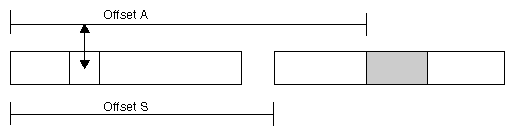
In Figure 4-1, a word in one segment contains an offset value A giving the distance in bytes to an object in a different mapped segment. Offset A is accurate only when the two segments are separated by a known distance, offset S.
You can create segments in such a relationship using the following procedure.
Map a single segment large enough to encompass the lengths of all segments that need fixed offsets. Use 0 for addr, allowing IRIX to pick the base address. Let this base address be B.
Map the smaller segments over the larger one. For the first (the one at the lowest relative position), specify B for addr and MAP_FIXED in flags.
For the remaining segments, specify B+offset S for addr and MAP_FIXED in flags.
The initial, large segment establishes a known base address and reserves enough address space to hold the other segments. The later mappings replace the first one, which cannot be used for its own sake.
You can specify any value for addr. IRIX will create the mapping if there is no conflict with an existing segment, or return an error if necessary. However, you cannot tell what virtual addresses will be available for mapping in any particular installation or version of the operating system.
There are three exceptions. First, after IRIX has chosen an address for you, you can always map a new segment of the same or shorter length at the same address. This allows you to map different parts of a file into the same segment at different times (see “Mapping Portions of a File”).
Second, the low 4 MB of the address space are unused (see “Address Space Boundaries”). It is a very bad idea to map anything into the 0 page since that makes it hard to trap the use of uninitialized pointers. But you could use other parts of the initial 4 MB for mapping.
Third, the MIPS Application Binary Interface (ABI) specification (an extension of the System V ABI published by AT&T) states that addresses from 0x30000000 through 0x3ffc0000 are reserved for user-defined segment base addresses.
You may specify values in this range as addr with MAP_FIXED in flags. When you map two or more segments into this region, no two segments can occupy the same 256 KB unit. This rule ensures that segments will always start in different pages, even when the maximum possible page size is in use. For example, if you wanted to create two segments each of 4096 bytes, you could place them at 0x30000000 through 0x30000fff and at 0x30040000 through 0x30040fff. (256 KB is 0x00040000.)
If you follow these rules you can place segments at a known address and your program will run on any system that complies with the MIPS ABI. For an example of mapping a segment in this range, see “Probing the Address Space”.
| Note: If two programs in the same system attempt to map different objects to the same absolute address, the second attempt will fail. |
A different way to create a shared segment of memory is with the SVR4-compatible shared memory functions such as shmget() (see “SVR4-Compatible Shared Memory”). These functions enable you to create one or more unique segments of memory, each named by a numeric key, and to map them into the address space of any process.
When your aim is to share a block of memory between processes, these functions allow you to do it in a portable way. They differ from mmap() in the following ways:
They identify a shared segment by an integer key rather than through a file descriptor.
The number of segments that can be allocated controlled by system configuration parameters.
Segments can only represent memory, not files or devices.
A page fault interrupts a process for many milliseconds. Not only are page faults lengthy, their occurrence and frequency are unpredictable. If your real-time frame rate exceeds a few hertz, your program cannot tolerate such interruptions. The solution is to lock some or all of the pages of your address space into memory. A page fault cannot occur on a locked page.
There are two functions that you use to lock segments into physical memory.
The two functions have the same effect. They differ only in how you specify the pages to be locked. (Refer to the mpin(2) and plock(2) reference pages.)
Using mpin() you have to calculate the starting address and the length of the segment to be locked. It is relatively easy to calculate the starting address and length of global data or of a mapped segment, but it can be awkward to learn the starting address and length of program text or of stack space. The best use of mpin() is to lock mapped memory segments, since you know their starting addresses and lengths immediately after creating them.
Both plock() and mpin() define all pages of the specified segments before locking them. It is possible to receive a SIGKILL exception while locking because there was not enough swap space to define all pages (see “Delayed Definition”).
Locking pages in memory of course reduces the memory that is available for all other programs in the system. Locking a large program will increase the rate of page faults for other programs.
You use either munpin() or punlock() to unlock pages, allowing the kernel to reclaim them when necessary. Locked pages of an address space are unlocked when the last process using the address space terminates.
Using plock() you specify whether to lock text, data, or both.
When you specify the text option, the function locks all executable text as loaded for the program, including shared objects (DSOs). (It does not lock segments created with mmap() even when you specify PROT_EXEC. Use mpin() to lock executable, mapped segments.)
When you specify the data option, the function locks the default data (heap) and stack segments, and any mapped segments made with MAP_PRIVATE, as they are defined at the time of the call. If you extend these segments after locking them, the newly-defined pages are also locked as they are defined.
Although new pages are locked when they are defined, you still should extend these segments to their maximum size while initializing the program. The reason is that it takes time to extend a segment: the kernel must process a page fault and create a new page frame, possibly writing other pages to backing store to make space.
One way to ensure that the full stack is created before it is locked is to call plock() from a function like this one:
#define MAX_STACK_DEPTH 100000 /* your best guess */
int call_plock()
{
   char dummy[MAX_STACK_DEPTH];
   return plock(PROCLOCK);
}
|
The large local variable forces the call stack to what you expect will be its maximum size before plock() is entered.
The plock() function does not lock mapped segments you create with MAP_SHARED. You must lock them individually using mpin(). You only need to do this from one of the processes that shares the segment.
If you map a file before you lock the data segment into memory (see “Mapping a File for I/O”), the mapped file is read into the locked pages. If you map a file after locking the data segment, the new mapped segment is not locked. Pages of file data are read on demand, as the program accesses them. From these facts you can conclude that:
You should map small files before locking memory, thus getting fast access to their contents without paging delays.
Conversely, if you map a file after locking memory, your program could be delayed for input on any access to the mapped segment.
However, if you map a large file and then try to lock memory, the attempt to lock could fail because there is not enough physical memory to hold the entire address space, including the file.
In a real-time program you cannot tolerate a delay to read a file page. However, a very large file can easily exceed the capacity of physical memory.
One alternative for a large file is to not map it, but to use conventional read and write access to it. However, this alternative forfeits the convenience of referring to the file as if it were an array in memory.
Another alternative is to map the entire file, perhaps hundreds of megabytes, into the address space, but to lock only the portion or portions that are of interest at any moment. For example, a vehicle simulator could lock the parts of a scenery file that the vehicle is approaching. When the vehicle moves away from a segment of scenery, the simulator could unlock those parts of the file, and possibly use madvise() to release them.
You can use mpin() to lock any portion of a mapped segment, and munpin() to unlock portions that are not needed. A call to mpin() implies a wait while the contents of that portion of the file are read, so this call should be made in an asynchronous process.
When the frame rate is high you become concerned, not with the loss of milliseconds to a page fault, but with the loss of microseconds to a cache miss. When your program accesses instructions or data that are not in cache memory (see Figure 2-1 on “Symmetric Multiprocessor Architecture” and “Memory Hierarchy”), the CPU requests a load of a “cache line” of 128 bytes from main memory. Possibly hundreds of CPU clock cycles pass while the cache is being loaded. Due to the pipeline architecture of the CPU, it can often continue to work during this delay. However, multiple successive cache misses can bring effective work to a halt for tens of microseconds.
In a normal program, delays due to cache misses are not noticeable because the overall average speed of the program is satisfactory. However, for a real-time program with a frame rate above 50 Hz, a cache miss can cause the unpredictable loss of a useful fraction of one frame interval.
There are three general steps you can take to improve cache use. For an example of a program in which good cache use was a top design objective, see ~4Dgifts/examples/grafix/skywriter.
| Note: In addition to the following guidelines, the IRIX kernel assists you in maintaining good cache use with special scheduling rules. See “Understanding Affinity Scheduling”. |
The key to good cache performance is to maintain strong locality of reference. This can be restated as a rule of thumb: “Keep things that are used together, close together.” Or, “Extract the greatest possible use from any 128-byte cache line before touching another.” You must decide how to apply these principles in the context of your program design. Some possible techniques:
When designing a large data structure, group small fields together at one end of the structure. Do not mix small and large fields.
Consolidate frequently-tested switches, flags, and pointers into a single record so they will tend to stay in cache.
Avoid searching linked lists of structures. Each time a process visits a link merely to find the address of the next link, it is likely to incur a cache miss. Worse, a search over a long list fills the cache with unneeded links, driving out important data.
Avoid striding through a large array of structures (such as an array of graphics library objects), visiting only one or two fields in each structure. Whenever possible, arrange the data so that any sequential scan will visit and use every byte before moving on.
Use inline function definitions for functions that are called within innermost loops. Do not use inline definitions indiscriminately, however, because they increase the total size of the binary, potentially causing more cache misses in non-looping code.
Use memalign() to allocate important structures on 128-byte boundaries, so as to ensure the structures fit in the smallest number of cache lines (see the memalign(3) reference page).
The cache design in the Challenge/Onyx line uses a simple algorithm to assign a memory location to a cache line: the address of a byte of data is taken modulo the cache size to generate the cache address. This means that two words that are separated in main memory by an exact multiple of the cache size are always loaded to the same cache location.
Only one of the words can occupy the cache at a time, so if your program alternates between words, it will have a cache miss on each reference. It is surprisingly easy to create this situation. The following code fragment causes bad performance in a Challenge/Onyx with a 1 MB cache.
float part1[262144]; /* 1 MB */ float part2[262144]; /* adjacent 1 MB */ for (j=0;j<262144;++j) part1[j] = part2[j]; |
In that code fragment, the words of each array hash to the identical cache lines, so each assignment in the loop incurs two cache misses. (Some Challenge/Onyx systems have caches of different sizes, but the same principle applies.)
| Note: The cache in the R8000-based POWER Challenge does not use simple modulus mapping; it is an associative memory that is much more resistant to cache conflicts. |
As described under “Memory Hierarchy”, when one CPU modifies cached data, it broadcasts the fact on the bus. Any other CPU holding that same cache line marks it invalid. If another CPU then needs to refer to the so-called “dirty” cache line, it has to fetch the modified version from the first CPU. This takes even longer than reloading the cache line from main memory.
These conflicts can cause cache delays when the processes in two or more CPUs are working on the same data concurrently. There is no conflict so long as all CPUs are reading the data. Each works from its own cache copy in that case. But whenever one CPU modifies the data, all other CPUs suffer a cache miss on the same data.
In general the only way to avoid such conflicts is to separate the readers and writers in time. Arrange the program so that data is updated occasionally in a burst, then used for a longer period. When using the REACT/Pro Frame Scheduler, plan the schedule so the process that updates the data runs in a different minor frame from processes that read the data.
There are relatively few tools for detecting or fixing cache problems in code. You can combine the two IRIX profiling tools, pixie and prof (see the pixie(1) and prof(1) reference pages), to arrive at a tentative diagnosis.
The pixie tool modifies the executable of a program so that every basic block is counted during execution. Its output ranks functions by the absolute count of instructions they executed.
The prof tool samples the instruction counter of the program while the program is executing. Its output ranks functions by the amount of time that the CPU spent in their code.
Normally the output of these tools should agree on the location of the hot spots in a program. However, if prof shows that a function is taking more time than is justified by its pixie execution count, that function may be running slowly due to cache-miss problems.
Your program can work with the IRIX memory manager to change the handling of the address space.
You can change the memory protection of specified pages using mprotect() (see the mprotect(2) reference page). For a segment that contains a whole number of pages you can specify protection of:
| Note: The mprotect() function changes the access rights only to memory image of a mapped file. You can apply it to the pages of a mapped file in order to control access to the file image in memory. However, mprotect() does not affect the access rights to the file itself, nor does it prevent other processes from opening and using the file as a file. |
IRIX writes modified pages to the backing store as infrequently as possible, in order to save time. When pages are locked, they are never written to backing store. This does not matter when the pages are ordinary data.
When the pages represent a file mapped into memory, you may want to force IRIX to write any modifications into the file. This creates a checkpoint, a known-good file state from which the program could resume.
The msync() function (see the msync(2) reference page) asks IRIX to write a specified segment to backing store. The segment must be a whole multiple of pages. You can optionally request
synchronous writes, so the call does not return until the disk I/O is complete—ensuring that the data has been written
page invalidation, so that the memory pages are released and will have to be reloaded from backing store if they are referenced again
Using the madvise() function (see the madvise(2) reference page) you can tell IRIX that a range of pages is not needed by your process. The pages remain defined in the address space, so this is not a means of reducing the need for swap space. However, IRIX puts the pages at the top of its list of pages to be reclaimed when some other process (or the calling process) suffers a page fault.
The madvise() function is rarely needed by real-time programs, which are usually more concerned with keeping pages in memory than with letting them leave memory. However, there could be a use for it in special cases.