This chapter discusses the cxPyramid data type and how it is used in the Explorer environment. It describes the pyramid structure and explains the concept of pyramid compression to save time and effort when constructing a pyramid. It also discusses how you use pyramid dictionaries to build the elements of a pyramid and lists the elements available in the Explorer standard pyramid dictionary.
The API (Application Programming Interface) routines are listed and examples of user function code for writing modules that build and manipulate pyramids are included.
Pyramids hold two kinds of data: irregular or unstructured grid data, such as finite element data, and molecular modeling data. In Explorer, the pyramid data type is used primarily for finite element modelling and creating irregular grids, and most Explorer pyramid modules handle only this kind of data, not molecular data.
The pyramid data structure, cxPyramid, defines the relationship between the different layers of data required to build a pyramidal structure. In finite element data, you can consider the element grid as a collection of vertices (points), edges (lines), faces (polygons), elements (three-dimensional cells), objects (collections of 3-D elements), assemblies (collections of objects), and so on. You can fit these together to make an object from faces, bounded by edges, which are in turn delimited by vertices.
Because cxPyramid combines several data types, it is an extremely flexible and powerful structure; witness its ability to handle both finite element data and molecular data. The flexibility of the cxPyramid data type also makes it somewhat difficult to use properly. It may take a little practice before the method of creating pyramids out of an hierarchical collection of points, lines, polygons, and elements makes sense.
In many cases where you are representing finite element data, it is simplest to use the pyramid dictionary representation. The reason is that the dictionary elements already contain the detailed hierarchy of points, lines, and faces. You simply create a list of vertices making up the overall finite element structure or irregular grid, and then describe the final structure as a collection of element types, each of which depends on certain identified vertices. Use of the dictionary serves to cut down on the unnecessary repetition of information in the interests of computational and storage efficiencies.
You can write two kinds of pyramid modules; those that read pyramid data, such as ComposePyr, and those that process pyramid data, such as IsosurfacePyr. It is relatively easy to write a pyramid reader module without having to be an expert on pyramid structure and the first part of this chapter explains how to do so, using two code examples. If you want to write a pyramid processing module, you need to understand the finer details of pyramid composition, and these are discussed later in the chapter.
The cxPyramid data type is a root data type, which means it can be used on module ports to pass data into and out of modules. A pyramid consists of three main parts:
the several layers of pyramidal data; for example, points, lines, and faces. These values are collected in cxLattice.
The structure of cxLattice is described in Chapter 3, “Using the Lattice Data Type.”
the relationships between these layers, described by cxPyramidLayer. You really need to know exactly how your lattices are constructed before you try to create the relationships that combine them.
Pyramid layers and connections are described in detail in “Pyramid Layer Connections.”
optional references to predefined pyramid elements, which are stored in a dictionary, cxPyramidReference. Pyramid dictionaries are described in detail in “Structure of a Dictionary.”
This is the data type definition for the pyramid:
root typedef struct cxPyramid {
    cxLattice           baseLattice     “Base Lattice”;
    long                count           “Num Levels”;
    cxPyramidLayer      layer[count];
    cxPyramidReference  ref;
} cxPyramid;
|
These are the variables for the pyramid:
| baseLattice | A 1-D curvilinear lattice that defines the vertices of the finite element pyramid. (It defines the bonds of a molecular pyramid.) The baseLattice must have coordinates in order to define the location of the vertices. Most finite element pyramid modules require data values as well. | |
| count | The count is an integer that indicates how many layers make up the pyramid, and thus its dimensionality. Layers are numbered from 0 to count-1, excluding the baseLattice. For example, a pyramid with count=4 would represent a collection of many 3-D elements (see Figure 4-3). | |
| layer | Each layer consists of a lattice and a cxConnection structure describing its relationship to the adjacent lattice one layer down. The explicit connections between lattices at adjacent levels determine the shape of each pyramid component, and hence the shape of the entire pyramid. The lattice values at each layer are optional, but the relationship structures are required at all layers in the pyramid. | |
| ref | Describes the pyramid dictionary, which is a set of predefined pyramidal data structures that you can incorporate by reference into your pyramid. |
A pyramid that incorporates a pyramid dictionary is said to be a “compressed pyramid” as opposed to the “uncompressed pyramids” lacking such a dictionary. A pyramid dictionary is simply a collection of uncompressed pyramids that describe in full detail their reference elements.
You can use pyramid dictionaries to:
Save storage space. A finite element pyramid composed of many cells may take up a great deal of storage space, which is expensive in computing terms. This is especially true for a pyramid composed entirely of one kind of cell, such as bricks. A pyramid dictionary offers a way for you to store and access representions of pyramid cells without having to list every single face and edge in your pyramid data structure.
Add your own dictionary entries. Explorer provides a standard reference dictionary of cell types which you can augment by adding any cells you wish. The dictionary is available through API calls.
The cxPyramidReference data structure, described in “Structure of a Dictionary” lets you specify the composition of your pyramid in terms of already-defined pyramidal elements. For example, to create a tetrahedral finite element grid, you would specify the element type as tetrahedral, list the vertices necessary to create the grid, and enumerate the constituent tetrahedra based on their four corner vertices.
For a grid of hexahedral bricks, you would specify the type as hexahedral, list the vertices necessary to create the grid, and enumerate the constituent hexahedral bricks based on their eight corner vertices. This is illustrated in the SimplePyrReader module described below.
The best way to learn how to use the pyramid data type is by example. The next section provides two examples of user functions for pyramid modules.
This example, called SimplePyrReader, takes in nodal points, reads them and makes bricks from them. It is a good template for creating any pyramid reader module that deals with only one data type. It uses compression and refers to the default pyramid dictionary. The source code is in /usr/explorer/src/MWGcode/Pyramid/C/reader.c There is also a Fortran version.
This is the sample data file, which contains finite element data. The file may not contain any comments.
12 1 2 0 0 0 100 0 1 0 100 1 1 0 100 1 0 0 100 0 0 1 200 0 1 1 200 1 1 1 200 1 0 1 200 0 0 2 300 0 1 2 300 1 1 2 300 1 0 2 300 0 1 2 3 4 5 6 7 4 5 6 7 8 9 10 11 |
The first line gives the number of nodes (12), the number of data variables (1) and the number of bricks (2). The next 12 lines list the coordinates (x,y,z) and the data value for each node. The data variable is pressure, changing in the Z direction. The bricks have eight nodes each, but share one face (four nodes) so there is a total of 12 nodes.
The last two lines define the connectivity list, or the relationship between the nodes that make up the bricks. The two bricks share the face delineated by nodes 4, 5, 6, and 7. The nodes are connected in the sequence indicated in the first list to make up the first brick.
The second list defines the form of the second brick. The form of the hexahedron in the default pyramid dictionary is shown in Figure 4-1.
This is the user function for SimplePyrReader.
/*
This code assumes that only one cell type is used. The user
can alter the two define's for a different cell type.
*/

#include <cx/cxPyramid.h>
#include <cx/Pyramid.h>
#include <cx/cxPyramid.api.h>
#include <cx/DataAccess.h>
#include <cx/DataTypes.h>

#include <sys/types.h>
#include <sys/stat.h>
#include <fcntl.h>

#define NODES 8
#define TYPE cx_pyramid_dict_hexahedron

int memclean(cxPyramid *pyr,
	     cxErrorCode ec,
	     cxConnection *conn)
{
/* this routine will clear up memory in case of errors */
  if(cxDataAllocErrorGet() || (ec != cx_err_none))
  {
    cxDataRefDec(pyr);
    cxDataRefDec(conn);
    return 1;
  } else {
    return 0;
  }
}

void       read_brick   (char *filename,
	                   cxLattice **base_lat,
		                cxPyramid ** pyramid )
{
  FILE *file;
  float *coord, *data;
  cxConnection *conn;
  cxPyramidDictionary *dict;
  cxErrorCode ec = cx_err_none;
  long *connec, num_nodes, num_bricks;
  long nDataVar,i,j,k, *elem;

  if(filename == NULL) return;
  if(filename[0] == NULL) return;
  if((file = fopen(filename,”r”)) == NULL)
  {
    printf(“Cannot open file %s\n”,filename);
    return;
  }
/*
  get the header information
   Number of Nodes,
   Number of Data Properties,
   Number of elements
*/
  fscanf(file,”%d %d %d”,&num_nodes, &nDataVar, &num_bricks);
  *base_lat = cxLatNew(1,&num_nodes,nDataVar,cx_prim_float,
		       3,cx_coord_curvilinear);
  if(cxDataAllocErrorGet()) return;
  cxLatPtrGet(*base_lat,NULL,&data,NULL,&coord);

/*
  read in the nodal data. This assumes there are 3 coords
  and nDataVar data values for each node.
*/
  for(i=0,k=0;i<num_nodes;i++)
  {
    fscanf(file,” %f %f %f”,&coord[3*i],&coord[3*i+1],&coord[3*i+2]);
    for(j=0;j<nDataVar;j++)
       fscanf(file,”%f”,&data[k++]);
  }
|
Pyramid Compression
/* build up the pyramid by ignoring the intermediate levels */
  *pyramid = cxPyrNew(0);
  cxPyrSet(*pyramid,*base_lat);
  cxPyrLayerSet(*pyramid,1,NULL,NULL);
  cxPyrLayerSet(*pyramid,2,NULL,NULL);
/* set up the connections list */

  conn = cxConnNew(num_bricks, num_bricks * NODES);
  if(memclean(*pyramid,ec,0))return;
  cxConnPtrGet(conn,NULL,NULL,&elem,&connec);
  *elem++ = 0;
  for(i=0,k=0;i<num_bricks;i++)
  {
    *elem++ = (i+1) * NODES;  /* each has NODES nodes per brick */
    for(j=0;j<NODES;j++)
    {
      fscanf(file,”%d”,&connec[k++]); /* read in nodal list */
    }
  }
  cxPyrLayerSet(*pyramid,3,conn,NULL);
  if(memclean(*pyramid,ec,conn))return;

/* make the pyramid dictionary */

  dict = cxPyrDictDefault( 3 );
  cxPyramidDictionarySet( *pyramid, dict, &ec );
  if(memclean(*pyramid,ec,conn))return;
  cxPyramidCompressionTypeSet( *pyramid,
			      cx_compress_unique, &ec );
  if(memclean(*pyramid,ec,conn))return;
  connec = (long *)cxPyramidCompressionIndexGet(*pyramid,&ec);
  if(memclean(*pyramid,ec,conn))return;
  *connec = TYPE;
}
|
The dictionary reference elements serve as building blocks from which the final pyramid is constructed. They include 2-D elements, such as triangles and quadrilaterals, and 3-D elements, such as bricks and tetrahedrons. The Explorer default dictionary contains some of the most commonly used reference elements (see Figure 4-1).
The vertices are labelled in the order that Explorer requires to make each form, counter-clockwise on the bottom and then counter- clockwise on the top. You provide this information in the connections list in cxConnection (see “Creating a Connection List”).
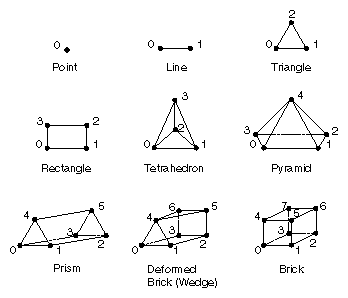
Table 4-1 lists the elements illustrated above, with the dictionary name and number of nodes that make up each element.
Table 4-1. Standard Dictionary Reference Elements
Dimension | Element | No. of Nodes | Name |
|---|---|---|---|
0-D | Point | 1 | cx_pyramid_dict_ point |
1-D | Line | 2 | cx_pyramid_dict_l ine |
2-D | Triangle | 3 | cx_pyramid_dict_t riangle |
| Rectangle | 4 | cx_pyramid_dict_ quadrilateral |
3-D | Tetrahedron | 4 | cx_pyramid_dict_t etrahedron |
| Pyramid | 5 | cx_pyramid_dict_ pyramid |
| Prism | 6 | cx_pyramid_dict_ prism |
| Deformed brick (wedge) | 7 | cx_pyramid_dict_ wedge |
| Brick | 8 | cx_pyramid_dict_ brick |
This pyramid type is useful for finite element-based simulations. It consists of several levels: the base lattice and a number of layers, each of which contains a lattice with data and coordinates, if needed, and the connections between layers. The number of layers in a pyramid is infinite in theory, although in practice, pyramids tend to be self-limiting. A pyramid usually has at least three levels, including a base lattice.
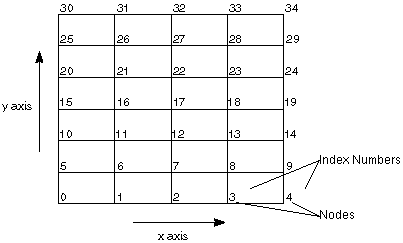
The finite element pyramid requires a 1-D curvilinear lattice at all levels. The 1-D restriction is so that the indexing information in the connections list makes sense. But there is a natural ordering from the nodes in a 3-D lattice to nodes in a 1-D lattice, so you can break out data from a 3-D lattice fairly easily into a 1-D lattice for inclusion in a pyramid. The natural ordering, or memory layout, of data in two or more dimensions gives the usual 1-D indexing into the array.
Figure 4-2 shows a 2-D lattice that, when translated into a 1-D IRIS pyramid lattice, has 35 nodes, indexed as 0-34.
Not all lattices in a pyramid need have data or coordinates. The base lattice, which contains all the nodal data and coordinate values, is frequently the only lattice that contains coordinate information at all. The 0-layer lattice can store edge-based data, and the 1-layer lattice can contain face-centered data, such as the mass flux, for example. The tetrahedral lattice contains volumetric or centroid data, such as a mass fraction, centroid pressure, or gauss point information, as well as coordinates for the exact location of the data in 3-D space.
The ClipPyr and CropPyr modules work by removing elements at the highest level in the pyramid, if those elements contain any vertices outside the bounding plane(s). Therefore, you should construct t finite element meshes with the top level being the most natural component. Often, this will mean that a finite element mesh has count=3 and is composed of a large number of 3-D elements. This is the default behavior of the LatToPyr module, which forms a tetrahedral or hexahedral mesh from a lattice.
The pyramid structure is built from lattices layered onto the base lattice. Figure 4-3 shows the relationship between elements and layers in an uncompressed tetrahedral pyramid. It illustrates how a finite element grid can be built from the hierarchy of relationships between four vertices.

However, the simplest tetrahedral grid is just an array of tetrahedra, defined by specifying their vertices. The vertex locations and data are stored in the base lattice. You can omit edge and face information and go directly to the 3-D element layer of the pyramid. The cxConnection structure of this layer (layer[2] in C or layer(3) in Fortran) really does all the work of constructing the tetrahedral grid.
It has 32 tetrahedra, so the structure of the elements array is:
numElements 32 elemArrayLen 33 elements[] 0 4 8 12 16 ... 128 numConnections 128 |
The vertices are labelled in the natural order shown in Figure 4-4. Grid A shows the vertices at the bottom of the pyramid and grid B shows those at the top. Grid C shows the top partially overlaid on the bottom to illustrate how the tetrahedra are formed.
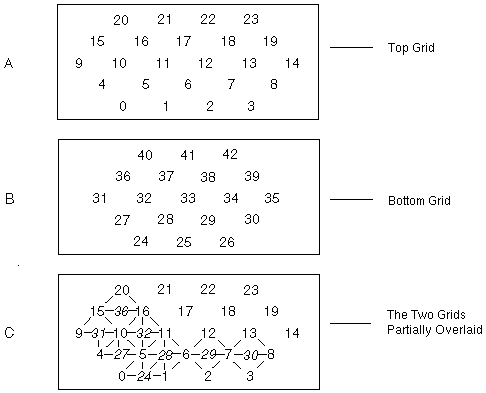
The elements array is the concatenation of the sets of four vertices for the 32 tetrahedra:
elements    0  1  5 24   1 2  6 25    2  3  7 26
            0  5  4 27   1  6  5 28   2  7  6 29   3  8  7 30
            4  5 10 27   5  6 11 28   6  7 12 29   7  8 13 30
            4 10  9 31   5 11 10 32   6 12 11 33   7 13 12 34    8 14 13 35
            9 10 15 31   10 11 16 32  11 12 17 33  12 13 18 34   13 14 19 35
             10 16 15 36  11 17 16 37  12 18 17 38  13 19 18 39
             15 16 20 36  16 17 21 37  17 18 22 38  18 19 23 39
             16 21 20 40  17 22 21 41  18 23 22 42
                      ...
|
When you use a pyramid dictionary, some of the cell structures in your own pyramid are compressed and you may not have to enumerate the faces or edges making up the finite element grid. In general, it is unnecessary to specify any relationship information for the layers between the vertices and the layer at which dictionary elements are referenced. It is this careful omission of repetitive data that makes the pyramid dictionary structure simpler and more compact to use.
However, you must still define the lattice and connection list pairs in the layer[] array above the “compression dimension” (see the definition of nDim in “Structure of a Dictionary.”) But below the compression dimension nDim, there are no lattice or cxConnection structures; these structures are superseded by the reference elements in the dictionary. The base lattice still holds the vertex data and coordinates necessary to give the compressed pyramid a location in physical space and to supply the data requirements of the pyramid modules.
In addition to the omission of some layers, there is an important change in the cxConnection structure at the compression layer. At layer [nDim-1] (in C) or layer(nDim) (in Fortran), the cxConnection structure must describe the composition of the compressed elements in terms of their vertices. You create such a connection list by listing the actual vertex indices of the baseLattice vertices you wish to go into the construction of each element, as in the example in “Creating a Tetrahedral Grid.”
The integer value that identifies the type of an element is really just an index into the pyramid dictionary. Since the dictionary is merely an array of uncompressed pyramids, it is natural to use the array index of the dictionary element as the identifying value.
In the case of a grid of a single element type, however, the vector of identical indices is omitted in favor of a single universal element type.
Figure 4-5 shows how the tetrahedral grid looks in compressed form.
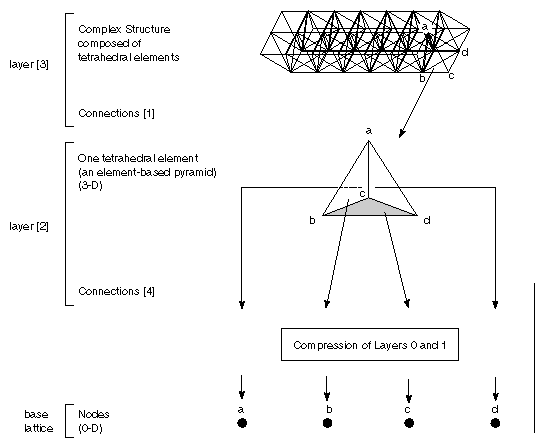
Figure 4-3 shows the same grid in uncompressed form, with all the layers visible.
Using the pyramid dictionary has two important advantages. Such a pyramid is easier to create, because you need only consider the vertices that make up each element. It also requires much less storage than its fully expanded version, because each reference element represents the internal face/edge/vertex hierarchy once for all instances of the type.
Using the pyramid dictionary has one drawback, the significance of which depends on your application. Because the face and edge structure is contained entirely within the omitted layers of a 3-D compressed pyramid, such a pyramid has absolutely no representation of the sharing of faces or edges within the pyramid. An algorithm that requires connectivity information between cells of a finite element mesh will find such information is not present in a compressed pyramid.
To use a compressed pyramid in this context, create your own data structure showing connectivity between the compressed elements of the pyramid.
If you do not want to use the dictionary, you can represent an empty dictionary by setting the cxPyramidReference member compressType to cx_compress_none. In this case, cxPyramidDictionary is never referenced.
Each dictionary has a dimensionality, which is also the dimensionality of all the elements found in it, and a vector of reference elements described as uncompressed pyramids. The data type structure is described by cxPyramidDictionary. Figure 4-1 shows the contents of the default 3-D pyramid. These nine reference elements are described as a vector of nine pyramids, each of which comprises points, lines, and faces.
The brick element, for example, comprises six faces, each of which comprises four out of the twelve edges found in the brick. Each of the twelve edges refers to two endpoint vertices. In the pyramid dictionary, the vertices are not given data or coordinates because they are generic elements, without location in Cartesian space or data values.
This is the type definition for the dictionary data type, cxPyramidDictionary:
shared typedef struct {
      long           nDim           “Num Dimensions”;
      long           numEntries     “Num Entries”;
      closed struct cxPyramid table[numEntries] “Table”;
} cxPyramidDictionary;
|
These are the variables:
| nDim | Gives the dimensionality of the pyramid dictionary, indicating the dimension at which compression takes place. If the reference elements are 3-D, then nDim is 3, the reference element pyramids have a count of 3, and the compressed data pyramid has no cxConnection structure at layers 0 or 1. For nDim values of 1, 2, or 3, you may be able to use the Explorer default dictionary (call cxPyrDictDefault(nDim)). For nDim > 3, you must provide your own dictionary. | |
| numEntries | The total number of entries in the vector table[] of pyramid structures. | |
| table[ ] | The list of reference elements stored in the dictionary. Each element of table[] is a pointer to a fully expanded cxPyramid structure. The default 3-D dictionary table has the reference elements listed in Table 4-1. |
This is the type definition for the dictionary reference structure, cxPyramidReference:
typedef struct {
    cxCompressType      compressType    “Compression Type”;
    switch (compressType) {
    case cx_compress_multiple:          /* Use many. */
        long        numIndices          “Number Indices”;
        long        indices[numIndices] “Compression Index”;
    case cx_compress_unique:            /* Use 1 element. */
        long        index               “Compression Index”;
    } r;
    cxPyramidDictionary     dictionary  “Dictionary”;
} cxPyramidReference;
|
These are the variables:
| compressType | Indicates the existence of the pyramid dictionary and the access pattern into it. A compressType value of cx_compress_none indicates that no dictionary is used in this fully expanded pyramid. A compressType value of cx_compress_unique indicates that a dictionary is used, but that the current finite element mesh is composed of only a single reference element type. A compressType value of cx_compress_multiple indicates that a dictionary is used and that the current finite element mesh is composed of one or more reference element types. In this case, each element at layer nDim-1 (in C indexing notation) in the pyramid's layer[] array has its own reference element index. | |
| index | The single index type of a cx_compress_unique pyramid. | |
| numIndices | The number of different reference element types selected from the dictionary. | |
| Indices | The vector of index types of a cx_compress_multiple pyramid. Each index is the array index into table[] of the reference pyramid to be used in giving structure to the element's vertices. |
 | Note: There is no substructure for cx_compress_none, as the pyramid dictionary is not present in this case. |
You use the connection list in each layer of a pyramid to define how elements in that layer and the one immediately below it are related. For example, the connection list in layer 0 of a tetrahedron represents the set of connections between the edge elements in layer 0 and the nodes, or point elements, in the base lattice. Each line element, or edge, is connected to two nodes, or vertices, and the concatenation of all connections is represented by a pair of arrays, connections and elements, in cxConnection.
The pyramid layers are described by the cxPyramidLayer structure. This is the type definition for a single pyramid layer:
typedef struct {
    closed cxConnection relation       “Layer %d Connection”;
    closed cxLattice    nextLattice    “Layer %d Lattice”;
} cxPyramidLayer;
|
The connections among elements within a layer can be fairly complex and each one must be specifically defined in the cxConnection structure. This is the type definition for the set of connections in a pyramid layer:
shared typedef struct {
  long         numElements            “Num Elements”;
  long         elemArrayLen           “Elements Array Length”;
  long         numConnections        “Connections Array Length”;
  long         elements[elemArrayLen]      “Elements Array”;
  long         connections[numConnections] “Connections Array”;
} cxConnection;
|
These are the variables:
| numElements | An integer that defines the number of elements, such as faces or lines, in this layer of the hierarchy. | |
| elemArrayLen | The dimensioning variable for the elements[] array. It defines the length of the elements array, given as the number of elements +1. | |
| numConnections |
| |
| elements [ ] | The vector of API connections between each element in this layer and elements in the next lower layer. The counts are listed cumulatively, so that elements[i+1] is elements[i] plus the number of connections from element numbered i (i >= 0 in C). | |
| connections [ ] | The vector of dependencies of current layer elements on elements in the next layer. The connections array lists the indices of elements in the next layer that are to be used in constructing the current layer. The entry at elements[i] in connections[] is the first subordinate item making up the ith element, with the others listed consecutively. The value at elements[i] is the index into the lattice at the next lower layer of the subordinate element (or into the base lattice if the current layer is numbered 0 in C). |
This is the data type declaration for cxConnection:
typedef struct cxConnection {
    long       numElements;
    long       elemArrayLen;
    long       numConnections;
    long       *elements;
    long       *connections;
} cxConnection;
|
The variables are described in “Creating a Connection List.”
Figure 4-6 illustrates the components of a connection list for layer 0 of a tetrahedron. It contains six edge elements connected to four nodes in the base lattice by twelve dependencies. The connection data structure defines each edge-vertex relationship specifically (see “The Pyramid Connections.”)
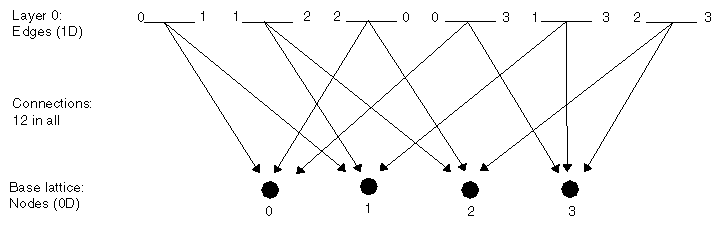
You can see how the vertex information and the description of the connections between them at each level are used to construct 2-D and 3-D elements, resulting in the creation of a tetrahedron. It is, however, legal to create a finite element pyramid without base data, coordinates, or indeed a base lattice at all.
This example shows how you fill out the connections list for each layer in a pyramid. The data are for the connections illustrated in Figure 4-6.
Use the API subroutine cxConnNew to set the total number of elements and connections in the current layer of the pyramid. numElements is 6 and elemArrayLen equals the number of elements + 1, 7. The extra entry is used to determine the number of nodes to which the last element points. Its value is equal to the total number of connections between elements and nodes, 12.
The invocation is cxConnNew( 6, 12 ).
Define the connections between each element and the nodes, listed in increasing order from 0. Do this by listing the node indices in order (the order need not be sorted by node number). For example, in Figure 4-6:
- Element 0 contains two nodes (2 =2 – 0) and points to nodes 0 and 1.
- Element 1 has two nodes (2 = 4 – 2) and points to nodes 1 and 2.
- Element 2 has two nodes (2 = 6 – 4) and points to nodes 2 and 0.
- Element 3 has two nodes (2 = 8 – 6) and points to nodes 0 and 3.
- Element 4 has two nodes (2 = 10 – 8) and points to nodes 1 and 3.
- Element 5 has two nodes (2 = 12 – 10) and points to nodes 2 and 3.
In short, the elements array has the contents [ 0 2 4 6 8 10 12 ].
Set the connections array to be the concatenation of the node indices associated with each element, as determined in step 3. In this case, the array is [0 1 1 2 2 0 0 3 1 3 2 3].
The numConnections value is correctly set to 12 by the call to cxConnNew.
Set the elements array to index into the connections array so that elements[i+1] is the cumulative number of dependencies for elements numbered 1 through i. Element i, consequently, has elements[i+1] – elements[i] connections, starting at connections [elements[i]]. For example, [0 2 4 6 8 10 12].
It is somewhat involved to write a module that takes a pyramid as input in order to perform a computation, create a filtered output pyramid, or to generate geometry for visualization in the Render module. You must take into account the hierarchical nature of the pyramid data, with the added option of a dictionary to indicate element types.
Because a few concepts usually suffice to create a compressed pyramid manipulation module, the steps to create such a module are given here in outline form.
The first step is to discover the natural dimension at which the module works. For example, an isosurface module typically works with a 3-D input in order to create the isosurface through a single cell. If the input is viewed as a collection of 3-D cells, the output is a collection of 2-D surfaces. The behavior of the module is characterized by the dimensionality of input that it naturally processes. Generally, the input must have at least this dimensionality (you cannot isosurface a 2-D input and get much interesting data), which translates into having at least this many layers in its pyramid.
The second step is to develop the computational algorithm for the module assuming the presence of data at the desired level. If the module requires the full hierarchical information of vertices, edges, and faces, this is the place to take advantage of it; however, if the module can work by omitting some layers of data, for instance by dealing with a face as a list of vertices, then you should assume that those layers are omitted and that the pyramid is compressed at the operational layer.
Next, assuming that the pyramid is compressed at the operational layer, or not at all, loop over all “active” elements. The active elements are those that are subordinate to some element at the top layer of the pyramid and are thus reachable from the top. Two routines exist to list the active elements at a given layer: cxPyrActive and cxPyrActiveList. The former returns a Boolean byte vector (0 for false, otherwise true) indicating whether the element is active; the latter returns an array of the active indices. Use cxPyrActive unless you suspect that most elements in your input pyramid will be inactive. Using the active indicators, loop over all active elements and process them.
If the pyramid is not compressed, but you wish to deal with compressed elements, you can create a default dictionary using cxPyrDictDefault, using the dimensionality of the operational layer as input. Then use cxPyrDictLookup to find the pyramid dictionary element that is appropriate for the fully expanded element you have. This routine returns the list of vertices that make up the element so that you can work directly with the vertex list (assuming that the looked-up element is one your algorithm is equipped to handle).
Using cxPyrDictLookup may be time-consuming. In effect, you are compressing your input at the operational layer; you may simply call cxPyrCompress if you wish to do this all at once, assuming that you have the storage necessary to hold both the expanded and compressed versions of the pyramid at one time.
At this point you have a module that will work with compressed or expanded inputs, assuming compression only at the operational layer. Now you must extend your module to handle inputs that are compressed at the wrong layer.
It is often sufficient to handle inputs that are compressed at too low a layer by simply expanding them, then dealing with the fully expanded input as above. The savings due to compression increase with the dimensionality of the compression (or conversely, decrease with decreasing dimensionality of compression), so a pyramid that has too low a compression level may not save much storage. If the cost of expanding an input is likely to prove too great, then you must extend your computational algorithm to handle compression at too low a level.
Handling pyramid compression at too high a level is relatively easy, but requires a little study to master the details. The concept is to represent each pyramid dictionary reference element at the too-high level as a collection of known dictionary reference elements at the operational layer, and then to process the input by processing the equivalent known elements.
Assume that you are writing the 2-D part of PyrToGeom, which creates shaded polygons from an input pyramid. However, the input pyramid is compressed at the 3-D cell level. It is prohibitively expensive in time and memory to expand the pyramid and then recompress it to faces, so instead you preprocess the 3-D element dictionary in terms of its faces, then simply draw the faces for each 3-D element.
The first step is to preprocess the pyramid dictionary. The routine cxPyrDictCompress simplifies this task. This routine takes an input dictionary compressed at too high a level and returns a new, equivalent dictionary, where each reference element in the input dictionary is replaced by a _compressed_ reference element in the output dictionary.
This violates the usual standard that a pyramid dictionary is made up of fully expanded pyramids, but the violation is temporary, as this output dictionary is really used as a translation table to process elements at the operational level. Figure 4-7 shows the process.
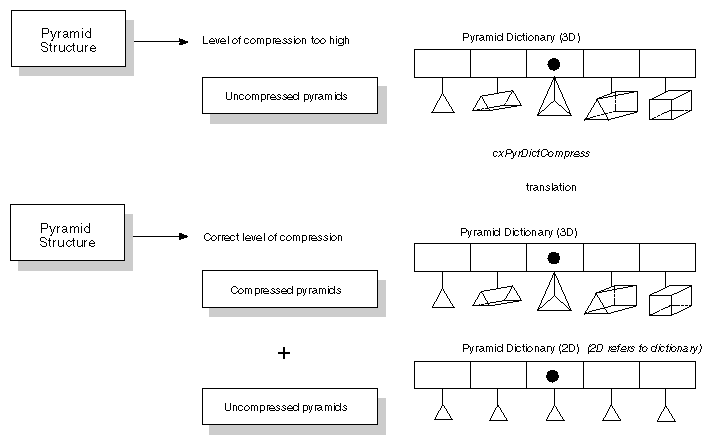
Each of the compressed reference elements now refers to the same dictionary, which has dimension equal to the operational level. This means that each reference element is now described in terms of elements that your algorithm can handle. Furthermore, all the reference elements in the input dictionary are described in terms of the same dictionary, which you can include in your output if necessary.
Relating this to the PyrToGeom example, you receive a grid of 3-D elements but want to work with faces. So you call cxPyrDictCompress to get a 3-D dictionary in which each 3-D reference element is instead a pyramid compressed at the 2-D level, that is, each 3-D reference element is now a compressed pyramid made up of faces.
Now it is easy to process the too highly compressed input. Simply operate on each active element at the compression level, looking up the element in the translation dictionary.
The element will comprise one or more elements at the right level of compression, which can be processed directly by your algorithm. For instance, a 3-D prism cell input is made up of triangular and rectangular faces, which PyrToGeom can handle.
Lastly, keep track of the vertices that are used to represent each element. In the original input, the vertices are listed at the compression layer in the connections[] array of the cxConnection structure. The input dictionary uses vertices numbered 0, 1, ... n-1 to indicate the first n vertices of the compressed element. During recompression of the input dictionary, the higher level element is decomposed into lower level elements, and the relevant vertices from the set [0, 1, ..., n-1] are used.
It is important to pick up the indirect indexing from both the compressed dictionary and the input connection list, so that the correct vertices are used. For example, the prism has six vertices. If vertices 1 2 3 6 7 8 make up a sample prism, then the prism element in the input dictionary refers to vertices 0-5, meaning the first six vertices of the input element. If you work with vertices 0, 1, 2, 3, 4, 5, you will be interpreting the input data incorrectly. Use the indirect addressing to pick up 0==>1, 1==>2, 2==>3, 3==>6, 4==>7, 5==>8.
The prism will then be made up of faces of two types, triangles (0,1,2) and rectangles (0,1,2,3). A sample connection array for a prism is [ 0 1 2 0 1 4 3 1 2 5 4 2 0 3 5 3 4 5 ]. When you work with the last triangle in the prism, make sure to index from its vertex number (0,1,2) into the connection array to get (3,4,5) as the vertices to look up in the original compressed input, yielding actual vertex numbers 6,7,8. This double translation may seem complex, but it naturally reflects the compression in two stages, first to too high a level, then down to the correct level.
Correct application of this technique makes it almost as easy to handle pyramid compression at any level as it is to handle it only at the desired level. Source code for the modules ComposePyr, CropPyr, and LatToPyr is provided in the directories below /usr/explorer/src.
Most modules operate at a single level, but some, like PyrToGeom, can operate at many levels. In this case, you can create a table of operational level versus level of compression. You will usually find that the table breaks down into actions at the operational level, actions below that level (including, perhaps, simply expanding the input data), and recompressing the input dictionary for inputs above the operational level.
Chemistry pyramids are used to construct objects according to information pertaining to molecular structures. The pyramid structure is more narrowly defined than that of the finite element pyramid and differs from it as follows:
The 3-D layer, which defines the complete molecule, is not a volume but a ball-and-stick construction.
The relationship between bonds (in the base lattice) and atoms (in the 0 layer) is not hierarchical, although the relationship of 0-1-DD to 1-D layer is shown as such.
The structure of the lattice at each level is closely defined.
The chemistry pyramid has four levels, which are:
| layer 2 | The top layer, which defines a complete molecule. | |
| layer 1 | Contains information about atomic residues. The lattice at this level is a 1-D uniform lattice (four vector, byte) that contains the four-character residue name. | |
| layer 0 | Contains all atomic information in a 1-D curvilinear, three-coordinate lattice (four-or-more vector, floating point). The lattice coordinate variable contains the exact position of the atom in 3-D space. The lattice data variable contains values set by the user (see Table 4-2). | |
| base lattice | Defines the atomic bonds in a 1-D uniform lattice structure (three-or-more vector, long integer). Each node contains the bond order (such as single, double, or triple) and two atom IDs. The IDs are the same as those specified in the atomic lattice. The data variable contains values set by the user (see Table 4-2). |
Source code examples, in the form of the source code used to build the modules MoleculeBuilder and ReadPDB, are provided in the directories below /usr/explorer/src.
Table 4-2 lists the minimum required set of data values for the base lattice and the layer 0 lattice in a chemistry pyramid.
Table 4-2. User-defined Values in the Chemistry Pyramid
Base Lattice Values | Layer 0 Lattice Values |
|---|---|
Type: 1 = single, 2 = double, | ID number |
First atomic number of the bond | Element number (from the Periodic Table of the Elements) |
Second atomic number of the bond | Van der Waals radius |
Topology: 1 = in ring, | Color index |
| Covalent radius |
| Mass |
| Charge |
| Valence |
| Radical |
| Ionization |
| Hybridization |
The connection list from atoms to bonds shows which bonds relate to which atoms, and the bond lattice's atomic IDs define which atoms are connected by which bonds. You can supply more information in additional vector components if you choose.
The cxPyramid data type, though defined in the Explorer typing language, can be considered as a C structure. Fortran users need to set pointers to the data type structures when they use them. The type declaration resides in the header file /usr/explorer/include/cx/cxPyramid.h.
This is the data type declaration for cxPyramid:
#include <cx/cxLattice.h>

typedef enum {
    cx_compress_none,
    cx_compress_unique,
    cx_compress_multiple
} cxCompressType;

typedef struct cxConnection {
    long              numElements;
    long              elemArrayLen;
    long              numConnections;
    long             *elements;
    long             *connections;
} cxConnection;

typedef struct cxPyramidLayer {
    cxConnection     *relation;
    cxLattice        *nextLattice;
} cxPyramidLayer;

typedef struct cxPyramidDictionary {
    long              nDim;
    long              numEntries;
    struct cxPyramid **table;
} cxPyramidDictionary;
|
The case of cx_compress_none does not appear in the union because it is empty. It is illegal to use an empty case in the Explorer data typing language.
 typedef struct cxPyramidReference {
     cxCompressType    compressType;
    union {
        struct {
            long              numIndices;
            long             *indices;
        } cx_compress_multiple;
        struct {
            long              index;
        } cx_compress_unique;
    } r;
    cxPyramidDictionary *dictionary;
} cxPyramidReference;

typedef struct cxPyramid {
    cxLattice        *baseLattice;
    long              count;
    cxPyramidLayer   *layer;
    cxPyramidReference ref;
} cxPyramid;
|
The Fortran type enumerations reside in the file /usr/explorer/include/cx/cxPyramid.inc.
The compression types are specified by this enumeration:
Integer cx_compress_none Integer cx_compress_unique Integer cx_compress_multiple Parameter (cx_compress_none = 0) Parameter (cx_compress_unique = 1) Parameter (cx_compress_multiple = 2) |
You can use the API (Application Programming Interface) routines to manipulate data types in Explorer. The subroutines for creating and manipulating pyramids in Explorer, and for creating and referencing a pyramid dictionary, are listed below and described in detail in the IRIS Explorer Reference Manual.
The subroutines let you:
create pyramids
set the values in the pyramid and connection list data structures
allocate and copy pyramid data types
extract pyramid values
create a pyramid dictionary
reference a pyramid dictionary
Pyramid allocation is based on the number of levels of the pyramid; the user must allocate the lattice and connections for each level (use cxLatNew and cxConnNew). By convention, a pyramid with two lattices and one connection has one level (nLevels is 1) because the base lattice is not counted as a level.
| Note: All the subroutines use zero-based indexing except cxPyrLayerGet and cxPyrLayerSet. These two subroutines use 1-based indexing. |
Table 4-3 lists the pyramid subroutines.
Table 4-3. Pyramid Subroutines
Subroutine | Purpose |
|---|---|
cxPyrNew | Allocates a pyramid structure |
cxConnNew | Allocates a connection list structure |
cxLatNew | Allocates a lattice structure |
cxPyrSet | Replaces the base lattice in a pyramid |
cxPyrLayerGet | Returns the lattice and connection list from a layer of the pyramid |
cxPyrLayerSet | Replaces the lattice and connection list from a layer of the pyramid |
cxPyrDup | Makes a copy of a pyramid structure |
cxConnDup | Copies a connection list structure |
cxPyrGet | Returns a pointer to the base lattice and the number of layers from a pyramid |
cxConnEleGet | Returns the connections of an element from a connection list |
cxConnEleSet | Sets the connections of an element in a connection list |
cxPyrClean | Removes unreferenced items from a pyramid |
cxPyrMerge | Selectively merges duplicated elements in a layer |
cxPyrLayerSkip | Returns a connection list relating two non-adjacent pyramid layers |
cxConnPtrGet | Returns all contents of a connection list |
cxConnPtrSet | Sets all contents of a connection list |
Table 4-4 lists the pyramid dictionary subroutines.
Table 4-4. Pyramid Dictionary Subroutines
Subroutine | Purpose |
|---|---|
cxPyramidDictionary | Creates a new a pyramid dictionary |
cxPyrDictDefault | Calls the default dictionary |
cxDictUniqNew | Creates a new a dictionary containing only one kind of element |
cxDictMultiNew | Creates a new a dictionary containing more than one kind of element |
cxDictElemDefault | Returns the complete default Explorer dictionary of finite elements for the given level |
cxPyrDictGet | Gets the pyramid dictionary |
cxPyrDictSet | Replaces the dictionary in a pyramid |
cxDictDescGet | Provides the information required to create a new dictionary structure |
cxPyrCompress | Converts an expanded pyramid to a compressed pyramid |
cxPyrDupExpand | Duplicates a pyramid and puts it in expanded form |
cxPyrEleDupExpand | Converts an element of a compressed pyramid into an uncompressed element in its own pyramid |
cxPyrConcat | Concatenates one pyramid onto another and expands or merges any dictionaries they may have |
cxPyrEleNormalForm | Removes duplicated nodes and edges, and fixes the faces that contain removed edges |
cxPyrEleBrickForm | Expands each element to 8-node form, adding duplicated nodes |
cxDictIndexGet | Finds the “index” of a specified dictionary element |
cxDictIndexVGet | Copies a vector of indices for the entire pyramid into “indices” |
cxPyrSize | Returns the number of bytes used to store the pyramid |
Here are some examples of user functions for pyramid modules.
This example uses compressed pyramids to generate a pyramid. The C and Fortran versions do the same thing. The code is in /usr/explorer/src/MWGcode/Pyramid/C/GeneratePyr.c and in /usr/explorer/src/MWGcode/Pyramid/Fortran/GeneratePyr.f.
#include <cx/cxLattice.api.h>
#include <cx/cxParameter.api.h>
#include <cx/cxPyramid.api.h>
#include <cx/Pyramid.h>
#include <cx/DataAccess.h>
#include <cx/DataTypes.h>
#include <cx/UI.h>

#include <string.h>
#include <stdio.h>
#include <sys/types.h>
#include <sys/stat.h>
#include <fcntl.h>

#define NUM_TYPES 9
#define NODE(i) ((i==0)?4:i)
long pyr_type[NUM_TYPES] = {
 cx_pyramid_dict_quadrilateral,
 cx_pyramid_dict_point,
 cx_pyramid_dict_line,
 cx_pyramid_dict_triangle,
 cx_pyramid_dict_tetrahedron,
 cx_pyramid_dict_pyramid,
 cx_pyramid_dict_prism,
 cx_pyramid_dict_wedge,
 cx_pyramid_dict_hexahedron,
};
int memclean(cxPyramid *pyr,
             cxErrorCode ec,
             cxConnection *conn)
{
  if(cxDataAllocErrorGet() || (ec != cx_err_none))
  {
    if(pyr != NULL)cxDataRefDec(pyr);
    if(conn != NULL)cxDataRefDec(conn);
    return 1;
  } else {
    return 0;
  }
}
void    compose  (
                  cxLattice      *baseLat,
                  unsigned char  *filename,
                  cxPyramid      **pyr,
                  long           quad )
{
  cxPyramidDictionary *dict;
  cxErrorCode ec = cx_err_none;
  cxConnection *conn;
  FILE *file;
  long *obj = NULL;
  long *node = NULL;
  long *iptr,i,num_nodes,num_objs,unique,levels;
  long show_quad,*elem,*connect;
  char buf[100];

  if(!filename || filename[0] == NULL) return;
  if((file = fopen(filename,”r”)) == NULL)
  {
    printf(“ Error reading file %s\n”,filename);
    return;
  }
/* the object list will not be any larger than the number of nodes */
  obj = (long *)calloc(baseLat->dims[0],sizeof(long));
  show_quad = FALSE;
  num_objs = num_nodes = 0;
  while(TRUE){
    if(fscanf(file,”%d”,&obj[num_objs]) < 0) break;
    if(node == NULL)
    {
      node = (long *)malloc(obj[num_objs]*sizeof(long));
    }else{
      node = (long *)realloc((void *)node,
                             (num_nodes+obj[num_objs])*sizeof(long));
    }
    for(i=0;i<obj[num_objs];i++)
    {
      if(fscanf(file,”%d”,&node[num_nodes+i]) < 1)
      {
        printf(“ Error reading obj %d. Not enough data\n”,num_objs);
        return;
      }
    }
    num_nodes += obj[num_objs];
/* determine whether it it a quad or tetra */
    if(obj[num_objs] == 4) {
      obj[num_objs] = ((quad == 0) ? 0:4);
      show_quad = TRUE;
    }
    num_objs++;
  }
/* do I need the radio button? */
  if(show_quad)
{
    cxInWdgtShow(“Quad”);
  }else{
    cxInWdgtHide(“Quad”);
  }
/* am I a unique compressed pyramid ? */
  unique = TRUE;
  for(i=1;i<num_objs;i++)
  {
    if(obj[i] != obj[i-1])
    {
      unique = FALSE;
      break;
    }
  }
/* build the pyramid */
  *pyr = cxPyrNew(0);
  cxPyrSet(*pyr,baseLat);
  levels = 3;
  conn = cxConnNew(num_objs,num_nodes);
  if(memclean(*pyr,ec,conn)) return;
  cxConnPtrGet(conn,NULL,NULL,&elem,&connect);
/* fill elem & connect */
  elem[0] = 0;
  for(i=0;i<num_objs;i++)
  {
    elem[i+1] = elem[i] + NODE(obj[i]);
  }
  bcopy(node,connect,num_nodes*sizeof(long));
/* verify all the nodes are legal */
  for(i=0;i<num_nodes;i++)
  {
    if(node[i] < 0 || node[i] > baseLat->dims[0])
    {
      printf(“Illegal connection %d at %d\n”,node[i],i);
      *pyr = NULL;
      return;
    }
}
/* load all the intermediate levels of the pyramid */
  for(i=1;i<levels;i++)
  {
    cxPyrLayerSet(*pyr,i,NULL,NULL);
  }
/* put the connectivity in the pyr */
  cxPyrLayerSet(*pyr,levels,conn,NULL);
  if(memclean(*pyr,ec,conn)) return;
/* add the compression info */
  dict = cxPyrDictDefault(levels);
  cxPyramidDictionarySet(*pyr,dict,&ec);
  if(memclean(*pyr,ec,NULL))return;
  if(unique)
  {
    cxPyramidCompressionTypeSet(*pyr,cx_compress_unique,&ec);
    if(memclean(*pyr,ec,conn)) return;
    iptr =  cxPyramidCompressionIndexGet(*pyr,&ec);
    if(memclean(*pyr,ec,NULL))return;
    *iptr = pyr_type[obj[0]];
  } else {         /* non-unique */
    cxPyramidCompressionTypeSet(*pyr,cx_compress_multiple, &ec);
    if(memclean(*pyr,ec,NULL)) return;
    cxPyramidNumberIndicesSet(*pyr,num_objs,&ec);
    iptr = (long *)cxPyramidCompressionIndexAlloc(*pyr);
    if(iptr != NULL)
    {
      cxPyramidCompressionIndexSet(*pyr,&iptr,&ec);
      if(memclean(*pyr,ec,NULL))return;
      for(i=0;i<num_objs;i++)
      {
        *iptr++ = pyr_type[obj[i]];
      }
    }
  }
  free(obj);
  free(node);
}
|
      subroutine compose ( baselat, filename, pyr, quad )
      implicit none
      include '/usr/explorer/include/cx/DataAccess.inc'
      include '/usr/explorer/include/cx/DataTypes.inc'
      include '/usr/explorer/include/cx/Pyramid.inc'
      integer cxPyramidCompressionIndexGet
      integer pyr_type(9) /
     1    cx_pyramid_dict_quadrilateral,
     1    cx_pyramid_dict_point,
     1    cx_pyramid_dict_line,
     1    cx_pyramid_dict_triangle,
     1    cx_pyramid_dict_tetrahedron,
     1    cx_pyramid_dict_pyramid,
     1    cx_pyramid_dict_prism,
     1    cx_pyramid_dict_wedge,
     1    cx_pyramid_dict_hexahedron/
      logical show_quad,unique
      integer long_size,num_objs, num_nodes,iunit
      parameter (long_size = 4)
      character*(*)   filename
      character*80 line
      integer     pyr, quad, baselat,levels,dict,INODE,conn
      integer ios,i1,i2,i3,i4,i5,i6,i7,dims(1),i,j,ec
      integer obj(1),elem(1),connect(1),node(1),nod(1)
      pointer (pobj,obj),(pnode,node),(pdims,dims)
      pointer (pelem,elem),(pconnect,connect),(pnod,nod)
      open(iunit,file=filename,status='old',iostat=ios)
      if(ios .ne. 0) then
         print*,”Error opening file “,filename
         return
      endif
      call cxLatDescGet(baselat,i1,pdims,i2,i3,i4,i5,i6,i7)
      pobj = malloc(dims(1)*long_size)
      show_quad = .false.
      num_objs = 0
      num_nodes = 0
 10   read(iunit,'(a)',end=20)line
      read(line,*)obj(num_objs+1)
      if(num_nodes .eq. 0)then
         pnode = malloc(obj(num_objs+1)*long_size)
      else
         pnod = pnode
         call realloc(pnode,pnod,(num_nodes+obj(num_objs+1))*long_size,
     1       num_nodes*long_size)
      endif
        read(line,*)i,(node(j),j=num_nodes+1,num_nodes+obj(num_objs+1))
      num_nodes = num_nodes + obj(num_objs+1)
      if(obj(num_objs+1) .eq. 4)then
         if(quad .eq. 0) then
            obj(num_objs+1) = 0
         else
            obj(num_objs+1) = 4
         endif
         show_quad = .true.
      endif
      num_objs = num_objs + 1
      go to 10
 20   continue
      close(iunit)
      if(show_quad)then
         call cxInWdgtShow(“Quad”)
      else
         call cxInWdgtHide(“Quad”)
      endif
      unique = .true.
      do i=2,num_objs
         if(obj(i) .ne. obj(i-1)) unique = .false.
      end do
      pyr = cxPyrNew(0)
      call cxPyrSet(pyr,baselat)
      levels = 3
      conn = cxConnNew(num_objs,num_nodes)
      call cxConnPtrGet(conn,i1,i2,pelem,pconnect)
      elem(1) = 0
      do i=1,num_objs
         elem(i+1) = elem(i) + INODE(obj(i))
      end do
      do i=1,num_nodes
         connect(i) = node(i)
      end do
      do i=1,num_nodes
         if(node(i) .lt. 0 .or. node(i) .gt. dims(1))then
            print*,”Illegal connection “,node(i),” at “,i
            pyr = 0
            return
         endif
      enddo
      call cxPyrSet(pyr,baselat,1)
      call cxPyrLayerSet(pyr,1,0,0)
      call cxPyrLayerSet(pyr,2,0,0)
      call cxPyrLayerSet(pyr,3,conn,0)
      dict = cxPyrDictDefault(3)
      call  cxPyramidDictionarySet(pyr,dict,ec)
      if(unique)then
         call cxPyramidCompressionTypeSet(pyr,cx_compress_unique,ec)
         pconnect = cxPyramidCompressionIndexGet(pyr,ec)
         connect(1) = pyr_type(obj(1))
else
         call cxPyramidCompressionTypeSet(pyr,cx_compress_multiple,ec)
         call cxPyramidNumberIndicesSet(pyr,num_objs,ec)
         pconnect = cxPyramidCompressionIndexAlloc(pyr)
         call cxPyramidCompressionIndexSet(pyr,pconnect,ec)
         if(pconnect .ne. 0)then
            do i=1,num_objs
               connect(i) = pyr_type(obj(i)+1)
            end do
         endif
      endif
      call free(pobj)
      call free(pnode)
      return
      end

      integer function INODE(i)
      INODE = i
      if(i .eq. 0) INODE = 4
      return
      end
      subroutine realloc(paddr,piaddr,new_size,old_size)
      implicit none
      character*1 addr(1),iaddr(1)
      integer i,new_size,old_size
      pointer(paddr,addr),(piaddr,iaddr)
      paddr = malloc(new_size)
      do i=1,old_size
         addr(i) = iaddr(i)
      end do
      call free(iaddr)
      return
      end
|