This chapter describes the light-emitting diodes (LEDs) found on the E-Plex board.
There are three types of LEDs on the E-Plex board:
Master board fault LED; this indicates the status of the AMD 29030 CPU.
SONIC chip status LEDs; these indicate the status of the individual SONIC Ethernet controllers.
Status LEDs; these are used only for factory debugging.
Figure 3-1 shows the locations of LEDs on the E-Plex board.
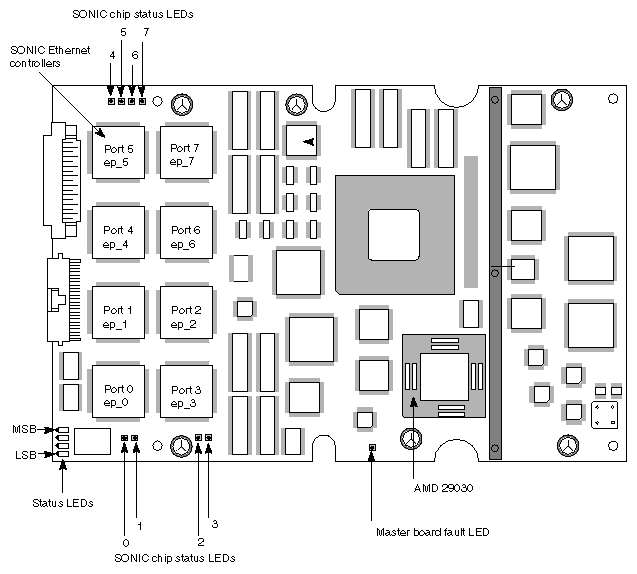
This LED indicates whether or not the AMD 29030 microprocessor is functioning. (See Figure 3-1.) When the LED is off (unlit), the microprocessor is functioning normally.
If the LED is lit for a long period of time, the AMD 29030 microprocessor has halted. This indicates a serious problem and the E-Plex board should be replaced. The LED may light briefly when the AMD 29030 microprocessor resets, but this will be a brief, almost undetectable pulse of light.
There is one SONIC chip status LED for each SONIC Ethernet controller. Figure 3-1 shows how the LEDs correspond to the individual chips and port numbers.
When an LED appears green, or is blinking rapidly, the port corresponding to that LED is transmitting and receiving data.
When an LED is solid yellow (or red on early E-Plex revisions), the port that corresponds to that LED is not enabled.