This chapter briefly describes how to configure the serial ports for RS-232 or RS-422 operation and how to set the baud rates. This chapter also shows how to use the audio ports.
 | Note: For additional information, see the Audio/Serial Option User's Guide (p/n 007-2645-xxx). |
The 9-pin D-sub serial connectors and signal pinouts are exactly the same as the DB-9, RS-232 connectors on existing Challenge, Onyx, Reality Station, POWER Challenge, and POWER Onyx systems (see Appendix A). You can therefore take RS-232 cables from those systems and use them for ASO board operation. The ASO serial ports are software selectable between RS-232 and RS-422 operation.
 | Caution: You cannot use the RS-422 cables from existing systems for operation on the ASO board ports. |
Table 3-1 shows how the ports correspond to IRIX device files (see also Figure 3-1).
Table 3-1. How the Serial Ports Correspond to IRIX Device Files
RS-232 Device | RS-422 Device | High-Speed (Memory-Mapped) Device |
|---|---|---|
/dev/tty[dfm]72 | /dev/tty4[dfm]72 | /dev/aso_mmap/tty72 |
/dev/tty[dfm]73 | /dev/tty4[dfm]73 | /dev/aso_mmap/tty73 |
/dev/tty[dfm]74 | /dev/tty4[dfm]74 | /dev/aso_mmap/tty74 |
/dev/tty[dfm]75 | /dev/tty4[dfm]75 | /dev/aso_mmap/tty75 |
/dev/tty[dfm]76 | /dev/tty4[dfm]76 | /dev/aso_mmap/tty76 |
/dev/tty[dfm]77 | /dev/tty4[dfm]77 | /dev/aso_mmap/tty77 |
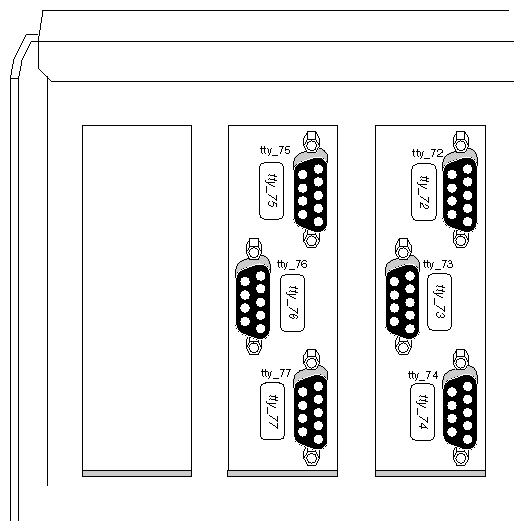
Table 3-2 shows how you can use any of the six ASO serial ports.
Table 3-2. ASO Serial Port Device Entries and Baud Rates
Serial Mode | Device Files | Maximum | Driver Required |
|---|---|---|---|
RS-232 | /dev/tty[dfm]72 | 115.2 Kbaud/sec (See Caution below.) | Silicon Graphics supplied ASO driver /var/sysgen/boot/asoser.o. (See Note below.) |
RS-422 | /dev/tty4[dfm]72
through | 115.2 Kbaud/sec (See Caution below.) | Silicon Graphics supplied ASO driver /var/sysgen/boot/asoser.o. (See Note below.) |
High-speed, memory-mapped | /dev/aso_mmap/tty72
through | 115.2 Kbaud/sec (See Caution below.) | Silicon Graphics supplied ASO driver /var/sysgen/boot/asoser.o. (See Note below.) |
| Caution: Baud rates beyond 115.2 Kbaud/sec are not supported by Silicon Graphics. |
| Note: Baud rate applications beyond 38.4 Kbaud/sec require customer-modified applications. |
You can set up the standard serial ports through use with IRIX by editing the /etc/inittab and other configuration files as described in the IRIX Advanced Site and Server Administrator's Guide (p/n 007-0603-xxx).
Do not use the graphical Port Setup tool, available from the Toolchest and System Manager to set up the ASO serial ports. The Port Setup tool does not recognize the ASO serial ports. This tool is documented in "Setting Up Peripheral Connections," in the Personal System Administration Guide (p/n 007-1366-xxx).
Table 3-3 describes the ASO audio ports.
Audio Port | Function | |
|---|---|---|
Digital Input/Output
| Serial digital audio input and output.
| |
Headphone Output/Line Output 2
| Stereo output jack. To support a four-channel configuration, the Headphone Output becomes Line Output 2. | |
Line Output 1
| Stereo jack for analog audio output to a tape deck, CD player, or similar destination. | |
Line Input 1
| Stereo jack for analog audio input from a tape deck, CD player, or similar source. | |
Microphone Input/Line Input2
| Microphone jack that supports stereo. To support a four-channel configuration, the Microphone input becomes Line Input 2. |


There are a number of Silicon Graphics audio utilities that are available. For additional information, see the Audio/Serial Option User's Guide (p/n 007-2645-xxx) or the Media Tools User's Guide, and the Media Control Panels User's Guide.
| Caution: The audio connector jacket should be no longer than about 1.75" to 2" (4.4 cm to 5 cm), because the I/O door can smash against longer connectors when the door is closed (see Figure 3-2.) To avoid damaging audio cables and connectors, it is recommended that the customer use right-angle audio connectors whenever possible. |
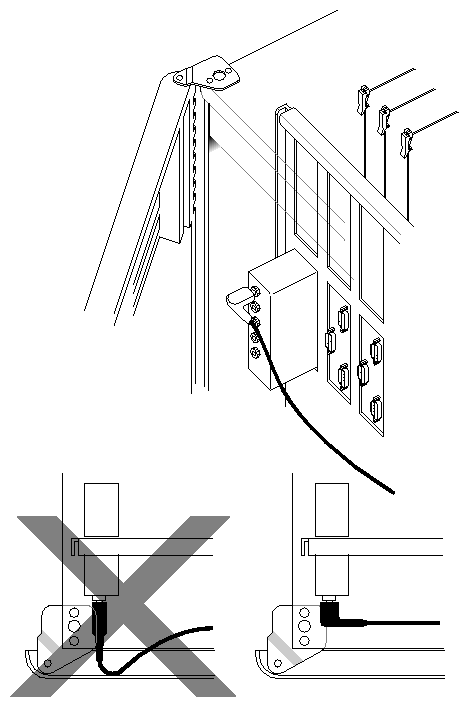
| Caution: It's highly recommended that right-angle audio connectors be used to prevent possible cable damage. Remember, the I/O door should always remain closed for proper FCC shielding. |