This appendix contains technical specification information about your system, as follows:
Table A-1 summarizes the Silicon Graphics Prism system Extreme configuration ranges.
Table A-1. Silicon Graphics Prism Extreme Configuration Ranges
Category | Minimum | Maximum |
|---|---|---|
Processors | 8 | 256 |
Graphics pipes | 2 | 16 |
CR–brick DIMM capacity | 16 | 48 |
System main memory capacity | 8 GB (4-node bricks) | 6 TB (64-node bricks) |
Available XIO I/O channels | 2 | 128 |
Number of I/O bricks | One IX-brick | One IX-brick and seven PX-bricks |
Table A-2 shows the physical specifications of each of the racks used in the Silicon Graphics Prism system.
Table A-2. Silicon Graphics Prism Extreme Physical Specifications
Feature | Specification |
|---|---|
Dimensions for a single tall rack, including doors and side panels (less system display) | Height: 74.25 in. (1886 mm) |
Shipping dimensions | Height: 80 in. (2032 mm) |
Weight: Empty |
425 lb (192.78 kg) |
Shipping weight Full rack (maximum) |
1785 lb (810 kg)
|
Access requirements Front |
48 in. (1219 mm) |
Table A-3 lists the environmental specifications of the Silicon Graphics Prism Extreme system.
Table A-3. Silicon Graphics Prism Extreme Environmental Specifications
Feature | Specification |
|---|---|
Temperature tolerance | +5 °C (41 °F) to +35 °C (95 °F) (up to 1500 m / 5000 ft.) |
Temperature tolerance | -40 °C (-40 °F) to +60 °C (140 °F) |
Relative humidity | 10% to 80% operating (no condensation) |
Heat dissipation to air Prism Extreme (per rack) |
38.93 Kbtu/hr maximum (based on 11.41 kW) |
Cooling requirement | Ambient air |
Air flow: intake (front), exhaust (rear) | Less than 3200 CFM |
Maximum altitude | 10,000 ft. (3,049 m) operating |
Acoustical noise level | Less than 65 dBa maximum |
Table A-4 shows the power specifications for the system.
Table A-4. Silicon Graphics Prism Extreme Power Specifications
Feature | Specification |
|---|---|
Single-phase[a] power requirements Voltage |
200-240V (180-254 VAC min/max)
|
Hold-up time | 16 ms |
[a] Three-phase optional | |
This section contains specifications and port pinout information for the base I/O ports of your system, as follows:
The system auto-selects the Ethernet port speed and type (duplex vs. half-duplex) when the system is booted, based on the device to which it is connected. Figure A-1 shows the Ethernet port.

Table A-5 shows the cable pinout assignments for the Ethernet port operating in both 10/100-Base-T mode and 1000Base-T mode.
Table A-5. Ethernet Connector Pin Assignments
Pin | Assignment (10/100BaseT ) | Pin | Assignment (1000BaseT) |
|---|---|---|---|
1 | Transmit + | 1 | Transmit/Receive 0+ |
2 | Transmit – | 2 | Transmit/Receive 0– |
3 | Receive + | 3 | Transmit/Receive 1+ |
4 | Not used | 4 | Transmit/Receive 2+ |
5 | Not used | 5 | Transmit/Receive 2– |
6 | Receive – | 6 | Transmit/Receive 1– |
7 | Not used | 7 | Transmit/Receive 3+ |
8 | Not used | 8 | Transmit/Receive 3– |
Figure A-2 shows and Table A-6 lists the pin assignments for the standard DB-9 serial connector. These ports are found on the IX-brick (via the base I/O PCI card), the router brick, the XG2N and CPU expansion modules, and the console and modem ports of the optional L2 controller. These ports are capable of transferring data at rates as high as 230 kbps. Other features of the ports include the following:
Programmable data, parity, and stop bits
Programmable baud rate and modem control

Caution: Although the image sync subsystem also uses DB-9 connectors, these connectors, whether on the ImageSync card or on the XG2N bricks, are not serial ports. Connecting a serial device to these connectors may cause damage to both the ImageSync devices and the serial devices.
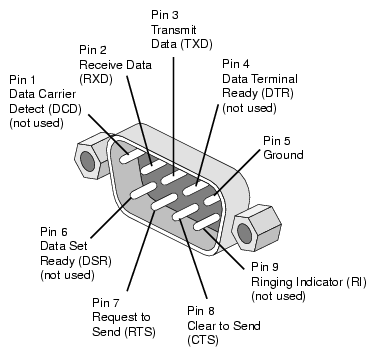
Table A-6 shows pinout assignments for the 9-pin male DB-9 connector.
Pin | Name | Function |
|---|---|---|
1 | DCD | Data carrier detect (not used) |
2 | RXD or RD | Receive data |
3 | TXD or TD | Transmit data |
4 | DTR | Data Terminal Ready (not used) |
5 | GND | Ground |
6 | DSR | Data set ready (not used) |
7 | RTS | Request to send |
8 | CTS | Clear to send |
9 | RI | Ringing indicator (not used) |
The XG2N module contains two graphics pipes, each capable of supporting two display devices. The graphics connector and pinouts are shown in Figure A-3 and Table A-7.

The console and L1 connectors on the XG2N module are the same as the compute module.
Table A-7. DVI-I Connector Signals and Pins
Pin | Function | Pin | Function |
|---|---|---|---|
1 | T.M.D.S.[a] Data 2- | 16 | Hot Plug Detect |
2 | T.M.D.S. Data 2+ | 17 | T.M.D.S. Data 0- |
3 | T.M.D.S. Data 2/4 Shield | 18 | T.M.D.S. Data 0+ |
4 | T.M.D.S. Data 4- | 19 | T.M.D.S. Data 0/5 Shield |
5 | T.M.D.S. Data 4+ | 20 | T.M.D.S. Data 5- |
6 | DDC Clock | 21 | T.M.D.S. Data 5+ |
7 | DDC Data | 22 | T.M.D.S. Clock Shield |
8 | Analog Vertical Sync | 23 | T.M.D.S. Clock+ |
9 | T.M.D.S. Data 1- | 24 | T.M.D.S. Clock- |
10 | T.M.D.S. Data 1+ |
|
|
11 | T.M.D.S Data 1/3 Shield | C1 | Analog Red Video Out |
12 | T.M.D.S. Data 3- | C2 | Analog Green Video Out |
13 | T.M.D.S. Data 3+ | C3 | Analog Blue Video Out |
14 | +5V Power | C4 | Analog Horizontal Sync |
15 | Ground (for +5V) | C5 | Analog Common Ground |
[a] Transition Minimized Differential Signaling | |||
Figure A-4 shows the USB type A connector that is used for USB ports 1 through 4 of the optional L2 controller that connects to XG2N and CPU Expansion modules.
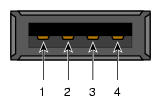
Table A-8 lists the pin assignments.
Table A-8. Pin Assignments for USB Type A Connector
Signal | Color | Pin Number |
|---|---|---|
VCC | Red | 1 |
-Data | White | 2 |
+Data | Green | 3 |
Ground | Black | 4 |
Figure A-5 shows the USB type B connector that is used for the USB L1 port of the XG2N and CPU Expansion modules. Table A-9 lists the pin assignments.
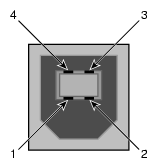
Table A-9. Pin Assignments for USB Type B Connector
Signal | Color | Pin Number |
|---|---|---|
VCC | Red | 1 |
-Data | White | 2 |
+Data | Green | 3 |
Ground | Black | 4 |