This chapter provides regulatory information about your workstation.
This chapter contains information on the following topics:
 | Note: Your dial box has several governmental and third-party approvals, licenses, and permits. Do not modify this product in any way that is not expressly approved by Silicon Graphics. If you do, you may lose these approvals and your governmental agency authority to operate this device. |
The dial box conforms to several national and international specifications and European Directives listed on the “Manufacturer's Declaration of Conformity.” The CE mark insignia displayed on each device is an indication of conformity to the European requirements.
This device complies with the Class B limits of Part 15 of the FCC Rules. Operation is subject to the following two conditions:
This device may not cause harmful interference.
This device must accept any interference received, including interference that may cause undesired operation.
This Class B digital apparatus meets all requirements of the Canadian Interference-Causing Equipment Regulations.
Cet appareil numérique n'émet pas de perturbations radioélectriques dépassant les normes applicables aux appareils numériques de Classe A préscrites dans le Règlement sur les interferences radioélectriques établi par le Ministère des Communications du Canada.
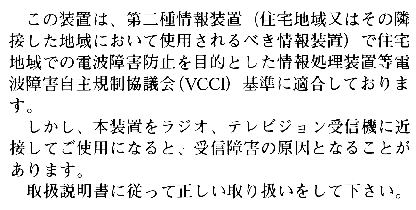
This device complies with Class B electromagnetic emissions limits of C.I.S.P.R. Publication 22, Limits and Methods of Measurement of Radio Interference Characteristics of Information Technology Equipment, Germany's BZT Class B limits for Information Technology Equipment, and with Japan's VCCI Class 2 limits.
 |
The equipment described in this guide generates and uses radio frequency energy. If it is not installed and used in accordance with the instructions in this guide, it can cause radio and television interference.
This equipment has been tested and complies with the limits for a Class B computing device in accordance with the specifications in Part 15 of FCC rules. These specifications are designed to provide reasonable protection against such interference in an industrial or office installation. However, there is no guarantee that the interference will not occur in a particular installation. This system is not certified for home use.
You can determine whether your system is causing interference by turning it off. If the interference stops, it was probably caused by the workstation or one of the peripherals. To tell if the interference is caused by one of the peripherals, try disconnecting one peripheral at a time to see if the interference stops. If it does, that peripheral is the cause of the interference.
If your dial box causes interference to radio or television reception, try to correct the interference by using one or more of the following suggestions:
Turn the television or radio antenna until the interference stops.
Move the dial box to one side or the other of the radio or television.
Move the dial box farther away from the radio or television.
Plug the dial box into an outlet that is on a different circuit from the radio or television. (That is, make certain the dial box and the radio or television are on circuits controlled by different circuit breakers or fuses.)
The dial box is FCC-compliant under test conditions that include the use of shielded cables between the dial box and its workstation. Your workstation or system and dial box from Silicon Graphics have shielded cables. Shielded cables reduce the possibility of interference with radio, television, and other devices. If you use any cables that are not from Silicon Graphics, make sure they are shielded. Telephone cables do not need to be shielded.
The monitor cable supplied with your system uses additional filtering molded into the cable jacket to reduce radio frequency interference. Always use the cable supplied with your system. If your monitor cable becomes damaged, a replacement cable should be obtained from Silicon Graphics.
Silicon Graphics designs and tests its products to be immune to effects of electrostatic discharge (ESD). ESD is a source of electromagnetic interference and can cause problems ranging from data errors and lockups to permanent component damage.
It is important that while you are operating your dial box you keep all the covers and doors, including the plastics, in place. The shielded cables that came with the workstation and its peripherals should be installed correctly, with all thumbscrews fastened securely.
An ESD wrist strap is included with some products, such as memory and graphics upgrades. The wrist strap is used when installing these upgrades to prevent the flow of static electricity, and it should protect your system from ESD damage.
| Note: Your button box has several governmental and third-party approvals, licenses, and permits. Do not modify this product in any way that is not expressly approved by Silicon Graphics. If you do, you may lose these approvals and your governmental agency authority to operate this device. |
The button box conforms to several national and international specifications and European Directives listed on the “Manufacturer's Declaration of Conformity.” The CE mark insignia displayed on each device is an indication of conformity to the European requirements.
A “Manufacturer's Declaration of Conformity” is available on the World Wide Web. Look on the FCC Declaration of Conformance on page 21 to determine your CMN (model) number, which you will need to identify your Declaration of Conformity.
To locate the information on the World Wide Web, enter the following in your Web browser location window:
http://www.sgi.com/Products/compliance/index.html
Locate and print or save your Declaration of Conformity. For future reference, make a note of your CMN number and the date on the Declaration of Conformity here:
Trade Name | Silicon Graphics Inc. |
|---|---|
Product | Peripheral, Button Box |
Model Number | CMNB018B8 |
Date of Conformance | 2/97 |
|
|
Responsible Party | Silicon Graphics Inc. |
Address | 2011 North Shoreline Boulevard, Mountain View, California 94043-1389 |
Telephone | (415) 933-1071 |
This equipment complies with Part 15 of the FCC Rules. Operation is subject to the following two conditions: (1) This device may not cause harmful interference, and (2) this device must accept any interference received, including interference that may cause undesired operation.
| Note: This equipment has been tested and found to comply with the limits for a Class B digital device, pursuant to Part 15 of the FCC Rules. These limits are designed to provide reasonable protection against harmful interference in a residential installation. This equipment generates, uses and can radiate radio frequency energy and, if not installed and used in accordance with the instructions, may cause harmful interference to radio communications. However, there is no guarantee that interference will not occur in a particular installation. If this equipment does cause harmful interference to radio or television reception, which can be determined by turning the equipment off and on, the user is encouraged to try to correct the interference by one or more of the following measures: |
Reorient or relocate the receiving antenna.
Increase the separation between the equipment and receiver.
Connect the equipment into an outlet on a circuit different from that to which the receiver is connected.
Consult the dealer or an experienced radio/TV technician for help.
 | Caution: Caution: The user is cautioned that changes or modifications to the equipment not expressly approved by the party responsible for compliance could void the user's authority to operate the equipment. |
If you received a regulatory label with your Button Box, place the label below the logos and over the lower portion of the regulatory label on the rear of your workstation.
This device complies with the Class B limits of Part 15 of the FCC Rules. Operation is subject to the following two conditions:
This device may not cause harmful interference.
This device must accept any interference received, including interference that may cause undesired operation.
This Class B digital apparatus meets all requirements of the Canadian Interference-Causing Equipment Regulations.
Cet appareil numérique n'émet pas de perturbations radioélectriques dépassant les normes applicables aux appareils numériques de Classe A préscrites dans le Règlement sur les interferences radioélectriques établi par le Ministère des Communications du Canada.
This device complies with Class B electromagnetic emissions limits of C.I.S.P.R. Publication 22, Limits and Methods of Measurement of Radio Interference Characteristics of Information Technology Equipment, Germany's BZT Class B limits for Information Technology Equipment, and with Japan's VCCI Class 2 limits.
|
The equipment described in this guide generates and uses radio frequency energy. If it is not installed and used in accordance with the instructions in this guide, it can cause radio and television interference.
This equipment has been tested and complies with the limits for a Class B computing device in accordance with the specifications in Part 15 of FCC rules. These specifications are designed to provide reasonable protection against such interference in an industrial or office installation. However, there is no guarantee that the interference will not occur in a particular installation. This system is not certified for home use.
You can determine whether your system is causing interference by turning it off. If the interference stops, it was probably caused by the workstation or one of the peripherals. To tell if the interference is caused by one of the peripherals, try disconnecting one peripheral at a time to see if the interference stops. If it does, that peripheral is the cause of the interference.
If your button box causes interference to radio or television reception, try to correct the interference by using one or more of the following suggestions:
Turn the television or radio antenna until the interference stops.
Move the button Box to one side or the other of the radio or television.
Move the button Box farther away from the radio or television.
Plug the button box into an outlet that is on a different circuit from the radio or television. (That is, make certain the Button Box and the radio or television are on circuits controlled by different circuit breakers or fuses.)
The button box is FCC-compliant under test conditions that include the use of shielded cables between the Button Box and its workstation. Your workstation or system and the Button Box from Silicon Graphics have shielded cables. Shielded cables reduce the possibility of interference with radio, television, and other devices. If you use any cables that are not from Silicon Graphics, make sure they are shielded. Telephone cables do not need to be shielded.
The monitor cable supplied with your system uses additional filtering molded into the cable jacket to reduce radio frequency interference. Always use the cable supplied with your system. If your monitor cable becomes damaged, a replacement cable should be obtained from Silicon Graphics.
Silicon Graphics designs and tests its products to be immune to effects of electrostatic discharge (ESD). ESD is a source of electromagnetic interference and can cause problems ranging from data errors and lockups to permanent component damage.
It is important that while you are operating your Button Box you keep all the covers and doors, including the plastics, in place. The shielded cables that came with the workstation and its peripherals should be installed correctly, with all thumbscrews fastened securely.
An ESD wrist strap is included with some products, such as memory and graphics upgrades. The wrist strap is used when installing these upgrades to prevent the flow of static electricity, and it should protect your system from ESD damage.