In this chapter, you will reuse the space in SGI 400 VTL shelf 0 (library SGI-C00) reclaimed in “Free Space in Library SGI-C00 for Dump Tapes” in Chapter 3 to create a set of dump tapes for the DMF system. There will be one set of dump tapes for the entire system, all located on shelf 0.
 | Note: All of the dump tapes must be on a single shelf. The sample DMF configuration file defines this to be shelf 0. If you want to use a different shelf, you must modify the DMF configuration file drivegroup object and the procedures in this guide accordingly. |
This chapter discusses the following:
| Note: This can be a time-consuming process. |
Do the following to reuse the space reclaimed in “Free Space in Library SGI-C00 for Dump Tapes” in Chapter 3:
Start the VTL Console as directed in “Subsequently Connecting to the VTL Server ” in Chapter 3.
Open the left-hand tree and place the cursor over the SGI-C00 library name:
VTL0 -> Virtual Tape Library System -> Virtual Tape Libraries -> SGI-C00
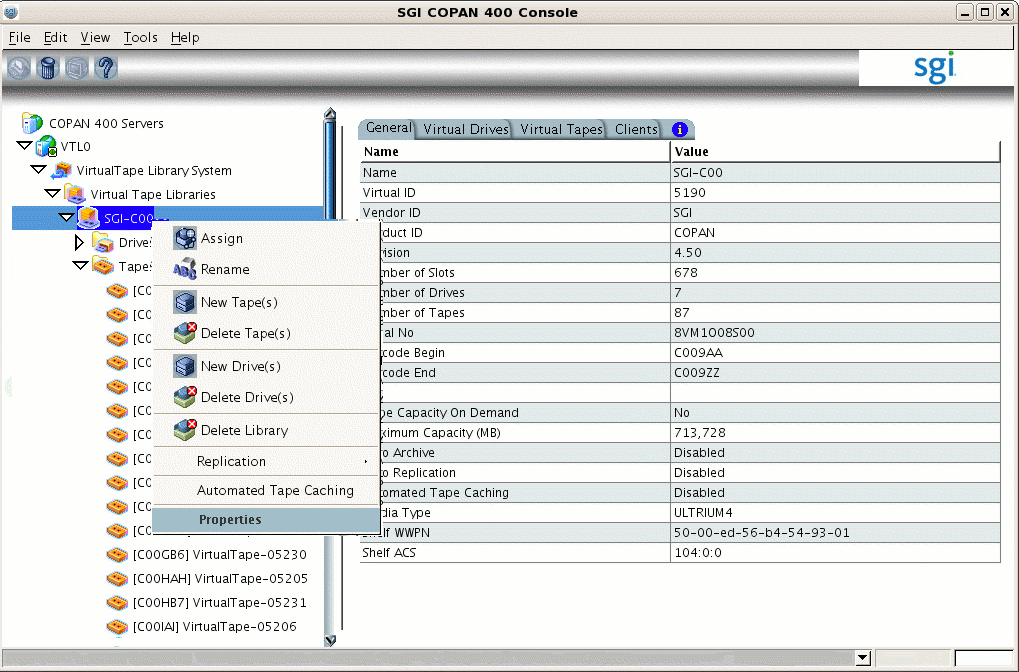
Right-click and select Properties, as shown in Figure 4-1.
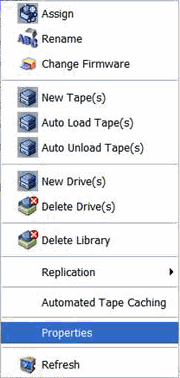
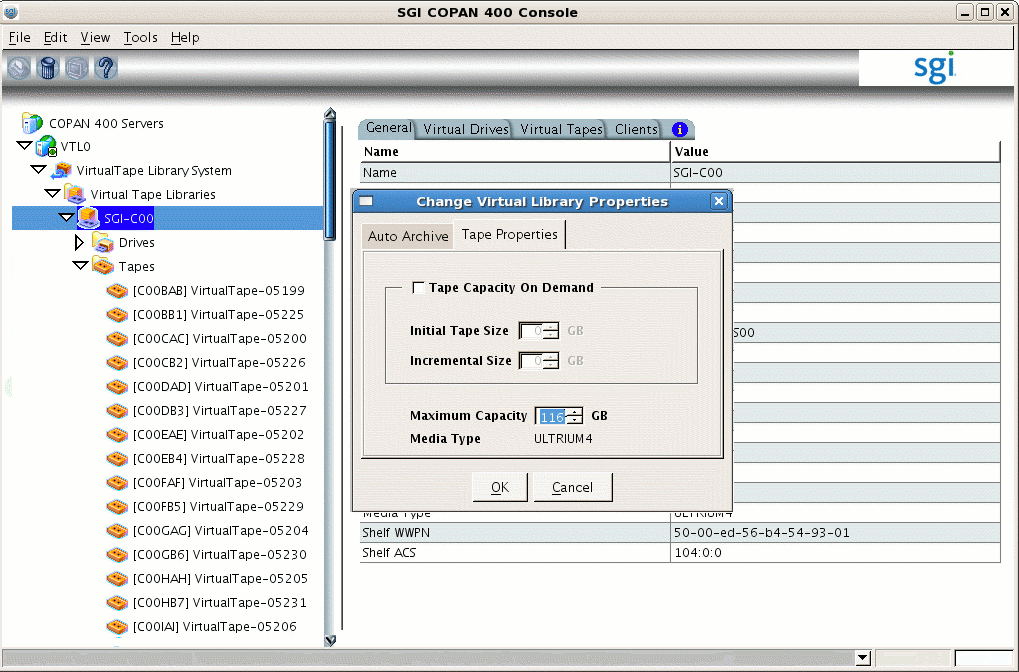
Note: In the 7.5 version of the GUI, the menu is slightly different: Then set the Maximum Capacity field in the Tape Properties tab to the Dump_Tape_Size value you determined in step 2 of “Free Space in Library SGI-C00 for Dump Tapes” in Chapter 3 and click OK. For example, Figure 4-3 shows setting the size to be 116 GB for dump tapes.
Note: This example uses 116 GB as an illustration.You should use a value appropriate for your site. Place the cursor over the library name, for example:
VTL0 -> Virtual Tape Library System -> Virtual Tape Libraries -> SGI-C00
Right-click and select New Tape(s).
Repeat the actions in steps 1 through 8 of “Configure Virtual Migration Tapes for the Library” in Chapter 3 to create the required number of dump tapes.
The DMF library server uses the barcode (or volume serial number, VSN) when selecting tapes. To make the virtual tapes created in the previous section ready for use as dump tapes, you must run the dmreadycopantapes script to relabel each virtual tape's barcode so that it indicates the specific RAID set in which the tape is stored, allowing DMF to optimize I/O to and from the shelf. (For example, C009AA might be transformed into D00AAA, where the first character D indicates that it is a dump tape, and the fourth character identifies the RAID set to DMF.)
Do the following:
Ensure that there is no other activity on the VTL Console or on the VTL application server that controls first library (such as VTL0 for library SGI-C00). This is a requirement for the duration of this procedure.
Run the dmreadycopantapes script on the VTL application server from the /usr/local/dmf directory and provide the library portion of the barcode (the first three characters, such as C00 in C00AAA).
The script will output an executed successfully line for each barcode that is changed. Depending upon the number of tapes and drives, this can be a time-consuming process.
For example, for dump tapes created on library SGI-C00 , which have barcodes that begin with C00:
[root@VTL0 vtl]# cd /usr/local/dmf
[root@VTL0 dmf]# ./dmreadycopantapes -d -l C00

Command: settapeproperty executed successfully.
...
Command: settapeproperty executed successfully.
[root@VTL0 dmf]#
For more information, add the -v option.

Caution: The script must complete successfully in order for DMF to function properly. If there are errors, fix them before continuing. If necessary, contact SGI Support.
Do the following to import the dump tapes for use by OpenVault and DMF:
Stop and restart OpenVault in order to refresh the cartridge inventory:
dmfserver# ov_stop
dmfserver# ov_start
For example:
burn# ov_stop
OpenVault clients stopped
Successfully initiated shutdown on OpenVault server burn with the message:
 Shutdown by root
burn# ov_start
OpenVault server started
OpenVault clients started
After OpenVault starts, wait a moment for other initialization to fully take place.
View the available library and drives by using the following ov_stat(8) command:
burn# ov_stat -ld
Library Name  Broken   Disabled   State     LCP State
C00           false    false      ready     ready

Drive Name  Group Access Broken Disabled SoftState HardState DCP State  Occupied  Cartridge PCL
C00d1       C00   true   false  false    ready     unloaded  ready      false
C00d2       C00   true   false  false    ready     unloaded  ready      false
C00d3       C00   true   false  false    ready     unloaded  ready      false
C00d4       C00   true   false  false    ready     unloaded  ready      false
C00d5       C00   true   false  false    ready     unloaded  ready      false
C00d6       C00   true   false  false    ready     unloaded  ready      false
C00d7       C00   true   false  false    ready     unloaded  ready      false
List the slot information to see all of the dump tapes that can be imported:
dmfserver# ov_stat -s -L OV_library_name
For example, for OpenVault library C00 (SGI 400 VTL library SGI-C00):
burn# ov_stat -s -LC00
Library Name   Broken    Disabled    State    CP State
C00            false     false       ready    ready
Library: 'C00'

Library     Slot Name   Slot Type   Occupied   PCL     Cart ID
C00       slot 1000   LTO         true       D00ABW
C00       slot 1001   LTO         true       C00BAB  ooA69k0rR6IACBC+
C00       slot 1002   LTO         true       C00CAC  ooA69k0rR6IACeSl
C00       slot 1003   LTO         true       D00DBX
C00       slot 1004   LTO         true       C00EAE  ooA69k0rR6IAC7lx
C00       slot 1005   LTO         true       C00FAF  ooA69k0rR6IADY40
C00       slot 1006   LTO         true       D00GBY
C00       slot 1007   LTO         true       C00HAH  ooA69k0rR6MAACDa
C00       slot 1008   LTO         true       C00IAI  ooA69k0rR6MAAfWQ
C00       slot 1009   LTO         true       D00JBZ
...
Library    Bay Name   Slot Type  Total Slots  Free Slots
C00        bay 1      DLT        0            0
The above output shows that the dump tape whose PCL column contains the VSN (barcode) D00ABW has not yet been imported into OpenVault, because it has no cartridge ID listed in the Cart ID column. (The VSNs for the migration tapes, such as C00BAB, do have cartridge IDs.)
Import the dump tapes for the library by tape type into OpenVault and add them to DMF according to the DMF configuration file TASK_GROUPS name by entering the following:
dmfserver# dmov_loadtapes -t Ultrium4-800 -l OV_library_name TASK_GROUPS_name
This command will invoke an editor session. If there are any tapes that you do not want added to the dump tapes list, such as any that should be reserved for use by an application other than DMF, you should delete those VSNs from the list. Otherwise, you should exit the editor.
For example, for SGI 400 VTL library SGI-C00, you would enter C00 (the corresponding OpenVault library name) and dump_tasks (the corresponding TASK_GROUPS name from the sample DMF configuration file for SGI 400 VTL use):
burn# dmov_loadtapes -t Ultrium4-800 -l C00 dump_tasks
...
(editor session is invoked)
Unused tapes in library C00.
Delete any you do not wish to use for task group dump_tasks.
D00ABW
D00DBX
D00GBY
...
(exit the editor session)
...
(wait a few moments for the process to complete)
...
Loading tapes into /dmf/home/dump_tasks/tapes for task group dump_tasks.
Creating Ultrium4-800 cartridges in cartgroup carts for dump_tasks.
The dump tapes for the library are now imported and ready for use.
Verify that the dump tapes now have OpenVault cartridge IDs assigned to them by examining the output from the following command:
dmfserver# ov_stat -s -L OV_library_name
For example, the following output shows that the dump tape with the VSN D00ABW in the PCL column now has an OpenVault cartridge ID of ooA69k0sSawABQWg:
burn# ov_stat -s -L C00
Library Name   Broken    Disabled    State    LCP State
C00            false     false       ready    ready
Library: 'C00'

Library   Slot Name   Slot Type   Occupied   PCL     Cart ID
C00       slot 1000   LTO         true       D00ABW  ooA69k0sSawABQWg
C00       slot 1001   LTO         true       C00BAB  ooA69k0rR6IACBC+
C00       slot 1002   LTO         true       C00CAC  ooA69k0rR6IACeSl
C00       slot 1003   LTO         true       C00BAB  ooA69k0rR6IACBC+
C00       slot 1002   LTO         true       D00DBX  ooA69k0sSawABtiq
C00       slot 1004   LTO         true       C00EAE  ooA69k0rR6IAC7lx
C00       slot 1005   LTO         true       C00FAF  ooA69k0rR6IADY40
C00       slot 1006   LTO         true       D00GBY  ooA69k0sSawACK2A
C00       slot 1007   LTO         true       C00HAH  ooA69k0rR6MAACDa
C00       slot 1008   LTO         true       C00IAI  ooA69k0rR6MAAfWQ
C00       slot 1009   LTO         true       D00JBZ  ooA69k0sSawACoJB

...
Library    Bay Name   Slot Type  Total Slots  Free Slots
C00        bay 1      DLT        0            0
To test that OpenVault can mount a dump tape from the library for the dmf application, enter the following:
dmfserver# ov_mount -A dmf -V VSN |
For example, to test that OpenVault can mount the tape with the VSN (barcode) D00ABW and then exit:
burn# ov_mount -A dmf -V D00ABW Mounted D00ABW on /var/opt/openvault/clients/handles//3yhZogXOqM4P burn:/sys/class/fc_host/host5 # exit exit |