The PCI expansion module is an I/O subsystem that provides additional I/O capabilities for SGI 300 systems. There are two versions of the PCI expansion module, as follows:
A PCI expansion module with 3.3-V support can seat up to twelve 3.3-V or universal PCI cards.
A PCI expansion module with 5.0-V support can seat up to six 5.0-V or universal PCI cards and up to six 3.3-V or universal PCI cards. Buses 1, 2, and 3 support 3.3-V PCI cards and buses 4, 5, and 6 support 5.0-V PCI cards (see Figure 2-1).
To differentiate between the two modules, the PCI expansion module with 5.0-V support has a label that is located on the right side of the module's rear panel.
 | Note: Both versions of the PCI expansion module require the 6.5.15 version (or later) of the IRIX operating system. |

| Note: All other physical characteristics of the PCI expansion modules are the same. |
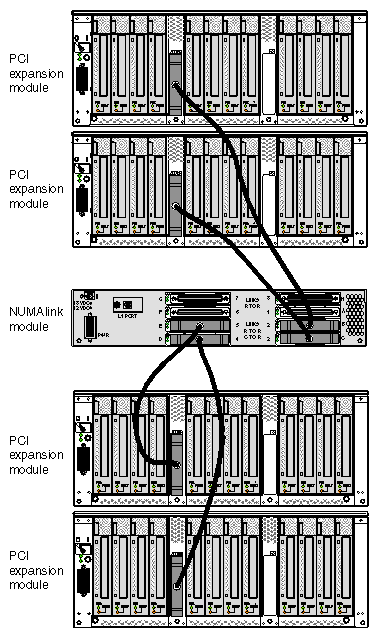
Both versions of the PCI expansion module connect to an SGI 300 compute module via a NUMAlink port or via a NUMAlink module. The NUMAlink module adds scalability to the system. For example, with a NUMAlink module, an SGI 300 compute module can connect to three other compute modules and four PCI expansion modules. Without a NUMAlink module, an SGI 300 compute module can connect to one SGI 300 compute module or one PCI expansion module.
Both versions of the PCI expansion module also connect to a 110- or 220-V power bay that supplies 12-VDC standby voltage and 48 VDC to the module. The 12-VDC standby voltage powers on the module's L1 controller. The 48 VDC powers on the other components within the module.
| Note: The 110-V power bay is not available for an SGI 300 system that contains a NUMAlink module. |
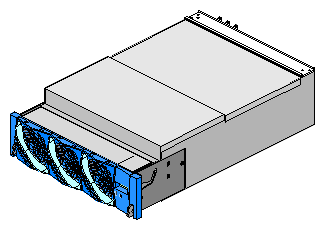
The PCI expansion module is similar to the Origin 3000 series P-brick; for example, the PCI expansion module seats up to 12 PCI cards, requires 48-VDC input voltage, uses the same L1 controller, and shares the same physical appearance as that of the P-brick. However, the PCI expansion module and the P-brick are not interchangeable. Table 3-1 lists the differences between the PCI expansion module and the P-brick.
Table 3-1. Differences between PCI Expansion Module and P-Brick
Differences | Description |
|---|---|
Interface board | The PCI expansion module uses a Bedrock interface card (BIC). The P-brick uses a host interface card (HIC). |
Motherboard | The motherboard of the PCI expansion module has additional logic to support the BIC. |
Power board | The power board of the PCI expansion module provides additional power for the BIC. |
Protocol when connecting to a host | The PCI expansion module uses NUMAlink protocol. |
Host connections | The PCI expansion module can connect to an SGI 300 compute module or a NUMAlink module. The P-brick connects to a C-brick. |
The SGI 300 compute module cannot connect to a P-brick because the P-brick requires a connection to the I/O interface (II) of a Bedrock ASIC (see Figure 3-3). The I/O interface of the SGI 300 compute module's Bedrock ASIC connects to an internal Xbridge ASIC (see Figure 3-4).
In order to expand the I/O capabilities of the SGI 300 compute module, the network interface (NI) of the SGI 300 compute module's Bedrock ASIC is used (see Figure 3-4). This interface must connect to another NI port; therefore, it must connect to a device that has a Bedrock ASIC. The PCI expansion module has a Bedrock interface card (BIC) that contains a Bedrock ASIC. (The P-brick does not contain a Bedrock ASIC.)
This Bedrock-to-Bedrock communication is referred to as peer I/O. The PCI expansion module is a “peer” I/O device to the SGI 300 compute module. In other words, the SGI 300 compute module communicates with the PCI expansion module in the same manner that it would communicate with another SGI 300 compute module.


The Bedrock ASIC of the PCI expansion module also communicates with three 600-MHz Xbridge ASICs via its I/O interface (II) port. The Xbridge ASICs control the PCI buses (see Figure 3-6): Xbridge ASIC U0 is the interface between the Bedrock ASIC and the PCI slots of bus 3 and bus 4. Xbridge ASIC U0 is also the interface between the Bedrock ASIC and the Xbridge ASICs U1 and U2. Xbridge ASIC U1 controls bus 1 and bus 2, and Xbridge ASIC U2 controls bus 5 and bus 6.
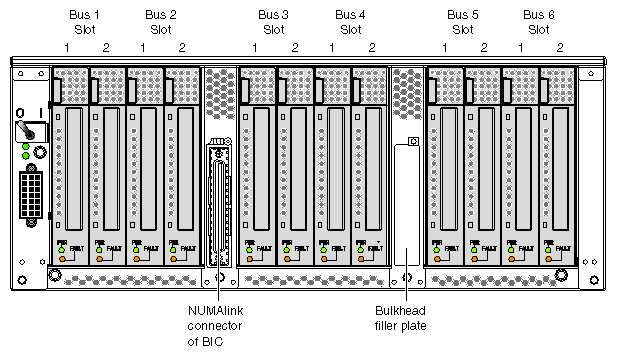
Each bus has two slots, labeled 1 and 2 as shown in Figure 3-5. Via these slots, the PCI expansion module seats up to twelve PCI cards. All slots support either 32-or 64-bit addressing and can accommodate 66-MHz or 33-MHz PCI cards; however, if a bus has one 33-MHz card and one 66-MHz card, the bus operates at 33 MHz.
The PCI cards can be hot-plugged, which means that the system and the PCI expansion module can remain powered on while a PCI card is installed or removed. The only component that must be powered off is the PCI slot. For more information about hot-plugging a PCI card, see Chapter 2 of this guide.

The PCI expansion module requires 4U of space within the rack and has the specifications that are listed in Table 3-2.
Table 3-2. PCI Expansion Module Specifications
Characteristic | Specification |
|---|---|
Height | 7.0 in. (177.80 mm) |
Width | 17.5 in. (444.50 mm) |
Depth | 27.5 in. (698.50 mm) |
Weight | 70 lb (31.50 kg) |
This section describes the front, rear, and internal components of the PCI expansion module.
The PCI expansion module contains the following front-panel items (see Figure 3-7):
L1 display is a 2-line by 12-character liquid crystal display (LCD) that displays status and error messages that the L1 controller generates.
On/Off switch with LED enables you to manually power on and power off the module.
-
On/Off switch LED illuminates green when the internal components are powered on.
Service required LED illuminates orange to indicate that an item is not functioning properly (for example, a fan is off), but the PCI expansion module is still operating.
Failure LED illuminates red to indicate that a failure has occurred and the PCI expansion module is down.
Three fans provide N+1 redundant cooling for the module. The fans move air from the front to the rear of the rack, can be hot-swapped, and run at variable speeds.

The PCI expansion module has the following rear-panel items (see Figure 3-8):
Power switch powers on the L1 controller when moved to the 1 position; moving it to the 0 position powers off the L1 controller.
12-VDC LED illuminates green when the L1 controller is powered on and operating.
48-VDC LED illuminates green when the rest of the internal components are powered on and operating.
PWR (power) connector attaches to a power bay. The PCI expansion module inputs 48 VDC and 12-VDC standby voltage from the power bay via a DC power cable.
PCI slots seat the PCI cards. Each slot has two LEDs, as follows:
NUMAlink connector attaches the PCI expansion module to an SGI 300 compute module or a NUMAlink module via a NUMAlink cable.
Bulkhead filler plate covers the unused connector slot so that air flows properly through the module.

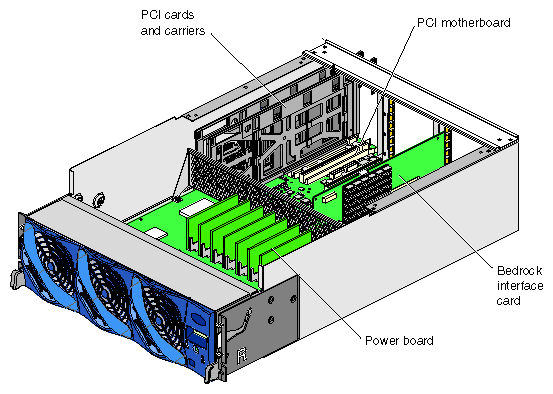
The PCI expansion module contains the following internal components (see Figure 3-9):
PCI motherboard
PCI cards and carriers
Power board
Bedrock interface card (BIC)
L1 controller logic (not shown in Figure 3-9)
The PCI motherboard contains three Xbridge ASICs that serve as the interface between the Bedrock ASIC and the PCI cards (see Figure 3-10). The PCI motherboard also contains twelve PCI slots and a serial ID EEPROM that contains component information (not shown in Figure 3-10).

The SGI 300 compute modules support various PCI cards that are produced by third-party manufacturers who specialize in peripheral devices. Each PCI card is mounted to a carrier so that you can slide the PCI card into and out of the module. The PCI card connects to the PCI motherboard when the PCI carrier is fully inserted into the module. For a list of supported PCI cards, see the following website:
The PCI carrier has a fixed size; however, it contains an assembly that adjusts to fit the varying sizes of the PCI cards (see Figure 3-11). Each PCI carrier holds one PCI card. To accommodate dual PCI cards, two PCI carriers are joined.
Empty PCI carriers reside in nonpopulated PCI slots to create even airflow through the PCI slots and to provide EMI (electromagnetic interference) shielding.

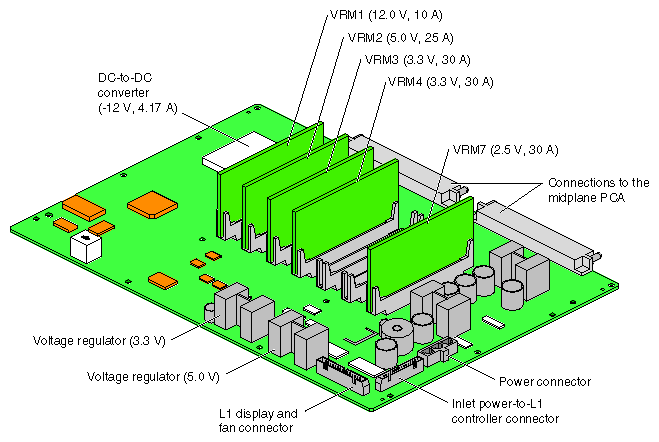
The power board contains the logic components of the L1 controller, five VRMs, one DC-to-DC converter, and two voltage regulators (see Figure 3-12). The VRMs, DC-to-DC converter, and voltage regulators convert the incoming 48 VDC to voltage levels that the components within the module require.
One 12.0-VDC, 10-A voltage regulator module (VRM 1)
One 5.0-VDC, 25-A voltage regulator module (VRM 2)
Two 3.3-VDC, 30-A voltage regulator modules (VRM 3 and VRM 4)
One 2.5-VDC, 30-A voltage regulator module (VRM 7)
One –12.0-VDC, 4.17-A DC-to-DC converter
One 3.3-VDC voltage regulator (auxiliary voltage)
One 5.0-VDC voltage regulator (auxiliary voltage)
The power board supplies an average of 10 W (3.3 V or 5.0 V) of power to each PCI slot. The L1 controller controls how the power board applies power to the PCI cards. The power board applies power to the PCI cards starting with the lowest-numbered slot. It continues to apply power to the PCI slots until all of the power has been consumed. The L1 controller uses two pins in each PCI slot to total the power consumption of the PCI cards. The L1 controller prints a message to the console if the power board cannot supply power to all of the PCI cards.
The power board is installed horizontally in the front of the module and it plugs into the PCI motherboard (see Figure 3-9).
The PCI expansion module uses one Bedrock interface card (BIC) (see Figure 3-13) that contains the following:
One Bedrock ASIC transfers signals between SGI 300 compute modules and the PCI cards. The Bedrock ASIC is the component that makes the PCI expansion module a peer device to the SGI 300 compute module. Unlike the Bedrock ASIC of the SGI 300 compute module, the PCI expansion module uses only two of the Bedrock ASIC interfaces: the I/O interface (II) and the network interface (NI). The processor interfaces (PI_0 and PI_1) and the memory interface (MD) are not used, because the BIC and the PCI expansion module do not contain any processors or memory.
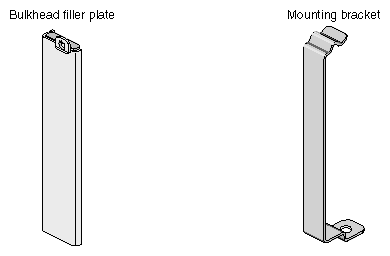
One NUMAlink connector connects the PCI expansion module to an SGI 300 compute module or a NUMAlink module. The NUMAlink connector is the left connector on the rear of the PCI expansion module (see Figure 3-8). The right connector slot is not used; therefore, it contains a bulkhead filler plate to maintain proper airflow through the module (see Figure 3-14).
One power connector transfers power from the PCI motherboard to the Bedrock ASIC.
One PCI motherboard connector connects the BIC to the PCI motherboard. The Bedrock ASIC transfers signals from its II port to the Xbridge ASICs via this connector.
The BIC is secured to the motherboard with the bracket shown in Figure 3-14.
The L1 controller monitors and controls the environment of the PCI expansion module. It consists of the following:
The display is located on the front of the PCI expansion module.
The logic components are located on the power board.
The cable connects the display to the logic components.
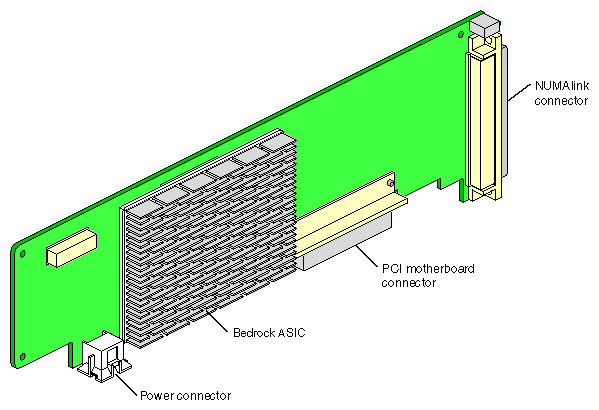
Figure 3-14 shows the bu lkhead filler plate and the mounting bracket.
The PCI expansion module contains one BIC that connects to the NUMAlink [LINK (NI)] port of an SGI 300 compute module in a system that does not contain a NUMAlink module (see Figure 3-15).
In a system that contains a NUMAlink module, the BIC connects to port 2, 3, 4, or 5 of the NUMAlink module (see Figure 3-16). The PCI expansion module must connect to port 2, 3, 4, or 5 of the NUMAlink module, because these ports carry USB signals. The PCI expansion module does not have an external USB port; therefore, it communicates with the L2 controller via the port and USB hub of the NUMAlink module.
| Note: The PCI expansion module will not function if it is cabled to port 1, 6, 7, or 8 of the NUMAlink module. |

Figure 3-16 shows four PCI expansion modules connected to a NUMAlink module.