A virtual clip ( vclip) directly links clip content segments through the use of metadata. A clip content segment defines a frame-continuous portion of a larger clip, characterized by in and out points. A virtual clip consists of metadata describing the referenced content using a series of clip name references and in and out points. A virtual clip is similar to an edit decision list or a play list. When a virtual clip plays, the segments referenced by the virtual clip are seamlessly combined into a unified, continuous clip. Figure 6-1 illustrates a vclip comprised of three segments.
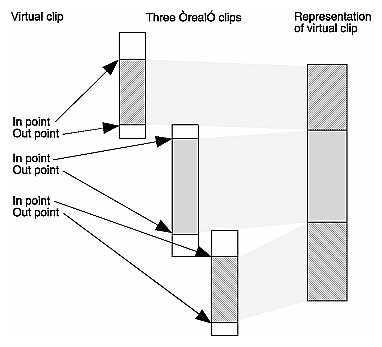
A virtual clip structure is not limited to a single level of links. Further clip virtualization can be accomplished, where one virtual clip references yet another, which in turn points to physical clip content files. The format for vclip segments is unique to the SGI Media Server and is the only segment format supported by the product.
The remainder of this chapter explains the Multiport Video Computer Protocol (MVCP) commands applied for vclip operations:
Table 6-1 provides an alphabetical summary of the MVCP commands used to manipulate virtual clips. The remainder of the chapter describes these commands in more detail. The mvcp(5) man page provides detailed descriptions of the MVCP vclip commands.
Table 6-1. MVCP Virtual Clip Commands
Command | Description |
|---|---|
Build a continuous clip from a virtual clip. | |
Close a clip. | |
Clear frames from a clip. | |
Insert new frames in a clip. | |
Remove frames from a clip. | |
Create a fetal state virtual clip. | |
Open a clip. | |
Save a clip. | |
Clear clip segments. | |
List clip segments. | |
Remove clip segments. | |
Update clip segments. |
This section describes the MVCP commands you use to create, open, save, close, or remove virtual clips. This section also describes how to build a non-virtual clip.
To create a virtual clip, use the MVCP command CMK. The syntax and arguments for CMK and the related command COPN are described briefly as follows:
CMK clip-name format-name COPN clip-name |
| clip-name | Specifies the name of the clip to create. | |
| format-name | Specifies the name of a segmented format. The only segmented format supported is movie/vclip. |
CMK creates a fetal clip. A fetal clip is not visible in the clip cache nor can it be used for playout until clip segments are assigned using the CUPS command. A fetal clip has minimal state and serves as the foundation for vclip editing operations. The COPN command opens virtual or non-virtual clips for subsequent edit operations.
It is important to note that a fetal virtual clip cannot be deleted unless it contains at least one segment and has been previously closed, thus promoting it out of the fetal state into the clip cache. A fetal clip without one segment is termed incomplete; VST cannot process incomplete fetal clips. Attempted deletion of an incomplete fetal clip leaves an unmanageable entry, which cannot be cleared without a VST restart. Attempts to reuse a deleted, incomplete fetal clip will fail.
To create a non-virtual clip, use the CBLD command. This command physically copies the referenced segments from a virtual clip into a continous, non-virtual clip and assigns an arbitrary timecode for a non-virtual clip start. The syntax of the CBLD command is as follows:
CBLD clip-name new-clip [start] |
| clip-name | Specifies the segmented virtual clip for the extraction of segment information for the copy into the non-virtual clip destination. The segmented virtual clip must have the movie/vclip format. | |
| new-clip | Specifies a non-virtual clip destination. | |
| start | Specifies the start timecode for the non-virtual output. |
To save, close, or remove a virtual clip, use the following MVCP commands, respectively:
CSAV [clip-name] CCLS [clip-name] CRM [clip-name] |
| clip-name | Specifies the name of the clip to save, close, or remove. If clip-name is not specified, the most recently created or opened clip is saved, closed, or removed.
|

The MVCP com mands in this section work only with segment-formatted clips; currently the only format supported is movie/vclip.
Once you create or open a vclip, you add segments to or remove segments from it to revise the vclip.
The CUPS (update) command, defined as follows, adds segments to vclips:
CUPS clip-name src-op dest-op trk-mask in out src-clip src-trk-mask src-in src-out |
| clip-name | Specifies the name of the vclip to which you add a segment. | |
| src-op | Specifies the operations on the segment in the vclip:
| |
| dest-op | Specifies whether the segment added to the vclip is inserted (FINS) into the vclip or overwrites (FOVR) segments already in the vclip. Valid values are FINS and FOVR. | |
| trk-mask | Must be an asterisk (*). | |
| in | Specifies the in point in the vclip where the segment is to be added. If this information is absent, the new segment is appended to the end of the vclip. | |
| out | Specifies the out point in the vclip where the added segment ends. | |
| src-clip | Specifies the name of the source clip. | |
| src-trk-mask | Must be an asterisk (*). | |
| src-in | Specifies the in point in the source clip. If this argument is unspecified, src-in is set to the in point of the source clip. | |
| src-out | Specifies the out point in the source clip. If this argument is unspecified, src-out is calculated from the following:
|
Figure 6-2 illustrates some of these arguments.
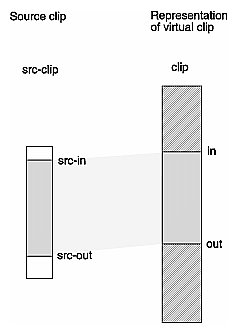
The interval between src-in and src-out must equal the interval between in and out; otherwise, an error is returned. If you supply only one of these intervals, CUPS automatically makes the other interval equal to it.
Using the CUPS command repeatedly enables you to populate your virtual clip with segments.
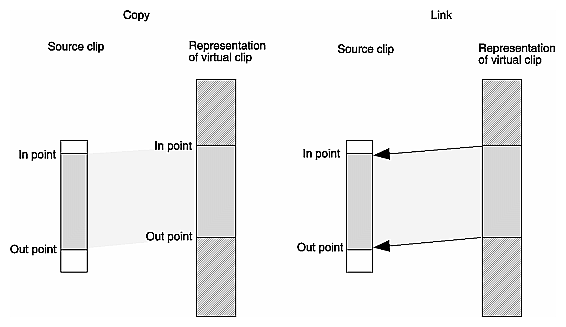
When a segment from a source clip is removed (FRM), the segments before and after the copied segment are joined. The FCL operation is not supported by the PCI-VIDAUD-MSB-B codec.
To display pertinent information about the segments in a vclip, use the CSLS command:
CSLS [ clip-name [ track-mask [ in [ out ]]]] |
| clip-name | Specifies the name of the clip you are interested in. If clip-name is not specified, the most recently opened or created clip is used. | |
| track-mask | Must be an asterisk (*). | |
| in | Displays information about segments beginning after this (timecode) point in the vclip. If in is not specified, the information displayed begins with the first segment in the vclip. | |
| out | Displays information about segments before this (timecode) point in the vclip. If out is not specified, the information displayed ends with the last segment in the vclip. |
Use the in and out arguments to display information about segments in a subsection of the vclip.
For each segment in a vclip, CSLS displays a line of information in the following format:
trk in out clip-name src-trk src-clip src-in src-out |
| trk | Always an asterisk (*). | |
| in | The in point of the segment in the vclip. | |
| out | The out point of the segment in the vclip. | |
| clip-name | The system-dependent name of a clip created automatically in the system used for reference counting. (This argument should be ignored.) | |
| src-trk | Always an asterisk (*). | |
| src-clip | The name of the clip in the clip cache where the segment comes from. | |
| src-in | The in point of the segment in the source clip. | |
| src-out | The out point of the segment in the source clip. |
To clear or remove segments in a virtual clip based on fixed-format clip content (DVCPRO, DVCPRO 50, DVCAM, or DV (16-bit/48 Khz audio only)), use the following MVCP commands, respectively:
CSRM clip-name track-mask timecode |
| clip-name | Specifies the name of the clip containing the segment to be removed. If clip-name is not specified, the most recently created or opened clip is used. | |
| track-mask | Must be an asterisk (*). | |
| timecode | Specifies the timecode of the first frame of the segment you want removed. |
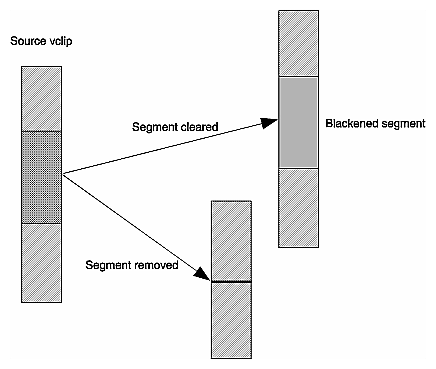
Segment clearing using the CSCL command is not supported by the PCI-VIDAUD-MSB-B codec. When a segment from a specified clip is removed (CSRM), the segments before and after the specified segment appear contiguous, as shown in Figure 6-4.
Ins tead of adding or removing segments, you can use MVCP commands to add or remove frames in a vclip.
The CFNW command inserts empty (black and silent) frames into a clip based on fixed-format clip content (DVCPRO, DVCPRO 50, DVCAM, or DV (16-bit/48 Khz audio only)). The syntax of the CFNW command is as follows:
CFNW clip-name track-mask in out |
| clip-name | Specifies the name of the vclip into which you want to add one or more empty frames. | |
| track-mask | Must be an asterisk (*). | |
| in | Specifies the in point in timecode in the vclip where the empty frames are to be inserted. | |
| out | Specifies the out point in timecode in the vclip where the inserted empty frames end. |
To use CFNW, the specified clip must have previously been opened or created using COPN or CMK, respectively, during the current MVCP session.