This overview of OpenGL Multipipe consists of the following sections:
SGI has always been focused on high-end graphics solutions. The Silicon Graphics Prism family of scalable visualization systems allows you to have multiple graphics pipes on one single-system-image machine in order to reach new visualization performances. These multipipe systems are commonly used to drive expanded visualization systems such as SGI Reality Center facilities. OpenGL Multipipe extends the use of these powerful supercomputers to a broad spectrum of graphics applications without the requirement of modifying the applications.
Many existing graphics applications—such as Netscape or applications based on Open Inventor, for example—are constrained to run on a single pipe. On these single-pipe applications, you can choose the pipe on which to open the application's windows, but the windows cannot be dragged from one pipe to another. The main reason is that the graphics pipes are separate logical units and are handled by an X server as different, unconnected screens. This means that the X server does not provide any functionality to group multiple screens into a single logical display. A second reason is that OpenGL applications connect directly to a specified graphics pipe and bypass the X protocol layer.
In the past, displaying an application on multiple screens required you to explicitly write the application for that purpose. You had to use tools like the OpenGL Performer or OpenGL Multipipe SDK libraries to help you create these multipipe applications. These tools allow you to explicitly open windows on different screens and to draw into them using OpenGL. However, this solution lacks consistency. In fact, all of the windows on the different pipes are independent; hence, moving or iconifying one window on one screen will not handle the other windows accordingly.
OpenGL Multipipe has been designed to overcome these difficulties. The goal is to group pipes managed by the X server in order to create a consistent, single virtual screen as shown in Figure 1-1. This means that the applications are unaware of the underlying hardware configuration. Rather, they only know about a single display and behave accordingly.

In contrast to Figure 1-1, if you have screens that overlap each other (such as in an SGI Reality Center wall display with edge blending), OpenGL Multipipe allows you to specify the amount of this overlap. Figure 1-2 shows the image blended on overlapping screens.

 | Note: OpenGL Multipipe does not require you to modify or recompile your application. |
OpenGL Multipipe provides the illusion that an application is rendering 2D (X perspective) and 3D (OpenGL perspective) on a single local pipe when it is actually using one or more pipes. This illusion, or logical display, is created by a set of protocols and proxies coupled with clients and servers, all of which are hidden from the application.
OpenGL Multipipe uses an X proxy layer to hide the physical screen layout from the application. This X proxy layer presents a single logical pipe or meta screen to all applications and allows their windows to be freely moved across or to span any set of pipes. OpenGL Multipipe uses the Distributed Multihead X (DMX) proxy server.
OpenGL Multipipe also uses an OpenGL proxy library and render servers to send OpenGL calls to each real pipe. Having 3D render servers separate from the 3D proxy library allows the application processing and the rendering to occur in separate processes. This separation aides application compatibility.
OpenGL Multipipe has the following components:
An X proxy layer (the DMX proxy server)
A session manager process (ompmgr)
A 3D proxy render library
An optional culling process (ompcull)
3D render servers
For pure X applications—that is, applications that do not use other graphics libraries (such as OpenGL) to draw into their windows—the X proxy layer ( DMX) is all that is needed to enable such applications to run transparently over multiple pipes. This means that windows of applications that are based on the X protocol and that use X extensions can be dragged from one pipe to another and even span multiple pipes. The applications behave as if they are running on a single, large virtual pipe. The X proxy layer hides the real screens from the client applications connecting to it. It distributes to all pipes the X requests from the clients but only sends the clients information about the large virtual display.
The DMX proxy server is a separate entity apart from the X server; it is an X application that behaves like an X server to other X applications. DMX is flexible both in regards to its supported display geometries and in its ability to act as a proxy for many different X servers. DMX also has built-in support for OpenGL applications through its support of the GLX X extension. This means that DMX will enable X and OpenGL applications to run transparently across multiple pipes. However, DMX's GLX extension is limited in performance. Hence, it is best to run graphics-intensive applications under the full OpenGL Multipipe environment.
Administrative privileges are not required to start and stop DMX. For more information about the DMX proxy server, see the Xdmx(1) man page, which is installed in /usr/share/omp/doc/user/Xdmx.1.html.
The session manager process (ompmgr) is used to manage and update special resources that are used by the 3D render library and render servers. It maintains structures in shared memory through which all the other components (the render servers, proxy library, and optional ompcull process) can communicate and share global session information. The followings tasks are handled by ompmgr:
Starting the DMX X proxy server during session initialization
Configuring hardware compositors during session initialization if they are being used
Maintaining information about all OpenGL windows in the session and updating the window(s) position/size when needed
Maintaining information about all currently running OpenGL applications that uses OpenGL Multipipe in the session
Handling hardware compositor re-configuration when using one of the dynamic composition schemes (dynamic load-balanced tiling or time-based composition)
OpenGL applications are X applications that use another graphics library (namely the OpenGL library) to draw into their windows. OpenGL applications open a direct connection to a graphics pipe. This means that the application is bypassing the X protocol (and the X proxy layer, which replicates the the X protocol stream to each pipe) in order to draw in the windows through this direct connection. The X proxy layer, which accounts only for the X protocol, is unable to handle this case.
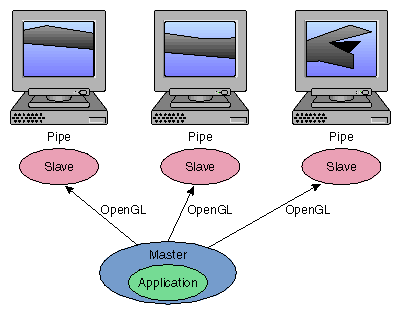
The master proxy library in OpenGL Multipipe handles the OpenGL side of any application. It intercepts OpenGL calls to enable distribution to multiple pipes. To distribute the OpenGL calls, the master library encodes each command using an OpenGL stream protocol and sends the command stream to the slave renderer processes, which render to local pipes on behalf of the application.
Figure 1-3 illustrates the functions of the master proxy library.
In addition to sending an OpenGL stream to each slave, the master also has the capability of rendering directly to a single local pipe in place of a single slave render process (for faster GL state queries), or it may use a local pipe only to track OpenGL state while a slave process renders to that pipe (for improved parallelism). For more information about performance and the master library modes, see Chapter 5, “Optimizing Performance”.
The optional culling process (ompcull) will be activated only if the geometry culling feature is turned on. This process reads the OpenGL stream encoded by the master proxy library before it reaches the rendering slaves and modifies each 3D bounding box found in the stream with its projected 2D screen coordinate bounding box, which will then be used by the rendering slave to decide whether to render the followed geometry or not. The purpose of doing that calculation on a separate process is to increase parallelism and throughput by not “stealing” CPU cycles from either the application or rendering slaves on configurations making use of multiple CPUs.
An application running under the master render library of OpenGL Multipipe communicates its OpenGL commands to slave renderer processes. Each slave process parses the OpenGL command stream and executes the commands on the application's behalf. For each rendering application thread of execution, one slave process exists for each screen of the display.