In contrast to most of the compounds described in Chapter 4, “Compounds”, scalable graphics hardware offers a hardware solution to joining or cascading the video output of two or more graphics pipes and outputting them in a single video output. Scalable graphics hardware provides nearly perfect scaling of both geometry rate and fill rate on some applications.
This chapter describes how you use MPK in conjunction with an SGI Scalable Graphics Compositor. The chapter gives a brief overview of the compositor and how to use it with MPK. For more information on the compositor, including the details of the hardware setup, refer to the document SGI Scalable Graphics Compositor User's Guide.
The compositor can join or cascade the video output of graphics pipes and perform spatial compositions, pixel averaging, and stereo rendering. The compositor receives two to four input signals and outputs a single signal either in analog or digital format.
The following items are noteworthy regarding the compositor's capabilities:
For every output pixel, the compositor averages all values from all the pipes. Among other things, this provides applications with the means to do full-scene antialiasing (FSAA) in hardware.
Stereo is supported only for analog output.
Due to restrictions imposed by the compositor, MPK does not allow the mixing of the various hardware decomposition modes—for example, two vertical stripes with two horizontal stripes.

Note: For more information on the current limitations and anomalies associated with the use of the SGI Scalable Graphics Compositor, refer to the hardware documentation.
Because the compositor receives two to four input signals and outputs a single signal either in analog or digital format, it can handle spatial composition of four inputs. This enables multiple pipes to contribute to a single output. Four different spatial composition schemes are available:
Figure 5-1 illustrates the various hardware composition schemes.
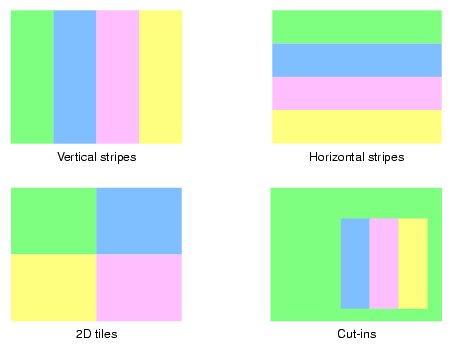
In order to use the compositor with MPK, you must specify the 2D, DPLEX, EYE, or FSAA compound mode along with the HW flag. If you do not specify the NOCOPY flag, copying is performed even though the compositor is being used. Example 4-7 shows a configuration file entry for an FSAA compound using the compositor.
Example 5-1 shows how a 2 x 2 tiling scheme might look in a configuration file.
Example 5-1. A 2 x 2 Tiling Scheme in a Configuration File
compound {
    mode    [ 2D HW NOCOPY ]
    channel “channel0”

    region {
        viewport    [ 0., 0.5, .5, .5 ]
        channel “channel0”
    }
    region {
        viewport    [ 0.5, 0.5, .5, .5 ]
        channel “channel1”
    }

    region {
        viewport    [ 0., 0., .5, .5 ]
        channel “channel2”
    }

    region {
        viewport    [ .5, 0., .5, .5 ]
        channel “channel3”
    }
}
|
To enable DPLEX decomposition, you must specify the DPLEX mode along with the HW flag in the configuration file. The destination channel's pipe is used to control the hyperpipe. Naturally, this is the display pipe of the DPLEX cascade. The use of the NOCOPY flag is mandatory to suppress pixel transfer.
Example 5-2 shows a three-pipe DPLEX cascade with the pipe associated to channel channel::1 being the display pipe. The order of the channels reflects the order of the pipes in the DPLEX cascade.
Example 5-2. A Typical DPLEX Compound
compound {
    mode [ DPLEX HW NOCOPY ]
    channel “channel::1”

    region {
        channel “channel::1”
    }

    region {
        channel “channel::2”
    }

    region {
        channel “channel::3”
    }
}
|
Note the following:
You must specify a destination channel if the compositor is to be used. Otherwise, MPK uses a software fallback solution.
MPK does not require that the destination channel be used as a source channel—that is, it does not have to contribute to the rendering.