TMF supports both IBM compatible tape and ANSI formats. This chapter describes and illustrates these formats and the label fields if applicable.
This section briefly describes and illustrates the IBM tape format. Tape format is determined by the presence or absence of labels and the number of files on a tape volume or number of volumes for a tape file.
System labels and filemarks are accessible to a user process only through the use of the tmmnt(1) command.
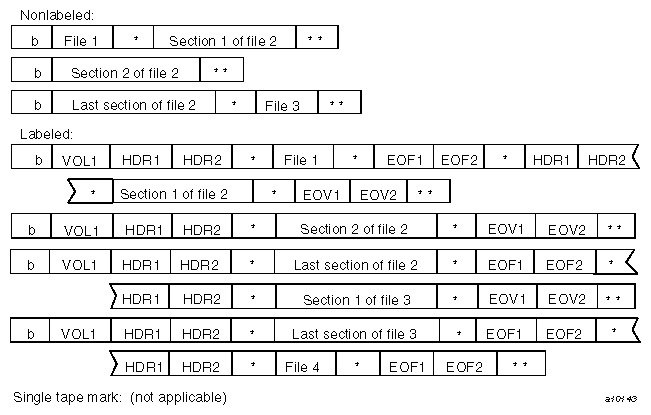
In the following figures, the character b represents the beginning of the tape and the character * represents a filemark (HDR2, EOV2, and EOF2 labels are optional for input). TMF always creates these labels for labeled tapes; other systems may not.
Nonlabeled tapes are of two formats, determined by the number of filemarks that indicate end-of-volume.
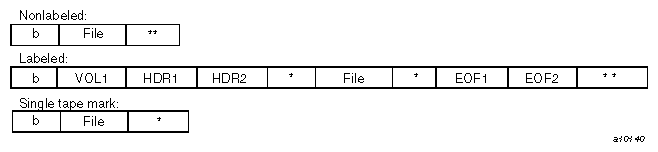
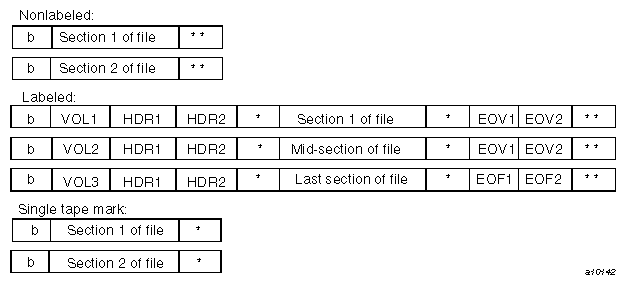
Nonlabeled tapes with two filemarks, implemented by the -l nl option of the tmmnt(1) command, may consist of a single-volume file; a multivolume file; or multifile, multivolume file formats. Figure 2-1, illustrates these formats. For tapes with multiple files, a single filemark separates files on the same volume. End-of-volume is reached when two consecutive filemarks are encountered, and there is another tape to read.

For nonlabeled, single filemark format, implemented by the -l st option of the tmmnt(1) command, a single filemark indicates end-of-volume. When using one filemark tape as an input tape, the system reads only to the first filemark encountered.
When using a single filemark tape as an output tape, the system terminates the tape with three filemarks, allowing it to be read as a nonlabeled tape later on. Note that because the system processes only the data blocks and the first filemark, you cannot have multifiles on a single filemark tape. That is, you cannot use the -l st option with the -q option of the tmmnt(1) command.
Figure 2-2 illustrates nonlabeled, single filemark formats.
Labeled tapes are implemented by the -l al (ANSI standard label) and the -l sl (IBM standard label) options of the tmmnt(1) command. ANSI standard labels and IBM standard labels are similar, with the exception that in IBM standard labels, the character fields are represented by EBCDIC characters while in ANSI standard labels, the character fields use ASCII characters.
Labeled tapes use the following labels in TMF (see Section 2.2, for a description of these labels):
Figure 2-3 illustrates labeled tape formats.

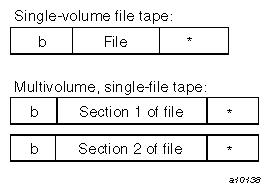
The formats described previously are illustrated in Figure 2-4, through Figure 2-7, grouped by number of files and number of volumes. Figure 2-4 shows a single-volume file; Figure 2-5 shows a multifile, single-volume tape; Figure 2-6 shows a multivolume, single-file tape; and Figure 2-7 shows a multifile, multivolume tape. For each format type, the figures show both labeled (ANSI or IBM) and nonlabeled tapes.

This section describes the various tape label fields for ANSI standard and IBM standard labels. Specifically, it describes the fields in which label types are supported. These are checked by the system when reading or writing a tape and those that are filled in with parameter values when you use the tmmnt(1) command to create a labeled tape.
In IBM standard-label character fields, the characters are represented by EBCDIC characters. ANSI standard labels use ASCII characters.
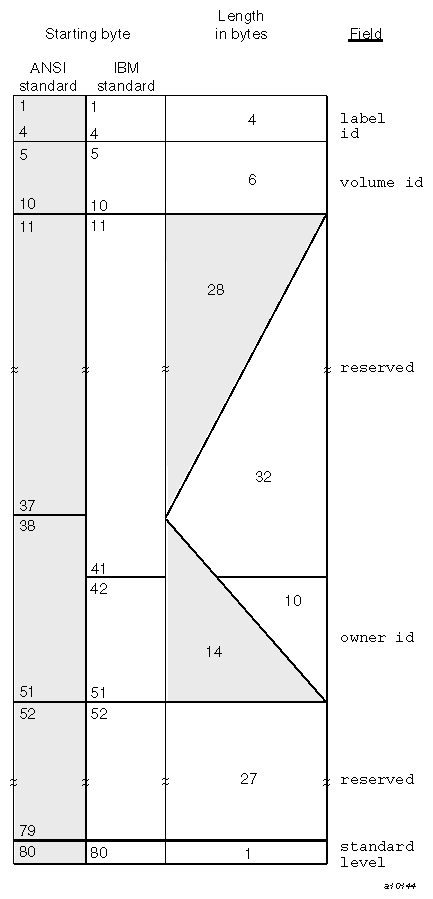
The VOL1 label is the first block on a labeled tape. Table 2-1 describes the fields for an ANSI standard label. Figure 2-8, shows the format of the VOL1 label.
Field | Starting byte | Length in bytes | Contents | Description |
|---|---|---|---|---|
1 | 4 | VOL1 | VOL1 label; required system-supplied character string. | |
5 | 6 | vi | Volume identifier of the tape; it is specified with the -v option or contained in the file specified with the -V option of the tmmnt(1) command. It is checked on all labeled tapes and contains up to 6 alphanumeric characters. | |
38 | 14 | owner_id | User ID of the tape owner. | |
80 | 1 | label standard version | ANSI standard version number for label and data formats. For Silicon Graphics systems, the version number is 4. |
The fields of the ANSI standard VOL1 label are the same as the IBM standard VOL1 label, with the following exceptions:
The owner id field of the IBM standard VOL1 label starts at byte 42 and has a length of 10 bytes.
The standard level field is not used in the IBM standard VOL1 label.
The HDR1 label is located before each file or section of a file on a tape volume. If a file is not completed on a tape volume and extends to the following tape volume, the data in the file is followed by an EOV1 label. If a file or file section is completed on a tape volume, the data in the file is followed by an EOF1 label.
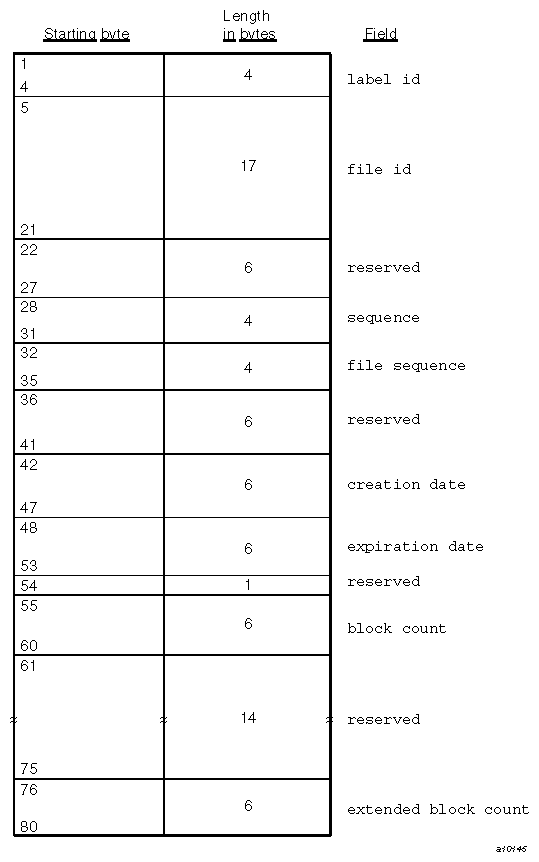
The fields of the HDR1, EOV1, and EOF1 labels are the same in both the ANSI standard label format and the IBM standard label format. Table 2-2 describes the specified fields. Figure 2-9, shows the format of the HDR1/EOV1/EOF1 labels.
Table 2-2. HDR1/EOV1/EOF1 Labels
Field | Starting byte | Length in bytes | Contents | Description |
|---|---|---|---|---|
label id | 1 | 4 | HDR1 EOV1 EOF1 | Label type; required system-supplied character string. |
file id | 5 | 17 | file_id | File identifier; 1- through 17-alphanumeric character field specified by the -f option of the tmmnt(1) command. If the -f option is not specified, the file identifier is taken from the path name of the -p or -P option of tmmnt. The level of checking on file id is installation specified. |
sequence | 28 | 4 | number | Order of this volume in a multivolume set; it is specified by a decimal number (1 through 9999) on the -O option of tmmnt. |
file sequence | 32 | 4 | number | File order within a multifile tape; it is specified by a decimal number (1 through 9999) on the -q option of tmmnt. The system uses the specified value to position the tape volume to the proper file. |
creation date | 42 | 6 | cyyddd | Creation date (pseudo-Julian format) of a new tape; c = century (blank = 19, 0 = 20, 1 = 21...), yy = year (00-99), and ddd = day (001-366). |
expiration date | 48 | 6 | cyyddd | Expiration date (pseudo-Julian format) at which time a tape may be scratched or overwritten. Normally, it is specified in the cyyddd format by using the -x option of tmmnt. Otherwise, you can specify the number of days on the -t option by using tmmnt(1). The specified number is added to the creation date, thus creating the expiration date. |
block count | 55 | 6 | number | Number of data blocks in the preceding file section or file on the current tape volume for EOV1 and EOF1 labels. The block count in the HDR1 label contains a value of 000000. In EOV and EOF labels for standard labels (sl), if the block count is greater than 999,999, the block count field will represent the block count as mod 1,000,000. The overflow (block count / 1000000) will be stored in bytes 76 through 80. This is the extended block count field. For ANSI standard labels (al), if the block count is greater than 999,999, the block count field will represent the block count as mod 1,000,000. |
extended block count | 76 | 5 | number | For standard labels (sl), if the block count is greater than 999,999, the block count field will represent the block count as mod 1,000,000. The extended block count field will contain the overflow (block count / 1000000). |
An HDR2 label immediately follows an HDR1 label, and it is followed by a filemark. An EOV2 label immediately follows an EOV1 label, and it is followed by two filemarks. An EOF2 label immediately follows an EOF1 label, and if more files follow this file, it is followed by one filemark. If the EOF2 label is the last file on the tape volume, it is followed by two filemarks.
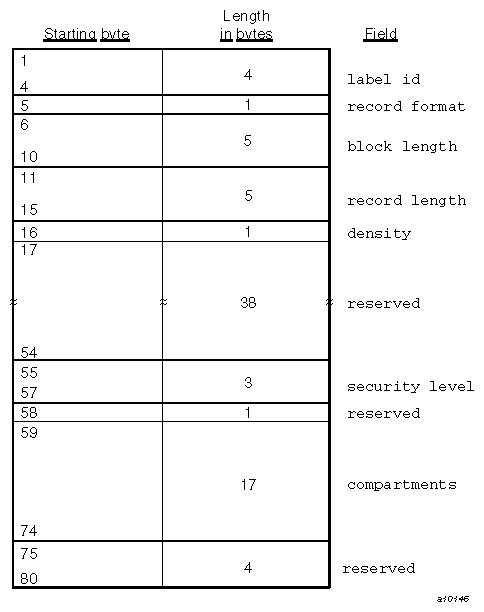
ANSI standard does not specify a format for these labels, except for the first 4 bytes. IBM standard labels use the HDR2, EOV2, and EOF2 labels to store additional information concerning the file they bracket. TMF automatically writes these labels when you use the -l sl or -l al options of tmmnt(1). These labels follow the IBM standard format. Table 2-3 describes the specified fields. Figure 2-10, shows the format of the HDR2/EOV2/EOF2 labels.
Table 2-3. HDR2/EOV2/EOF2 Labels
Field | Starting byte | Length in bytes | Contents | Description |
|---|---|---|---|---|
label id | 1 | 4 | HDR1 EOV1 EOF1 | Label type; required system-supplied character string. |
record format | 5 | 1 | format | Record format; 1-character filed specified by the -F option of tmmnt(1). |
block length | 6 | 5 | number | Maximum block length, in bytes, for the associated file; specified by a decimal number (1 through 99999) on the -b option of tmmnt. If the block length is greater than 100000, the block length field will represent the block length as mod 100000. |
record length | 11 | 5 | number | Record length, in bytes; specified by the -L option of tmmnt. |
density | 16 | 1 | number | Tape density; specified by the -d option of tmmnt. TMF supports 1600 bpi (this field contains the value 3) and 6250 bpi (this field contains the value 4). |