This user's guide documents the characteristics and capabilities of the Tape Management Facility (TMF). It explains the ways in which you may work with TMF and provides many examples of commonly used commands.
The guide describes the following topics:
Software overview and basic terminology
Structure of tape formats
Commands that access tapes by using TMF as well as the tape status and information commands
Use of TMF from C programs
TMF system messages
TMF user man-page list
This section provides a brief software architecture overview, and it covers the following topics:
Architecture
Tape label support
Resource management
Volume mounting and unmounting
Tape positioning
Front-end servicing
User end-of-volume processing
Multifile volume allocation
Concatenated tape files
Tape message log file
For details of specific IRIX releases, hardware platform support, and tape device and library support, see the IRIX TMF Release and Installation Guide.
TMF is an IRIX subsystem that supports processing of ANSI and IBM labeled tape, including multifile volumes and multivolume sets. These capabilities are most important to customers who run production tape operations where tape label recognition and tape security are requirements.
The basic elements of TMF are the TMF daemon and TMF tape device driver. TMF provides operating personnel with a means to view and manage the tape resources configured within TMF. It also is the backbone for the operation of the Data Migration Facility (DMF), and for the operation of the xfsdump(1m) and xfsrestore(1m) commands.
TMF is started by the system operator or the system administrator, or it is started automatically as part of the system startup. It can communicate directly with the TMF driver and the IRIX SCSI tape device driver to process your requests as shown in Figure 1-1.
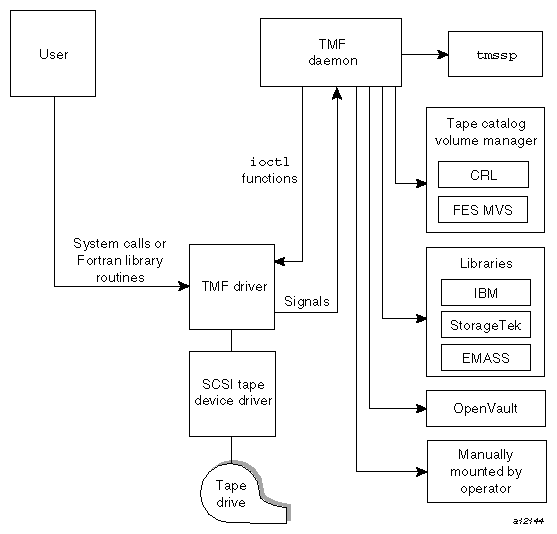
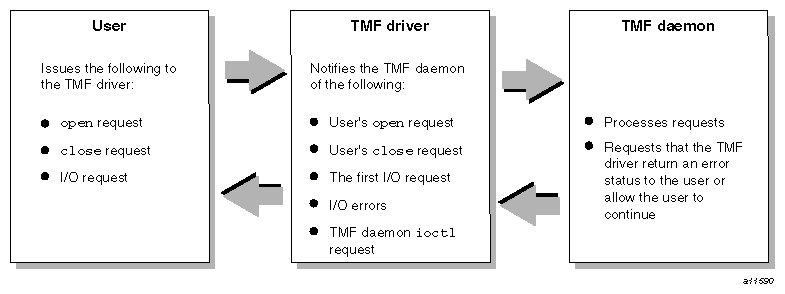
The TMF driver signals the TMF daemon if any of the following conditions occur:
You issue an open(2) request to the tape path name.
You issue a close(2) request to the tape path name.
You issue the first I/O request to the tape path name.
An I/O error occurs.
A filemark is read.
An end-of-file is detected, requiring filemark processing.
If any of these conditions occur, your job is suspended until the TMF daemon finishes processing. At this point, the TMF daemon requests that the TMF driver either issue you an error message or allow you to continue. Figure 1-2 illustrates this process.
Most vendors only support a character-special functionality, defined simply as the ability to open, to read from and write to, and to close a device that is recognized by the system software.
SGI offers a well-defined set of advanced functionality on all devices that TMF supports:
Dynamic resource control
Standard label support
Nonlabeled tape support
Bypass labeling
Dynamic configuration control
Multivolume and multifile support
Embedded filemarks
Distributed operator control
Loader domains
User end-of-volume processing
Front-end servicing
Absolute positioning
OpenVault support
Automatic volume recognition
When device vendors introduce new products, the standard marketing line is "this product is designed and operates within the boundaries of the xxx specification." While this may be true in the vendor engineering and test labs, when the device is introduced to the real world, reality sets in.
SGI has found that almost every device that vendors have produced can be made to fail when introduced into an environment with SGI systems configured. We have found that our software drives the devices to their limitations. Most every failure that has been discovered and fixed by the device vendor has led to a more stable and better performing product in the field.
While most enterprise vendors delegate device driver support to the peripheral vendors, SGI has accepted development and support as its role.
TMF supports ANSI standard labels, IBM standard labels, single filemark format tapes, and nonlabeled tapes. Single filemark format tapes do not have labels and are terminated by a single filemark at the end of volume, whereas a normal nonlabeled tape is terminated by two filemarks at the end-of-volume. Also, bypass-label processing is available to tape administrators. Bypass-label processing lets users read or write tape labels as regular files.
TMF monitors all of the tape resources configured within the system. It reads a TMF configuration file that contains a description of the tape configuration and then constructs a data-structure complex that contains information about each one of the tape drives. TMF enables system administrators to configure tape devices up or down. It also contains several commands to monitor its activities.
TMF allocates tape drives upon request, and ensures sure that such an allocation does not result in a deadlock condition. (A deadlock condition is one in which a task is locked in a state from which it cannot proceed.)
TMF creates and maintains wait queues for requests that cannot be satisfied at the time of the request. After a user has finished using a tape drive, that resource can be assigned to another user who has been queued in one of the wait queues.
TMF issues messages to either operating personnel in plain text or to a library in a data-structure format. These messages request the mounting of tapes on tape drives.
TMF supports several different families of libraries, including those from IBM, StorageTek, and EMASS. It also supports OpenVault, a storage library management facility. The automatic volume recognition (AVR) feature allows the operator to premount tapes prior to use and to direct the mounting of tapes to specific devices.
Tape positioning lets you position to the beginning of a tape block. Tape movement may be forward or backward; however, tape positioning directives cannot be used to circumvent normal tape label processing or label checking unless you are root and use an absolute track address positioning request. You can position the tape file relative to a filemark, tape block, or volume; or you can position the tape file to an absolute track address.
TMF provides a means of using a tape management system: front-end servicing for MVS (FES MVS available from SGI) that allows TMF messages and catalog requests to be processed by a IBM MVS system. Alternately, user exits let you use a local implementation for catalog services.
User end-of-volume (EOV) processing lets you gain control at the end of a tape volume. For EOV processing or positioning to a tape block, it is necessary to know that the file being processed is a tape file. You may request to be notified when end-of-volume is reached.
In addition, you can request special user EOV processing, which includes the reading, writing, and positioning of the volume before and after a volume switch. After special processing has completed, you must request that TMF resume normal processing.
Multifile volume allocation lets you process a multifile volume tape without the need for the system to unload and load tapes between files. A volume is a physical unit or storage medium, usually synonymous with a reel of magnetic tape.
The concatenated tape file feature lets you read multiple tape files as though they were one tape file. An EOV status is returned for all of the concatenated files read, until the last file and its end-of-file is encountered.
Table 1-1 describes TMF terminology that is used throughout this manual.
Term | Definition |
|---|---|
block size | The block size specifies the size (in bytes) of a data block on a tape. |
device group | Each tape device belongs to a device group. The device group name is the generic device name in the TMF configuration file. Also referred to as a resource. |
device name | Each tape device is identified by a device name, which is defined by a device name entry in the TMF configuration file. |
device type | Each device has a device type, which is specified by a number. The different tape devices are available on IRIX systems. |
external VSN | The external VSN is the human readable label applied to the tape's container. It is also called the external volume identifier. |
file identifier | The file identifier is the name of the file recorded in the HDR1 label of a labeled tape. If specified in lowercase, the file identifier is converted to uppercase, per ANSI standard. |
label type | The label type may be one of the following: nonlabeled, IBM standard, ANSI standard, or single filemark format. |
path name | Each tape file is defined by a path name. You can specify the path name of the tape file by using the tmmnt(1) command. The system creates an entry in the directory specified by the path name. The tape device assigned to the tape file may change during volume switching. While a tape device is assigned to a tape file, you may not remove the path name of that tape file; the path name is removed when the tape device is released. |
record length | The record length specifies the maximum length of a logical record (in bytes). |
session identifier | The session identifier is the process identification number unique to the shell or batch job currently in use. |
volume identifier | The volume identifier is a character string that consists of 1- to 6-alphanumeric characters identifying a tape. The volume identifier may also be referred to as the volume serial number (VSN), the internal VSN, or the internal volume identifier. |