This chapter explains where to find PCI board installation instructions for your workstation and describes how to verify the board installation. It also explains how to connect cables once the board is in place.
The following topics are covered:
The IEEE 1394 option board is a half-size PCI expansion board that provides three IEEE 1394 interface ports. One, two, or three of the ports may be used, and all ports have the same functionality. You may install one IEEE 1394 board in the O2 chassis.
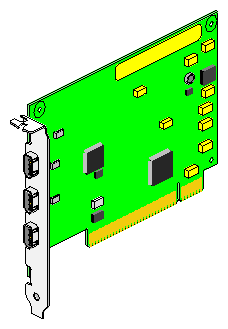
Your package includes all of the items listed below. If anything is missing, contact your sales representative.
PCI IEEE 1394 option board
IEEE 1394 6-pin to 4-pin cable
IEEE 1394 6-pin to 6-pin cable
Antistatic wrist strap
IEEE 1394 Option Board Installation and User Guide (this manual)
Compact disc (CD-ROM)
In an O2 workstation, you install the PCI IEEE 1394 option board in the PCI module located on the system module.
For instructions on how to install the board, see the section “Installing a PCI Board: R5000 Workstation” or “Installing a PCI Board: R10000 Workstation” in the O2 Workstation Owner's Guide. If you don't have the printed owner's guide handy, the information is also online in the following locations:
IRIS InSight Library—From the Toolchest on your O2 workstation, choose
Help > Online Books > SGI EndUser > O2 Hardware Reference Guide. If the book was removed from your system disk, you can reinstall it from the IRIX CD.Silicon Graphics Technical Publications Library—If you have access to the Internet, enter the following URL in your Web browser location window:
http://techpubs.sgi.com/library/.Choose Catalogs > Hardware Catalog > and look in the O2 section for the
O2 Hardware Reference Guide.
After installing the board, go on to “Connecting the Cables”.
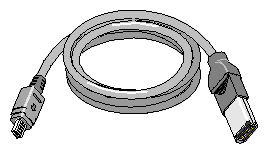
You received two cables with your package—an IEEE 1394 6-pin to 4-pin cable and an IEEE 1394 6-pin to 6-pin cable. Most IEEE 1394 video devices use a 4-pin connector, but Silicon Graphics provides both types so you will always have the correct one.
Examine the IEEE 1394 option board, and you will see three IEEE 1394 connectors. All three are the 6-pin (large) style and all are equivalent; you may attach a compatible IEEE 1394 device to any of them.
Examine the cables. One will have two 6-pin (large) ends, and the other will have a 6-pin end and a 4-pin (small) end. A 6-pin end is always used at the computer end and fits into any of the three available IEEE 1394 connectors on the IEEE 1394 option board.
Examine your IEEE 1394 compatible device. Many video devices have a 4-pin connector. If so, use the 6-pin to 4-pin cable. If your device has a 6-pin connector, use the other cable. Cables should connect from the computer (IEEE 1394 option board) to an external device; don't loop the cable back to the 02 because loopbacks are not allowed by the standard.
To verify that the system recognizes the new board, see “Verifying the Hardware Installation”.
After installing the board, install the PCI 1394 option software from the CD-ROM included in the package. You can use Software Manager or Inst.
 | Note: The PCI 1394 option requires that the system be running IRIX 6.5.2 or later. For instructions on installing IRIX 6.5.2, refer to the booklet that is included with the operating system CD. |
Once you have installed the PCI option board and installed the software, verify that the system recognizes the new hardware:
Open a UNIX shell. At the prompt, enter
hinv
Look for a line similar to this:
IEEE 1394 High performance serial bus controller 0: Type: OHCI
If you do not see the listing, turn off the workstation and go over each step of the installation instructions again. Make sure the board is fully seated in the slot.