This chapter describes the Netscape Server Application Programming Interface (NSAPI). This chapter describes how to create and compile your custom functions and how to use the functions you create. This chapter also lists the header files you need when programming your custom functions.
 | Note: Before creating custom functions, you should be familiar with the server configuration files. See the Netscape Commerce and Communications Servers Administrator's Guide for information on the configuration files called magnus.conf and obj.conf. |
The NSAPI is a set of functions and header files that help you create functions to use with the directives in server configuration files. The Netscape Commerce and Communications Servers use this API to build the regular functions for the directives used in both magnus.conf and obj.conf (these regular functions are described in the Netscape Commerce and Communications Servers Administrator's Guide).
Because the servers use this API, you can learn how the servers work. This also means you can override server functionality, add to it, or customize your own functions to use in addition to it. For example, you can create functions that use a custom database for access control or you can create functions that create custom log files with special entries.
The following steps are a brief overview of the process for creating your custom server application functions:
You write code for the custom functions you want to use. Each function you create is written specifically for the directive it will be used with in the configuration files.
You compile your code to create a shared object file (.so file).
In magnus.conf you tell the server to load your shared object file.
You use your custom functions in your server configuration files (magnus.conf and obj.conf).
Before you program your functions, you should understand how the server handles requests. The following section describes this process.
When the server is started, it loads the magnus.conf file, which contains information the server uses to configure itself. For example, the file tells the server what port to bind with, what the server name is, what user account to use after start-up, and so on.
Once running, the server waits for requests to come in from client applications (such as Netscape Navigator). When a request comes in, the server uses another file, obj.conf, to determine if and how it should service the request. For example, the obj.conf file tells the server if a user has access to the document they're requesting, and if they have access, it determines (among other things) if the server should attach information to the document when it sends it to the client. This process is much more detailed, as described here and in the following sections.
The Netscape server design breaks down the process of responding to a request so that each step in the process is done once for all objects matching the request, then another step is done for all objects, and so on. For example, authorization translation (the first step) is performed on all objects in obj.conf, and then name translation (the second step) is done for all objects.
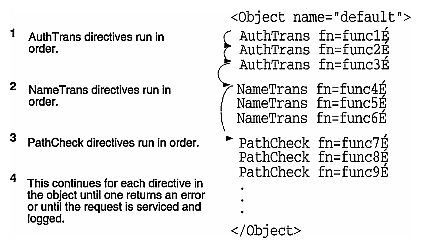
| Note: For more information on creating functions for these directives, see . |
The process steps are as follows:
Authorization translation. Translate any authorization information sent by the client into a user and a group. If necessary, decode the message to get the actual request. Also, user authorization is available through user databases.
Name translation. Before anything else is done, a URL can be translated into a filesystem-dependent name (an administration URL), a redirection URL, mirror site URL, or it might be kept intact and retrieved as-is (the normal server case).
Path checks. Perform various tests on the resulting path, largely used to make sure that it's safe for the given client to retrieve the document (only for local access).
Object types. Determine the MIME type information for the given document. MIME types can be registered document types such as text/html and image/gif, or they can be internal document identification types. Internal types always begin with magnus-internal/, and are used to select a server function to use to decode the document. (Only used for local access; the server system calls these routines automatically when necessary.)
Service. Select an internal server function that should be used to send the result back to the client. This function can be the normal server-service routine, it can return a custom document, or it can run a CGI program.
Error. Controls how the server responds to the client when it encounters an error.
If at any time one of these steps fails, another step must be taken to handle the error and inform the client about what happened. In this case, the Netscape HTTP server lets you customize the response that is sent with more site-specific information about the error.
To accomplish each of the request response steps, a set of server application functions are used in each step. These functions take the client's request and the server's configuration variables as input and return a response to the server as output.
Server application functions belong to a particular class that corresponds to the directive they're called with in the configuration files. The functions appear after the directive type in obj.conf. You use the format:
directive fn="yourfunction" value="v1" … value="vn" |
directive is the directive the function belongs to (for example, AuthTrans). You can then send any number of optional values to your function as arguments you specify in obj.conf. For example, you could create a NameTrans function called myfunc1 that takes a URL path as a value and maps it to a hard-coded path specified in your function. The entry in obj.conf might look like this:
NameTrans fn="myfunc1" path="/special/docs" |
The response can tell the server to do the following (REQ stands for request):
REQ_PROCEED indicates that the function has performed its task without a problem. When a NameTrans, Service, or Error function returns this, the server skips any other directives of the same type and moves to the next type of directive in an object. However, with AuthTrans, PathCheck, ObjectType, and AddLog functions, a REQ_PROCEED value is the same as REQ_NOACTION—the server moves to the next line in the object.
REQ_ABORTED indicates that an error occurred and that the request (not necessarily the session) should be terminated.
REQ_NOACTION indicates that the function found conditions such that it did not perform its intended action. The meaning of this depends on the step being performed, but usually the server moves to the next line in the object file.
REQ_EXIT should only be used when a read or write error has occurred while talking to the client, and the entire session cannot continue.
There is an additional class of application function, called initialization functions, that run when the server starts. They perform static data initialization for the various server modules. Server application functions and the custom functions you create work with a single directive class.
| Note: Before you can use any of your custom server application functions, you must tell the server to load the functions. You do this in magnus.conf. The full process is described later in this chapter. |
This section describes how to begin programming your custom functions. This section also describes the header files you need to include in your code. See the section “Compiling Your Code” for additional information.
The server root directory has a subdirectory called /nsapi that contains sample code, the header files, and a makefile. You should familiarize yourself with the code and samples. This documentation is written as a starting point for exploring that code.
The nsapi/examples/ directory contains C files with examples for each class of function you can create.
The nsapi/include/ directory contains all the header files you need to include when programming your custom functions.
The server and its header files are written in ANSI C.
This section describes the header files you can include when programming your custom functions. This section is intended as a starting point for learning the functions included in the header files.
Header files are stored in two directories:
nsapi/include/base contains header files that deal with low-level, platform independent functions such as memory, file, and network access.
nsapi/include/frame contains header files of functions that deal with server and HTTP-specific functions such as handling access to configuration files and dealing with HTTP.
Table 2-1. Header Files in the base Directory
Header File
Description
Contains functions that buffer I/O.
Contains functions for object typing, specifically mapping files to MIME types.
Contains functions called from other header files. It also contains functions that manage group processes that run the server.
Contains functions that handle low-level errors.
Contains functions to handle file I/O.
Contains functions for I/O with the client software over the network.
Contains miscellaneous functions.
Contains functions that manage parameter passing and server internal variables. It also contains functions to get values from a user via the server.
Contains semaphores in platform-independent ways (they prevent two processes from doing the same thing).
Contains session data structures for IP addresses, security, and so on.
Contains functions to customize wildcard patterns through parsed data.
Contains functions that handle Unix systems information.
Contains utility functions.
Contains functions that buffer I/O.
Contains functions for object typing, specifically mapping files to MIME types.
Contains functions called from other header files. It also contains functions that manage group processes that run the server.
Contains functions that handle low-level errors.
Contains functions to handle file I/O.
Contains functions for I/O with the client software over the network.
Contains miscellaneous functions.
The server stores variables in name=value pairs. The parameter block, or pblock
, is a hash table keyed on the name string. The pblock maps these name strings with their value character strings.
Basically, your custom functions use parameter blocks to get, change, add, and remove name=value pairs of data. Before learning about the functions you use to do these actions, it's helpful to know how the hash table is formed and how the data structures are managed.
The pb_param structure is used to manage the name=value pairs for each client request. The pb_entry
structure creates linked lists of pb_param structures.
The pblock is the hash table that holds these pb_entry structures. Its contents are transparent to most code.
#include “base/pblock.h”

typedef struct {
    char *name,*value;
} pb_param;

struct pb_entry {
    pb_param *param;
    struct pb_entry *next;
};

typedef struct {
    int hsize;
    struct pb_entry **ht;
} pblock;
|
All server application functions (regardless of class) are described by the following prototype:
int function(pblock *pb, Session *sn, Request *rq); |
pb is the parameter block with the parameters given by the site administrator for this function invocation. This parameter should be considered read-only, and any data modification should be performed on copies of the data. Doing otherwise is unsafe in threaded server architectures, and will yield unpredictable results in multiprocess server architectures.
When adding, removing, editing, and creating name=value pairs, you use the following functions. This list might seem overwhelming, but you'll use only a handful of these functions in your custom application functions. For a more detailed look, see the code in the header file /base/pblock.h.
FUNCTION
pb_param *param_create(char *name, char *value); |
The param_create function creates a parameter with the given name and value. If name and value aren't NULL, they are copied and placed into the new pb_param structure.
FUNCTION
int param_free(pb_param *pp); |
The param_free function frees a given parameter if it's non-NULL, and it returns 1 if pp was non-NULL and returns 0 if pp was NULL. This is also useful for error checking before using pblock_remove.
FUNCTION
pblock *pblock_create(int n); |
The pblock_create function creates a new pblock with a hash table of size n. It returns the newly allocated pblock.
FUNCTION
void pblock_free(pblock *pb); |
The pblock_free function frees the given pblock and any entries inside it. If you want to save anything in a pblock, remove its entities with pblock_remove first and then save the pointers you get.
FUNCTION
pblock *pblock_find(char *name, pblock *pb); |
The pblock_find function finds the name=value entry with the given name in pblock pb. If it's successful, it returns the param block. If not, it returns NULL. You then use pblock_findval to get the actual value in the name=value pair.
| Note: This function is actually a macro that calls a separate function with a hard-coded third parameter. |
FUNCTION
char *pblock_findval(char *name, pblock *pb); |
The pblock_findval function finds the name=value entry with the given name in pblock pb and returns its value; otherwise, it returns NULL.
FUNCTION
pblock *pblock_remove(char *name, pblock *pb); |
The pblock_remove function behaves exactly like pblock_find, but it removes the given entry from pb.
This function is actually a macro that calls a separate function with a hard-coded third parameter.
FUNCTION
pb_param *pblock_nvinsert(char *name, char *value, pblock *pb); |
The pblock_nvinsert function creates a new parameter with the given name and value and inserts it into pblock pb. The name and value in the parameter are also newly allocated. Returns the pb_param it allocated (in case you need it).
FUNCTION
void pblock_pinsert(pb_param *pp, pblock *pb); |
The pblock_pinsert function inserts a pb_param into a pblock.
FUNCTION
int pblock_str2pblock(char *str, pblock *pb); |
The pblock_str2pblock function scans the given string str for parameter pairs in the format name=value or name="value". Any backslash (“\”) must be followed by a literal character. If string values are found with no unescaped equal (“=”) signs (no name=), it assumes the names 1, 2, 3, and so on depending on the string positions (zero doesn't count). For example, if it finds "some" "strings" "together", the function treats the strings as if they appeared in the name=value pairs as 1="some" 2="strings" 3="together".
This function returns the number of parameters added to the table, or it returns -1 if it encounters an error.
FUNCTION
char *pblock_pblock2str(pblock *pb, char *str); |
The pblock_pblock2str function places all of the parameters in the given pblock into the given string (NULL if it needs creation). It will re-allocate more space for the string. Each parameter is separated by a space and of the form name=”value”
A session is the time between the opening and the closing of the connection between the client and the server. The Session data structure holds variables that apply session wide, regardless of the requests being sent, as shown in the following code.
#include “base/session.h”

typedef struct {
    /* Information about the remote client */
    pblock *client;

    /* The socket descriptor to the remote client */
    SYS_NETFD csd;
    /* The input buffer for that socket descriptor */
    netbuf *inbuf;

   /* Raw socket information about the remote */
   /* client (for internal use) */
    struct in_addr iaddr;
} Session;
|
The client parameter block used in the previous Session structure contains two entries:
dns is the DNS name of the remote host. This member must be accessed through the session_dns function call:
#include “base/session.h”
/*
 * session_dns returns the DNS hostname of the client for this
 * session and inserts it into the client pblock. Returns NULL if
 * unavailable.
 */

char *session_dns(Session *sn);
With HTTP there is only one request per session. The following structure contains the variables that apply to the request in that session (for example, the variables include the client's HTTP headers):
#include “frame/req.h”

typedef struct {
    /* Server working variables */
    pblock *vars;

    /* The method, URI, and protocol revision of this request */
    pblock *reqpb;
    /* Protocol specific headers */
    int loadhdrs;
    pblock *headers;

    /* Server's response headers */
    pblock *srvhdrs;

    /* The object set constructed to fulfill this request */
    httpd_objset *os;

    /* The stat last returned by request_stat_path */
    char *statpath;
    struct stat *finfo;
} Request;
|
are the server's working variables. The set of active variables is different depending on which step of the request the server is processing, as discussed in “Conditions for Each Function Class”.
reqpb contains the request parameters that are sent by the client:
method is the HTTP method used to access the object. Valid HTTP methods are currently GET, HEAD, and POST.
uri is the URI the client asked for. The uri is the part of the URL following the host:port combination. This URI is unescaped by the server using URL translations.
protocol identifies the protocol the client is using.
clf-request is the full text of the first line of the client's request. This is used for logging purposes.
headers is a pblock that contains the client's HTTP headers. HTTP sends any number of headers in the form (RFC 822):
Name: value
If more than one header has the same name, then they are concatenated with commas as follows:
Name: value1, value2 |
The parameter block is keyed on the fully lowercase version of the name string without the colon. Application functions should not access this pblock directly, but instead use the function request_header, which finds the named header depending on the requesting protocol.
FUNCTION
#include “frame/req.h” int request_header(char *name, char **value, Session *sn, Request *rq); |
Name should be the lowercase header name string to look for, and value is a pointer to your char * that should contain the header. If no header with the given name was sent, value is set to NULL.
The server might not load headers until the first header is requested. This increases performance when talking to certain NCSA products. This option is not currently active.
If this option is active, the function can return REQ_ABORTED. If it does, your function should return REQ_ABORTED. On success, this returns REQ_PROCEED.
 | Caution: Currently, it's safe to access the pblock instead of using this function, but this behavior should not be relied upon. |
The srvhdrs pblock in the Sessions structure is the set of HTTP headers for the server to send back. This pblock can be modified by any function.
The last three entries in the Session request structure should be considered transparent to application code because they are used by the server's base code.
After the server has a path for the file it intends to return, application functions should use the following call to obtain stat() information about the file:
#include “frame/req.h” /* * request_stat_path tries to stat path. If path is NULL, it will look in * the rq->vars pblock for “path”. If the stat is successful, it returns the * stat structure. If not, returns NULL and copies an error message into err. * If a previous call to this function was successful, and path is the same, * the function will simply return the previously found value. * * Application functions should not free this structure. */ struct stat *request_stat_path(char *path, char *err, Request *rq); |
Using this function avoids multiple, unnecessary calls to stat().
When your custom application function is done working with the name=value pairs, it must return a status code that tells the server how to proceed with the request. The following integer return codes are available to server application functions:
#define REQ_PROCEED 0 indicates that the function has performed its task without a problem.
#define REQ_ABORTED -1 indicates that an error has occurred and that the request (not necessarily the session) should be terminated.
#define REQ_NOACTION -2 indicates that the function found conditions such that it did not perform its intended action. The meaning of this depends on the step being performed (see below).
#define REQ_EXIT -3 should only be used when a read or write error has occurred while talking to the client, and the entire session cannot continue.
When problems occur, the server application functions should set server status codes that give the client an idea of what went wrong. The function should also log an error in the server error log file.
There are two interfaces for reporting errors: setting a response code and reporting an error.
Setting a Response Status Code
The protocol_status function sets the status to the code and reason string. If the reason is NULL, the server attempts to match a string with the given status code (see Table 2-2). If it can't find a string, it uses “Because I felt like it.”
#include “frame/protocol.h” void protocol_status(Session *sn, Request *rq, int n, char\ *r); |
Generally, protocol_status will be called with a NULL reason string, and one of the following status codes defined in protocol.h. (If no status is set, the default is PROTOCOL_SERVER_ERROR.)
Table 2-2. Status Codes Used with protocol_status
Status code | Definition |
|---|---|
PROTOCOL_OK | Normal status, the request will be fulfilled normally. This should only be set by Service class functions. |
PROTOCOL_REDIRECT | The client should be directed to a new URL, which your function should insert into the rq->vars pblock as url. |
PROTOCOL_NOT_MODIFIED | If the client gave a conditional request, such as an HTTP request with the if-modified-since header, then this indicates that the client should use its local copy of the data. |
PROTOCOL_BAD_REQUEST | The request was unintelligible. Used primarily in the framework library. |
PROTOCOL_UNAUTHORIZED | The client did not give sufficient authorization for the action it was trying to perform. A WWW-authenticate header should be present in the rq->srvhdrs pblock that indicates to the client the level of authorization it needs to perform its action.
|
PROTOCOL_FORBIDDEN | The client is explicitly forbidden to access the object and should be informed of this fact. |
PROTOCOL_NOT_FOUND | The server was unable to locate the item requested. |
PROTOCOL_SERVER_ERROR | Some sort of server-side error has occurred. Possible causes include misconfiguration, resource unavailability, etc. Any error unrelated to the client generally falls under this rather broad category. |
PROTOCOL_NOT_IMPLEMENTED | The client has asked the server to perform an action that it knows it cannot do. Generally, this is used to indicate your refusal to implement one of the thousands of less than useful HTTP features. |
When errors occur, it's customary to report them in the server's error log file. To do this, your custom functions should call log_error. This logs an error and then returns to tell you if the log was recorded successfully (a return value of 0 means success, -1 means failure).
#include “frame/log.h” /* * log_error formats the arguments with the printf() style fmt. * Returns whether the log was successful. * It also records the current date. * sn and rq are optional parameters. If specified, information * about the client is reported. */ int log_error(int degree, char *func, Session *sn, Request *rq, char *fmt, ...); |
You can give log_error any printf() style string to describe the error. If an error occurs after a system call, use the following function to translate an error number to an error string:
#include “base/file.h” char *system_errmsg(SYS_FILE fd); |
| Note: The fd parameter is vestigial under IRIX and might need to be changed for other operating systems. |
The following sections list the special conditions that exist in the Request variables and return codes for each class of server function.
Authorization is split into two steps. First, the authorization data sent by the client (if any) is decoded and verified against internal databases. If the data is valid, it should be stored into the Request->vars pblock. In the second step, this data is compared against the required authorization for the requested path (performed in a PathCheck class function).
There is no reason that both of these steps could not be performed in one AuthTrans or one PathCheck directive; however, the steps are split for flexibility and for supporting the HTTP SSL protocol.
There are no variables active in the Request->vars pblock upon entry to an AuthTrans function. Upon successful translation and function exit, the following variables are customarily set:
Of course, the flexibility of the pblock structure lets AuthTrans functions define their own custom variables that can later be retrieved by the PathCheck function that implements the second step.
Upon return, the AuthTrans function should return REQ_ABORTED if the request is to be aborted, REQ_NOACTION if the translation was unsuccessful, or REQ_PROCEED if successful.
NameTrans class functions are used to translate a virtual path sent by the client into a physical path as used by the server.
The following variables are active in the Request->vars pblock for NameTrans functions:
ppath is a partial path. Initially, it is the virtual path given to the server by the client. If other NameTrans functions have modified the ppath, this might be a partially translated path. Your function can change this ppath regardless of the return code.
name, if inserted into the pblock by your function, dictates that the given named object should be added to the set of active objects for this request. The directives in that object will be applied.
Upon return, the REQ return codes have the following meaning:
REQ_PROCEED: Indicates that a name translation was performed, and that name translation for this object should not continue. This means the server moves to the next directive type in the object in obj.conf (usually PathCheck).
REQ_ABORTED indicates that the request has encountered an error and that an error message should be sent to the client. No functions are called after your function returns this, except any functions that are designated error handlers.
REQ_NOACTION indicates that no terminal name translation was applied by your function. This doesn't mean that ppath was not changed. The server continues applying the rest of the object's name translation functions.
REQ_EXIT indicates that an I/O error occurred while talking with the client. The request should be aborted and no error message should be sent.
PathCheck class functions are used to verify that a given path is safe to return to a given client. This class of functions performs various system-specific URL filtering and screening actions, authorization checks, access control, searches for CGI extra path information, and other functions.
The system only defines one variable for PathCheck functions in Request->vars: path is the path resulting from the execution of all NameTrans directives. Any variables that have been created by previous NameTrans or AuthTrans directives are also active.
On return, a code other than REQ_ABORTED is considered a success.
ObjectType functions take the path resulting from the previous directives and locate a filesystem object for the path. If none exists and none of the PathCheck directives have looked yet, the current ObjectType routines return an error to the client.
ObjectType directives receive no special variables aside from path in Request->vars and the variables defined by the previous directives. Upon return, a code other than REQ_ABORTED indicates success.
The server's base functionality library provides mechanisms for typing files natively to the host's operating system. Under most systems, this consists of filename extension recognition code.
Service functions send the server's reply to the client. The function is generally selected by the directory the file resides in or the type of the file being sent. Most files are simply mapped into memory and sent to the client. Some types of documents run as system programs and others are parsed before being sent to the client.
Service directives receive no special variables aside from path in Request->vars and the variables defined by the previous directives.
The REQ return codes are defined for Service class functions as follows:
REQ_PROCEED indicates that the response has been sent to the client successfully.
REQ_NOACTION indicates that the function was not applied. The server should look at the rest of the Service directives.
REQ_ABORTED indicates that an error has occurred and a message should be sent to the client.
REQ_EXIT indicates that the connection to the client should end.
The Service class functions need to start the protocol-specific response process for the server. They do this through the following function:
int protocol_start_response(Session *sn, Request *rq); |
If this function returns REQ_NOACTION, then the body response should be skipped and the application function should return successfully. Otherwise, this function returns REQ_PROCEED.
If cross platform considerations are not required, then operating-system specific I/O calls can be made by Service functions.
This special class of server application functions initialize static data for the server to use on startup. These functions are called by the base server daemon process, and their data, sockets, or file descriptors are inherited by child processes or threads. This class of function initializes the logging, file typing, and some of the name translation functions.
Init functions receive their parameters just like the other functions, except that the Session and Request parameters are NULL. The parameter pblock is filled with information from the server's technical configuration file (magnus.conf).
Static data should be limited to read-only data if possible. Other mediums will need to employ some method of locking to ensure that only one process or thread is accessing the data at a time. Unfortunately, there is currently no OS-generic abstraction for this functionality available from the base server code.
Upon failure, custom Init functions should return REQ_ABORTED and insert a variable into their parameter pblock named error that contains a string describing the error. Any other return code is considered success.
If the server is restarted, these modules might need to be terminated before they are started again by the server code. For this purpose, the server provides the following function:
void magnus_atrestart(void (*fn)(void *), void *data) |
The given callback fn is called by the server when the server is restarted. The data pointer is given to the function as its argument.
| Note: Netscape does not call the termination callbacks upon server termination, only upon restart. |
This section lists the linking options you need to use in order to create a shared object that the server can load from magnus.conf.
The following table describes the commands used to link object files into a shared object under the various UNIX platforms. In these examples, the compiled object files t.o and u.o are linked to form a shared object called test.so.
System | Compile options |
|---|---|
ld -shared t.o u.o -o test.so | |
ld -assert pure-text t.o u.o -o test.so | |
ld -G t.o u.o -o test.so | |
ld -all -shared -expect_unresolved "*" t.o u.o -o test.so | |
ld -b t.o u.o -o test.so When compiling your code, you must also use the +z flag to the HP C compiler. |
For Windows NT, use Microsoft Visual C++ 2.0 to compile a DLL. You must create a file that lists each function you want to export to the server. You also need the file httpd.lib, which gives you the locations needed to link your library.
After you've compiled your code, you need to tell the server to load the shared object and its functions so that you can begin using your custom functions in obj.conf.
When the server starts, it uses magnus.conf to get its configuration information. To tell the server to load your shared object and functions in the shared object, you add the following line to magnus.conf:
Init fn=load-module shlib=[path]filename.so
     funcs="function1,function1,…,functionN"
|
This initialization function opens the given shared object file and loads the functions function1, function2, and so on. You then use the functions function1 and function2 in the server configuration files (either magnus.conf or obj.conf). Remember to use the functions only with the directives you programmed them for, as described in the following section.
This section describes how to use your functions in the server configuration files. All functions are called as follows:
Directive fn=function [name1=value1] ... [nameN=valueN] |
Directive identifies which class of function is being called. Functions should not be called with the wrong class!
fn=function identifies the function to be called using the function's unique character-string name.
These two parameters are mandatory. After this, there may be an arbitrary number of function-specific parameters, each of which is a name-value pair.
You specify your function using the directive it was written for. For example, the following line uses an AddLog custom function called myaddlog that adds an entry to a log file called mylogfile. The custom function takes another parameter that defines how much information to log.
AddLog fn=myaddlog name="mylogfile" type="maxinfo" |