The Common Gateway Interface (CGI) is an interface between your Netscape server and programs you write. CGI lets those programs process HTML forms or other data coming from clients, and then it lets the CGI programs send a response back to the client where the response can be HTML documents, GIF files, video clips, or any data the client browser can view. This makes your Web pages interactive with the user.

The word gateway can be used in two ways. The original meaning describes a gateway to other services through the HTTP server (some of these other services might be Archie/Prospero, WAIS, and so on). Currently, you can't access these services through the World Wide Web, but you can access them through a CGI program and an HTTP server.
Another interpretation defines gateway as a connection between programs and your HTTP server. This is the definition used for CGI. Like a gate in a fence between two fields, CGI rests between your program and the server.
The rest of this chapter describes:
How CGI works
Accessing CGI programs with URLs
Data the server sends to the CGI program
Output from CGI programs
Configuring your server to use CGI programs
A CGI example and development tips
This section provides an overview of how CGI fits into the interaction of client software like Netscape Navigator and HTTP servers like the Netscape Commerce and Communications Servers. When a client requests a document from a server, the server finds the file and sends it to the client (this is a simplification of the process). However, if a client requests a CGI program, the server simply acts as a middle-man between the client and the CGI program.
The following steps are a very simplified overview of what happens when a client requests a CGI process (in-depth details appear in the following sections). Figure 1-1 is a graphical overview of this process.
The client (Netscape Navigator) sends a request to the server for a document. If it can, the server responds to the request directly by sending the document.
If the server determines the request isn't for a document it can service, the server creates a CGI process. The CGI process is a copy of the server and has access to certain types of information about the request.
The CGI process turns the request information into environment variables, and it creates data pathways between the server and external CGI program.
After the external CGI program processes the request, it uses the data pathway to send a response back to the server, which in turn, sends the response back to the client.
In reality, the CGI process is a bit more complicated. The specific details that happen at each stage are described in the next few sections.
The navigation software (the client) sends a request to the Netscape server running on your machine. The request might be for a document, or it might be the contents of an HTML form. If the request is for a regular document (such as an HTML document or a GIF file), the server sends that document directly back to the navigator.
If the request is data intended for an external application, then the server uses CGI to run that application. For example, the client's request might be to search a database. The CGI application takes the search criteria, searches the database, then sends the results back to the client.
When the server receives a request for an external application, called a CGI request, the server creates a copy of itself, called a CGI process. The only purpose for this process is to set up communications between the CGI program and the server. This process is one of the processes your server already has allocated with the minimum processes to load feature. You should make sure you have enough processes dedicated to the server to ensure your machine doesn't run out of processes. Also, be careful with CGI programs that can run infinitely because as long as the program runs, your server has one less process for servicing requests.
Because it is a copy of the server, the CGI process has access to information about the CGI request. For example, the CGI process knows
The CGI process stores this information in environment variables.
The CGI process takes the data the server has about the current request and puts it into environment variables. The CGI process can send the data to the CGI program as standard input.
The CGI process also creates data pathways between your CGI program and the server. This means the server can send to the program any encoded form data the client submitted, and the external CGI program can send a reply back to the client via the server.
The external CGI program takes the data that the server provides, processes it, contacts any external services it needs to (such as Archie or WAIS), and then sends a response to the server via the data pathways using standard output. The server then takes the program's response, prepends any necessary protocol headers to the output, and sends it back to the client software. Your program can output any type of data it needs to, including HTML, GIFs, or JPEGs.
You can also use nonparsed headers to bypass the server and send data directly to the client browser.
CGI is a powerful tool for interacting with users, but it can also be a potential security problem. You should follow these guidelines when implementing CGI on your server:
Check the client's data. The data should be shell escaped.
Check all filenames and paths. For example, you should check for and not allow paths with /./, /../, or // in them.
Don't activate CGI in directories where people can upload data. Someone could potentially upload a CGI program that gives them access to other data on your machine.
When responding to a request from a client, the server must figure out if it can handle the request itself or if it must create a CGI process. To determine if a URL that the client requests refers to a CGI program, the Netscape server can use two methods. You can configure the server to use either method, but neither is active by default.
You can specify a MIME type for CGI programs and then store the CGI programs in the same directories as your HTML documents and graphics. When you use this method, any file with the .cgi extension runs as a CGI program. This method is the most flexible, but you need to be careful about which directories you put CGI programs in. You shouldn't put CGI programs in directories where users can upload information because users can then write CGI programs that return information such as your /etc/passwd file or that delete files from your server machine.
You can set up a specific directory for CGI programs. This gives you more control over who writes CGI programs and who has access to them. By using this method, you designate certain virtual paths (URL prefixes) as CGI directories. Then, any URL requesting a file inside those directories is executed as a CGI program. A popular example of this method is the prefix /cgi-bin, which maps to a directory in the server root called cgi-bin. The cgi-bin directory is where you store all of your CGI programs.
If you try to access a CGI program and you get a server error accompanied by a message such as
no way to service request for /some/stuff.cgi |
in your error log, or if the text of your program appears in the client's window, then you have not properly activated CGI in that directory. See “Configuring Your Server to Use CGI Programs” for instructions on configuring your server to use CGI.
The method of CGI activation you choose determines only part of the URL used to access your program. URLs to CGI programs can be split into three different parts, shown here in brackets:
virtual path[extra path information]?[query string] |
The virtual path is similar to a path you would use to access a regular document or image. That is, it points the server to the file that contains the CGI program you want to run.
Extra path information is embedded in the URL after the program name. Extra path information can be used for two purposes.
First, you can use it to convey constant information to your CGI programs independent of the information the client sends.
Second, you can use it to access the server's virtual-to-physical path translation. You can send a virtual path as extra path information, so your CGI program can use the path information to access a file on your server machine. This means you don't have to embed file paths inside your CGI URLs. The server provides the physical path name corresponding to that virtual path in the environment variables by using path translation. For example, if your document root directory is /usr/docs/ and a request comes in with extra path information like /test/test.html, the server translates the path to /usr/docs/test/test.html and stores that translated path in an environment variable.
The query string is an optional part of the URL. It can be explicitly entered in your hypertext anchor, it can come from a user typing into a search dialog box for an HTML document with the ISINDEX tag, or it can come from HTML forms (see “Accepting User Input From URLs and Other Sources”).
The following table shows some sample CGI URLs. In all of these examples, the CGI program name is /misc/search.cgi, and the document root is in the physical directory /Netscape/docs.
CGI URL | Description |
|---|---|
http://yourserver/misc/search.cgi | This is a simple URL to the CGI program located at /Netscape/docs/misc/search.cgi with no extra path information and no search query. |
http://yourserver/misc/search.cgi/type=minimal | This example uses embedded extra path information in the URL: /type=minimal. This is the same as sending this information as a query string |
http://yourserver/misc/search.cgi/misc/movies.mdb | This URL specifies the extra path information /mis/movies.mdb. The search script could then use the path information to find and search the database called /Netscape/docs/misc/movies.mdb. |
http://yourserver/misc/search.cgi?sgi | This could be a hyperlink that automatically searches for the word sgi without the user having to type anything. |
http://yourserver/misc/search.cgi/misc/ movies.mdb?sgi | This hyperlink would automatically return the results of a search for sgi in the movies database /Netscape/docs/misc/movies.mdb. |
There are three ways the client can send information to a CGI program:
HTML form data
Input to an ISINDEX search dialog
Clickable images (ISMAP or imagemaps)
When the data is typed as form text, the data is encoded using URL encoding. In URL encoding, there are two rules:
If the data comes from an HTML form, then the location of the data varies depending on the method attribute specified with the FORM tag in your HTML document.
If the GET method is used, the data comes from the QUERY_STRING variable (as described under QUERY_STRING in “Environment Variables and Their Formats”).
If the POST method is used, this information is sent to your program using standard input.
If ISINDEX is used, the information is sent to your program as command-line arguments.
Wherever the data comes from, it appears in this form:
name1=value1&name2=value2 ... &nameN=valueN |
 | Note: The Perl and C examples later in the chapter have functions that do this decoding. |
If there are any equals signs (=) or ampersands (&) in the data, they're encoded using URL encoding. This avoids ambiguity when your program translates the form data. To properly decode this data, your CGI program should first split it into name=value pairs (eliminating the ampersands), then split each pair into a name and a value, and then apply URL decoding to each portion of the pair.
When a user submits a form, you can use the order of the form items to determine what order your CGI program receives the name=value pairs. However, you should not depend on this behavior. The various form elements have their own rules for determining what value is associated with the name they are given:
All of the text input areas use the user's typed input as the value.
Radio buttons use the value of whichever button is enabled.
If checkboxes are unchecked, they will use either an empty value string, or their name won't appear in the encoded form data at all.
Hidden form elements can send constant or per-document data to your script without the user's knowledge or intervention.
| Note: The example program documented on “A More Detailed perl Example” demonstrates decoding form data. |
When the data comes from a search dialog resulting from an ISINDEX tag, the escaped character decoding is done by the CGI process. Your CGI program receives this information fully translated as command-line arguments. This is handy if you want to avoid the hassle of performing this translation yourself.
In the case of clickable images, the data you receive from the client software is sent as a query string that takes the form xx,yy where xx and yy are the coordinates of where the user clicked the image. Coordinates are measured as the number of pixels from the upper left hand corner of the image the user clicked. This lets your CGI program respond differently depending on where the user clicked the image.
The server sends data to the CGI program in three ways: environment variables, standard input, and command-line arguments.
Environment variables are the most common method used to pass data about a request to your CGI program. This data comes from the server software itself, from the network socket connecting the client to the server, and from the URL that was used to access the CGI program (for example, when using the GET method, the data is sent to the QUERY_STRING variable).
This section describes how to get the information stored in environment variables, standard input, and command-line arguments.
There are a several ways programs can access environment variables. The method you use depends on what programming or scripting language you use. Environment variables are identified by character strings and have character string values. This section lists some examples of the different methods programming languages use to access environment variables.
In C or C++ you can use the getenv library call to access the environment variables.
#include <stdlib.h>
char *rhost = getenv("REMOTE_HOST");
|
This sections lists each of the environment variables and their format.
Gives the name and version of the software that your program is running under.
FORMAT
name/version |
EXAMPLE
Netscape-Communications/1.1 Netscape-Commerce/1.1 |
Gives the hostname or IP address of the server machine.
FORMAT
A fully-qualified domain name or IP address
EXAMPLE
198.93.93.10 or www.netscape.com |
Gives the URL that individuals should use to access this server.
| Note: This variable is not supported by revision 1.1 of the CGI interface. It is only available using Netscape server software. |
FORMAT
protocol://hostname:port |
If the server is running on a protocol's default port, the :port section won't be present.
EXAMPLE
http://www.sgi.com |
The revision of the CGI specification supported by the server software.
FORMAT
CGI/n.n |
n.n is the numerical revision.
EXAMPLE
CGI/1.1 |
The name and revision of the protocol being used by the client and server.
FORMAT
name/version |
EXAMPLE
HTTP/1.0 |
The port number to which this request was sent.
FORMAT
A number between 1 and 65,535 |
EXAMPLE
80 |
The HTTP protocol defines a number of different methods that are used when accessing URLs on the server. When a hyperlink is clicked, the GET method is used.
When a form is submitted, the method used is determined by the METHOD attribute to the FORM tag. (See “HTML Form Data” for more information.)
CGI programs do not have to deal with the HEAD method directly and can treat it just like the GET method.
FORMAT
method |
EXAMPLES
GET, HEAD, POST |
The extra path information that the server derives from the URL used to access the CGI program.
FORMAT
/dir1/dir2… |
EXAMPLE
/html/graphics/doc1.gif |
The Netscape server distinguishes between path names used in URLs, and filename path names. It is often useful to make your PATH_INFO a virtual path so that the server provides a physical path name in this variable. This way, you can avoid giving filename path names to remote client software.
FORMAT
/dir1/dir2.. |
EXAMPLE
/Netscape/docs/doc1.html. |
If your program needs to refer the remote client back to itself, or needs to construct anchors in HTML referring to itself, you can use this variable to get a virtual path to your program.
FORMAT
/dir1/dir2/progname |
EXAMPLES
/orders/tickets.cgi, /cgi-bin/order-tickets |
Gives information from an HTML page to your script in these three instances:
When a form was accessed with the GET method
When a page contains an ISINDEX tag and the user executes a search
When a page contains links with encoded queries
The information sent by the server is encoded using the URL encoding rules described earlier.
FORMAT
varies |
EXAMPLE
With links, you can get play or view returned from the following:
I want to <A HREF=multimed.cgi?play>play some music!</A> I want to <A HREF=multimed.cgi?view>view a graphic!</A> |
From a form, you might get button1=on&button2=off, or from a document that contains the ISINDEX tag you might get two+words.
Returns the hostname of the remote client software. This is a fully-qualified domain name such as www.sgi.com (instead of just www).
FORMAT
machine.subdomain.domain |
EXAMPLE
www.sgi.com |
If no hostname information is available, the script relies on the REMOTE_ADDR variable instead.
Returns the IP address of the remote host. This information is guaranteed to be present.
FORMAT
n.n.n.n |
n is a number between 1 and 255.
EXAMPLE
198.93.93.10 |
The Netscape server supports HTTP basic access authorization; it will probably support additional types of authorization in the future as standards develop. If the CGI script is protected by any type of authorization, this variable is set to identify the type.
EXAMPLE
basic |
This variable is set to the name of the local HTTP user of the person using the navigation software only if HTTP access authorization has been activated for this script's URL. Note that this is not a way to determine the user name of any person accessing your program.
EXAMPLE
jdoe |
If a form is submitted with the POST method, then this is the type of data being sent by the client. Note that while clients currently only send application/x-www-form-urlencoded, this variable can contain any MIME type. Future systems might use this method to transfer data back and forth.
FORMAT
type/subtype |
Number of bytes being sent by the client. You use this variable to determine the number of bytes you need to read.
EXAMPLE
Content-Length: 64 |
The Netscape Commerce Server defines the following additional environment variables to describe the server and client's security status:
HTTPS—Depending on whether security is active on the server, this is set to on or off.
HTTPS_KEYSIZE—When security is on, this is the number of bits in the session key used to encrypt the session.
HTTPS_SECRETKEYSIZE—is the number of bits used to generate the server's private key.
In addition to the other environment variables, if the client sends any HTTP headers along with its request, then these headers are also placed into the environment. The only exception is the Authorization header.
When put in environment variables, the HTTP headers are prefixed with HTTP_ and are changed to upper case. All hyphens are changed to underscore characters. Examples of these HTTP headers are described in the following sections.
Enumerates the types of data the client can accept. For most client software, this protocol feature has become a bit convoluted and the information isn't always useful.
FORMAT
type/subtype[, type/subtype]… |
EXAMPLE
image/gif, image/jpeg, */* |
Identifies the browser software being used to access your program.
FORMAT
varies |
EXAMPLE
Mozilla/1.1N (Windows) |
The client requests that the program's response be sent only if the data has been modified since the given date. This date is set according to GMT standard time.
FORMAT
Weekday, dd-mon-yy hh:mm:ss GMT |
Weekday specifies the full name of the day, such as Thursday or Friday. dd specifies the number of the day of the month. mon specifies the 3-letter abbreviation of the month. yy specifies the current year within the century. hh:mm:ss gives the current time in 24-hour format.
EXAMPLE
Saturday, 12-Nov-94 14:05:51 GMT |
This is the email address of the remote user. If their client software supports this header, the client software can send it. This header might be user selectable depending on the kind of client software being used.
FORMAT
[email protected] |
EXAMPLE
[email protected] |
HTML forms that use the POST method send their encoded information using the standard input. You can use the CONTENT_LENGTH environment variable to determine the number of bytes to read in.
Although the only currently used content-type is application/x-www-form-urlencoded, you can use the standard input with a custom navigator to send other types of data to your programs via the standard input. For example, a user could send scientific data to your CGI program, which then saves the data to a file on your server machine.
Command-line arguments are only used with ISINDEX queries. The query string is split and placed in the command line only if the string doesn't contain = characters (you must encode the = sign if you want to use it as an argument).
| Note: Command-line arguments are not used with an HTML form or any undefined query types. |
The server searches the query information for a nonencoded = character to determine whether or not to use the command line. This means the client applications must encode the = sign in ISINDEX queries if the CGI program is to use the command-line arguments.
If the server finds any encoded = characters, it decodes the query information by first splitting it at the plus signs in the URL. It then performs additional character decoding before placing the resulting characters as command-line arguments. For example, the information name+date is split and sent as command-line arguments name date to the CGI program.
| Note: If the server cannot send the string due to internal limitations (such as exec() or /bin/sh command line restrictions) the server sends no command-line information and provides the nondecoded query information in the environment variable QUERY_STRING. |
Usually the CGI program's output goes to the client through the server-spawned CGI process. This means your CGI program doesn't have to worry about protocol-specific headers and such. This can make your CGI programs simpler and guarantees that they can take advantage of newer revisions of the protocol with little or no changes to your program code.
However, if you know enough about the HTTP protocol to code the protocol and send it directly back to the client, you can use the non-parsed header feature.
Nonparsed headers let you bypass the server and send your CGI output directly to the client. As of CGI version 1.1, the only reason you would use this feature is if your program outputs an excessively lengthy amount of data and you want to sidestep the server buffering of your output (not all HTTP servers buffer the output).
To activate the feature, make sure your CGI program names start with the characters nph-. The server makes the standard output a direct copy of the socket to the client. Once you activate this feature, your CGI program is responsible for any protocol-related response headers or messages, including the following:
HTTP/1.0 200 OK Date: DayOfWeek, DD-Mon-YY nn:nn:nn GMT Server: Netscape-Communications/1.1 MIME-version: 1.0 |
Even though you can control the non-parsed header feature, in most cases you should avoid it because CGI programs must print a valid CGI header on the standard output in order for the server to accept the response and send it to the client. In the Netscape server, the standard output and the standard error file streams are directed to the same place: back into the server.
This means that errors your program generates or system utilities your program calls can interfere with your header. Similarly, if your program is abnormally terminated (through a bug or some other disaster), the server will send a server error to the client and describe the error in the server's error log file. Because of this, you should print your header as early as possible in your program.
When the CGI program sends its output to the server, it begins the text with generic headers. A CGI header consists of several text lines in this format:
name: value |
The end of the header is signalled by a single blank line. After the blank line, the server stops parsing your program's header and sends the rest of your data untouched back to the client. This means that your program can output any type of data it needs to, including HTML, GIFs, or JPEGs.
Each name: value pair is an HTTP protocol header. You can output any header you want and the server sends it to the client. However, if the server detects odd header lines, the server logs a 500 error and doesn't return any data to the client.
Some of the commonly used HTTP headers are described here. When you output any of these headers, the server doesn't alter their values or their output.
The length of the data in bytes, not including the header.
The type of data your program is returning. This is a valid MIME type in the format type/subtype. This header should always be sent from any CGI program.
EXAMPLE
text/html, text/plain, image/gif, image/jpeg, audio/basic |
Gives the date on which this file should be considered outdated by the client. The date format is the same as the format for if-modified-since.
EXAMPLE
Saturday, 12-Nov-94 14:05:51 GMT |
The data is the given content-type, but it is compressed. Current values that can be used are x-gzip for GNU zip compression and x-compress for standard UNIX compression.
The headers listed in this section are special to CGI and make the server act on your program's behalf.
Location sends the location of a new file for the server or client to retrieve. This header must be in one of two forms: a complete URL or a virtual path.
If the value is a full URL, such as http://yourserver/misc/file.html then the server redirects the client to the new URL (this is transparent to the user). The client then acts as if it had originally requested that redirected URL, so all relative links in the document of the URL are resolved from the directory specified in that URL. For example, if the URL points to an HTML file with relative paths to graphic files, the client locates the files from the directory where the .html file is.
| Note: You do not necessarily have to redirect to an HTTP URL; you can redirect to a Gopher, news, FTP, or any other valid URL. |
If the location is a virtual path, such as /misc/file.html, then the server restarts the request using the virtual path, for example http://yourserver/misc/file.html.
However, the client isn't informed of the new location, so any relative links in the document are resolved from the directory of your CGI program, not of the document that is actually being returned. This means images referenced in the document might not work because the client might be looking for them in the wrong directory.
Every HTTP request is returned with a status code that indicates to the client whether the request succeeded or not. If the request was unsuccessful, several error codes are provided to tell the client what happened. If the request was successful, there are status codes that indicate a successful request and to ask for further action from the client. If no Status line is provided in the CGI header, the default is "200 OK" unless a Location header with a full URL is present. If the location is present, the default is "302 Found".
The status line has the form nnn reason, where nnn is the three-digit code for the request, and reason is a short string describing the error. The following codes and reasons are currently recognized by Netscape Navigator.
Table 1-2. Status error codes for CGI headers
Error Code | Description |
|---|---|
200 OK. | The request finished normally. |
204 No response. | The request was understood and processed, but there is no new document to be loaded by the client. |
302 Found. | The client should look for data at a new URL, given by a Location header. |
304 Use local copy. | The client sent a request with an if-modified-since header, and the requested data hasn't been modified since the given date. |
400 Bad request. | The request had illegal or unintelligible HTTP inside. |
401 Unauthorized. | If access authorization is enabled, the request could not be fulfilled because the user did not provide the proper authorization to access the area. With current authorization schemes, a WWW-Authenticate header must be provided to give the client instructions on how to complete the request with the proper authorization. |
403 Forbidden. | The client is not allowed to access what it requested. |
404 Not found. | The client asked for something the server couldn't find. |
500 Server error. | This is a catch-all error code that indicates something went wrong in the server or the CGI program, and the problem stopped the request from being completed. |
501 Not implemented. | The client asked the server to perform an action that the server knows about, but can't do. |
The following CGI program output sends an HTML document back to the client:
| Note: Notice the blank line after the header. This lets the server know when the header ends and where document begins. |
Content-type: text/html <title>My little document</title> This is my own little document. Do you like it? |
The following output instructs the client to retrieve a different URL. The small HTML fragment at the bottom allows any navigation software that doesn't support redirection to retrieve the given URL.
Location: http://www.sample.org/abc/afile This document can be accessed at the following <a href=http://www.sample.org/abc/afile>location</a>. |
Before your server can use CGI programs, you must either activate CGI as a MIME type or specify that all files in designated directories are CGI programs.
You can specify a directory that contains only CGI programs. You can also edit and remove current CGI directory mappings.
CGI programs are an excellent way to extend the capabilities of your server. However, they can also be somewhat of a security risk; you might want to keep tabs on all CGI programs in one directory.
You can activate CGI as a file type for part of your server instead of selecting a specific directory. If you do this, any files with the .cgi extension is interpreted by the server as a CGI program. This lets you keep your CGI programs next to the HTML files they affect.
Click the link for specifying a CGI directory, then enter a URL prefix that you want to map to a CGI directory. The prefix is used in URLs to indicate the URL specifies a CGI program. For example, you can use the URL prefix cgi-bin, which means your URLs will be of the form http://www.acme.com/cgi-bin/program.
Next, you specify the directory you want that URL prefix to map to. It should be a full system path.
Sometimes, it makes more sense to keep CGI programs near the HTML files that refer to them. You also might not want to have the programs kept in a central directory (for example if you have many people controlling their own directories in the document root).
With CGI active as a file type, any files with the .cgi extension are interpreted as CGI programs.
To activate CGI, in the Server Manager, click the link to activate CGI as a file type. Use the buttons at the top of the page to select a resource (the entire server, a directory, or a wildcard pattern of directories—such as */user-cgi/*), and then check the option that activates the CGI file type.
The HTML ISINDEX tag is an easy way for a client to send queries to the server. When the server receives a request from an ISINDEX tag, it sends that request to a CGI program that acts as a query handler. You can set a default query handler for part of the server.
In the Server Manager, click the link to set a default query handler. Use the buttons at the top of the page to select a resource. If you choose a directory, then the default query handler you specify runs only when the server receives a URL for that directory or any file in that directory.
Finally, enter the full path name for the CGI program you want to use as the default for the resource you chose.
Normally, HTML documents are sent to the client exactly as they are stored on disk. However, sometimes you might find it useful to have the server parse these files and insert request-specific information or files into the document. You can do this through server parsed HTML.
To customize server-parsed HTML, click the Server Manager link to the customize form. Use the buttons at the top of the form to select the directory where you want to set up server-parsed HTML.
Next you should choose whether you want to activate the exec tag. The exec tag lets an HTML file run an arbitrary program on the server (you might want to deactivate exec for security or performance reasons).
You also need to choose a method the server uses to determine which files should be parsed. The usual method is to use a file extension of .shtml for server parsed HTML files. Sometimes you might not want to use a different filename extension.
The server can also parse only files with the Unix file permissions set so the execute bit is on. This is often unreliable because some documents have the execute bit set even though they aren't really executable.
The server can also look at every HTML file on the server. This can be a large performance hit because the server must look at every single HTML file it sends back from the parsed directory. (If the directory isn't that large, this may not be that much of a problem.)
Server-parsed HTML Tags
The files the server parses should be tagged with commands the server recognizes. The server replaces the commands with data defined by the commands and their related tags.
The format for the commands is:
<!--#command tag1="value1" tag2="value2" … --> |
The available commands are listed here.
errmsg defines a message sent to the client when an error occurs while parsing the file. The error is also logged in the error log file.
timefmt determines the format of dates when parsed by the server. It uses the same format at the strftime library call in Unix.
sizefmt determines the format of the file size and can be
bytes is a whole number in the format 12,345,678.
abbrev abbreviates the number by KB or MB.
include inserts a text file into the parsed file (this can't be a CGI program). You can chain files by referencing another parsed file, which then includes another file, and so on. The user requesting the parsed document must also have access to the included file if your server uses access control for the directories those files appear in.
echo sends the data in an environment variable or special variable. You use the tag var to specify the variable to echo.
fsize sends the size of a file. The tags are the same as include. The file size format is determined by the sizefmt tag in the config command.
flastmod prints the date a file was last modified. The tags are the same as include. The date format is determined by the timefmt tag in the config command.
exec runs a shell command or CGI program.
In addition to the normal set of environment variables, you can include the following variables in your parsed commands:
DOCUMENT_NAME is the filename of the parsed file.
DOCUMENT_URI is the virtual path to the parsed file (for example, /user/test.shtml).
QUERY_STRING_UNESCAPED is the unescaped version of any search query the client sent with all shell-special characters escaped with the \ character.
DATE_LOCAL is the current date and local time.
DATE_GMT is the same as DATE_LOCAL but in Greenwich mean time.
LAST_MODIFIED is the date the file was last modified.
You can append a custom trailer to documents within a certain part of the server without having to use server parsed HTML. With server parsed HTML, you can add a trailer to an HTML file, but sometimes you might not want the overhead of server-parsed HTML; trailers let you do with without parsing the HTML.
In the Server Manager, click the link to add customized signatures. Use the buttons at the top of the form to select the directories of files you want to add custom trailers to. The trailers are added when someone requests the file from your server.
Next, choose what file type to add the trailer to. Type a file extension such as *.html.
Choose what format the last modification date should have. You can choose from the list of formats given, or you can specify your own using the strftime format. See strftime(3C) for details on that format.
Finally, you can type your text trailer using HTML tags and entity encoding. You can use up to 254 characters. Any existing trailer appears in the box.
| Note: Any entities you type in the trailer are decoded if you later edit the trailer. Be sure to re-encode the entities before submitting the form again! For example, if you use & in your trailer, when you later edit the trailer you'll see simply &. You need to change & to & before submitting the form. |
When developing CGI programs, one of the first things you'll notice is that you can't use a debugger to find out what's wrong with your programs. A primitive but effective solution is to use print statements to print the contents of an environment variable that would normally be sent to the client from your program. You'll need to print a small CGI header before you print the value of a variable, if you haven't already printed a header in your program.
If you're using C to write your program, and you have the dbx or gdb debugger installed on your system, then you can attach to your program before it begins by placing a call to sleep at the beginning of your program. Make that sleep long enough for you to search the process list and attach to that process with your debugger.
Finally, although the CGI specification does not explicitly require it, the Netscape server changes its current directory to the directory where the CGI program resides. This means that if your program dumps core, the core file can be found in the directory in which the program is executing (if the user the server is running as can write to that directory).
The following sections provide simple examples of CGI programs.
The following shell script is very simple. It sends an HTML page to the client showing the current date in bold type. Figure 1-2 shows the page as a user would see it in Netscape Navigator.
#!/bin/sh # Print out necessary header and empty line echo "Content-type: text/html" echo "" # Print out a title and text. Note the HTML tags in the strings. echo "<TITLE>The current date!</TITLE>" echo "" echo "<H1 align=center>The current date</H1>" echo "<hr>" echo "" echo "Today's date is <b>" # Echo the date date +"%a %b %e, %Y" # Clean up HTML page. Note the ending bold tag. echo "</b>" echo "<hr>" |

The following perl example prints something different if the user is using Netscape Navigator. This shows how you can do different actions depending on the client browser. This example also shows how you get information from environment variables.
#!/bin/perl
# Remember that the above line must reflect where your perl really resides.
# sample2.pl: A simple Perl CGI program that displays a different message
#             depending on the user's browser.

# Terminate headers
print "Content-type: text/html\n\n";

# Get the User-Agent (also known as client type)
$user_agent = $ENV{"HTTP_USER_AGENT"};

# Print a header with appropriate information
print "  <TITLE>Which browser are you using?</TITLE>
<H1 align=center>Which browser are you using?</H1>";

# Print the browser that they're using.
print "<hr>I'm using <b>".$user_agent."</b><hr>\n";

# If it's Mozilla (Netscape Navigator), tell them how cool they are.
if($user_agent =~ "Mozilla")
  { print "<i>Congratulations!</i>"; }
else
  { print "<i>To each his own, as they say.</i>"; }

print "<hr>";
|
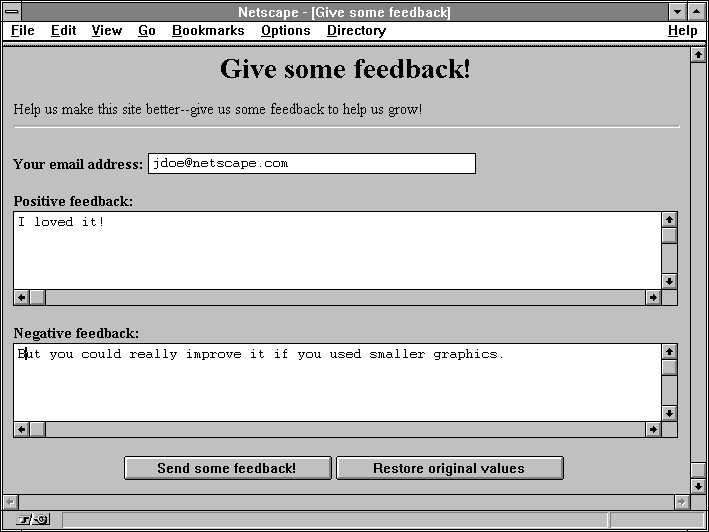
The following example is a simple HTML form that sends feedback about a server. The perl code following the HTML example is a simple form handler that takes the data from the HTML form and mails it to a hard-coded address.
The CGI form handler uses either method=POST and method=GET.
<TITLE>Give some feedback</TITLE> <h1 align=center>Give some feedback!</h1> Help us make this site better--give us some feedback to help us grow! <hr> <FORM method=POST action=/cgi-bin/sample3.pl> <b>Your email address:</b> <INPUT type=text name=email size=40> <p><b>Positive feedback:</b> <TEXTAREA name=p_feed rows=5 cols=80>I loved it! </TEXTAREA> <p><b>Negative feedback:</b> <TEXTAREA name=n_feed rows=5 cols=80>You could really improve it if you... </TEXTAREA> <p><center><INPUT type=submit value="Send some feedback!"> <INPUT type=reset value="Restore original values"> </FORM> |
#!/bin/perl # Remember that the above line has to reflect where your perl really resides. This is a # simple form handler that uses form values to send mail to a hard-coded user. # Terminate headers print "Content-type: text/html\n\n"; # Who should get the email and where is the email program? $send_to = "[email protected]"; $mail_prog = "/usr/lib/sendmail"; # See if the user sent an HTTP_FROM header. Many clients don't these days. $http_from = $ENV{"HTTP_FROM"}; # See which method they used to access this form. If they used POST, then # read the input from STDIN. If they used GET, use the query string. # Which method is used is determined by the HTML in the form. if($ENV{'REQUEST_METHOD'} eq "GET") { $buffer = $ENV{'QUERY_STRING'}; if($buffer eq "") { print "<TITLE>Error - use HTML</TITLE>\n"; print "<H1 align=center>Please use the HTML form provided</H1>\n"; print "You accessed this program without a valid query string. Please "; print "use the associated form to access it.\n"; exit(1); } } else { read(STDIN, $buffer, $ENV{'CONTENT_LENGTH'}); } # Split pairs by the ampersand which divides variables @pairs = split(/&/, $buffer); # Create an array, indexed by the variable name, that contains all the values foreach $pair (@pairs) { # Each variable is structured "name1=value1", so split it on those lines ($name, $value) = split(/=/, $pair); # Decode the value (+ is a space, and %xx in hex is an encoded character) $value =~ tr/+/ /; $value =~ s/%([a-fA-F0-9][a-fA-F0-9])/pack("C", hex($1))/eg; # Create an array indexed by names and put the value in $form{$name} = $value; } # We should have the following values: # email = the person's email address # p_feed = the person's positive feedback # n_feed = the person's negative feedback # # Next, we need to put it into a usable form and mail it. Check to see if they left # an email address. We don't check to see if it's valid, just to see if it's there. if($form{"email"} eq "") { print "<TITLE>Sorry</TITLE>\n"; print "<h1 align=center>No email address given</h1>\n"; print "<p align=center>Your request could not be sent because you "; print "gave no return address. Please give a return address and "; print "try again.</p>\n"; exit(1); } # Open the mail command, or print an error. open (MAIL, "|$mail_prog $send_to") || die "Could not open $mail_prog"; # Send the feedback. If the user had an HTTP_FROM variable, use that in # the from line. If not, use the one he gave in the form. if($http_from) { print MAIL "From: $http_from\n"; } else { print MAIL "From: $form{'email'}\n"; } # Print their email address as a reply-to, and send him a copy print MAIL "Reply-to: $form{'email'}\n"; print MAIL "Cc: $form{'email'}\n"; # Terminate mail headers. print MAIL "\n"; # Create the document body print MAIL "Feedback from ".$form{'email'}.":\n"; print MAIL "--------------------------------------------------------------\n"; print MAIL "\n----Positive feedback----\n"; print MAIL $form{'p_feed'}; print MAIL "\n----Negative feedback----\n"; print MAIL $form{'n_feed'}; print MAIL "\n------------------------------------------------------------\n"; # Close the command, and send the mail. close (MAIL); # Now print out a success story, so the user knows it was sent print "<TITLE>Thanks for your feedback</TITLE>\n"; print "<h1 align=center>Thanks for your feedback</h1>\n"; print "Thanks for taking the time to give us your feedback. We hope that "; print "with your help, we can make this an even better web site!\n"; print "<hr>"; exit(0); |
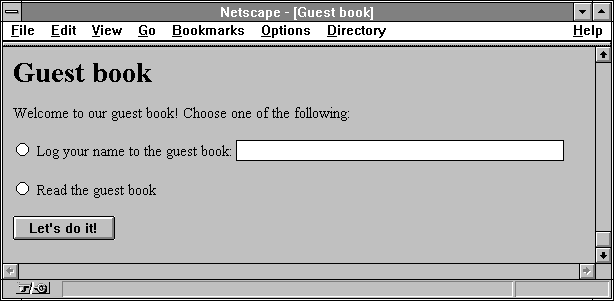
This section describes a sample CGI program that handles the output of an HTML form. The following listing is the text of the HTML form:
<TITLE>Guest book</TITLE> <H1>Guest book</H1> Welcome to our guest book! Choose one of the following:<p> <FORM ACTION=gb.cgi METHOD=POST> <INPUT TYPE=radio NAME=action VALUE=log> Log your name to the guest book: <INPUT TYPE=text NAME=email SIZE=40><p> <INPUT TYPE=radio NAME=action VALUE=read> Read the guest book<p> <INPUT TYPE=submit VALUE="Let's do it!"> </FORM> |
First the user accesses the HTML form as /guestbook/gb.html. Once the user selects an action and optionally types in a name for the guest book, they click the submit button. Note that the name of the radio button is action, and can have the values log or read. Also note that there is a text area called email.
The following code is for the program called when the user submits this form. In this example, the server administrator has activated CGI as a file type, so the compiled program that goes with this code is called gb.cgi.
| Note: For brevity, the entire code necessary to actually update or maintain a guest book is not provided. Only the code necessary to get information to and from the server and client through CGI is shown. |
This program takes the output of a form and processes it. If the user entered their name, then the program enters it into a guest book. If the user decided to view the guest book, they are redirected to a new URL. The function to update the guest book is not actually provided here, in order to keep the focus on CGI.
The comments to the right of the following header-file includes indicate which function prototypes are used from that header file.
#include <stdio.h> /* stdin, printf, fread */ #include <stdlib.h> /* malloc, getenv */ #include <ctype.h> /* isalpha */ #include <string.h> /* strchr, strcmp */ |
The program begins with some defines and prototypes. Code execution begins in the main function later in the code.
/* The biggest set of form data we'll accept. This is a small form. */
#define MAX_CONTENT_LEN 2048

/* Function defined below prints an error to the client and exits. */
void err(char *s);

/*
 * Function defined below takes a pointer to some URL-encoded
 * data and allocates a new string, copies and decodes the data into
 * that string, and returns the new string.
 */
char *url_decode(char *encoded);
/* This function logs the given email address to the guest book. */
void log_address(char *email)
{
  /* This code is not provided...it should be straightforward. */
}
int main(int argc, char *argv[]}
{
|
The previous functions and defines are used in the main subroutines where the program starts. Note that the command-line parameters to main are defined but not used. It begins by defining and initializing its variables. The variables that aren't initialized here are initialized later as they are needed.
/* * Get the method used to access the script from the environment. This * form uses the POST method, and using any other results in an error. */ char *method = getenv(“REQUEST_METHOD”); /* The length of the form results the browser sends us (set below) */ char *clstr; int clen; /* We hold the form contents in this buffer (+1 for the null) */ char content[MAX_CONTENT_LEN +1]; /* Return code from system or library calls */ int ret; /* Pointers used to parse the form data */ char *name, *value; /* A pointer for the remote person's email address */ char *email = NULL; /* * Which action the user selected. -1 is invalid and used to indicate * that no action was selected. */ int action = -1; |
The execution code begins in the following section. The first thing this program does is check the data the server provides in the environment variables to see if it is correct. If it isn't, the request can't proceed and a message is sent to the client navigation software.
/* First, see if they got the method right. */ if(strcmp(method, “POST”) !=0) err(“you must submit a <a href=gb.html>form</a> to access this URL.”); /* Make sure we got form data and check its length */ clstr = getenv(“CONTENT_LENGTH”); if(!clstr) err(“your browser didn't send any content. Is it not POST capable?”); /* Change that string into a number */ clen = atoi(clstr); /* Make sure it's really form data */ if(strcmp(getenv(“CONTENT_TYPE”), “application/x-www-form-urlencoded”) !=0 err(“your browser sent the wrong content type.”); /* * Check for negative or outrageously large content lengths * An upper limit is set to make sure they don't steal extra system * resources for no good reason */ if((clen < 0 || (clen >= MAX_CONTENT_LEN)) err(“your browser created too much data from that tiny form.”); |
If the variables appear to be set correctly, the program can then read the form data into a string variable.
/* Read in the data in one shot */
ret = fread(content, 1, clen, stdin);
/* Return of < 1 means either EOF or error */
if(ret <1)
   err("an I/O error occurred before your form data could be read.");
/* Terminate it with a null char */
content[ret] = '\0';
|
When the program has the string of data the client sent, the program parses that string of data. This involves splitting the string into name=value pairs, splitting those pairs into name and value strings, and then URL-decoding those strings.
/*
 * Here's where the fun starts. Most of the time, you will want to create
 * a generic function to decode form data, and then use that routine in
 * your script.
 *
 * Form data looks like this:
 * name1=value1&name2=value2...
 *
 * The nameN and valueN strings are URL-encoded, which means that many
 * special characters such as spaces, semicolons, forward or back slashes,
 * question marks, percent signs, newlines, plus signs, and colons will be
 * changed from one character into three, of the form %xx, where x is a
 * hexadecimal digit. These two digits are changed into a number from 0-255,
 * which is interpreted as a character.
 *
 * Further, many browsers turn spaces into plus signs.
 */
  /* Start our name pointer at the beginning of the data */
  name = content;
  /* name will be set to NULL by some of the code below when we're done */
  while(name && (*name != '\0')) {
     /* We first find somewhere to put the value pointer */
     value = strchr(name, '=');
     /* However, we must check to make sure we got the right data */
     if(value == NULL)
        err("the submitted form data was corrupt.");

     /* Otherwise, mark the end of the name string. */
     *value++ = '\0';

     /*
      * We now have the name string by itself. See what it is.
      * Note that we do not URL-decode the name string, because our form
      * is set up such that the names don't use any bad characters.
      */

  if(strcmp(name, "action") == 0) {
     /* First, find the next name string. NULL indicates the last one */
     name = strchr(value, '&');
     if(name != NULL)
        *name++ = '\0';
     /*
      * Action can have two values: "log" and "read". Again, we
      * avoid URL-decoding the value because we don't use any
      * special chars in our form.
      */
     if(strcmp(value, "log") == 0)
        action = 1;
     else if(strcmp(value, "read") == 0)
        action = 2;
     else
         err("your form results had an invalid action.");
  }
  else if(strcmp(name, "email") == 0) {
     /* Find the next name string. NULL indicates the last one */
     name = strchr(value, '&');
     if(name != NULL)
        *name++ = '\0';

     /*
      * The email value will be an email address, which can have
      * weird % signs and ! marks in them. We have to URL decode
      * this string. url_decode is defined below.
      */
     email = url_decode(value);
  }
}
|
After the program has the data in the email and action variables, it can verify that the form was filled out in its entirety.
/* Check to make sure they filled out the necessary data. */
if(action == -1)
   err("you did not pick a button.");
if((action == 1) && ((email == NULL) || (*email == '\0')))
   err("you did not fill out your email address");
|
Finally, the program looks at the action the user selected and does what they asked it to do. Note that there is an example of returning a new document (a success page in HTML) and an example of redirecting the client to a new URL (the one that has the guest book for them to view).
  /* Now that we have the data, do something with it. */
  if(action == 1) {
     /* Log their email address */
     log_address(email);

     /* Now generate a success page */
     printf("Content-type: text/html\n\n");
     printf("<title>Congratualtions</title><h1>Congratulations</h1>\n");
     printf("Your name has been added to our guest book, %s!\n", email);
  }
  else {
     /* View the guest book */

     /*
      * Instead of printing a new HTML page, this function sends them to
      * a new URL. This URL is hard-coded to a certain location, but uses
      * CGI variables to get the server's hostname and port.
      */

     printf("Location: http://%s:%s/guestbook/guests.html\n\n",
          getenv("SERVER_NAME"), getenv("SERVER_PORT"));
  }
  return 0;
}
|
The main program calls the following supporting functions to perform some basic tasks.
/* -------------------- Function: err --------------------- */

/* Returns an error to the client */
void err(char *s)
{
   /* Print the CGI header telling the client that this is HTML */
   printf("Content-type: text/html\n\n");

   /* This generates HTML for the client, telling them what went wrong. */
   printf("<title>Guestbook error</title><h1>Guestbook error</h1>\n");
   printf("Your form results could not be processed because %s.\n");

   /* Now, just exit and let them try again */
   exit(0);
}
|
The following functions perform URL decoding on the string.
/* -------------------- Function: url_decode --------------------- */

/* First, a function that verifies that a 2-char string is a hex digit */
int is_hex(char hex)
{
   /* Make sure it's upper case */
   if(isalpha(hex))
      hex = toupper(hex);

   /* This just checks the character to see if it's in the two ranges */
   if(((hex < 'A') && (hex > 'F")) && ((hex < '0') && (hex > '9')))
      return 0;
   else
      return 1;
}

char *url_decode(char *encoded)
{
   /* Allocate space for the new string. We won't need more space than we
      already have after decoding */
   char *new = (char *) malloc((strlen(encoded) + 1) * sizeof(char));
   /* Index register for string copy */
   char *enc, *dec;
   /* Digit is used to translate hex into character */
   char digit;

   if(new == NULL)
      err("the program ran out of memory.");

   /* We go through the string, looking for + signs or percents */
   for(enc = encoded, dec = new; *enc; enc++, dec++) {
      if(*enc != '%') {
         /* Plus goes to space, but most chars are untouched */
         if(*enc == '+')
            *dec = '';
         else
            *dec = *enc;
   }
   else {
      /* Another tricky part. First, make sure we got what we want. */
      if((!is_hex(enc[1])) || (!is_hex(enc[2])))
        err("invalid escape sequence");

     /* Now, advance over the % sign to the first digit, and decode. */
     /* The Oxdf is to turn the character into upper case */
     ++enc;
     if(*enc >= 'A')
        digit = 16 * (((*enc & Oxdf) -'A') + 10);
     else
        digit = 16 * (*enc - '0');

     /* Finally, transfer the digit to the new string. */
     *dec = digit;
   }
  }
  *dec = '\0';

  return new;
}
|