Silicon Graphics' RAID (Redundant Array of Inexpensive Disks) product is a large capacity disk that provides protection against media failure. RAID stores parity information across a group of disk drives so that if a single disk drive in the group fails, users' data can be recovered.
This chapter briefly explains the characteristics of RAID and the features of the Silicon Graphics implementation of RAID. The sections in this chapter are:
RAID:definedlevels of RAIDRAID was first defined by Patterson, Garth, and Katz of the University of California, Berkeley, in their 1987 paper, “A Case for Redundant Arrays of Inexpensive Disks (RAID)” (see “For More Information” in “About This Guide”). Silicon Graphics' RAID product implements these RAID levels:
RAID 3, striping with a single parity disk per group
RAID 5, striping with parity spread over all disks
RAID:level 3RAID:disk layoutsparity bits:RAID 3XOR parityexclusive-OR paritycheck disk drivedata disk driveSilicon Graphics' RAID 3 is shown in Figure 1-1. It is a “4+1” implementation: data is spread across four disk drives and a fifth “check” disk drive stores parity information. A parity bit on the check disk drive is calculated by an exclusive-OR (XOR) of the corresponding bits on the four data disk drives: for each bit of data, if there is an even number of 1's on the data disk drives, the check disk drive contains a 0; if the number of 1's is odd, the check disk drive contains a 1.
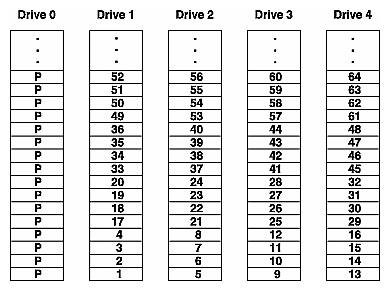
If a data disk drive fails, the information on this disk drive can be reconstructed by recalculating the parity of the remaining good data disk drives and comparing that parity bit-by-bit to the parity bits on the check disk drive. For each bit, if the parities agree, the failed bit was a 0, otherwise it was a 1. If the check disk drive fails, its data can be reconstructed by recalculating parity from the data disk drives.
RAID:level 5parity bits:RAID 5RAID:performanceSilicon Graphics' RAID 5, shown in Figure 1-2, is similar to RAID 3, except that the parity information is distributed across all of the disk drives rather than just a single disk drive. This distribution of parity data gives better performance for multiple writes in parallel (in RAID 3, multiple writes must be sequential because all writes require a write to the check disk drive). Reconstruction of a failed RAID 5 disk drive is done in the same manner as for a RAID 3 disk drive.
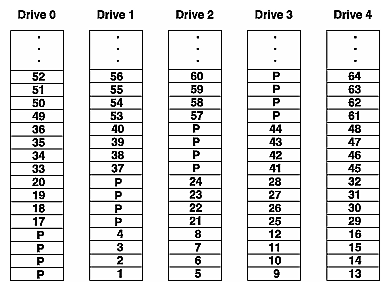
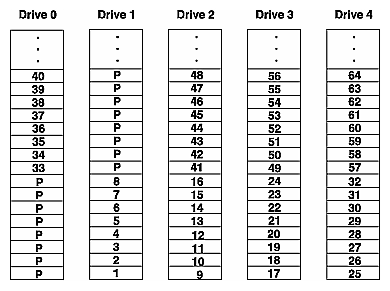
stripe sizeRAID:stripe depthstripe depth:definitionconfiguration:stripe depthFigure 1-1 and Figure 1-2 show the minimum “stripe depth” of 4. Each numbered slice of a disk drive is one 512-byte sector, and each disk drive in this example contains groups of four sequentially numbered sectors. Figure 1-3 and Figure 1-4 show a stripe depth of 8 for RAID 3 and RAID 5 respectively. The stripe size (the total number of sectors in each stripe) is the stripe depth times 4 (because each stripe uses four of the five disk drives for user data). The minimum stripe depth for any RAID is 4 and the maximum is 64.
RAID:stripe widthRAID:stripe sizestripe widthThe stripe width, depth, and size are analogous to the width, length, and area of a sheet of paper. For Silicon Graphics RAID, the width is always 4, and the depth is user setable. Since the total stripe size is always the depth times 4, this guide and the raid(1M) command use only the stripe depth rather than the more common “stripe size.”

IRIX and RAID<Italics>hinv<Default Para Font> command and RAIDEach RAID is viewed as a single 8 GB SCSI-2 compatible disk by the IRIX operating system. The RAID appears as a single disk at the PROM level also, but the PROMs cannot determine that it is a RAID. When a RAID is installed on a workstation or server, hinv from IRIX displays a single line of output for each RAID. An example is:
Disk drive: unit 5 on SCSI controller 0: RAID |
RAID:same as non-RAID diskdisk:RAID vs. non-RAIDA RAID is the same as a non-RAID disk in these ways:
The default sector size is 512 bytes.
The RAID has a volume header that is written just like any other volume header, and it uses the standard partition tables.
<Italics>fx<Default Para Font> command and RAIDYou can use mkfs(1M) and fx(1M) (IRIX fx only, not standalone fx) as usual.
filesystems on RAIDFilesystems on a RAID are mounted in /etc/fstab.
filesystems on RAIDFilesystems on a RAID can be exported for NFS mounting. (As with all NFS mounting, hard mounting a RAID filesystem is more reliable than soft mounting. It is particularly recommended for RAIDs.)
Block and character device access is supported.
The logical volume disk driver, lv(7M), supports RAIDs.
The IRIS Volume Manager supports RAIDs.
RAID:different from non-RAID diskA RAID is different from a non-RAID disk in these ways:
A RAID must be formatted by the RAID administration program raid(1M).
system diskA RAID cannot be used as the system disk: it cannot contain the / (root) and /usr filesystems or the primary swap space.
Third party disk drives cannot be used in a RAID.
RAID:device driverThe RAID device driver, usraid(7M), is used rather than other device drivers, such as dks(7M) and jag(7M).
The sector size cannot be changed.
Standalone fx is not supported.
Add_disk(1) cannot be used.
RAID configuration has two components:
RAID:configuration decisionsconfiguration:decisionsTo perform this configuration, you must decide:
The RAID level
The stripe depth
The number of RAIDs per SCSI channel
RAID:performanceThe next three sections explain how to choose the configuration options that will maximize your applications' I/O performance. You must choose the level of each RAID and the number of RAIDs per SCSI channel before RAID units can be installed in a system.
RAID:choosing RAID levelRAID:stripe depthperformance of applicationsconfiguration:RAID levelThe number of users using a RAID, their applications, and the I/O characteristics of the applications that access the RAID all influence the choice of RAID 3 or RAID 5 and the stripe depth. For four combinations of RAID level and stripe depth, Table 1-1 shows the number of users, applications, I/O stream, and transfer size that is best suited for each combination.
The best stripe depth for maximum performance of a RAID depends upon the typical read/write size of the applications that access the RAID. Optimally, each read should access just one of the five disk drives in a RAID 5. For example, if the typical read is 2 KB, a good stripe depth would be 4: four sectors of 512 bytes each is 2 KB. The entire 2 KB can be read from a single disk drive.
RAID:level 3RAID:level 5RAID:typical applications
Table 1-1. RAID 3 and RAID 5 Characteristicsapplications and RAID
RAID Level | Stripe Depth | Typical Number of Users | Typical Applications | Typical I/O Stream | Typical Transfer Size |
|---|---|---|---|---|---|
3 | small |
| not useful |
|
|
3 | large | low | supercomputer applications, graphics | single stream of large requests (small number of requests per second and a massive amount of information in each request) | 1 MB or more is optimal; the range is 64 KB and up |
5 | small | high | databases, NFS, file serving | multiple streams of small requests (a large number of requests for a small amount of information each time) | 8 KB or less is optimal; the range is .5 KB to 64 KB |
5 | large | low | supercomputer applications, graphics | single stream of large requests (small number of requests per second and a massive amount of information in each request), mostly reads with few writes | 1 MB or more is optimal; the range is 64 KB and up |
stripe depth:choosingA rule of thumb for choosing the stripe depth is to choose a stripe depth that accommodates the typical transfer size or is slightly larger. When the typical transfer size is unknown, a stripe depth of 32 is a good choice. Larger stripe depths are better for the controller because it is more efficient to read contiguous sectors from a single disk drive in a single read operation than many reads of small numbers of sectors from several disk drives.
The RAID level and stripe depth are specified when formatting a RAID (see Chapter 2, “Formatting a RAID”).
RAID unit:number per SCSI channelchannel:maximum number of devicesI/O performance guidelinesSCSI devices per channelBecause of packaging and cabling limitations, a maximum of 12 SCSI devices are supported on each SCSI channel (each RAID unit is counted as a single SCSI device). However, I/O performance can be affected by putting too many RAID units on a single SCSI channel.
channel:recommended number of devicesconfiguration:RAID units per channeldisk:RAID vs. non-RAIDYou can use these rules of thumb when determining how many RAID units to attach to a channel:
channel:capacityThe rated capacity of a channel is 20 MB per second, but because of overhead, assume that the capacity is 18 MB per second.
A RAID 3 at maximum throughput uses most of the capacity of a channel.
A RAID 5 at maximum throughput uses about one quarter of the capacity of a channel.
For RAID 5, the sizes of the transfers and the number per second determine how many transfers (and therefore RAIDs) can fill the capacity of the channel.
A non-RAID disk at maximum throughput uses 3 MB to 4 MB per second.
Putting slow devices such as tape drives and CD-ROM drives on a channel with one or more RAID units can adversely impact the performance of the RAIDs.
In general, RAID units should be put on channels with other RAID units and non-RAID disk drives only.
RAID:configuration at hardware installationRAID units are attached to channels at the time of hardware installation. Changing the configuration, for example, because you determine that there are too many RAID units formatted as RAID 5 on a single channel, requires a service call by your support provider.
<Italics>hinv<Default Para Font> command and RAIDRAID:<Italics>hinv<Default Para Font> outputThe hinv(1M) command can be used to figure out how many RAID units are on each channel. Each controller listed in hinv output drives one channel. Counting the number of units listed for a controller tells you how many devices are on the channel for that controller. The hinv output for a controller with 3 RAID units and 5 other disk drives on its channel looks like this:
Integral SCSI controller 4: Version WD33C95A Disk drive: unit 15 on SCSI controller 4: RAID Disk drive: unit 14 on SCSI controller 4: RAID Disk drive: unit 13 on SCSI controller 4: RAID Disk drive: unit 5 on SCSI controller 4 Disk drive: unit 4 on SCSI controller 4 Disk drive: unit 3 on SCSI controller 4 Disk drive: unit 2 on SCSI controller 4 Disk drive: unit 1 on SCSI controller 4 |
Several sets of LEDs (Light Emitting Diodes) in the RAID unit display status information. This section contains diagrams that show the locations of these LEDs and tables that list their meanings.
RAID:LEDsLEDs in RAID unitRAID:controller LEDscontroller:LEDsRAID controller:LEDsAn array of eight LEDs on the front edge of the RAID controller (inside the RAID unit) displays status information for each of the five disk drives and for the RAID as a whole. These LEDs are shown in Figure 1-5 and their meanings are listed in Table 1-2. The table assumes that the RAID unit is powered on. The term “failed” means that the RAID unit or a disk drive is either not responding to commands or is responding but not operating properly. The term “down” means that the RAID unit or a disk drive has failed or it is not operating because it has been manually shut down with the raid –d command.
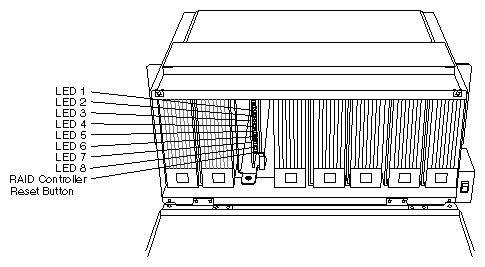
Table 1-2. RAID Controller LEDs
LED | Lit Means | Off Means | Flashing Means |
|---|---|---|---|
1 | The RAID is processing commands. | The RAID is not processing commands. | The RAID is processing commands. |
2 | The RAID has failed. | The RAID has failed. | The RAID is operating normally (note that the on/off cycle can be as long as 10 seconds). |
3 | A maintenance command such as rebuilding a disk drive or checking parity is active. | The RAID is operating normally. | A maintenance command such as rebuilding a disk drive or checking parity is active. |
4 | Disk drive 0 is down. | Disk drive 0 is operational. | N/A |
5 | Disk drive 1 is down. | Disk drive 1 is operational. | N/A |
6 | Disk drive 2 is down. | Disk drive 2 is operational. | N/A |
7 | Disk drive 3 is down. | Disk drive 3 is operational. | N/A |
8 | Disk drive 4 is down. | Disk drive 4 is operational. | N/A |
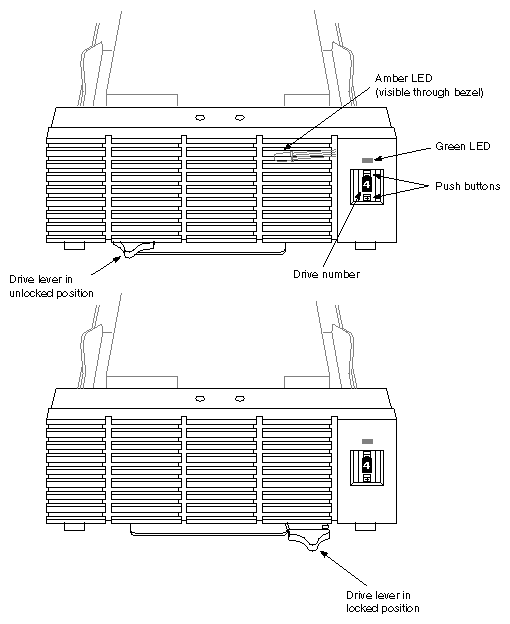
RAID:disk drive LEDsdisk drive:LEDsdisk drive:drive numberRAID unit:disk drive LEDsFigure 1-6 shows the fronts of two RAID disk drives. In the figure, they are shown rotated 90 degrees counterclockwise from their position when installed in the RAID unit. See also Figure 4-2.
An amber LED behind the bezel of the disk drive lights when the disk drive is down (failed or shut down with raid –d). When this LED is lit, the LED on the edge of the RAID controller that corresponds to this disk drive will be lit also (see Section 1.5.1).
The green LED on the front of each disk drive is lit when it is servicing a command.
RAID unit:drive numbersdrive numberDisk drives in the RAID unit are numbered 0 to 4, left to right. The number of each disk drive displayed on its front must match its drive number. The push buttons above and below the number are used to increase or decrease it.
<Italics>/var/adm/SYSLOG<Default Para Font> fileRAID:failure prediction (PFAwarning messagesdisk drive:sizedisk drive:predictive failure analysis (PFA)PFA (predictive failure analysis)The 2.0 GB disk drives used in RAIDs have a sophisticated predictive failure analysis (PFA) feature. They use internal diagnostics and device information to attempt to give at least 24 hours' notice before they fail.
PFA information is written to the system console and to the file /var/adm/SYSLOG when:
A disk drive predicts that it will fail within 24 hours.
The system is powered on and a disk drive has predicted its failure.
The raid command is given with the –L option.
An example of a PFA message is:
disk n is predicting failure, replace as soon as possible |
Chapter 5, “Error Messages,” contains a complete list of PFA messages. Chapter 4, “Recovering after a Disk Warning or Failure,” explains what to do if you get a PFA message.
)RAID:failure recoveryRAID:two failed disk drivesbackup tapes:the importance ofmultiple failures in a RAID unitWhen a single disk drive in a RAID unit fails, the data on the failed disk drive can be reconstructed from the remaining disk drives, while IRIX and applications accessing the RAID continue to operate. However, if two disk drives fail or if a disk drive and the controller fail, the data cannot be reconstructed, and IRIX and applications can no longer access the RAID. Backup tapes should be made for data on a RAID just as on any other type of disk.
RAID:hot plugging a replacement drivehot pluggingWith RAID, you can “hot plug” a replacement disk drive: a disk drive can be removed from the RAID unit and a replacement inserted while IRIX is running and applications are accessing the RAID. See Chapter 4, “Recovering after a Disk Warning or Failure,” for more information.
 | Caution: When a disk drive has failed, removing any disk drive other than the failed disk drive will probably result in the loss of all data on the RAID. |
To reduce the risk of pulling the wrong disk drive when a disk has returned a PFA warning, you can use the –d option of the raid command to mark the disk down before pulling it. This will light the amber LED in the disk drive (see Figure 1-6) and the LED on the controller that corresponds to the disk drive (see Figure 1-5) to give a clear indication of which drive must be pulled.