This appendix contains information that may be useful to Browser users:
a glossary of SNMP management terms
information about the Silicon Graphics SNMP agent
instructions for providing additional MIB specifications to Browser
This section describes some basic terms used in the SNMP management framework. It begins with basic concepts. Later definitions build on terms defined previously. Terms in italics are defined elsewhere in this section.
The Network Management Model contains three components:
A network management station running network management applications.
A network management protocol.
Managed nodes, each containing the corresponding agent.
A Network Management Station is a host that runs network management applications and is responsible for managing the network. For example, a Silicon Graphics workstation running NetVisualyzer Display Station software is a network management station.
Network management applications typically reside in the network management station and collect data from various agents in the network. They process and present that data to the user. The applications may also control or configure the data and thus affect the behavior of the underlying network entity or device. NetVisualyzer tools are examples of network management applications.
An agent is software or firmware that gathers the information important to the device on which it resides. It also implements a protocol that exchanges that information with a network management station. snmpd(1M) is an example of an SNMP agent.
The network management protocol is the protocol used to convey management information between an agent and a network management application. The protocol used by Browser to query information from various agents is SNMP.
SNMP is the network management protocol used by Browser to talk to agents on remote managed nodes. It is defined in RFC 1157 (see “Protocol References” in Appendix C). For Silicon Graphics workstations, the SNMP agent is snmpd(1M). Agents for other types of nodes may be implemented in software or firmware and are vendor-specific.
A MIB is the specification for the virtual store of the information supported by an agent. Some MIBs have RFC status, which means they have been approved by the IETF.
MIBs are defined in SMI format. For instance, a router MIB is a collection of important information about a router defined in SMI format. An SNMP agent typically implements two MIBs, MIB-II and a device-specific MIB (an Enterprise MIB). However, the agent may not implement all of the objects defined in each MIB.
The vast information that agents gather about devices is organized into a hierarchical tree called the SNMP Containment Tree. A portion of this tree is shown in Figure E-1. Some of the subtrees in this tree are MIBs. In Figure E-1, mib-2, cisco, and cabletron are MIBs.
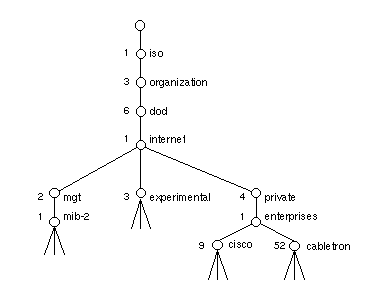
Each node with children in the SNMP Containment Tree (Figure E-1) is called a subtree.
MIB-II is the Internet-standard MIB (RFC 1213). This MIB has managed objects that are important for managing the TCP/IP suite of protocols. The subtrees of MIB-II—system, interfaces, at, ip, and so on—and some of their variables are shown in Figure E-2.
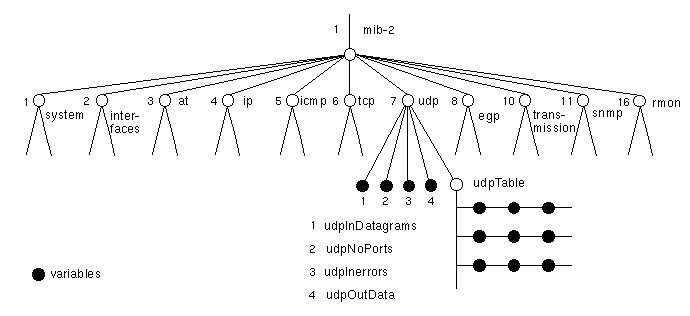
A managed object is also known as a variable. Figure E-2 shows an additional portion of the SNMP Containment Tree. In this figure, the managed objects are solid circles. For example, sysContact is an object in mib-2 that contains the name of the contact person for that system.
A leaf node in the SNMP Containment Tree is called a variable. In the SMI definition for each MIB, each variable is defined to be read-write, read-only, or write-only.
An object identifier is a name in a dot notation that uniquely identifies an object (subtree or managed object) in the MIB. It is a sequence of numbers that traverses the SNMP Containment Tree shown partially in Figure E-1. For example, the object ID for sysContact is 1.3.6.1.2.1.1.4.
Enterprise MIBs are MIBs defined by different vendors for managing their devices. They can be very device or vendor specific. For example, the CISCO MIB has objects for the Cisco router.
A community string is a password used by an SNMP agent for authentication purposes. The default string for Silicon Graphics workstations is “public”. Community strings are typically defined by system administrators.
The Silicon Graphics SNMP agent is the SNMP daemon, snmpd(1M). Its default community string is public. Information on this agent is provided in the snmpd manual page in Appendix F, “NetVisualyzer Manual Pages.” See also “Authorizing Browsing” in Chapter 1 for information on snmpd authorization.
Browser is supplied with MIB specifications for MIB-II, RMON, Cisco, and Cabletron. These specifications are in the files /usr/lib/netvis/mibs/mib2, /usr/lib/netvis/mibs/rmon.mib, /usr/lib/netvis/mibs/cisco.mib, and /usr/lib/netvis/mibs/cabletron.mib respectively. Browser is designed so that you can add MIBs for any additional devices you want to browse to the directory /usr/lib/netvis/mibs.
Some guidelines for the /usr/lib/netvis/mibs directory are:
Only MIB files in SMI format should be present in the /usr/lib/netvis/mibs directory.
Do not make any subdirectories in the /usr/lib/netvis/mibs directory.
Do not edit or move the files in /usr/lib/netvis/mibs that were provided with NetVisualyzer.
To add MIB specifications to /usr/lib/netvis/mibs, follow this procedure:
For vendor-specific MIBs, contact the vendor for that device to get the MIB in SMI format.
For MIBs that aren't vendor specific, obtain the MIB specifications from the RFC for that MIB. (See the address for obtaining RFCs in “Protocol References” in Appendix C.)
Edit the MIB specification and comment out the following lines by preceeding each line you want to comment out with two dashes, “--”.
Definition lines:
DEFINITIONS ::= BEGIN
or
XXXXXXX-MIB DEFINITIONS ::= BEGIN
IMPORTS sections:
IMPORTS
...
Lines such as:
XXXXX-MIB { iso org(3) dod(6) internet(1) private(4) enterprises(1) 9 }
Copy that MIB specification file to the directory /usr/lib/netvis/mibs. You can choose any file name you want.