This chapter describes how to generate a bitstream and the associated configuration files for the RASC Algorithm FPGA once the Algorithm Block design has been completed. Instructions for installation, setup, and implementation are included along with examples to demonstrate different implementation flows. The implementation flow begins with a completed HDL design and ends with generating the <alg_name>.bin file, which is used by the Loader FPGA to configure the Algorithm FPGA. Other implementation flow outputs are the files user_space.cfg and core_services.cfg, which are used by the software abstraction layer to recognize the algorithm.
This chapter contains the following sections:
This section provides an overview of the RASC Algorithm FPGA implementation process. It covers the following topics:
In this document, implementation flow refers to the comprehensive run of the extractor, synthesis, and Xilinx ISE tools that turn the Verilog or VHDL source into a binary bitstream and configuration file that can be downloaded into the RASC Algorithm FPGA. There are several stages to this process, but the implementation flow has been encapsulated in a Makefile flow for ease of use.
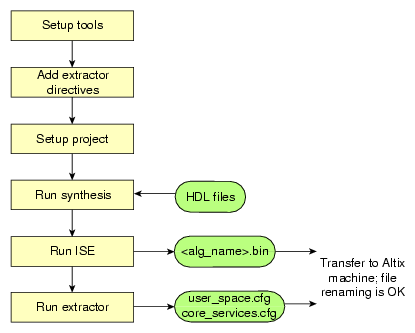
There are two supported ways to create a bitstream. The first method, and recommended for most cases, is to implement the Algorithm FPGA using our pre-synthesized Core Services Block EDIF netlist. This allows faster synthesis time and easy trials of multiple algorithms.
The second method, which allows more optimization between the Core Services and the Algorithm Block, is to synthesize from the top-down, including re-synthesis of the Core Services Block source codes.
The supported flow has been tested using the tool versions and operating system shown in Table 7-1.
Table 7-1. Supported Implementation Tools
Tool | Version |
|---|---|
OS | Red Hat Enterprise Linux 3.0 (or later) |
Shell | Bash or tcsh |
Python | Python 2.4 or higher |
Synthesis | Synplicity Synplify Pro 8.9 |
ISE | Xilinx ISE 9.2, Service Pack 2 |
SGI suggests that you consult the reference documentation associated with the supported tools of your choice for the details on tool setup.
ISE Software Manuals
Synplify Pro Documentation
RASC software is distributed either on a CD-ROM or through file transfer protocol (FTP). If an International Standards Organization (ISO) file is received through FTP, put it in a convenient directory in the SGI Altix system. If the directory /mnt/cdrom does not exist, create that directory with the following command:
mkdir /mnt/cdrom |
At the directory where the ISO file is saved, execute the following command:
mount -o loop iso_file_name /mnt/cdrom |
The CD-ROM image will be visible in the directory /mnt/cdrom.
On the CD-ROM image, there will be one or more files with the extension .rpm and a readme.txt file. Read the readme.txt file for further instructions for installing the software.
This section describes the installation and setup of the RASC Algorithm FPGA Developer's Bundle. Please note that the Xilinx ISE tools and the synthesis tool of choice must be installed on an x86 Linux system and each user must have the associated environment variables defined for their use.
The RASC Algorithm FPGA Developer's Bundle comes as a tar.gz file. This tar.gz file is available in the Altix system after the rasc_cs-xxx.ia64.rpm is installed. It is in the directory /usr/share/rasc/x86_dev_env. Run the executable x86_dev_env_install and read the license agreement. Agree to the agreement to extract the file x86_dev_env. Transfer this file to a directory in the PC. If there is an older version of the bundle software, remove it. Unzip the tar.gz file using the following command:
tar -zxvf file_name |
The Developer's Bundle requires setting one additional environment variable, RASC, to identify the Bundle installation directory to the supporting Makefiles (see Table 7-2).
Table 7-2. Environment Variables Required for Bundle Environment
Name | Description |
|---|---|
RASC | RASC Algorithm FPGA Developer's Bundle Installation Directory |
XILINX | Xilinx tools installation directory |
SYNPLIFY | Synplify Installation directory |
LIB | Required Synplify variable |
The directory hierarchy within the RASC Algorithm FPGA Developer's Bundle is shown in the README file at the top level. A description of the top level directories included in the Bundle is shown in Table 7-3.
Table 7-3. Top Level Directory Descriptions
Directory | Description |
|---|---|
examples | Contains subdirectores with example algorithm source code and implementation files. |
design | Contains Verilog source codes for the top-level FPGA wrapper and the Core Services Block modules. |
pd | Additional files needed for physical design / implementation: synthesis and ISE constraint files, the pre-synthesized Core Services Block netlist and the macros needed for re-synthesis of the Core Services Block. |
implementations | Contains template files for running the bitstream implementation flow (Makefiles and project files). |
dv | Functional simulation components: testbench with SSP stub and QDR2-SRAM models, example diagnostic stimulus code, and scripts for VCS simulator. |
When the Developer's Bundle is installed and the $RASC variable is set, the user can proceed to experiment with the example implementations.
A synthesis constraint file (.sdc) is provided for use with the Synplify Pro tool. It is used to provide additional inputs to the synthesis tool on desired mapping, netlist formats, and post-synthesis timing estimates.
The synthesis constraint file specified in the <alg_name>.prj is added to the generated full_<alg_name>.prj synthesis project file created by Makefile build process. If a user desires to add constraints for portions of the Algorithm Block, this can be done by editing the .sdc file manually or through the associated synthesis GUI.
The synthesis constraint files are located under the install directory at $RASC/pd/constraints/synthesis.
A script file (.scr) is provided for use with the XST tool. An XST script is a set of various options used to run synthesis. It is utilized to control various aspects of the synthesis process to meet your design goals or obtain the best implementation of your design.
The synthesis script is used along with the synthesis project file <alg_name>_xst.prj. If a user desires to add constraints for portions of the Algorithm Block, this can be done by creating an .xcf file. To specify the XCF file in the script, use the -uc switch with run command.
The XST script file should be located under the synthesis project directory of each algorithm.
Table 7-4. Synthesis Constraint Files Provided
File | Synthesis Tool | Description |
|---|---|---|
acs_top.sdc | Synplify Pro | Basic synthesis constraint file |
<alg_name>_xst.scr | XST | General (global) constraints |
A top level user constraint file (ASCII) needs to be used with the ISE tools to guide placement and routing and to achieve timing-driven placement results. The UCF file is generated from separate constraint files (see Table 7-5) located in the directory $RASC/pd/constraints/ise.
Table 7-5. Implementation Constraint Files Provided
File | Description |
|---|---|
alg.ucf | Algorithm specific UCF constraints, optional |
ssp.ucf | Timing constraints and I/O assignments |
virtual_gnd.ucf | Virtual ground I/O assignments |
prohibit.ucf | Prohibit constraints for specific sites |
qdr_bank0.ucf, qdr_bank1.ucf, ..., qdr_bank4.ucf, and qdr_misc.ucf | Location and specific constraints for QDR banks |
The constraint file should always be included in the design, and the provided constraints should not be modified. However, a user can add to the constraint file to put in constraints related to the Algorithm Block. See the last line of the Makefile.local. Uncomment the last line, as follows:
# Algorithm dependent UCF constraints file #ALG_UCF=alg.ucf |
The constraint file provided in the Bundle provides the following types of constraints:
Period specifications for all internal clock signals, both for the Core Services Block and the Algorithm Block
I/O Pad placement constraints and I/O standard settings
Setup and hold constraints for input pads
DCM attributes settings
Cross clock domain path constraints
BUFG and DCM placement constraints
All constraints are written in the Xilinx-specified User Constraint File format.
An example of a constraint file is, as follows:
--# Set the current user constraint file for ISE
UCF_FILE_LIST=./alg_cmu_dft_n16k_w32_local.ucf
${UCF_DIR}/virtual_gnd.ucf ${UCF_DIR}/ssp.ucf ${UCF_DIR}/prohibit.ucf
${UCF_DIR}/qdr_bank0.ucf ${UCF_DIR}/qdr_bank1.ucf
${UCF_DIR}/qdr_bank2.ucf ${UCF_DIR}/qdr_bank3.ucf
${UCF_DIR}/qdr_bank4.ucf ${UCF_DIR}/qdr_misc.ucf
|
The ./alg_cmu_dft_n16k_w32_local.ucf file contains these statements that are currently commented-out:
#INST "u_user_space_wrapper/u_alg_block_top/u_calc_control/u_dft/*/FIFOinst*/fifo*" LOC=RAMB16_X2Y0:RAMB16_X6Y47; # INST "u_user_space_wrapper/u_alg_block_top/u_calc_control/u_dft/instList699/instList2221/instrc2226/instList2235/instParallelWithControl2243/seu2313/FIFOinst2318/fifo*" LOC=RAMB16_X3Y0:RAMB16_X6Y47; # INST "u_user_space_wrapper/u_alg_block_top/u_calc_control/u_dft/instList699/instrc2222/instList2346/instParallelWithControl2347/seu2362/FIFOinst2367/fifo*" LOC=RAMB16_X3Y0:RAMB16_X6Y47; |
Symbol table information is required for GDB to correctly display internal FPGA values and for the RASC Abstraction Layer (RASCAL) to communicate parameters and data that should be written to and read from the SRAM banks and internal registers. A python script called extractor parses all the Verilog, VHDL, and header files in an arbitrary algorithm directory that is passed as an argument. The user specifies the top level algorithm directory by setting the ALG_DIR variable in the Makefile.local file, to be discussed later. When the extractor script is called, it generates two configuration files that communicate the necessary information for the RASCAL and GNU source-level debugger (GDB) to communicate with the hardware correctly.
The extractor script parses comment lines that contain special extractor directives from within source and header files in the algorithm directory. There is a template in the examples directory, in addition to full examples for each of the example algorithms. The comment fields can be located in one or more files below the directory specified in the second argument to the extractor call.
The command to run the extractor has been automated in the Makefile flow discussed in detail later. The user does not need to run extractor at the command line, but can issue the make extractor command after the Makefiles have been set up.
The comment fields that need to be inserted within the algorithm source or header code are: core services version, algorithm version, sram (denoting where data will be read from and written to on the sram interface), register in (for parameters set through an application writer's code), and register out (for a section of code that needs to be mapped to a debug register).
The comments can be located anywhere within a Verilog, VHDL or header file. They can have Verilog or VHDL syntax (“//” or “- -” respectively). Extractor comments begin with the tag “//extractor” in the source file. The general format is shown below.
//extractor <type>:[<value/specifier1> ... <value/specifierN>] (Verilog)
- - extractor <type>:[<value/specifier1> ... <value/specifierN>] (VHDL)
For details on each extractor comment, see Table 7-6.
Table 7-6. Extractor Comment Fields
Type | Description | Value | Example |
|---|---|---|---|
CS | Core Services Version: Tag detailing which iteration of core services was used in this bitstream. | <version>.<revision> | //extractor CS:0.7 |
VERSION | Algorithm Version: Tag for the type and version number of the algorithm in this bitstream. This is user defined but it should match the first register in the debug space (see Chapter 3, “RASC Algorithm FPGA Hardware Design Guide” for more details.) | <version>.<revision> | //extractor VERSION:0.12 |
SRAM | Array: Tag for the SRAM inputs and outputs to the algorithms. | <array name> <number of elements in array> <bit-width of each element> <SRAM bank for array> <starting byte offset> <array direction: in | out | inout> <data type for array elements: u=unsigned> <array use attribute: stream | fixed> | //extractor SRAM:a_in 512 64 sram[0] 0x0000 in u stream |
REG_IN | register in: Tag for the registers that are PIO written as specified by the application and where the value will be mapped in the address space. | <register name> <bit width of register> <data type for element> <alg_def_reg mapping> <bit range mapping of alg_def_reg> | //extractor REG_IN:match 32 u alg_def_reg[0][31:0] |
REG_OUT | register out: Tag for the registers that are PIO written or read by the application or the debugger and where the value will be mapped in the address space. | <register name> <bit width of register> <data type for element> <debug port mapping> <bit range mapping of debug_port> | //extractor REG_OUT: a 16 u debug_port[1] debug_port[1] [15:0]
|
STREAM_IN | stream in tag | <stream_name> <stream number> <stride> | // extractor stream:input_stream in 8 |
STREAM_OUT | stream out tag | <stream_name> <stream number> <stride> | // extractor stream:output_stream out 8 |
A sample of the comments that might be included within a source file is:
// extractor VERSION: 6.3 // extractor CS: 1.0 // extractor SRAM:a_in 2048 64 sram[0] 0x0000 in u stream // extractor SRAM:b_in 2048 64 sram[0] 0x4000 in u stream // extractor SRAM:c_in 2048 64 sram[0] 0x8000 in u stream // extractor SRAM:d_out 2048 64 sram[1] 0x0000 out u stream // extractor REG_OUT:alg_id 32 u debug_port[0][63:32] // extractor REG_OUT:alg_rev 32 u debug_port[0][31:0] // extractor REG_OUT:rd_addr 64 u debug_port[1] // extractor REG_OUT:rd_data_sram0_lo 64 u debug_port[2] // extractor REG_OUT:rd_data_sram0_hi 64 u debug_port[3] // extractor REG_OUT:wr_addr 64 u debug_port[4] // extractor REG_OUT:wr_data_sram1_lo 64 u debug_port[5] // extractor REG_OUT:wr_data_sram1_hi 64 u debug_port[6] // extractor REG_OUT:cntl_sigs 64 u debug_port[7] |
The first recommended implementation flow uses the pre-synthesized version of the Core Services Block. The bulk of the Core Services Block (excluding clocking, resets, and I/O) has been pre-synthesized and has soft-fixed source code (we do not support customer modifications). The implementation time could be significantly reduced by using the pre-synthesized core, but results vary depending on the loading of signals between the Algorithm Block and the Core Services Block. We suggest that you first try this method, and if timing is not met due to loading issues on the Algorithm Block / Core Services interface, re-synthesize the full design from scratch (discussed later).
Each algorithm project will have its own associated implementation project directory, which can be located anywhere in the directory space of the user. The user customizes template Makefiles and synthesis project files to run the desired bitstream generation flow. Each project directory must contain the following three files, the first two provided in the $RASC/implementations/templates directory:
Makefile (linked or copied from the templates directory).
This Makefile contains general definitions and targets necessary to run the synthesis and ISE tools. It includes the Makefile.local file. This file is meant to be linked into each new algorithm project directory. Customizations should be added to Makefile.local; it is recommended to keep this file common between all projects.
Makefile.local
This included Makefile allows custom definitions and targets for each algorithm project. Here you can define the synthesis project name, specify different constraint files, and override tool options.
Synthesis Project File
Synplify Pro <alg_name>.prj.
This file defines the algorithm source files and synthesis tool options. This is where you need to add / modify the paths to the algorithm code. The Synplify Pro project file is a TCL script, which can also be opened and run by the GUI version of the synthesis tools. Read the synthesis tool documentation for more information on the TCL commands available. You will notice that the template synthesis project file does not contain any source files for the Core Services Block. All Core Services files are stored in another file in the templates directory, acs.files. The Makefile flow combines acs.files with the synthesis project file of the user to create a complete synthesis project (renamed as full_<alg_name>.prj). If you are creating a synthesis project from scratch or not using the Makefile flow, you will need to copy acs.files into your synthesis project.
XST <alg_name>_xst.prj.
This file only defines the algorithm source files. This is where you need to add / modify the pointers to the algorithm code. The synthesis options are included in a separate script file <alg_name>_xst.scr which can be opened and run by the synthesis tools.
Examples of each of these required files are located in the templates directory, as well as the included example algorithm implementation project directories:
$RASC/implementations/<alg_name> |
Any Makefile variables you want to redefine can be changed using the Makefile.local file. This allows each project you create to use the same base Makefile, but have project-specific customizations in a separate file. The key Makefile variables that are commonly redefined for each project are listed here. Default settings are provided with the Makefile.local version in the templates directory.
Table 7-7 shows common Makefile.local variable settings.
Table 7-7. Common Makefile.local Variable Settings
Variable | Example | Definition |
|---|---|---|
ALG_DIR | $RASC/examples /alg_simple | Pointer to top level algorithm directory. This is a full path, not a relative path. |
SYNTHESIS_PROJ | <any name>, e.g., alg_simple_hc | Name of the synthesis project; the base filename to Synplify's *.prj file. |
SYNTHESIS_DIR | <any relative path directory>, e.g. rev_1 | Output directory for synthesis and implementation flow, relative to project's implementation directory. |
DEFAULT_SYNTHESIS_TOOL | synplify_pro, ise_xst | Specify synthesis tool to use for default make flow |
SYN_RESULT_EXT | edf, ngc | Specify the synthesis tool's output file extension |
LOCAL_SOURCE_DIR | <any full path list of directories> | List of directories of additional edf/sources related to the algorithm that need to be read by ngdbuild (default: none). |
MAP_OPTIONS, PAR_OPTIONS | Any ISE allowed options | Set ISE tool options for a specific run. |
UCF_DIR, CURR_UCF_FILE, etc. |
| Additional variables to override the Makefile settings |
The Synplify Pro tool uses a <alg_name>.prj file to specify the HDL files for synthesis and other compiler, mapping, and output options. When creating a new project for a new algorithm, the algorithm related files need to be added to the project file so that the synthesis tool knows which algorithm to compile. The user should specify the location of the files alg_block_top.v and alg.h, along with any submodules. For example, if you are compiling an algorithm whose two source files alg_block_top.v and sort_byte.v are located under $RASC/examples/alg_simple_v/, you would need to add the following lines to the project file:
add_file -verilog "$RASC/examples/alg_simple_v/alg_block_top.v" add_file -verilog "$RASC/examples/alg_simple_v/sort_byte.v” |
Please note that for some projects it is useful to read the EDIF netlist of Core Services Block during the synthesis. To do that add the following line to the project file:
add_file -edif "$RASC/pd/acs_core/acs_core.edf" |
The XST tool uses a <alg_name>_xst.prj file to specify the HDL files for synthesis and creates Xilinx specific netlist files called ngc files. All other compiler (for example, verilog include directories), synthesis, and output options are included in a separate script file <alg_name>_xst.scr. When creating a new project for a new algorithm, the algorithm related files need to be added to the project file so that the synthesis tool knows which algorithm to compile. The user should specify the location of the files alg_block_top.v and alg.h, along with any submodules. For example, if you are compiling an algorithm whose source file alg_block_top.v is located under $RASC/examples/alg_simple_v/, you would need to add its full or relative path to the project file:
verilog work "../../example/alg_simple_v/alg_block_top.v" |
After the Makefile, Makefile.local, and synthesis project file are set up and customized, the next step is to run the make command to generate the bitstream and configuration files for download to the RASC hardware.
FPGA implementation comprises many sub-steps such as synthesis, ngdbuild, map, place-and-route, bitgen, and timing analysis. The user can choose to run the entire flow or individual subsections based on the Makefile target. If no target is specified, the full implementation flow is executed:
% cd $RASC/implementations/alg_simple_v % make all |
Other available targets are described in Table 7-8. The default command is make all.
Command Line | Description |
|---|---|
make all | Runs extractor, synthesis and ISE tools, results in the <alg_name>.bin and related .cfg files, ready to download to FPGA. This is the default make target. |
make extractor | Run the Extractor script to generate the configuration files based on the source code comments, |
make synplify_pro | Run Synplify Pro tool alone. Results in EDF file. |
make amplify | Run Amplify tool alone. Results in EDF file. |
make ise_xst | Run XST tool alone. Results in NGC file. |
make oneloop | Run ISE tools, does not rerun synthesis. Performs 1 PAR iteration. Results in NCD output |
make ngdbuild | Run NGDBUILD alone. |
make map | Run MAP alone. |
make par | Run PAR alone. |
make trce | Run TRACE (static timing analysis) alone. |
make bitgen | Run BITGEN alone. |
make clean | Remove all intermediate and output files. |
A full-chip implementation refers to synthesis of the entire FPGA design, including a re-synthesis of the Core Services Block. The implementation steps for this flow are similar to those for the flow using the pre-synthesized Core Services Block netlist, with differences specified in the Makefile.local and the synthesis project file.
When synthesizing the full FPGA, including a re-synthesis of the Core Services Block, we only support the use of Synplify Pro. The Core Services Block design has been optimized for use with these tools and results from using another synthesis tool will not likely achieve the same quality-of-results and timing closure. Therefore, the Makefile.local for the full chip project must use the following Makefile variable settings (see Table 7-9).
Table 7-9. Required Full Chip Makefile Variable Settings
Variable | Possibilities |
|---|---|
DEFAULT_SYNTHESIS_TOOL | synplify_pro |
SYN_RESULT_EXT | edf |
A synthesis option must be set to allow the Core Services Block to be re-synthesized. This option is in the form of a Verilog compiler directive, which can be added to the synthesis project file with the following TCL command:
set_option -hdl_define -set RESYNTHESIZE_CS=1 |
This option is commented in the <alg_name>.prj and must be uncommented by the user desiring to re-synthesize the Core Services Block. The rest of the synthesis project should be the same as described earlier.
Table 7-10 includes the commonly referenced files. The synthesis and ISE tools use a number of intermediate files. To find out more information about files not discussed here, please consult the on-line reference guides mentioned above.
Table 7-10. Commonly Referenced Files
Name | Type | Produced By | Description |
|---|---|---|---|
.bin | Binary | Bitgen | Contains only configuration data for the FPGA. The .bin has no header like the .bit file. Meant for input to non-Xilinx tools such as the FPGA Loader Device Driver. |
.bit | Binary | Bitgen | Contains proprietary header information as well as configuration data. Meant for input to other Xilinx tools such as PROMGen and Impact. |
.cfg | ASCII | Extractor | Configuration file used by the Abstraction Layer software to recognize features of the Algorithm and Core Services. |
.edf | ASCII | Synplify Pro Synthesis Tool | EDIF Netlist. |
.ngc | ASCII | XST Synthesis Tool | NGC Netlist. |
.ncd | Data | Map, PAR | Flat physical design database. After PAR, this is the database file with the full placed-and-routed design. |
.ncf | ASCII | Synplify Pro Synthesis Tool | Constraint file produced by the Synplify Pro synthesis tool to be associated with the .edf file of the same name. |
.prj | ASCII | User or Synthesis Tool | Synthesis Project definition file. |
.sdc | ASCII | User (text editor) / Synthesis tools GUI (Synplify Pro or Amplify) | Provides directives and attributes for the synthesis tool to use while it is compiling the design |
.twr | ASCII | Trace | Timing report file. Provides details on failing timing paths. |
.twx | XML | Trace | Timing report file, with the same information as TWR but can be opened by the Timing Analyzer tool. |
.ucf | ASCII | User (text editor) / ISE Constraints Editor or PACE | User-specified logic constraints file. Constrains pinout, placement and timing constraints. |