This chapter contains the following topics:
SGI ICE X hardware components are attached to one or more VLANs. This appendix section contains networking reference material that can be useful if you want to reconfigure or debug an SGI ICE X network.
This appendix section includes VLAN information for SGI ICE X systems that include Intel Xeon Phi Many Integrated Core (MIC) devices. The VLAN information for the MIC devices pertains only to SGI ICE X systems that include MIC devices on the compute blades and service nodes. Within this appendix section, the subnetworks are named as you see them in the cluster configuration tool's Subnet Network Address menu.
An SGI ICE X system includes at least two VLANs: one head VLAN and one or more rack VLANs. There is one rack VLAN for each rack in the system. The VLAN configuration file is /opt/sgi/lib/discover-ice-backend.
Figure B-1 shows an SGI ICE X system with three VLANs.

If your SGI ICE X system is equipped with MIC devices, each compute blade includes one or two IP addresses for each device. Only one cable connects each compute blade to the network, but each MIC device requires its own, unique IP address on your network.
Figure B-2 shows how the components in an SGI ICE X system connect to the master switch stack.

The following topics contain more information about the head and rack VLANs:
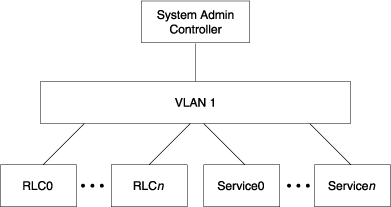
The head VLAN is VLAN 1. The head VLAN includes the system admin controller (SAC), all rack leader controllers (RLCs), and all service nodes. The head VLAN is always configured as untagged. Any untagged packets coming into a SAC, RLC, or service node port are associated with the head VLAN. In the cluster configuration tool's menus, the head VLAN appears as Head.
Figure B-3 shows the components that participate in the head network.
There is one rack VLAN for each rack in the system. The VLANs are numbered incrementally. The VLAN for rack 1 is 101. The VLAN for rack 2 is 102. The VLAN for rack 99 is 199. At the maximum, the VLAN number for rack 1000 is 1100. Figure B-4 shows the rack VLAN for an example rack.

The following system components reside on a rack VLAN:
Rack leader controllers (RLCs). Each RLC resides in both the head VLAN and on its own rack VLAN. The dual residence enables the RLCs to communicate with both the components in the head network and with the compute nodes in their rack.
The RLC's management-related IP address subnetworks are as follows:
One IP address on the head VLAN.
The following two IP addresses on the rack VLAN:
The BMC network IP address
The GBE network IP address
The RLC Ethernet interface is configured with VLAN tagging. VLAN tagging ties these networks to the rack VLAN.
Chassis management controllers (CMCs). Each CMC internal switch cascades down from the top level switch. The switch ports for all CMCs in a rack are configured to be on the rack VLAN. Each CMC connects to a port on a top level switch. The port is configured so that all traffic coming in and going to that port travels to the rack VLAN by default. The CMC gets its rack VLAN IP address using DHCP.
Compute nodes. The backplane connects the compute nodes to the cascaded CMC switch. The compute node's BMC has a shared Ethernet connection with the host interface. Both the compute node and BMC traffic are on the rack VLAN.
The compute nodes and baseboard management controllers (BMCs) reside on the same rack VLAN. The BMCs have a subnetwork that is separate from the host interfaces.
Figure B-5 shows VLAN 3, which is the VLAN that the MCell cooling system uses on SGI ICE X systems. This VLAN resides on your system only if you have MCells.
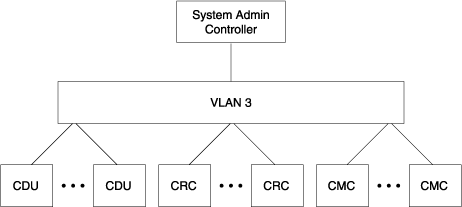
Table B-1 shows the system-wide SGI ICE X IP address ranges that the cluster management software uses. The following notes pertain to this table:
The Head_bmc network is a separate IP subnetwork.
The Mic0, Mic1, Mic2, and Mic3 subnetworks apply only to the service nodes on SGI ICE X systems that include Intel Many Integrated Core Architecture (Intel MIC Architecture) based products. For these processors, the IP address ranges for the Mic0, Mic1, Mic2, and Mic3 subnetworks intentionally overlap with the IP address range for the head network. If you change the default IP addressing scheme, make sure your new IP addresses also overlap.
Table B-1. System-wide IP Address Ranges for the Head Network
VLAN | Subnetwork Name | IP Range | Nodes |
|---|---|---|---|
1 | Head | 172.23.0.0/16 | SAC Service nodes RLCs |
1 | Head_bmc | 172.24.0.0/16 | SAC BMC Service BMCs RLC BMCs |
1 | Mic0 | 172.23.160.0 | Service nodes with MIC devices |
1 | Mic1 | 172.23.176.0 | Service nodes with MIC devices |
1 | Mic2 | 172.23.192.0 | Service nodes with MIC devices |
1 | Mic3 | 172.23.208.0 | Service nodes with MIC devices |
Table B-2 shows the per-rack IP address ranges that the cluster management software uses in the rack VLANs.
Table B-2. Per-rack IP Address Ranges for Cluster Management Software
Rack VLAN Name | Subnetwork Name | IP Range | Components |
|---|---|---|---|
101 | Gbe | 10.159.1.0/24 | Rack 1's RLC Rack 1's CMCs Rack 1's compute nodes |
101 | Bmc | 10.160.1.0/24 | Rack 1's RLC's BMC Rack 1's CMCs' BMC Rack 1's compute nodes' BMCs |
| Mic0-gbe | 10.157.1.0/24 |
|
| Mic1-gbe | 10.158.1.0/24 |
|
102 | Gbe | 10.159.2.0/24 | Rack 2's RLC Rack 2's CMCs Rack 2's compute nodes |
102 | Bmc | 10.160.2.0/24 | Rack 2's RLC's BMC Rack 2's CMCs' BMC Rack 2's compute nodes' BMCs |
| Mic0-gbe | 10.157.2.0/24 |
|
| Mic1-gbe | 10.158.2.0/24 |
|
X | Gbe | 10.159.X.0/24 | Rack X's RLC Rack X's CMCs Rack X's compute nodes |
X | Bmc | 10.160.X.0/24 | Rack X's RLC's BMC Rack X's CMCs' BMCs Rack X's compute nodes' BMCs |
|
Mic0-gbe | 10.157.X.0/24 |
|
|
Mic1-gbe | 10.158.X.0/24 |
|
Table B-3 shows the system-wide IP address ranges for cluster application software. Only the RLCs that provide InfiniBand subnetwork services need to connect.
Table B-3. Application Software System-wide IP Address Ranges
VLAN Name | Subnetwork Name | IP Range | Nodes |
|---|---|---|---|
IB0 | ib-0 | 10.148.0.0/16 | Service nodes Some RLCs Compute nodes |
IB1 | ib-0 | 10.149.0.0/16 | Service nodes Some RLCs Compute blades |
The Intel Xeon Phi Coprocessor is the brand name for all Intel Many Integrated Core Architecture (Intel MIC Architecture) based devices. If the compute nodes of your SGI ICE X system include MIC devices, then your system includes the additional networks upon which these MIC devices reside. The following topics explain these networks and describe how to troubleshoot an SGI ICE X system that includes MIC devices.
Figure B-6 shows the various subnetworks that exist on an SGI ICE X system M-Rack that contains compute nodes with MIC devices.

Figure B-7 shows the network interfaces that reside on the compute nodes of an SGI ICE X system with MIC devices.

The SGI ICE X commands enable you to run commands and perform some procedures on only one component or on a range of similar components. Addressing methods differ depending on the component, the VLAN (or VLANs) in which the component resides, and whether or not the component has an IP address that is externally available.
The topics that follow use the following terms:
Component. The name of the component that you typically use in speech or in writing. For example: SAC, RLC, and so on.
Node name. The system-wide unique identifier for the component.
Table B-4 explains how to specify components when you run administrative and user commands. x is always an integer number.
Component | Node name | Examples |
|---|---|---|
SAC | Site-defined hostname | icex1 mysiteicex sleet |
RLC | rxlead | r0lead, the RLC on the first rack r1lead, the RLC on the second rack |
RLC BMC | rxlead-bmc | r1lead-bmc, the BMC on the second rack |
Service node | servicex servicex-mic0 servicex-mic1 servicex-mic2 servicex-mic3 | service0, the first service node service3, the fourth service node |
Service node BMC | servicex -bmc | service1-bmc, the BMC on the second service node |
InfiniBand switch | ibswitch x-bmc | ibswitch1-bmc, the BMC on the second InfiniBand switch |
Compute node | rxi xnx rxixn x-eth rxi xnx-mic0 rxixn x-mic1 | r1i3n10, the compute node on the second rack, in the fourth IRU, in position 10 |
Compute node BMC | rxi xnx-bmc | r1i3n10-bmc, the BMC on the second rack, in the fourth IRU, in position 10 |
CMC | rxi xc | r1i1c, the CMC for the second rack, in the second IRU |
The system control network for an SGI ICE X system can be configured in one of the following ways:
A redundant management network configuration. This is the default. In a redundant management network configuration, the number of GigE switches in the system control network is doubled. A redundant management network also includes the following:
The GigE switches are stacked (using stacking cables).
The links from the CMCs are doubled.
Links from the SAC, RLCs, and most service nodes are doubled. BMC connections are not doubled. Certain failures can cause temporary inaccessibility to the BMCs, but the host interfaces remain accessible.
Figure B-8 shows the switches in a redundant management network configuration.
A nonredundant management network configuration. In the nonredundant configuration, a single GigE fabric has a single connection to the SAC, RLCs, and CMCs. Figure B-9 shows the switches in a nonredundant management network configuration.
Figure B-8 shows a redundant management network cascaded switch configuration.

Figure B-9 shows a nonredundant management network cascaded switch configuration.

For diagrams that show both redundant and nonredundant management network wiring, see the chassis manager interconnect diagrams in the SGI ICE X System Hardware User Guide.