This chapter provides an overview of the physical and architectural aspects of your Silicon Graphics Prism Extreme system. The major components of the system are described and illustrated.
The Silicon Graphics Prism Extreme system is a family of multiprocessor distributed shared memory (DSM) computer systems that scale from 8 to 128 Intel 64-bit processors as a cache-coherent single system image (SSI).
In a DSM system, each processor board contains memory that it shares with the other processors in the system. Because the DSM system is modular, it combines the advantages of low entry-level cost with global scalability in processors, memory, and I/O. You can install and operate the Silicon Graphics Prism Extreme system in a rack in your lab or server room. Each rack holds from 8 to 64 processors in 1 to 8 CR-bricks.
This chapter consists of the following sections:
Figure 3-1 shows a front view of a multiple-rack Silicon Graphics Prism Extreme system.

The CR-brick contains the processors (8 processors per CR-brick) and two internal high-speed routers (“R-bricks”). The routers connect to other system bricks via NUMAlink cables and expand the compute or memory capacity of the Silicon Graphics Prism system. The 40U rack in this server houses all bricks, drives, and other components—up to 40 processor and 8 graphics pipes in a single rack. The Silicon Graphics Prism system can expand up to 256 Intel Itanium 2 processors and 16 graphics pipes.
The system requires a minimum of one 40U rack with at least one power bay and one single-phase PDU per rack. (The single-phase PDU has two openings with three cables that extend from each opening to connect to the power bay. The three-phase PDU has two openings with six cables that extend from each opening to connect to two power bays.)
You can also add additional racks containing CR-bricks, I/O bricks, graphics modules, CPU expansion modules, and disk storage to your server system.
Figure 3-2 shows an example configuration of a 40-processor 8-pipe Silicon Graphics Prism system.

The Silicon Graphics Prism system is based on a distributed shared memory (DSM) architecture. Because it is modular, the DSM architecture combines the advantages of low entry cost with the ability to scale processors, memory, and I/O independently.
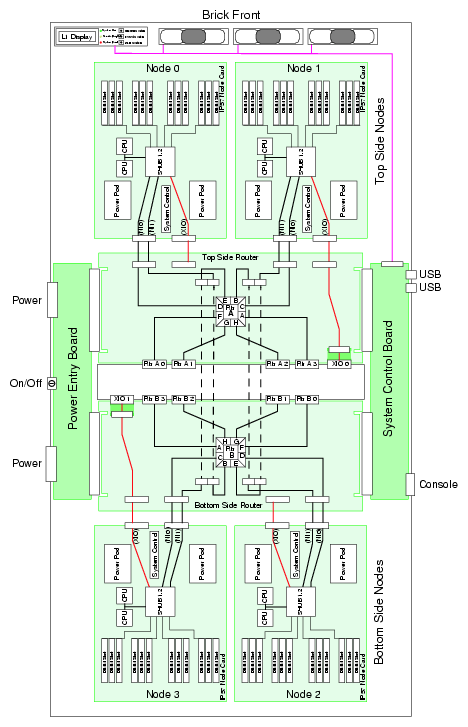
The system architecture for the Silicon Graphics Prism system is a fourth-generation NUMAflex DSM architecture known as NUMAlink-4. In the NUMAlink-4 architecture, all processors and memory are tied together into a single logical system with special crossbar switches (routers). This combination of processors, memory, and crossbar switches constitute the interconnect fabric called NUMAlink. There are two router switches in each CR-brick.
The basic building block for the NUMAlink interconnect is the CR-brick. A CR-brick contains up to four processor nodes; each processor node consists of a Super-Hub (SHub) ASIC and two 64-bit processors with three levels of on-chip secondary caches. The two Intel 64-bit processors are connected to the SHUB ASIC via a single high-speed front side bus.
The SHub ASIC is the heart of the CR-brick. This specialized ASIC acts as a crossbar between the processors, local SDRAM memory, the network interface, and the I/O interface. The SHub ASIC memory interface enables any processor in the system to access the memory of all processors in the system. Its I/O interface connects processors to system I/O, which allows every processor in a system direct access to every I/O slot in the system.
Another component of the NUMAlink-4 architecture is the router ASIC. The router ASIC is a custom designed 8-port crossbar ASIC in the CR-brick. Using the router ASICs with highly specialized NUMAlink-4 cables provides a high-bandwidth, extremely low-latency interconnect between all CR-bricks in the system. This interconnection can create a single contiguous system memory of up to 1.5 TB (terabytes) for a 128 processor system.
Figure 3-3 shows a functional block diagram of the Silicon Graphics Prism Extreme system CR-brick including nodes, routers, and other major components.
The main features of the Silicon Graphics Prism systems are introduced in the following sections:
The Silicon Graphics Prism systems are modular systems. The components are housed in building blocks referred to as bricks. You can add different brick types to a system to achieve the desired system configuration. You can easily configure systems around processing capability, I/O capability, memory size, or storage capacity. You place individual bricks that create the basic functionality (compute/memory, I/O, and power) into custom 19-inch racks. The air-cooled system has redundant, hot-swap fans at the brick level and redundant, hot-swap power supplies at the rack level.
In the Silicon Graphics Prism system memory is physically distributed among the CR-bricks (compute/router nodes) and the XG2N and Compute modules; however, it is accessible to and shared by all processors within the system, even those in different bricks/modules. A CR-brick with configured memory but zero processors is generally referred to as a “memory node” or M-brick.
Note the following types of memory:
If a processor accesses memory that is connected to the same SHUB ASIC on a compute node, the memory is referred to as the node's local memory.
If processors access memory located in other nodes, the memory is referred to as remote memory.
The total memory within the system is referred to as global memory.
Memory latency is the amount of time required for a processor to retrieve data from memory. Memory latency is lowest when a processor accesses local memory.
Like DSM, I/O devices are distributed among the compute nodes (each compute node has two I/O ports) and are accessible by all compute nodes through the NUMAlink interconnect fabric.
As the name implies, the cache-coherent non-uniform memory access (ccNUMA) architecture has two parts, cache coherency and nonuniform memory access, which are discussed in the sections that follow.
The Silicon Graphics Prism systems use caches to reduce memory latency. Although data exists in local or remote memory, copies of the data can exist in various processor caches throughout the system. Cache coherency keeps the cached copies consistent.
To keep the copies consistent, the ccNUMA architecture uses directory-based coherence protocol. In directory-based coherence protocol, each block of memory (128 bytes) has an entry in a table that is referred to as a directory. Like the blocks of memory that they represent, the directories are distributed among the compute nodes. A block of memory is also referred to as a cache line.
Each directory entry indicates the state of the memory block that it represents. For example, when the block is not cached, it is in an unowned state. When only one processor has a copy of the memory block, it is in an exclusive state. And when more than one processor has a copy of the block, it is in a shared state; a bit vector indicates which caches contain a copy.
When a processor modifies a block of data, the processors that have the same block of data in their caches must be notified of the modification. The Silicon Graphics Prism system uses an invalidation method to maintain cache coherence. The invalidation method purges all unmodified copies of the block of data, and the processor that wants to modify the block receives exclusive ownership of the block.
The Silicon Graphics Prism system components have the following features to increase the reliability, availability, and serviceability (RAS) of the systems.
Power and cooling:
Power supplies are redundant and can be hot-swapped.
Bricks have overcurrent protection.
Fans are redundant and can be hot-swapped.
Fans run at multiple speeds in all bricks except the optional R-brick. Speed increases automatically when temperature increases or when a single fan fails.
System monitoring:
System controllers monitor the internal power and temperature of the bricks, and automatically shut down bricks to prevent overheating.
Memory, L2 cache, L3 cache, and all external bus transfers are protected by single-bit error correction and double-bit error detection (SECDED).
The NUMAlink interconnect network is protected by cyclic redundancy check (CRC).
The L1 primary cache is protected by parity.
Each brick has failure LEDs that indicate the failed part; LEDs are readable via the system controllers.
Systems support the optional Embedded Support Partner (ESP), a tool that monitors the system; when a condition occurs that may cause a failure, ESP notifies the appropriate SGI personnel.
Systems support remote console and maintenance activities.
Power-on and boot:
Automatic testing occurs after you power on the system. (These power-on self-tests or POSTs are also referred to as power-on diagnostics or PODs).
Processors and memory are automatically de-allocated when a self-test failure occurs.
Boot times are minimized.
Further RAS features:
Systems support partitioning.
Systems have a local field-replaceable unit (FRU) analyzer.
All system faults are logged in files.
Memory can be scrubbed when a single-bit error occurs.
The Silicon Graphics Prism system features the following major components:
40U rack. This is a custom rack used for both the compute and I/O rack in the Silicon Graphics Prism system.
CR-brick. This contains the compute power, standard routers and DIMM memory for the Silicon Graphics Prism system. The CR-brick is 4U high and contains four Super-Hub (SHUB) ASICs, eight Intel Intanium 2 processors, eight NUMAlink-4 router ports, and up to 48 memory DIMMs.
IX-brick. This 4U-high brick provides the boot I/O functions and 12 PCI-X slots.
PX-brick. This 4U-high brick provides 12 PCI-X slots on 6 buses for PCI expansion.
R-brick. This is a 2U-high, 8-port router brick.
XG2N module. This is a 2U-high module containing processors, memory, and 2 graphics pipes.
CPU Expansion module. This is a 2U-high module containing processors and memory (it is very much like the XG2N module, but does not contain graphics pipes).
Power bay. The 3U-high power bay holds a maximum of six power supplies that convert 200-240 VAC to 48 VDC. The power bay has eight 48-VDC outputs.
D-brick2. This is a 3U-high disk storage enclosure that holds a maximum of 16 low-profile Fibre Channel disk drives.
TP900 disk storage module. This is a 2U-high disk storage enclosure that holds a maximum of eight low-profile Ultra320 SCSI disk drives.
SGIconsole. This is an optional combination of hardware and software that allows you to manage multiple SGI servers.
Figure 3-4 shows the Silicon Graphics Prism system components.
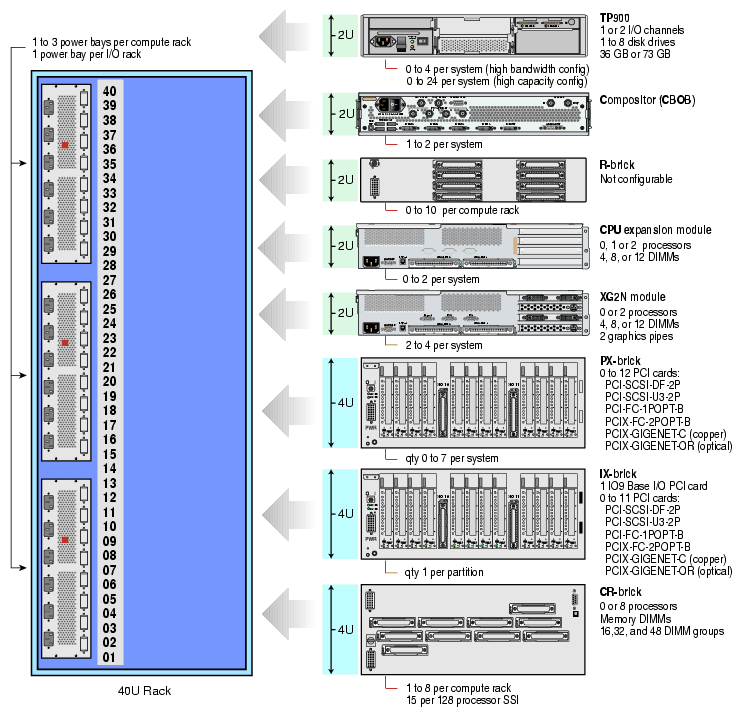
Bays in the racks are numbered using standard units. A standard unit (SU) or unit (U) is equal to 1.75 inches (4.445 cm). Because bricks occupy multiple standard units, brick locations within a rack are identified by the bottom unit (U) in which the brick resides. For example, in the 40U rack, a CR-brick positioned in U05, U06, and U07 is identified as being in U05.
A rack is numbered with a three-digit number. Compute racks are numbered sequentially beginning with 001. A compute rack is a rack that contains CR-bricks. I/O racks are numbered sequentially and by the physical quadrant in which the I/O rack resides. In a single compute rack system, the rack number is always 001.
The Silicon Graphics Prism system has the following external storage options:
Host bus adapter interfaces (HBA)
2Gbit Fibre Channel, 200MB/s peak bandwidth
Ultra320 SCSI, 320 MB/s peak bandwidth
Gigabit Ethernet copper and optical
10-Gigabit Ethernet PCI-X
JBOD (just a bunch of disks)
SGI TP900 Ultra320 SCSI
RAID
SGI TP9300, TP9300S, TP9500 or TP9500S, 2 Gbit Fibre Channel
D-brick2, 2 Gbit Fibre Channel
Data servers
SGI InfiniteStorage NAS 2000 Fileserver
SGI SAN Server 2000/San Gateway
Tape libraries
STK L20, L40, L80, L180, and L700
ADIC Scalar 100, Scalar 1000, Scalar 10000, and ADIC Scalar i2000
Tape drives
STK 9840B, 9940B, LTO, SDLT, and DLT
Availability of optional components for the Silicon Graphics Prism systems may vary based on new product introductions or end-of-life components. Check with your SGI sales or support representative for the most current information on available product options.