This chapter discusses the following enhanced XFS extensions:
The agskip mount option influences the allocation group (AG) selected as a starting point for the allocation of user data for a file. It has the opposite effect of the rotorstep system tunable parameter (see “rotorstep” in Appendix A).
Using agskip=agskipvalue causes the start of user data for a file to be placed in the AG initialAG+agskipvalue, where initialAG is the AG used for the previously created new file; when using the ibound mount option, this AG will always be within the user-extents region (see “ibound Mount Option for SSD Media”).
For example, agskip=3 means the start of user data for each new file thereafter will be allocated three AGs away from the AG used for the most recently created file.
Use the following formula to determine an appropriate agskipvalue:
(number_of AGs / number_of_concats) + 1 = agskipvalue |
For example, if you have six AGs and two concats, you would use a value of 4:
(6/2) + 1 = 4 |
 | Note: The agskip mount option disables the rotorstep system tunable parameter. |
This section discusses the following:
The purpose of the ibound mount option is to specify the location of the metadata region , which contains metadata operations for extended attributes, directory entries, and inodes. The remainder of the filesystem is known as the user-extents region.
If you first create a filesystem on a volume that concatenates a slice of solid-state drive (SSD) media with rotating hard-disk drive (HDD) media, you can then use the ibound mount option to restrict metadata to the SSD media at the beginning of that filesystem. The result will be operations that take place on media with the appropriate characteristics:
Small latency-sensitive metadata operations in the metadata region on fast SSD media
Large bandwidth-demanding and capacity-intensive user data operations in the user-extents region on HDD media
The ibound mount option is available for enhanced XFS filesystems of any size. There must be at least as many AGs in the user-extents region as in the metadata region (for practical purposes, you will normally want more AGs in the user-extents region). If this requirement is not met, the option is ignored. See “When ibound is Ignored”.
There should be at least 8 AGs in the metadata region on the SSD. For example, to create 8 AGs, you would set the AG size using the mkfs.xfs agsize option so that it is 1/8 the size of the SSD.
| Note: The configuration rules for filesystems using ibound may result in an XFS filesystem with thousands of AGs. With this many AGs, XFS will consume more CPU resources searching for free space in a nearly full filesystem. For best performance, ensure that the filesystem is less than ~90% full as reported by the df(1) command. |
To maximize performance of the filesystem with an SSD drive, you should use an external log. You can use a partition of the SSD media or separate HDD media.
The ibound mount option specifies the highest physical disk block address where metadata should be stored.
| Note: The argument you supply to ibound is the address of the physical disk block, not the filesystem block. |
This value is then rounded up to the end of the AG that holds the specified block. Ideally, the address that you specify will be at the end of the AG, and that AG will consist of SSD disk. The resulting region, from the beginning of the first AG (that is, block 0 of AG0) through end of the AG that contains the specified physical address, is the metadata region. The remainder of the filesystem is the user-extents region.
When using ibound, space allocation is made in separate regions according to data type:
Metadata is allocated to an AG within the metadata region
User data for a file is allocated to AGs within the user-extents region
XFS will use as many AGs within the user-extents region as required to contain the user data for a file. By default, it will start the user-data allocation at a specific AG, if that AG is available. If the desired AG has become too full or fragmented, the next AG will be used in order, wrapping around to the first AG in the user-extents region.
The specific AG that XFS selects for the beginning of user data for a file is calculated based upon the AG used for the corresponding inodes:
For inodes located in AG0 (the first AG in the metadata region), XFS will attempt to begin to allocate space starting in the first AG of the user-extents region
For inodes allocated in successive AGs within the metadata region, XFS will attempt to begin to allocate space in proportionally indexed AGs within the user-extents region
For example, Figure 7-1 shows a conceptual diagram using a value of ibound=15022944, which is located in AG7 (for best performance, the value should represent the final physical block in the AG). This designates that the metadata region is AG0 through AG7.
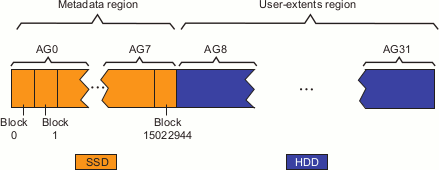
| Note: The metadata region always consists of complete AGs. If you specify a value that is not the final block, the metadata region end-point will be rounded up to the final block of the AG. |
In this case, the filesystem has 8 AGs in the metadata region ( AG0-AG7) and 24 AGs in the user-extents region (AG8-AG31). For each AG within the metadata region, Table 7-1 shows the default selection preference for the corresponding user-extents region. Figure 7-2 represents this graphically.
Table 7-1. Default Proportional Indexing of AGs in the User-Extents Region
Metadata Region | User-Extents Region |
|---|---|
AG Containing the Inode | Preferred AG Where User Data Allocation Begins |
AG0 | AG8 |
AG1 | AG11 |
AG2 | AG14 |
AG3 | AG17 |
AG4 | AG20 |
AG5 | AG23 |
AG6 | AG26 |
AG7 | AG29 |
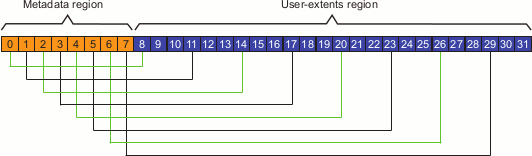
For example, using the above situation, suppose the inode for file myfile is located in AG1. XFS would therefore by default prefer to start allocating user-extents for the file in AG11; however, if AG11 is busy, XFS will start allocation of space at AG12, allocating space in as many AGs as necessary. When XFS reaches the end of the user-extent region at AG31, it will wrap around to the beginning of the user-extent region at AG8.
To override the default ibound extent allocation policy, see “agskip Mount Option for Allocation Group Specification ”.
| Note: If agskip is specified, its value is used instead of the default proportional indexing. For example, if you specified agskip=2 for the above situation, the start of user data for the first new file written will be in AG8 because it is the first AG in the user-extents area and the start of user data for the second new file written will be in AG10. |
To determine the required SSD size, multiply the number of inodes by the inode size and add some overhead space for other metadata, such as file names and extended attributes:
(number_of_inodes X inode_size) + overhead = SSD_size |
The size of other metadata is highly variable and depends heavily upon how the filesystem is used. If there are large extended attributes in the filesystem or if there are long filenames, more overhead space will be required.
Questions to consider:
What is the typical size of a filename? Include in the overhead the average filename length times the number of inodes.
What is the typical size of a directory name? Include in the overhead the average directory name length times the number of directories.
What percentage of the inodes will be directories? Include in the overhead 4096 bytes for each directory with a minimum of 32 bytes times the total number of inodes.
What is the size and number of extended attributes? Include in the overhead the number of extended attributes times the average extended-attribute size.
To use ibound, do the following:
Configure the filesystem so that the metadata area to be effectively described by ibound is on very fast disk that is at the beginning of the volume. SSD media is ideal.
Use an external XFS log on very fast disk. SSD media is ideal.
Set the AG size using the mkfs.xfs agsize option so that it is 1/8 the size of the SSD (meaning that 8 AGs can span the SSD).
Mount the filesystem using the -o ibound=physicalblock option, where physicalblock is the physical disk block at the end of AG7. This will establish the metadata region as the physical disk blocks within AG0 through AG7.
Note: If you specify a block that is not at the end of the AG, the value will be rounded up to the end of the AG that contains the specified value. Verify that the mount was successful by examining the XFS kernel messages.
If there are more AGs in the metadata region than in the user-extents region, then the ibound option will be ignored. In this case, one of the following will occur:
If the filesystem size permits more than 2 32 inodes, then inode32 behavior will be used. Inodes will be limited to 32 bits of significance. Data and inodes may be separated, and may be placed anywhere within the filesystem.
If the filesystem size does not permit 2 32 inodes, then inode64 behavior will be used. The inode count will be limited by the number of inodes that the filesystem can hold (the default inode size is 256 bytes.) Metadata and user data may be allocated anywhere within the filesystem, without regard to disk type. You can explicitly impose this behavior with the inode64 mount option if you do not specify the ibound option.
Note: The ibound and inode64 mount options are mutually exclusive. If you issue both options, an error will be logged.
This section discusses the following:
When the ibound mount option is used successfully, the XFS kernel module will log an INFO message, indicating the maximum possible inode identification number that results given the effective metadata region. ().
| Note: This number is the inode identification number, not the count of inodes. |
XFS: filesystem filesystem_name maximum new inode number is new_inode_ID_number |
The new_inode_ID_number value may be used by SGI Support during troubleshooting to verify that inodes are in the correct area of the filesystem. This new maximum inode identification number is not reflected in the xvm show output and is not the same as the value that you specify for the ibound mount option.
If the ibound value that you specify points to a block that does not allow for a sufficient number of inodes, the XFS kernel module will log a WARN message to indicate that it will instead use an appropriate value. For example:
XFS: filesystem filesystem_name ibound is too small, using new_inode_ID_number |
If there are insufficient AGs in the user-extents area, the XFS kernel module will log a WARN message, indicating that it is reverting to either inode32 or inode64 behavior, as appropriate for the filesystem size. For example:
XFS: filesystem filesystem_name ibound is too small, using inode32|inode64 |
If the filesystem grows so that there are sufficient AGs in the user-extents area, then ibound will be reinstated and the following message will be logged:
XFS: filesystem filesystem_name maximum new inode number is new_inode_ID_number |
This section discusses the following:
This example describes how to create an XVM volume using both SSD and HDD so that the SSD is used for storing as many inodes as possible. The volume is constructed so that the first 8 allocation groups (AGs) and external log are placed on the SSD. The external log is the maximum size of 1 GiB. The remainder of the volume is a two-disk stripe.
Partition the SSD disk and HDD disks similarly, using a GPT label and primary partition that starts at MB 34:
SSD disk sdb:
cxfsxe4:~ # parted /dev/sdb
GNU Parted 2.3
Using /dev/sdb
Welcome to GNU Parted! Type 'help' to view a list of commands.
(parted) mklabel gpt
Warning: The existing disk label on /dev/sdb will be destroyed and all data on
this disk will be lost. Do you want to continue?
Yes/No? yes
(parted) unit s
(parted) mkpart primary xfs 34 -34
Warning: The resulting partition is not properly aligned for best performance.
Ignore/Cancel? ignore
(parted) quit
Information: You may need to update /etc/fstab.
HDD disks sdc and sdd:
cxfsxe4:~ # parted /dev/sdc
GNU Parted 2.3
Using /dev/sdc
Welcome to GNU Parted! Type 'help' to view a list of commands.
(parted) mklabel gpt
Warning: The existing disk label on /dev/sdc will be destroyed and all data on
this disk will be lost. Do you want to continue?
Yes/No? yes
(parted) unit s
(parted) mkpart primary xfs 34 -34
Warning: The resulting partition is not properly aligned for best performance.
Ignore/Cancel? ignore
(parted) quit
Information: You may need to update /etc/fstab.

cxfsxe4:~ # parted /dev/sdd
GNU Parted 2.3
Using /dev/sdd
Welcome to GNU Parted! Type 'help' to view a list of commands.
(parted) mklabel gpt
Warning: The existing disk label on /dev/sdd will be destroyed and all data on
this disk will be lost. Do you want to continue?
Yes/No? yes
(parted) unit s
(parted) mkpart primary xfs 34 -34
Warning: The resulting partition is not properly aligned for best performance.
Ignore/Cancel? ignore
(parted) quit
Information: You may need to update /etc/fstab.
Use the xvm command to show the unlabeled devices:
cxfsxe4:~ # xvm
xvm:local> show unlabeled
unlabeled/dev/pm/ATA-HDT722525DLA380---VDS41LT8CAA9RH          * *
unlabeled/dev/pm/ATA-INTEL_SSDSA2M080---CVPO006500CD080BGN          * *
unlabeled/dev/pm/ATA-ST3500631NS---9QG4F29A          * *
unlabeled/dev/pm/ATA-ST3500841AS---3PM1TSNN          * *
Assign the disks to XVM by using the xvm label command:
xvm:local> label -name ssd0 unlabeled/dev/pm/ATA-INTEL_SSDSA2M080---CVPO006500CD080BGN
ssd0
xvm:local> label -name disk0 unlabeled/dev/pm/ATA-ST3500631NS---9QG4F29A
disk0
xvm:local> label -name disk1 unlabeled/dev/pm/ATA-ST3500841AS---3PM1TSNN
disk1
Construct a volume named hybridvol with a data subvolume that is a concatenation of SSD and HDD media and an external log subvolume:
xvm:local> slice -length 262144 phys/ssd0
</dev/lxvm/ssd0s0>  slice/ssd0s0
xvm:local> slice -start 262144 phys/ssd0
</dev/lxvm/ssd0s1>  slice/ssd0s1
xvm:local> slice -all phys/disk0
</dev/lxvm/disk0s0>  slice/disk0s0
xvm:local> slice -all phys/disk1
</dev/lxvm/disk1s0>  slice/disk1s0
xvm:local> subvolume -volname ssdlog -type log slice/ssd0s0
</dev/lxvm/ssdlog,log>  subvol/ssdlog/log
xvm:local> stripe -volname diskstripe -vename diskstripe slice/disk0s0 slice/disk1s0
</dev/lxvm/diskstripe>  stripe/diskstripe
xvm:local> concat -volname hybridvol -vename hybridconcat slice/ssd0s1 stripe/diskstripe
</dev/lxvm/hybridvol>  concat/hybridconcat
xvm:local> attach subvol/ssdlog/log vol/hybridvol
vol/hybridvol
xvm:local> delete -all vol/ssdlog
xvm:local> delete -all vol/diskstripe
xvm:local> show -top vol/hybridvol
vol/hybridvol                     0 online,accessible
    subvol/hybridvol/data    2109536416 online,accessible
        concat/hybridconcat      2109536416 online,accessible
            slice/ssd0s1              156022944 online,accessible
            stripe/diskstripe        1953513472 online,accessible
                slice/disk0s0             976756768 online,accessible
                slice/disk0s0             976756768 online,accessible
                slice/disk1s0             976756768 online,accessible
    subvol/hybridvol/log         262144 online,accessible
        slice/ssd0s0

xvm:local> quit
The above shows that the SSD slice is 156022944 sectors.
For more information about the xvm commands shown, see XVM Volume Manager Administrator Guide or the xvm(8) man page.
Determine the appropriate AG sector size for the SSD slice to be supplied to the mkfs.xfs(8) command, which must be a multiple of 8 (because there are eight sectors in a filesystem block):
Divide the size of slice/ssd0s1 (which is 156022944) by the number of allocation groups (8 in this case) and truncate the result to an integer value (resulting in 19502868 ).
Divide the result of step 5a by 8 (eight sectors per block) and truncate the result to an integer (resulting in 2437858).
Multiply the result of step 5b by 8, resulting in 19502864. This is the agsize value to be used in step 6 and step 7.
Make the filesystem, specifying the largest disk address (sector) allowed to be used for storing an inode (19502864 in this case, as determined in step 5c) for the agsize value:
cxfsxe4:~ # mkfs.xfs -f -d agsize=19502864s -l logdev=/dev/lxvm/hybridvol_log -l size=128m /dev/lxvm/hybridvol
warning: unable to probe device topology for device /dev/lxvm/hybridvol
meta-data=/dev/lxvm/hybridvol    isize=256    agcount=109, agsize=2437858 blks
         =                       sectsz=512   attr=2, projid32bit=0
data     =                       bsize=4096   blocks=263692052, imaxpct=25
         =                       sunit=0      swidth=0 blks
naming   =version 2              bsize=4096   ascii-ci=0
log      =/dev/lxvm/hybridvol_log bsize=4096   blocks=32768, version=2
         =                       sectsz=512   sunit=0 blks, lazy-count=1
realtime =none                   extsz=4096   blocks=0, rtextents=0
Mount the filesystem, supplying the size of slice/ssd0s1 (which is 156022944 ) for the ibound mount option:
cxfsxe4:~ # mount -o ibound=156022944,logdev=/dev/lxvm/hybridvol_log /dev/lxvm/hybridvol /mnt
Display the kernel messages to verify that the filesystem was correctly mounted with the ibound option, as described in “Message Indicating a Successful Mount with ibound”. For example:
cxfsxe4:~ # dmesg | grep XFS
XFS (xvm-46): XFS: filesystem xvm-46 maximum new inode number is 508767775
XFS (xvm-46): Mounting Filesystem
XFS (xvm-46): Ending clean mount
(In the case of error messages, see “ibound and Kernel Messages”.)
If you use a value for ibound that is smaller than the size of the first AG, the filesystem will determine an appropriate value to use instead. To illustrate this, carrying on from the example in “Example of Successfully Maximizing SSD Storage of Inodes for an SSD/HDD Filesystem”:
Unmount the filesystem:
cxfsxe4:~ # umount /mnt
Mount the filesystem with an ibound value that is obviously too small, such as 1:
cxfsxe4:~ # mount -o ibound=1,logdev=/dev/lxvm/hybridvol_log /dev/lxvm/hybridvol /mnt
Display the kernel messages to determine if the filesystem was correctly mounted with the ibound option. In this case, the output shows that the improper value specified in the previous step is overridden with an appropriate value:
 cxfsxe4:~ # dmesg | grep XFS
XFS (xvm-46): XFS: filesystem xvm-46 ibound is too small, using 19502856
XFS (xvm-46): XFS: filesystem xvm-46 maximum new inode number is 39005727
XFS (xvm-46): Mounting Filesystem
XFS (xvm-46): Ending clean mount
If there are more AGs in the metadata region than in the user-extents region, the ibound option will be ignored. To illustrate this, carrying on from the previous example that has an AG count of 109:
Unmount the filesystem:
cxfsxe4:~ # umount /mnt
Mount the filesystem with an ibound value that specifies a block within AG55 (which would result in 54 AGs in the metadata region and 55 AGs in the user-extents region, given a total of 109 AGs):
cxfsxe4:~ # mount -o ibound=1072657520,logdev=/dev/lxvm/hybridvol_log /dev/lxvm/hybridvol /mnt
Display the kernel messages to determine if the filesystem was correctly mounted with the ibound option. In this case, the output shows that the ibound option has been ignored, and inode32 behavior will be used instead:
cxfsxe4:~ # dmesg | grep XFS
XFS (xvm-46): filesystem xvm-46 ibound is too small, using inode32
XFS (xvm-46): Mounting Filesystem
XFS (xvm-46): Ending clean mount