This chapter includes the following topics:
You can use the Intelligent Platform Management Interface (IPMI) protocol to manage a system from a remote console over a network connection. You can access the IPMI v1.5/v2.0 interface through the ipmitool(1) command, which is an open-source command line tool. IPMI management software is included in most Linux distributions and in IPMI-compliant management applications. For more information about the ipmitool command, see the following:
http://ipmitool.sourceforge.net/
This chapter explains the remote management commands and uses the following terminology:
The term SGI UV 3000 system or SGI UV 300 system includes the server, the rack management controller (RMC), and the baseboard management controllers (BMCs). In addition, an SGI UV 3000 system also includes chassis managment controllers (CMCs.)
The term SGI UV 3000 server or SGI UV 300 server refers only to the server component of the system. The server is enclosed within each chassis. The RMC, the BMCs, and the CMCs are not part of the server itself.
The following figures show the network topology for the RMC management network and the relationships between the major components:
Figure 3-1 shows an SGI UV 3000 system.
Figure 3-2 shows an the SGI UV 300 system or an SGI UV for SAP HANA appliance.
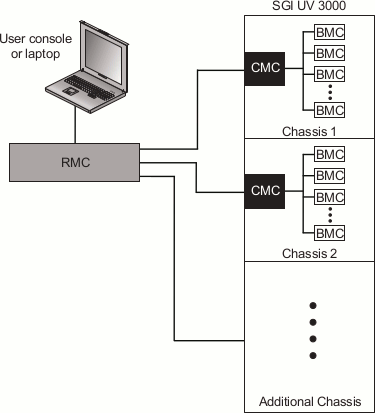
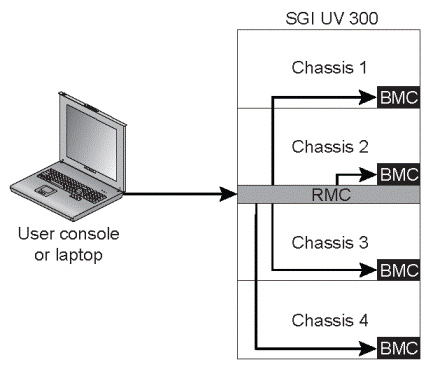
As Figure 3-1 and Figure 3-2 show, the SGI UV 3000 and SGI UV 300 systems each have a hierarchical system controller network. Because of this hierarchy, you cannot use ipmitool commands to access the baseboard management controllers (BMCs) and chassis management controllers (CMCs) directly.
From a remote console, you can issue ipmitool commands over the network to the RMC. The remote console needs to be on the same local network as the RMC, and you need to use the ssh command to gain access to the RMC.
The SGI UV chassis CMCs and BMCs are not exposed directly to the network. If you are logged into a remote system and you want to run a command on a BMC or an RMC, you have to connect to the RMC first. The procedures in this topic show how to run ipmitool commands on the RMC, BMC, and CMC components of SGI UV 3000 systems and SGI UV 300 systems. These procedures use an SGI wrapper script that makes it easier to target a specific component, all BMCs, or all CMCs in a system.
The following procedures explain how to use the ipmitool commands:
This manual explains the ipmitool commands that SGI supports.
For more information, see the ipmitool(1) man page on the SGI UV server.
The RMC supports a limited set of ipmitool commands that you can use to power up the RMC, power down the RMC, or obtain RMC status information. When you run an ipmitool command on the RMC, it returns information about the RMC only.
The following procedure explains how to run an ipmitool command to the RMC of an SGI UV 3000 system or an SGI UV 300 system.
Procedure 3-1. To run an ipmitool command on an RMC
From a remote host, type the following command:
remotehost% ipmitool -I lanplus -H host -U ADMIN -P pwd cmd
The variables in this command are as follows:
host The hostname (preferred) or IP address of the RMC.
For example: uv1-rmc.
pwd The authentication password.
The default password is ADMIN. If you changed the ipmitool command's password, specify your site-defined new password.
For information about how to change the ipmitool command's password, see the following:
“Changing the Factory Default ipmitool Command Password” in Chapter 1
cmd One of the ipmitool commands.
The following procedure explains how to log into an RMC and then target an ipmitool command to one CMC of an SGI UV 3000 system.
Procedure 3-2. To run an ipmitool command on one CMC
Type the ssh(1) command in the following format to log into the RMC:
remotehost% ssh root@host
For host, specify the hostname (preferred) or IP address of the RMC.
For example:
remotehost% ssh root@uv1-rmc
Type the RMC password when prompted.
Type the following SGI wrapper command to target the CMC:
RMC> cmc exec "ipmi cmd" cmc_id
The variables in this command are as follows:
cmd One of the ipmitool commands.
cmc_id The ID of a specific CMC.
The following procedure explains how log into an RMC and then target an ipmitool command to all CMCs of an SGI UV 3000 system.
Procedure 3-3. To run an ipmitool command on all CMCs
Type the ssh(1) command in the following format to log into the RMC:
remotehost% ssh root@host
For host, specify the hostname (preferred) or IP address of the RMC.
For example:
remotehost% ssh root@uv1-rmc
Type the RMC password when prompted.
Type the following SGI wrapper command to target all the CMCs:
RMC> cmc ipmi cmd
For cmd, specify one of the ipmitool commands.
The following procedure explains how to log into an RMC and then target an ipmitool command to one BMC.
Procedure 3-4. To run an ipmitool command on one BMC
Type the ssh(1) command in the following format to log into the RMC:
remotehost% ssh root@host
For host, specify the hostname (preferred) or IP address of the RMC.
For example:
remotehost% ssh root@uv1-rmc
Type the RMC password when prompted.
Type the following SGI wrapper command to target the BMC:
RMC> bmc exec "ipmi cmd" bmc_id
The variables in this command are as follows:
cmd One of the ipmitool commands.
bmc_id The ID of a specific BMC.
The following procedure explains how to log into an RMC and then target an ipmitool command to all BMCs.
Procedure 3-5. To run an ipmitool command on all BMCs
Type the ssh(1) command in the following format to log into the RMC:
remotehost% ssh root@host
For host, specify the hostname (preferred) or IP address of the RMC.
For example:
remotehost% ssh root@uv1-rmc
Type the RMC password when prompted.
Type the following SGI wrapper command to target the BMCs:
RMC> bmc ipmi cmd
For cmd, specify one of the ipmitool commands.
Assume the following:
You are logged into a Linux computer as a regular user, not the root user.
The hostname of the SGI UV system's RMC is uv1-rmc .
The SGI UV chassis BMC IDs are r001i01b, r001i06b, r001i11b, and r001i02b .
Example 1. Type the following command to obtain information about the power status on the RMC:
% ipmitool -I lanplus -H uv1-rmc -U ADMIN -P ADMIN power status Chassis Power is on |
Example 2. Type the following commands to obtain information about the power status on SGI UV chassis BMC r001i01b:
% ssh root@uv1-rmc root@uv1-rmc's password:###### % bmc exec "ipmi power status" r1i1b Chassis Power is on |
In this example, the user supplied the root user's password for the RMC when prompted.
 | Note: The SGI documentation shows ipmitool command output. However, depending on the revision level of the ipmitool command you use on your remote console, the command output you see at your site can differ from the output shown in the documentation. |
The following list shows the ipmitool commands that SGI supports on the RMC:
chassis power. This command powers on the server or powers off the server.
For more information, see the following:
fru list. This command lists data pertaining to field-replaceable units (FRUs).
For more information, see the following:
lan print 1. This command lists the LAN configuration.
For more information, see the following:
sdr list. This command retrieves information about environmental sensors.
For more information, see the following:
sel list. This command retrieves information about the system event log (SEL).
For more information, see the following:
sol activate. This command lets you access the server console of an unpartitioned system. You cannot access the server console if the SGI UV system is partitioned.
For more information, see the following:
For more information about these commands, see the ipmitool(1) man page on your SGI UV server.
The RMC itself has no power on or power off capability. The RMC is always on if the SGI UV server is connected to a power source. Likewise, the BMCs for each chassis are always on when the SGI UV server is connected to a power source. To power on and power off the SGI UV server, you need to issue power on and power off commands through the RMC.
The following topics explain the ipmitool power commands:
The following command sends power control requests to the SGI UV system:
% ipmitool -I lanplus -H host -U ADMIN -P ADMIN chassis power action |
For host, specify the hostname (preferred) or IP address of the RMC.
For action, specify on, off, cycle, or reset.
If you want to watch the server boot process, use the ipmitool sol activate command to open up a serial console. For information about the sol activate command, see the following:
| Note: The ipmitool power command in this topic
addresses the entire SGI UV server, not any of the individual chassis.
SGI recommends that you do not attempt to issue power commands to any
of the individual SGI UV chassis.
The RMC power command is an alternative to the ipmitool power command. For more information about the RMC power command, see the following: “power” in Chapter 4 |
The following command sends a non-maskable interrupt (NMI) signal to the SGI UV system, which responds by writing a system crash dump:
# ipmitool -I lanplus -H host -U ADMIN -P ADMIN chassis power diag |
For host, specify the hostname (preferred) or IP address of the RMC.
For more information about how to create crash dump files, see the SGI UV System Software Installation and Configuration Guide.
The fru list command lists information about each FRU.
Example 1. The following command lists FRUs for an SGI UV 300 RMC:
# ipmitool -I lanplus -H uv1-rmc -U ADMIN -P ADMIN fru list FRU Device Description : Builtin FRU Device (ID 0) Board Mfg Date : Mon Oct 6 08:29:00 2014 Board Mfg : BENCHMARK Board Product : UV3_RMC Board Serial : RXE968 Board Part Number : 030_2940_002 Board Extra : _A01 Board Extra : 00004a87 Board Extra : 00000002 Board Extra : 00000e46 |
Example 2. The following commands list FRUs for a specific SGI UV 300 chassis BMC:
# ssh root@uv1-rmc root@uv1-rmc's password: ##### # bmc exec "ipmi fru list" r1i1b FRU Device Description : Builtin FRU Device (ID 0) Board Mfg Date : Tue May 27 05:21:00 2014 Board Mfg : BENCHMARK Board Product : IP127_EX_4_SKT Board Serial : RWN463 Board Part Number : 030_2926_001 Board Extra : _A05 Board Extra : 00001369 Board Extra : 00000002 Board Extra : 00000448 FRU Device Description : SH775 Board Mfg Date : Tue May 27 05:21:00 2014 Board Mfg : BENCHMARK Board Product : IP127_EX_4_SKT Board Serial : RWN463 Board Part Number : 030_2926_001 Board Extra : _A05 Board Extra : 00001369 Board Extra : 00000002 Board Extra : 00000448 |
The lan print 1 command lists the LAN configuration.
Example 1. The following command lists the LAN configuration for the RMC:
# ipmitool -I lanplus -H uv1-rmc -U ADMIN -P ADMIN lan print 1
Set in Progress         : Set Complete
Auth Type Support       : NONE MD2 MD5 PASSWORD
Auth Type Enable        : Callback :
                        : User     : MD5
                        : Operator : MD5
                        : Admin    : MD5
                        : OEM      : MD5
IP Address Source       : Static Address
IP Address              : 192.168.1.22
Subnet Mask             : 255.255.255.0
MAC Address             : 00:00:00:00:00:00
SNMP Community String   : sgi
IP Header               : TTL=0x40 Flags=0x40 Precedence=0x00 TOS=0x10
BMC ARP Control         : ARP Responses Enabled, Gratuitous ARP Disabled
Gratituous ARP Intrvl   : 2.0 seconds
Default Gateway IP      : 0.0.0.0
Default Gateway MAC     : 00:00:00:00:00:00
Backup Gateway IP       : 0.0.0.0
Backup Gateway MAC      : 00:00:00:00:00:00
RMCP+ Cipher Suites     : 0,1,2,3,6,7,8,11,12
Cipher Suite Priv Max   : XuuOXXuuOXXuOXX
                        :     X=Cipher Suite Unused
                        :     c=CALLBACK
                        :     u=USER
                        :     o=OPERATOR
                        :     a=ADMIN
: O=OEM |
Example 2. The following commands list the current configuration for a specific SGI UV chassis BMC:
% ssh root@uv1-rmc
root@uv1-rmc's password: #####
# bmc exec "ipmi lan print 1" r1i1b
Set in Progress         : Set Complete
Auth Type Support       : NONE MD2 MD5 PASSWORD OEM
Auth Type Enable        : Callback : NONE MD2 MD5 PASSWORD OEM
                        : User     : NONE MD2 MD5 PASSWORD OEM
                        : Operator : NONE MD2 MD5 PASSWORD OEM
                        : Admin    : NONE MD2 MD5 PASSWORD OEM
                        : OEM      :
IP Address Source       : Static Address
IP Address              : 172.30.50.100
Subnet Mask             : 255.255.255.0
MAC Address             : 08:00:69:17:00:b4
SNMP Community String   : sgi
IP Header               : TTL=0x40 Flags=0x40 Precedence=0x00 TOS=0x10
BMC ARP Control         : ARP Responses Enabled, Gratuitous ARP Disabled
Gratituous ARP Intrvl   : 0.0 seconds
Default Gateway IP      : 0.0.0.0
Default Gateway MAC     : 00:00:00:00:00:00
Backup Gateway IP       : 0.0.0.0
Backup Gateway MAC      : 00:00:00:00:00:00
802.1q VLAN ID          : Disabled
802.1q VLAN Priority    : 0
RMCP+ Cipher Suites     : 0,1,2,3,6,7,8,11,12
Cipher Suite Priv Max   : XaaaXXaaaXXaaXX
                        :     X=Cipher Suite Unused
                        :     c=CALLBACK
                        :     u=USER
                        :     o=OPERATOR
                        :     a=ADMIN
: O=OEM |
The sdr list command retrieves a list of the system's environmental sensors and shows their values.
Example 1. The following command targets the RMC:
% ipmitool -I lanplus -H uv1-rmc -U ADMIN -P ADMIN sdr list RMC Inlet | 23 degrees C | ok RMC Exhst | 24 degrees C | ok RMC PSOC Temp | 23 degrees C | ok RMC PSOC 3.3v | 3.33 Volts | ok RMC 12v | 12.08 Volts | ok RMC 3.3v Aux | 3.33 Volts | ok RMC 2.5v | 2.47 Volts | ok RMC 1.5v | 1.49 Volts | ok RMC 1.2v | 1.19 Volts | ok RMC 1.0v | 1.00 Volts | ok RMC 0.75v | 0.76 Volts | ok Pwr Good | 0x00 | ok Pwr Sply Fault | 0x00 | ok Pwr Redund OK | 0x00 | ok Stacking Pres | 0x00 | ok PS0 VOUT | 11.92 Volts | ok PS0 IOUT | 0.41 Amps | ok PS0 Temp1 | 20 degrees C | ok PS0 Temp2 | 23 degrees C | ok PS0 Fan1 | 10858 RPM | ok PS1 VOUT | 12.05 Volts | ok PS1 IOUT | 0.69 Amps | ok PS1 Temp1 | 19 degrees C | ok PS1 Temp2 | 23 degrees C | ok PS1 Fan1 | 10797 RPM | ok Memory Warning | 0x00 | ok Memory Critical | 0x00 | ok Disk Warning | 0x00 | ok Disk Critical | 0x00 | ok 12V ENA | 0x00 | ok |
Example 2. The following commands target a specific SGI UV 300 BMC:
% ssh root@uv1-rmc root@uv1-rmc's password: ##### # bmc exec "ipmi sdr list" r1i1b CPU0_TEMP | -58 degrees C | ok CPU1_TEMP | -57 degrees C | ok CPU2_TEMP | -59 degrees C | ok CPU3_TEMP | -58 degrees C | ok CPU0_DIMM_MAX | 29 degrees C | ok CPU1_DIMM_MAX | 27 degrees C | ok CPU2_DIMM_MAX | 26 degrees C | ok CPU3_DIMM_MAX | 26 degrees C | ok CPU0_DIMM_MAX_ID | 0x00 | ok CPU1_DIMM_MAX_ID | 0x00 | ok CPU2_DIMM_MAX_ID | 0x00 | ok CPU3_DIMM_MAX_ID | 0x00 | ok HARP_INLET_TEMP | 23 degrees C | ok HARP_OUTLET_TEMP | 31 degrees C | ok . . . |
The sel list command retrieves the system event log (SEL).
Example 1. The following command targets the RMC:
% ipmitool -I lanplus -H uv1-rmc -U ADMIN -P ADMIN sel list 1 | 07/10/2014 | 12:11:20 | Temperature #0x01 | Upper Non-critical going low | Asserted 2 | 07/10/2014 | 12:11:20 | Temperature #0x01 | Upper Critical going low | Asserted 3 | 07/10/2014 | 12:11:20 | Temperature #0x01 | Upper Non-recoverable going low | Asserted 4 | 07/10/2014 | 12:11:20 | Temperature #0x02 | Upper Non-critical going low | Asserted 5 | 07/10/2014 | 12:11:20 | Temperature #0x02 | Upper Critical going low | Asserted 6 | 07/10/2014 | 12:11:20 | Temperature #0x02 | Upper Non-recoverable going low | Asserted 7 | 07/10/2014 | 12:16:53 | Voltage #0x0a | Upper Non-critical going high | Asserted 8 | 07/10/2014 | 12:16:53 | Voltage #0x0a | Upper Critical going high | Asserted 9 | 07/10/2014 | 12:16:53 | Voltage #0x0a | Upper Non-recoverable going high | Asserted a | 07/10/2014 | 12:16:56 | Voltage #0x0a | Upper Non-critical going high | Deasserted b | 07/10/2014 | 12:16:56 | Voltage #0x0a | Upper Critical going high | Deasserted c | 07/10/2014 | 12:16:56 | Voltage #0x0a | Upper Non-recoverable going high | Deasserted d | 07/10/2014 | 12:23:50 | Voltage #0x0a | Lower Non-critical going low | Asserted e | 07/10/2014 | 12:23:50 | Voltage #0x0a | Lower Critical going low | Asserted f | 07/10/2014 | 12:23:50 | Voltage #0x0a | Lower Non-recoverable going low | Asserted 10 | 07/10/2014 | 12:23:53 | Voltage #0x0a | Lower Non-critical going low | Deasserted 11 | 07/10/2014 | 12:23:53 | Voltage #0x0a | Lower Critical going low | Deasserted 12 | 07/10/2014 | 12:23:53 | Voltage #0x0a | Lower Non-recoverable going low | Deasserted 13 | 07/10/2014 | 12:34:50 | Voltage #0x0a | Upper Non-critical going high | Asserted . . . |
Example 2. The following command targets the RMC on a different day and shows no SEL entries:
% ipmitool -H uv1-rmc -U ADMIN -P ADMIN sel list SEL has no entries |
Example 3. The following commands target a specific SGI UV chassis BMC:
% ssh root@uv1-rmc root@uv1-rmc's password: ##### % bmc exec "ipmi sel list" r1i1b SEL has no entries |
The sol activate command opens a serial console to the SGI UV server. You might want to issue this command, for example, if you want to observe system messages during a boot. This command is as follows:
# ipmitool -I lanplus -H host -U ADMIN -P ADMIN sol activate |
For host, specify the hostname (preferred) or IP address of the RMC.