This chapter includes the following topics:
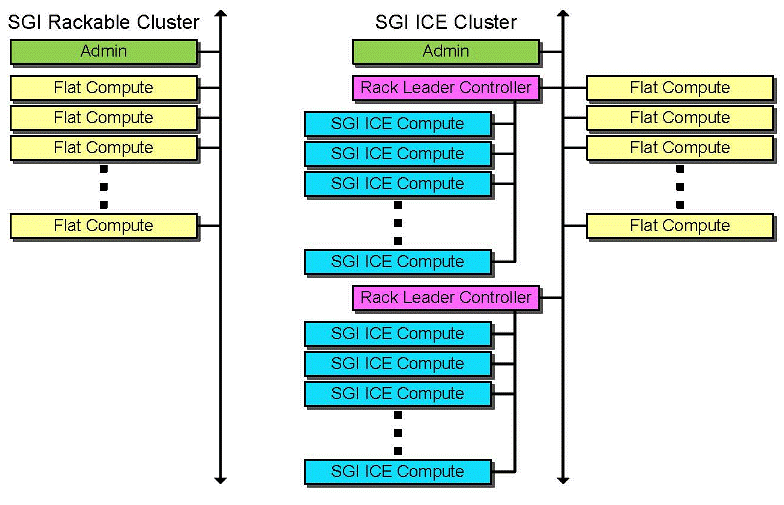
Figure 1-1 shows an SGI Rackable cluster and an SGI ICE X cluster. Each type of cluster includes an admin node and flat compute nodes. As the figure shows, the admin node and the flat compute nodes attach directly to the management network. Admin nodes are sometimes referred to as system admin controller (SAC) nodes.
In an SGI ICE X cluster, the SGI ICE compute nodes are configured in a hierarchical way, under a rack leader controller (RLC). In the SGI ICE X cluster, it is the RLC that attaches to the management network, not the compute nodes.
The following topics describe the SGI cluster systems:
The nodes in an SGI Rackable cluster have the following roles:
The admin node is the cluster's administrative node. This is the node from which you install software and manage the cluster. SGI Management Center (SMC) software resides on the admin node. SMC enables you to install, provision, configure, and manage the SGI Rackable cluster computing system.
Each cluster has admin node. The admin node hosts the original, factory-installed copies of the software images for each component. System administrators log into the admin node to run system management commands, to modify component images, and to perform system-wide operations.
The SMC software distribution includes the master system image for the admin node. During the installation and configuration process, the installation software creates the master system images for the other components in the cluster. As you customize the system for your site, you modify the component-specific system images on the admin node and push the updated images to the other nodes.
The compute nodes in an SGI Rackable cluster are called flat compute nodes because they are not configured in a hierarchical structure. An admin node can manage thousands of compute nodes, depending on the cluster's workload. The compute nodes all receive a hostname and an IP address during the configuration process. You can configure flat compute nodes with one or more of the following types of user services:
Login services. These services allow an end user to log in and then, for example, run or monitor MPI jobs.
Batch scheduling services. You can install workload schedulers such as Altair's PBS Professional, Adaptive Computing's Moab, SLURM, or TORQUE.
I/O gateway. On a small system, you can combine the I/O gateway, login services, and batch scheduling on the same compute node.
The I/O gateway services connect the cluster to your site network. You can configure one or more of the following protocols on the node: network file system (NFS), network address translation (NAT), or network information service (NIS).
Storage. A compute node with storage is a network attached (NAS) appliance bundle that provides InfiniBand attached storage for the system.
Object storage server. This service is used in Lustre File Storage configurations.
Metadata server. This service is used in Lustre File Storage configurations.
SGI recommends the following login practices:
Only the system administrator should be able to log into the admin node. SGI recommends that sites prohibit end-user access to the admin node.
User services can be configured on the compute nodes, and end users can have access to these compute nodes.
On an SGI ICE X cluster, the admin node and the flat compute nodes have the same characteristics that they have in an SGI Rackable cluster. That is, an admin node can support flat compute nodes configured for services such as logging in, batch computing, I/O, gateway, OSS, MDS, or storage. SGI recommends that in an SGI ICE cluster, you install user services on the flat compute nodes. For more information about the flat compute nodes, see the following:
The hierarchical structure of the RLCs and the SGI ICE compute nodes is unique to the SGI ICE X cluster. The hierarchical design enables these computing systems to be provisioned quickly. Master software images for each type of node in the cluster reside on the admin node. When an SGI ICE X system is configured, the admin node pushes the software images to the flat compute nodes and to the RLCs. Each RLC pushes the compute node images to the SGI ICE X compute nodes that reside in its rack.
An SGI ICE X admin node can support many RLCs, each of which can manage hundreds of SGI ICE compute nodes. The characteristics of the RLCs and SGI ICE compute nodes are as follows:
The RLC's role is to manage a set of SGI ICE compute nodes in a rack. SGI ICE clusters have at least one RLC.
The SGI ICE compute nodes are simplified, typically diskless compute nodes that reside in a rack with an RLC. These compute nodes require an RLC for services, infrastructure, and support. An RLC can manage up to 288 SCI ICE compute nodes in a rack. The exact number of SGI ICE compute nodes that an RLC can manage depends on the specific model number of your SGI ICE cluster.
If you have an SGI Rackable or SGI ICE cluster, you can configure the admin node for high availability (HA) operations. An HA admin node consists of two physical nodes dedicated to the admin node role and one virtual machine (VM). The VM hosts the functioning admin node, and the VM resides on one host at a time. The host upon which the VM resides is the active node. The other node is the passive node.
If you have an SGI ICE X cluster, you can also configure the RLC for HA operations. In this case, two physical nodes and one virtual machine are dedicated to the RLC role, and the RLC VM resides on one of the RLC nodes at a time.
Figure 1-2 shows two example cluster systems. The figure on the left is an SGI Rackable cluster, and the figure on the right is an SGI ICE cluster that also includes some flat compute nodes.

Figure 1-2 shows the image names for the software images on each node. As the example shows, you can configure nodes with different operating system images within the same cluster. On an SGI ICE cluster, the admin node, RLC nodes, and SGI ICE compute nodes must be installed with the same operating system. The image names shown in the figure are the default names for the factory-installed system images. The system images for the cluster nodes are unique to each type of node.
Table 1-1 lists the nodes in each type of SGI cluster and shows the images that reside on each node. The table shows the default, factory-given name for each image.
Table 1-1. Cluster Nodes and Software Image Names
SGI Rackable Nodes | SGI ICE Nodes | Node System Image Name |
|---|---|---|
Admin node | Admin node | --Not applicable-- Installation of the admin node is facilitated by the admin install DVD (sgi-mgmtsuite-install). |
Flat compute nodes | Flat compute nodes | os_name For example, centos6.5 |
--Not applicable-- | Rack leader controller (RLC) | lead-os_name For example, lead-sles11sp3 |
--Not applicable-- | SGI ICE compute nodes | ice-os_name For example, ice-rhel6.6 |
If you modify the image to include site-specific software, it is typical to copy the image, update the copy, and give the modified image a new name. Copying is also referred to as cloning in the cluster documentation. By using a new image name for your changes, you always able to refer back to the original image.
Whenever you add or modify the software on a node, you can use the SGI Management Center software's version control software to manage multiple versions of each node's software. The version control system facilitates the following:
Storage. You can have many versions of each individual software image, and each version is easily retrieved.
Experimentation. Each software image is tagged with a version number, so you can easily enable and disable specific versions of the software images.
The SGI cluster computer systems support the following operating systems:
Red Hat Enterprise Linux (RHEL)
SLES
CentOS
 | Note: In SGI documentation, you can assume that feature descriptions for RHEL platforms also pertain to CentOS platforms unless otherwise noted. |
The following topics explain the SGI cluster networks:
Figure 1-3 is a logical representation of the SGI ICE Ethernet networks.

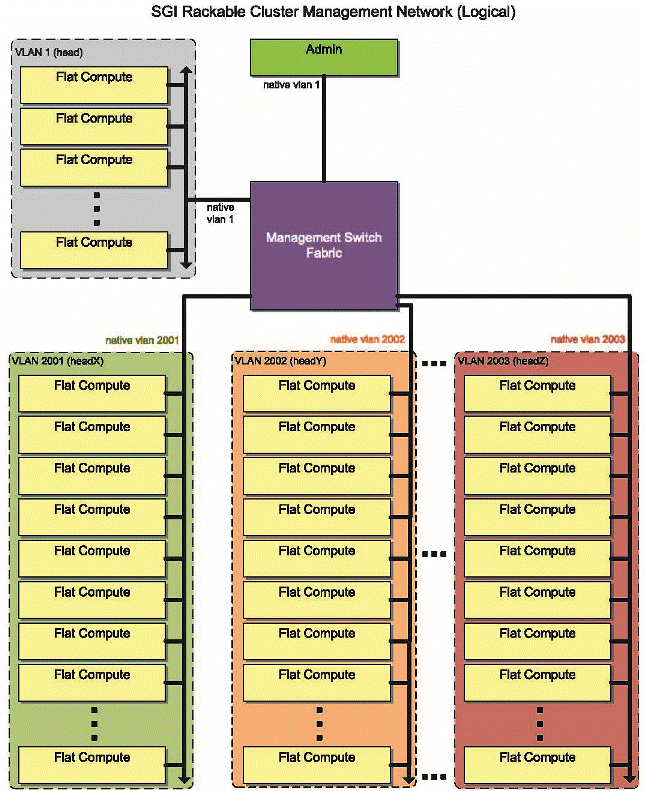
Figure 1-4 shows the logical networks of an SGI Rackable cluster.
The system components in an SGI ICE X cluster are attached to one or more of the following two internal networks:
The data network.
The management network.
The data network is designed for high-performance computing and bandwidth-intensive applications. This network is based on InfiniBand (IB) technology, and it facilitates communication to all SGI ICE compute nodes from the flat compute nodes. It connects the following:
The SGI ICE compute nodes to each other. The InfiniBand network connects all the SGI ICE compute nodes (blades) to each other. The SGI ICE compute node InfiniBand connections are not part of the head network.
The flat compute nodes to the SGI ICE compute nodes. One or two separate InfiniBand networks (or fabrics) segregate traffic within the SGI ICE X system in a way that optimizes computing performance. When there are two InfiniBand networks, communication is segregated by InfiniBand interface, as follows:
ib0, which is used typically for Message Passing Interface (MPI) communication.
ib1, which is typically used for storage traffic.
The management network, also known as the head network, is designed for monitoring, provisioning, and other functions not covered by the data network. This Ethernet network is designed for communication between the admin node, the RLCs, and the flat compute nodes. These components communicate to each other directly within the head network. The head network connects the following nodes directly into the Ethernet switches:
Admin Node
RLCs
Flat compute nodes
Additional Ethernet Switches
The head network also includes several additional virtual local area networks (VLANs). Figure 1-5 is a logical representation of the SGI ICE X Ethernet networks that shows how SGI ICE X components are logically separated by these VLAN boundaries.

On an SGI ICE X cluster, several virtual local area networks (VLANs) are configured. The following list shows the typical VLAN names and numbers:
Head network. VLAN tag 1.
Cooling network. VLAN tag 3. Clusters with MCells only.
Rack 1 network. VLAN tag 101.
Rack 2 network. VLAN tag 102.
Rack x network. VLAN tag 10 x.
| Note: The head VLAN network must always be VLAN 1. Do not attempt to change VLAN 1's number. You can change the other VLAN numbers and names. |
In Figure 1-5, the head network is VLAN 1. The ports connected to the admin node and the flat compute nodes are in VLAN 1 natively.
The Ethernet Switches are configured with a VLAN for each RLC. This VLAN segregates management traffic so that communication between the SGI ICE compute nodes and their corresponding RLC is contained within that VLAN. Physically, the SGI ICE compute nodes are connected to a chassis management controller (CMC) and do not directly connect to the Ethernet switch. Instead, the CMCs connect directly to the Ethernet Switch. Only the RLC can communicate with the SGI ICE compute nodes and CMCs in its own logical rack.
Users can log into the admin node and into the flat compute nodes directly. If access to the RLC is required, users will need to log directly into the admin node and then use the ssh(1) command to log into an RLC. The typical VLAN mapping for the Ethernet switches on each node is as follows:
| Node type | VLANs | |
| Admin | Native VLAN 1 Tagged VLAN 3 | |
| Flat compute | Native VLAN 1 | |
| RLC | Native VLAN 1 Tagged VLAN 10x. VLAN created for each RLC. | |
| CMCs | Native VLAN 10x. VLAN created for their corresponding RLC. Tagged VLAN 3. | |
| Cooling equipment cooling distribution units (CDUs) and cooling rack controllers (CRCs) | Native VLAN 3. Clusters with MCells only. |
Figure 1-6 shows the physical networks of an SGI ICE cluster.
