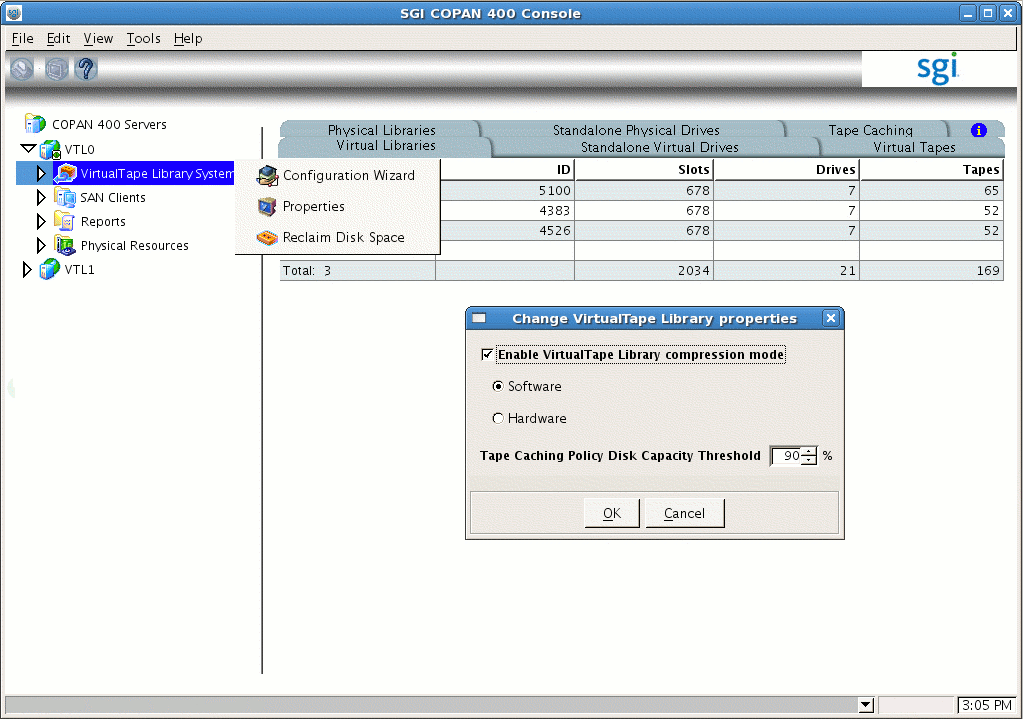
If your site's data would benefit from software compression, you can enable SGI 400 VTL compression mode (and therefore DMF compression) for each application server (VTL0 and VTL1).
 | Note: If you are using the 4.5 VTL software, compression carries
an overhead CPU penalty and is not appropriate in some cases.
This is not an issue with the 7.5 VTL software because it uses a different compression algorithm. |
Do the following:
Open the left-hand tree and place the cursor over Virtual Tape Library System . For example, for VTL0:
VTL0 -> Virtual Tape Library System
Right-click and select Properties.
Check the Enable Virtual Tape Library compression mode box, select Software, use the default threshold value, and click OK. Figure B-1 shows an example.
Note: The 7.5 VTL GUI also displays information about Migration Threshold and Reclamation Threshold; these values do not apply to DMF and can be ignored.