This appendix section includes the following topics:
The system control network on an SGI UV system includes the following components:
The system management node (SMN)
One or more chassis management controllers (CMCs)
One or more baseboard management controller (BMCs)
The components communicate with each other in the following ways:
The SMN and CMCs use a private, dedicated Gigabit Ethernet network to pass system control commands and other communication. The CMCs communicate directly with the BMC in each installed blade by way of the IRU's internal backplane.
All the CMCs communicate with each other via a private, dedicated Ethernet network.
In larger configurations, the system control communication path includes a private, dedicated Ethernet switch.
Each of the four ports on the SMN, eth0 through eth3, connect to one of the private, dedicated Ethernet system control networks. The ports and their associated LANs are as follows:
| LAN | Port | |
| LAN1 | eth0 | |
| LAN2 | eth1 | |
| LAN3 | eth2 | |
| LAN4 | eth3 |
The following topics describe the SGI UV 2000 network topology:
A single IRU system that is not partitioned does not require GigE switches.
Figure A-1 illustrates the cabling for a single IRU system.
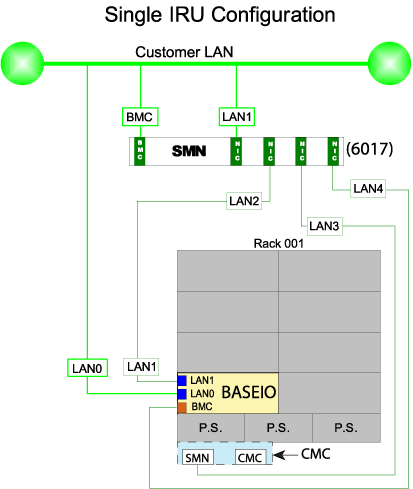
The cable connections for a single IRU system without a GigE switch are as follows:
Connect LAN1 of the SMN to the customer LAN.
Connect LAN2 of the SMN to LAN1 of the Base I/O.
Connect LAN3 of the SMN to the SMN port of the CMC.
Connect LAN4 of the SMN to the BMC port of the Base I/O.
Connect the BMC port of the SMN to the customer LAN.
Connect LAN0 of the Base I/O to the customer LAN.
Figure A-2 illustrates one SSI SGI UV 2000 system management network.
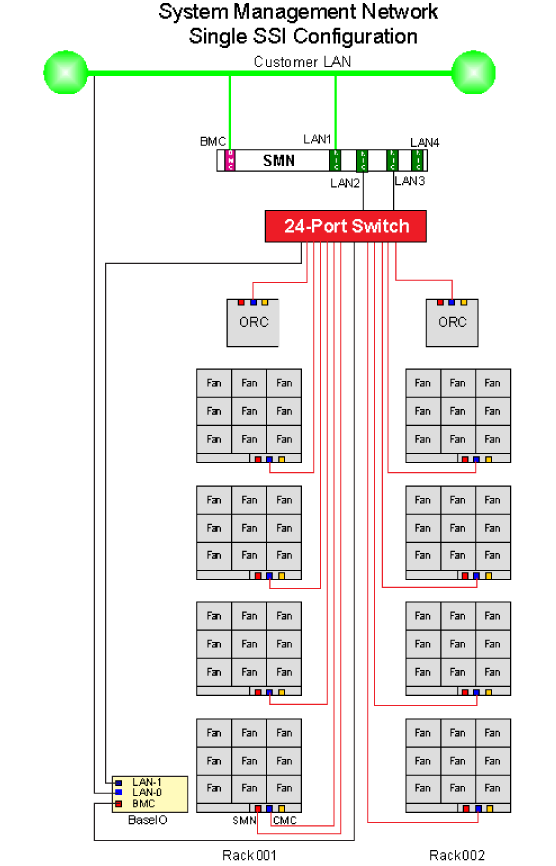
The cable connections for a single-partition, multiple-IRU system with a GigE switch are as follows:
Connect LAN1 of the SMN to the customer LAN.
Connect LAN2 of the SMN to the GigE switch.
Connect LAN3 of the SMN to the GigE switch.
Connect the BMC port of the SMN to the customer LAN.
Connect the SMN port of the CMC in the lowest position of the lowest rack number to the GigE switch.
Connect the LAN0 port of the Base I/O to the customer LAN.
Connect the LAN1 port of the Base I/O to the GigE switch.
Connect the BMC port of the Base I/O to the GigE switch.
Connect the CMC port of all CMCs located in the IRUs to the GigE switch.
Connect the CMC port of all CMCs located in the ORCs to the GigE switch.
Figure A-3 illustrates a multiple-SSI, or multiple partition, SGI UV 2000 system management network.
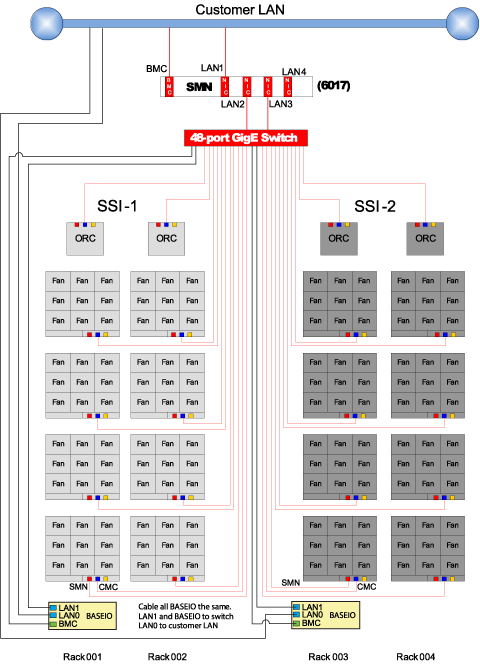
The cable connections for a multiple-SSI, multiple-IRU system with a GigE switch are as follows:
Connect LAN1 of the SMN to the customer LAN.
Connect LAN2 of the SMN to the GigE switch.
Connect LAN3 of the SMN to the GigE switch.
Connect the BMC port of the SMN to the customer LAN.
Connect the SMN port of the CMC in the lowest position of the lowest rack number for each partition or SSI to the GigE switch.
Connect the LAN0 port of each Base I/O to the customer LAN.
Connect the LAN1 port of each Base I/O to the GigE switch.
Connect the BMC port of each Base I/O to the GigE switch.
Connect the CMC port of all CMCs located in IRUs to the GigE switch.
Connect the CMC port of all CMCs located in ORCs to the GigE switch.
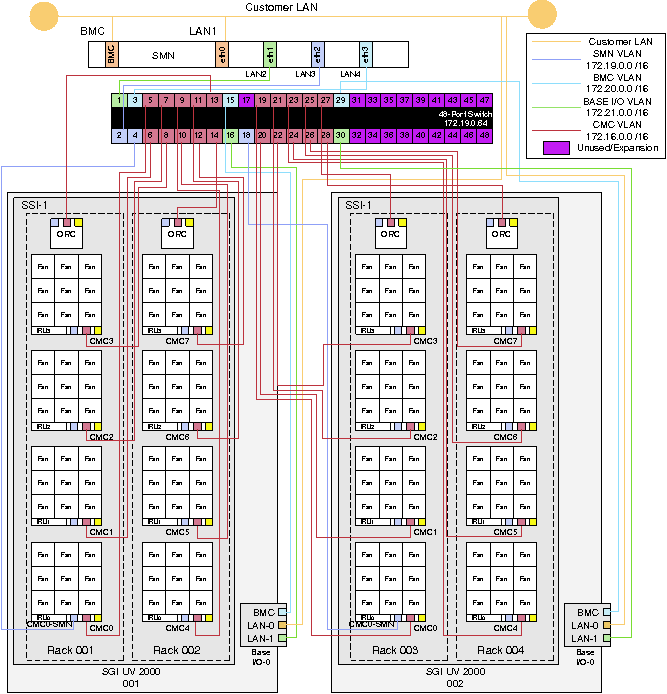
Figure A-4 shows the SMN network for two SGI UV 2000 systems configured into one SSI.
The following topics describe the SGI UV 1000 network topology:
Each IRU contains one CMC. The CMC jacks are used to connect all the CMCs in a private network. Specific connections between CMCs ensure redundancy. See the cabling diagram for details.
The SBK jack is used to interconnect building blocks into another private network. Up to four building blocks may be interconnected, creating a superblock (SBK). Using only the SBK jacks on the primary CMCs for these connections, connect a cable from a CMC in the first building block to a CMC in the second building block. Then, select another CMC in the second building block and connect it to a CMC in the third building block (or back to a CMC in the first building block in the case of only two building blocks). To minimize network hops, it is recommended that the two connections within a building block be in different racks (for redundancy) and that the two racks be adjacently cabled with respect to the CMC network.
One SMN is required for each system. Systems with more than one partition or more than one building block require a GigE switch. Systems with more than one superblock require two GigE switches.
The SMN should be connected to the SMN jack in a CMC that also has an SBK connection. The SMN requires a GigE switch to support connections to two different superblocks.
The EXT[0,1,2] jacks are used for connections from the smart door controller, etc. The SMN jack can be used for other in-rack devices if it is available and all SMNs in the configuration are already connected.
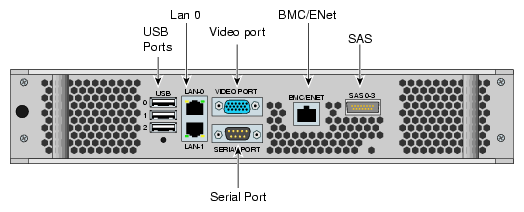
Figure A-6 shows the an SMN Ethernet cabling example for a single SGI UV rack.
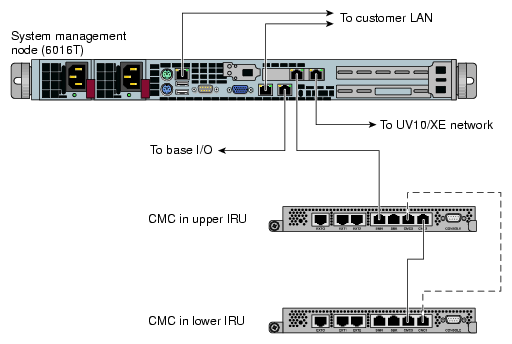
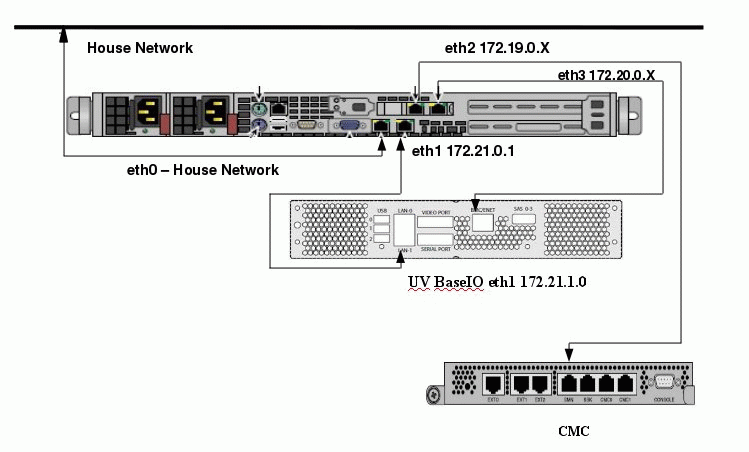
Figure A-7 shows an example layout.
The following VLANs are possible within the system controller network:
Vbmc0 - VLAN between the primary CMC and the blades
Vcmc0 - VLAN between the primary CMCs within a building block
Vsbk - VLAN between building blocks within an superblock
Vacc - VLAN between external devices and the CMC
VSmw - Vlan between SMN and CMCs
Each CMC processor has a single physical connection to the local 48-port Ethernet switch ASIC within the CMC. This physical connection carries the following VLANs (x matches the local CMC's position):
Vbmcx
Vcmcx
Vsbk
Vacc
Vsmn
Additionally, each CMC processor has a physical connection to the 48-port Ethernet switch ASIC on the redundant CMC in the same IRU. This physical connection carries the following VLANs:
Vbmc
Vcmc
Within the building block, each CMC is connected to the CMC VLANs. Each CMC broadcasts a UDP packet containing an identification string at 5 second intervals.
Given two CMCs, each receiving the other broadcast packet, only one initiates a connection to other. The decision is based on the contents of the broadcast string. The CMC with the lesser broadcast string initiates the connection.
Once the building block discovery is complete, a given CMC has a connection to every CMC in the building block on VLAN_PRI_CMC.
Each CMC now has two connections to each IRU in the building block. By default, the CMC routes requests first to the CMC in the same position as itself - that is, a CMC tries to send the request to another CMC first.
The two CMCs in each building block with a physical connection on the SBK jacks is used to establish a SBK VLAN between building blocks. These CMCs are considered building block controllers (BBCs). When the CMC detects a connection on the SBK jack, it broadcasts a similar identification string on the SBK VLAN. These BBCs connect to each other in the same fashion as the CMCs did within the building block. There are two BBCs in each building block, but neither is designated as primary or secondary explicitly. Since each BBC is connected to two other BBCs in each of the other building blocks, losing a connection to one still allows access to that building block through the second connection.
Each CMC collects configuration information from each of its BMCs. A CMC functioning as a BBC collects configuration information from each of the CMCs in the local building block and shares that information with other BBCs. By collecting configuration information from each BBC, a complete SBK configuration is created.
Figure A-8 illustrates the system control connections for a single rack system.
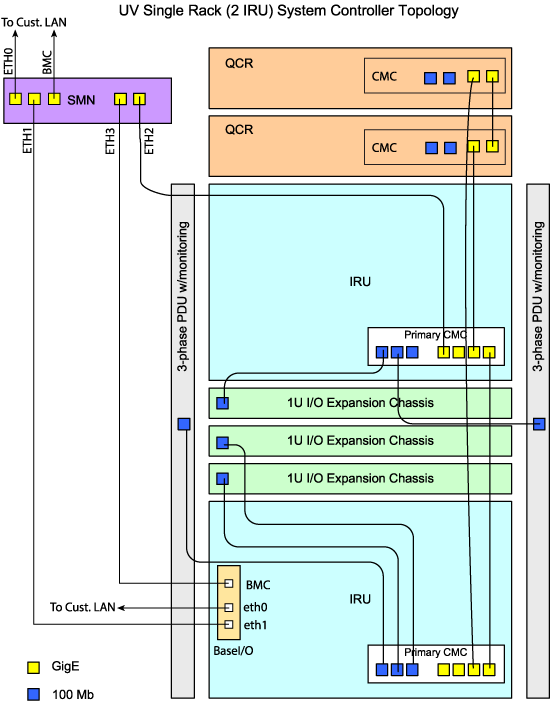
Figure A-9 illustrates the system control cabling for a four rack group (a building block).
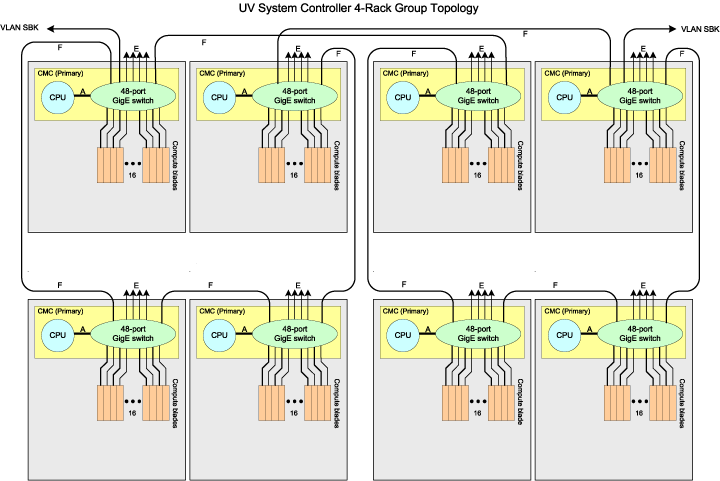
Link references on Figure A-9 are as follows:
A links - support VLANs [SBK, Primary BMC, Primary CMC and External]
D links - support VLANs [Primary BMC and Primary CMC]
E links = support VLAN [External]
F links - support VLANs [Primary CMC and SBK]
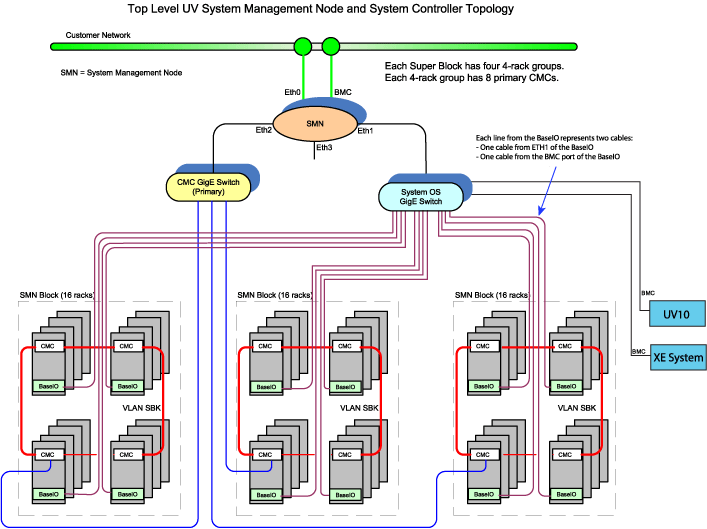
Figure A-10 illustrates the complete system control topology for a very large (48 rack) system.