This chapter describes how to use Linux kernel features to make the execution of a real-time program predictable. Each of these features works in some way to dedicate hardware to your program's use, or to reduce the influence of unplanned interrupts on it:
The default Linux scheduling algorithm is designed for a conventional time-sharing system. It also offers additional real-time scheduling disciplines that are better-suited to certain real-time applications.
This section discusses the following:
In order to understand the differences between scheduling methods, you must understand the following basic concepts:
For information about time slices and changing the time-slice duration, see the information about the CPU scheduler in the Linux Configuration and Operations Guide.
In normal operation, the kernel pauses to make scheduling decisions every several millisecond (ms) in every CPU. You can determine the frequency of this interval with the sysconf(_SC_CLK_TCK) function (see “Clocks” in Chapter 2). Every CPU is normally interrupted by a timer every timer interval. (However, the CPUs in a multiprocessor are not necessarily synchronized. Different CPUs may take timer interrupts at different times.)
During the timer interrupt, the kernel updates accounting values, does other housekeeping work, and chooses which process to run next--usually the interrupted process, unless a process of superior priority has become ready to run. The timer interrupt is the mechanism that makes Linux scheduling preemptive; that is, it is the mechanism that allows a high-priority process to take a CPU away from a lower-priority process.
Before the kernel returns to the chosen process, it checks for pending signals and may divert the process into a signal handler.
A real-time thread can select one of a range of 99 priorities (1-99) in the real-time priority band, using POSIX interfaces sched_setparam() or sched_setscheduler(). The higher the numeric value of the priority, the more important the thread. For more information, see the sched_setscheduler(2) man page.
Many soft real-time applications must execute ahead of time-share applications, so a lower priority range is best suited. Because time-share applications are scheduled at lower priority than real-time applications, a thread running at the lowest real-time priority (1) still executes ahead of all time-share applications.
 | Note: Applications cannot depend on system services if they are running ahead of system threads without observing system-responsiveness timing guidelines. |
Within a program it is usually best to follow the principles of rate-monotonic scheduling. However, you can use the following list as a guideline for selecting scheduling priorities in order to coordinate among different programs:
| Priority | Description |
| 99 | Reserved for critical kernel threads and should not be used by applications (99 is the highest real-time priority) |
| 90 - 98 | Hard real-time user threads |
| 60 - 89 | High-priority operating system services |
| 40 - 59 | Firm real-time user threads |
| 31 - 39 | Low-priority operating system services |
| 1 - 30 | Soft real-time user threads |
Real-time users can use tools such as strace(1) and ps(1) to observe the actual priorities and dynamic behaviors.
The Linux pthreads library shipped with SLES and RHEL is known as the new pthreads library (NPTL). By default, a newly created pthread receives its priority from the same scheduling policy and scheduling priority as the pthread that created it; new pthreads will ignore the values in the attributes structure.
You can set the priority and scheduling policy of pthreads as follows:
To change a running pthread, the pthread must call pthread_setschedparam().
To set the scheduling attributes that a pthread will start with when it is created, use the pthread_attr_setschedpolicy() and pthread_attr_setschedparam() library calls to configure the attributes structure that will later be passed to pthread_create().
The pthread_attr_setinheritsched() library call acts on the pthread_attr_t structure that will later be passed to pthread_create(). You can configure it with one of the following settings:
In some situations, kernel threads and user threads must run on specific processors or with other special behavior. Most user threads and a number of kernel threads do not require any specific CPU or node affinity, and therefore can run on a select set of nodes. The SGI bootcpuset feature controls the placement of both kernel and user threads that do not require any specific CPU or node affinity. By placing these threads out of the way of your time-critical application threads, you can minimize interference from various external events.
As an example, an application might have two time-critical interrupt servicing threads, one per CPU, running on a four-processor machine. You could set up CPUs 0 and 1 as a bootcpuset and then run the time-critical threads on CPUs 2 and 3.
| Note: You must have the SGI cpuset-*.rpm RPM installed to use bootcpusets. For configuration information, see the bootcpuset(8) man page. |
You can use the react command to configure the real-time CPUs; see Chapter 9, “REACT System Configuration”.
A certain amount of CPU time must be spent on general housekeeping. Because this work is done by the kernel and triggered by interrupts, it can interfere with the operation of a real-time process. However, you can remove almost all such work from designated CPUs, leaving them free for real-time work.
First decide how many CPUs are required to run your real-time application. Then apply the following steps to isolate and restrict those CPUs:
| Note: The steps are independent of each other, but each must be done to completely free a CPU. |
Every CPU takes a timer interrupt that is the basis of process scheduling. However, CPU 0 does additional housekeeping for the whole system on each of its timer interrupts. Therefore, you should not to use CPU 0 for running real-time processes.
To minimize latency of real-time interrupts, it is often necessary to direct them to specific real-time processors. It is also necessary to direct other interrupts away from specific real-time processors. This process is called interrupt redirection.
You can use the react command to redirect interrupts; for more information, see Chapter 9, “REACT System Configuration”.
| Note: SGI recommends that someone with knowledge of the system configuration use react to redirect only the interrupts that must be moved. |
The process involves writing a hexadecimal bitmask to the /proc/irq/interruptnumber/smp_affinity file, which shows a bitmask of the CPUs that are allowed to receive this interrupt. A 1 in the least-significant bit in this mask denotes that CPU 0 is allowed to receive the interrupt. The most-significant bit denotes the highest-possible CPU that the booted kernel could support.
For example, to redirect interrupt 62 to CPU 1, enter the following:
[root@linux root]# echo 1 > /proc/irq/62/smp_affinity |
To view the IRQ/CPU affinity, use the less command to view the smp_affinity file. For example:
[root@linux root]# less /proc/irq/62/smp_affinity |
| Note: To avoid any potential viewing problems, you should use less(1) rather than cat(1) to view the smp_affinity file. |
You can examine the /proc/interrupts file to discover where interrupts are being received on your system.
In general, the Linux scheduling algorithms run a process that is ready to run on any CPU. For best performance of a real-time process or for minimum interrupt response time, you must use one or more CPUs without competition from other scheduled processes. You can exert the following levels of increasing control:
Restricted and isolated, which prevents the CPU from running scheduled processes and removes the CPU from load balancing considerations, a time-consuming scheduler operation.
Shielded, which switches off the timer (scheduler) interrupts that would normally be scheduled on the CPU. These are a source of jitter, but only a minor source of interrupt response latency. Shielding should only be done for short periods where basically jitter-free program execution is required.
You should use the react command to create a real-time CPU that is restricted and isolated. For more information, see Chapter 9, “REACT System Configuration”.
You can also use the REACT C application programming interface (API) to restrict and isolate a CPU. See Chapter 10, “Using the REACT Library”.
You can restrict one or more CPUs from running scheduled processes and isolate them from scheduler load balancing by designating them as realtime CPUs with the react command.
The only processes that can use a restricted CPU are those processes that you assign to it, along with certain per-CPU kernel threads. Isolating a CPU removes one source of unpredictable delays from a real-time program and helps further minimize the latency of interrupt handling.
To restrict one or more CPUs, use the react -r command documented in Chapter 9, “REACT System Configuration”.
After restricting a CPU, you can assign processes to it using the SGI cpuset command. See “Running a Process on a Real-Time CPU” in Chapter 9.
Each rtcpu is set to be cpu_exclusive .
To remove the CPU restriction, allowing the CPU to execute any scheduled process, see “Changing the Configuration” in Chapter 9.
You can shield a CPU from the normally scheduled Linux timer (scheduler) interrupts. For more information on timer interrupts, see “Timer Interrupts”.
Timer interrupts are a source of interrupt response latency (usually several usec). Shielding is done dynamically from program control, and should only be done for short periods where essentially jitter-free program execution is required.
When a CPU's timer interrupts are switched off, scheduling on that CPU ceases. A thread must not yield the CPU (sleep) unless it expects to be awoken by an external event such as an I/O interrupt or if timer interrupts will be switched back on before it must be scheduled again.
| Note: Be aware of the following:
|
To shield a CPU from timer interrupts, do the following:
Load the sgi-shield kernel module. For example:
[root@linux root]# modprobe sgi-shield
From your application, call the cpu_shield() function with the SHIELD_STOP_INTR flag and the desired CPU number. Your program must link in the libreact library to access the cpu_shield() function. For more information, see the libreact(3) man page.
For example, to switch off timer interrupts on CPU 3, perform the following function call from the application:
cpu_shield(SHIELD_STOP_INTR, 3)
To unshield the CPU, call the cpu_shield() function with the SHIELD_START_INTR flag and the desired CPU number.
For example, when shielding CPU 3 is no longer necessary, perform the following call from the application:
cpu_shield(SHIELD_START_INTR, 3) |
The insertion and removal of Linux kernel modules (such as by using modprobe or insmod/rmmod) requires that a kernel thread be started on all active CPUs (including isolated CPUs) in order to synchronously stop them. This process allows safe lockless-module list manipulation. However, these kernel threads can interfere with thread wakeup and, for brief periods, the ability to receive interrupts.
While a time-critical application is running, you must avoid Linux kernel module insertion and removal. All necessary system services should be running prior to starting time-critical applications.
The process of mounting/unmounting a filesystem (including an NFS filesystem) can interfere with response times for a number of CPUs. These delays do not happen after the mount has completed. There is no delay for disk accesses.
Prior to running a time-critical application, you should complete all filesystem mounts that may be necessary during application execution. Filesystem unmounts during application execution should be avoided. This includes autofs mounts performed by automount .
Interrupt response time is the time that passes between the instant when a hardware device raises an interrupt signal and the instant when (interrupt service completed) the system returns control to a user process. SGI guarantees a maximum interrupt response time on certain systems, but you must configure the system properly in order to realize the guaranteed time.
This section discusses the following:
In properly configured systems, interrupt response time is guaranteed not to exceed 30 microseconds (usecs) for SGI x86-64 systems running Linux.
This guarantee is important to a real-time program because it puts an upper bound on the overhead of servicing interrupts from real-time devices. You should have some idea of the number of interrupts that will arrive per second. Multiplying this by 30usecs yields a conservative estimate of the amount of time in any one second devoted to interrupt handling in the CPU that receives the interrupts. The remaining time is available to your real-time application in that CPU.
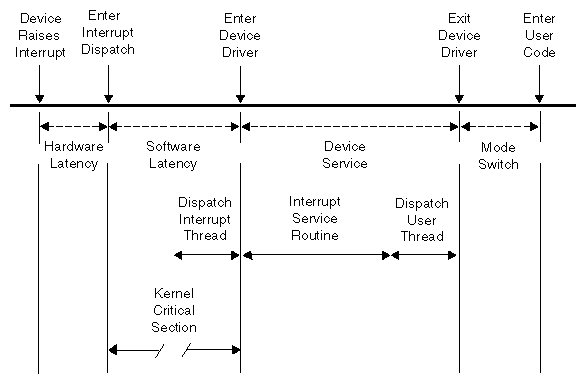
The total interrupt response time includes the following sequential parts:
| Time | Description | |
| Hardware latency | The time required to make a CPU respond to an interrupt signal. See “Hardware Latency”. | |
| Software latency | The time required to dispatch an interrupt thread. See “Software Latency”. | |
| Device service | The time the device driver spends processing the interrupt and dispatching a user thread. See “Device Service”. | |
| Mode switch | The time it takes for a thread to switch from kernel mode to user mode. See “Mode Switch”. |
Figure 4-1 diagrams the parts discussed in the following sections.
When an I/O device requests an interrupt, it activates a line in the PCI bus interface. The bus adapter chip places an interrupt request on the system internal bus and a CPU accepts the interrupt request.
The time taken for these events is the hardware latency, or interrupt propagation delay. For more information, see Chapter 7, “PCI Devices”.
Software latency is affected by the following:
Certain sections of kernel code depend on exclusive access to shared resources. Spin locks are used to control access to these critical sections. Once in a critical section, interrupts are disabled. New interrupts are not serviced until the critical section is complete.
There is no guarantee on the length of kernel critical sections. In order to achieve 30-usec response time, your real-time program must avoid executing system calls on the CPU where interrupts are handled. The way to ensure this is to restrict that CPU from running normal processes. For more information, see “Restricting a CPU from Scheduled Work and Isolating it from Scheduler Load Balancing”.
You may need to dedicate a CPU to handling interrupts. However, if the interrupt-handling CPU has power well above that required to service interrupts (and if your real-time process can tolerate interruptions for interrupt service), you can use the restricted CPU to execute real-time processes. If you do this, the processes that use the CPU must avoid system calls that do I/O or allocate resources, such as fork(), brk(), or mmap(). The processes must also avoid generating external interrupts with long pulse widths.
In general, processes in a CPU that services time-critical interrupts should avoid all system calls except those for interprocess communication and for memory allocation within an arena of fixed size.
The primary function of interrupt dispatch is to determine which device triggered the interrupt and dispatch the corresponding interrupt thread. Interrupt threads are responsible for calling the device driver and executing its interrupt service routine.
While the interrupt dispatch is executing, all interrupts at or below the current interrupt's level are masked until it completes. Any pending interrupts are dispatched before interrupt threads execute. Thus, the handling of an interrupt could be delayed by one or more devices.
In order to achieve 30-usec response time on a CPU, you must ensure that the time-critical devices supply the only device interrupts directed to that CPU. For more information, see “Redirect Interrupts”.
Device service time is affected by the following:
The time spent servicing an interrupt should be negligible. The interrupt handler should do very little processing; it should only wake up a sleeping user process and possibly start another device operation. Time-consuming operations such as allocating buffers or locking down buffer pages should be done in the request entry points for read(), write(), or ioctl(). When this is the case, device service time is minimal.
A number of instructions are required to exit kernel mode and resume execution of the user thread. Among other things, this is the time when the kernel looks for software signals addressed to this process and redirects control to the signal handler. If a signal handler is to be entered, the kernel might have to extend the size of the stack segment. (This cannot happen if the stack was extended before it was locked.)
You can ensure interrupt response time of 30 usecs or less for one specified device interrupt on a given CPU provided that you configure the system as follows:
The interrupt is handled by a device driver from a source that promises negligible processing time
The CPU is isolated from the effects of load balancing
The CPU is restricted from executing general Linux processes
Any process you assign to the CPU avoids system calls other than interprocess communication and allocation within an arena
Kernel module insertion and removal is avoided
When these things are done, interrupts are serviced in minimal time.