This chapter provides an introduction to SGI ProPack 4 for Linux Service Pack 3 and describes the CD contents, provides documentation information, and provides a brief overview of the installation process. It covers the following topics:
The SGI ProPack 4 for Linux Service Pack 3 product includes capabilities and performance improvements ideal for enabling technical and creative users to solve their big compute and data problems by using the Linux operating system and Itanium processors. This product adds to or enhances features in the base SUSE Linux Enterprise Server 9 (SLES9) Service Pack 3 (SP3) Linux distribution. SGI ProPack 4 for Linux SP3 is designed to run on any SGI Altix system or any Silicon Graphics Prism Visualization System.
SGI hardware platforms and OS configuration settings supported by SGI in this release are documented at the following URL:
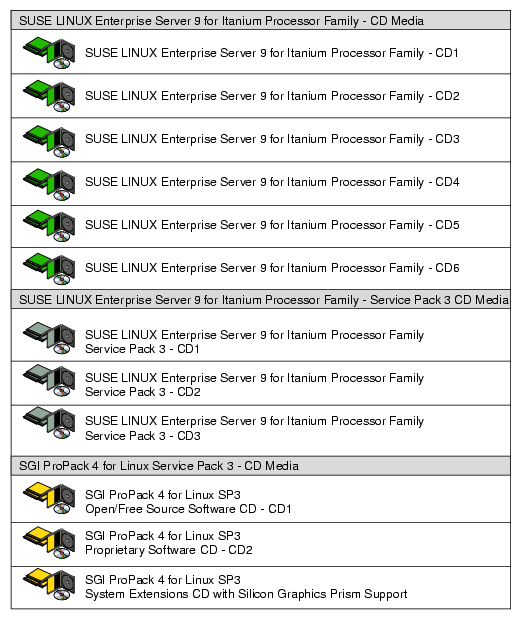
This section describes the CDs that you receive with SGI ProPack 4 for Linux SP3 (see Figure 1-1), as follows:
SGI ProPack 4 for Linux Service Pack 3 Open/Free Source Software CD
The Open Source CD contains open source software licensed under GPL/LGPL or other open source licenses, and has files necessary for installation of the following major products:
Array Session Module
Linux Comprehensive System Accounting (CSA)
Linux jobs (Commands, init scripts, libraries and PAM module)
LSI Fusion-MPT host adapter management utility
NUMA tools to manage CPU placement of processes (bcfree, dplace, dlook utilities)
Performance Co-Pilot, system-level performance monitoring and performance management tool
Open Source SGI Profile Tools
SGI ProPack configuration recommendations
For a complete list of the RPMs included on the Open Source CD, see a file called RPMS.TXT that is available in /docs directory on the SGI ProPack 4 for Linux Service Pack 3 Open/Free Source Software CD.
SGI ProPack 4 for Linux Service Pack 3 Proprietary Software CD

Note: This CD contains software for use on SGI systems only. Redistribution is not permitted. Please see the shrink-wrap license agreement. The Proprietary CD contains proprietary software for your SGI Altix system and has files necessary for installation of the following major products:
Flexible File I/O (FFIO) system
Cpuset Facility workload manager tool
Embedded Support Partner (ESP) software suite to monitor events, set up proactive notification, and generate reports
Performance Co-Pilot visualization tools
Intel Compiler Runtime Libraries
Array Services
Message-Passing Toolkit (MPT)
Scientific Computing Software Library (SCSL)
XVM Command line tools and graphical user interface (GUI)
SGI Itanium 2 PROM (System controller software)
SGI ProPack documentation
SGI ProPack 4 for Linux Service Pack 3 System Extensions CD
This CD contains an SGI built kernel (rtgfx variant) and associated software that provide support for Silicon Graphics Prism systems, Digital Media tools and libraries, and REACT Real-Time for Linux features. The rtgfx kernel and associated kernel modules are auto-selected for installation if you select the SGI ProPack Graphics, SGI ProPack Digital Media, and/or SGI REACT groups. For more information, see “How To Install SGI ProPack 4 for Linux SP3 For the First Time” in Chapter 2.
The System Extensions CD has files necessary for installation of the following major products:
For a complete list of the RPMs included on and SGI ProPack 4 for Linux SP3 release, see a file called RPMS.TXT that is available in /docs directory on the SGI ProPack 4 for Linux Service Pack 3 Open/Free Source Software CD.
For the latest information about software and documentation in this release, see the release notes that are in a file named README.TXT that is available in /docs directory on the SGI ProPack 4 for Linux Service Pack 3 Open/Free Source Software CD.
The SGI ProPack 4 for Linux SP3 release notes get installed to the following location on a system running SGI ProPack 4 for Linux Service Pack 3:
/usr/share/doc/sgi-propack-4/README.txt |
| Note: The System Controller Software 1.12 CD is not shipped by default. You can download the System Controller Software 1.12 package from http://support.sgi.com/ or order it on CD-ROM (P/N 812-1138-007). Contact you SGI account representative if you need assistance obtaining the software package. |
| Note: The SGI System Controller software is licensed for use only on Origin and Onyx 3000 series systems (SGI systems based on MIPS processors) and on SGI Altix 330 systems, SGI Altix 350 systems, SGI Altix 3000 and SGI Altix 4000 series systems (SGI systems based on Intel Itanium processors), and Silicon Graphics Prism Visualization systems. This CD contains software provided under restricted or SGI proprietary licensing terms. The licensing terms for items on this CD allow users to install this software only on SGI systems. |
To get updates for your SGI ProPack 4 for Linux Service Pack 3 system, you may download and install patches from the SGI YaST Online Update (YOU) server. For instructions on how to setup up the YaST Online Update client and access the SGI YOU server, read through the instructions available on Supportfolio:
https://support.sgi.com/content_request/329516/you_server_instructions.html
| Note: You must have a Supportfolio account to access this page and the YOU server. |
The YaST Online Update - Patch Media Instructions describes how to update your system using patch media.
SGI maintains the following website for open source information that describes projects related to its open source efforts:
You can also access open source information (such as LKCD) from the following website:
SGI ProPack 4 for Linux Service Pack 3 will most likely come preinstalled on your SGI platform. Installation is described in Chapter 2, “Software Planning and Installation”.
This release also supports installing your Linux software over the network as described in “SLES and SGI ProPack Network Installation for Experts” in Chapter 2.
The following manuals are new or have been updated for this release:
Linux Resource Administration Guide, 007-4413-010
Contains a new section called “Using Cpusets with Hyper-Threads” in Chapter 6, “Cpusets on SGI ProPack 4 for Linux”.
Corrected crontab entry information in Chapter 2, Comprehensive System Accounting.
REACT Real-Time for Linux Programmer's Guide, 007-4746-003
Contains new information about the following:
The sysconf(_SC_CLK_TCK) function to determine the tick frequency
kbar kernel barrier facility
External interrupts
Linux Configuration and Operations Guide, 007-4633-009
Updated information in "Cloning System Disks on SGI ProPack Systems" in Chapter 1.
Updated the “System Partitioning” section in chapter 1, “Configuring Your System” and added a new section in the same chapter called “Partitioning Guidelines for SGI Altix 4000 Series Systems”.
Added information about Machine Check Architecture (MCA) error recovery in "Recovering from Machine Check Architecture Memory Errors" in Chapter 2.
Updated information and added a new procedure for performing diskless booting on an SGI Alitx system in"Diskless Booting" in Chapter 2.
YaST Online Update - Patch Media Instructions
New for this release, this document describes how to update your system using patch media. It is available off the SGI Technical Publicatons Library or PatchWorks on SupportFolio.